|
Fat32 to NTFS?
|
|
|
djlen
Member

|
13. February 2005 @ 12:41 |
 Link to this message

|
|
I just read a thread in which it was recommended that a portion of a drive should be converted to NTFS if it's a Fat32.
First, how do I find out which format my drive is at present?
And if it is Fat32, how important is it to convert it over to NTFS? It was stated that NTFS handles larger files better. I'd like to get some feedback on this to better understand.
If there is a guide that explains it, please point me in that direction.
Len
|
|
Advertisement
|
|
|
|
|
djlen
Member
|
14. February 2005 @ 07:24 |
 Link to this message
|
|
Anybody?
|
AfterDawn Addict
|
14. February 2005 @ 07:30 |
Link to this message
|
|
Fats have a 4gb limit, which if your going to make an iso of a dvd, then most dvds are bigger than 4gb.
To find out what file system you have, just right click your c-drive or other hdd's, and go to properties, and its right there next to where it says, file system.
good luck
jD
This message has been edited since posting. Last time this message was edited on 14. February 2005 @ 07:40
|
Member
|
14. February 2005 @ 07:32 |
Link to this message

|
|
djlen--
There are many ways to tell what type of file system you have--one easy one is to open Disk Defragmenter and it will be listed under System
The reason people prefer the NTFS system is that it can handle large files--(10GB I think) whereas Fat32, I think the largest file it can handle is about 2-3 GB--Since most movies are between 6-9GB, the NTFS system is far better--Not too hard to convert either
Whitfield
|
|
ScubaBud
AfterDawn Addict
|
14. February 2005 @ 07:43 |
Link to this message

|
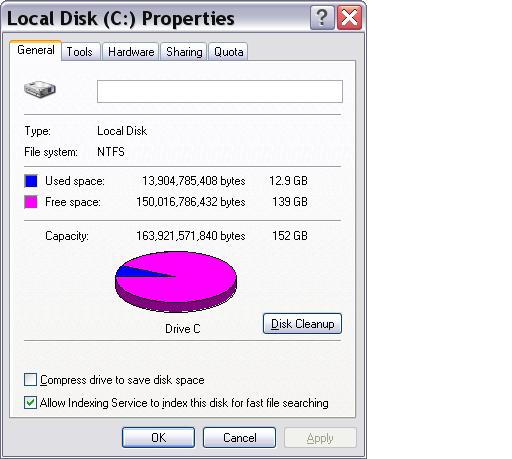
Just go to the Command Prompt and execute the command: C:\> CONVERT C: /fs:ntfs
Where C: is a name of the drive you want to convert.
After machine re-boot conversion process will start and you'll have your FAT32 converted to NTFS without of data loss.
|
|
pfh
Suspended due to non-functional email address
|
14. February 2005 @ 08:11 |
Link to this message
|
|
File size is not limited with NTFS and it's much more stable than fat32 (less lost clusters from crashes).
AMD 2500+,1gig Corsair,ATI 9800pro,NEC 2510 DVDr/w,TDK CDRW,ConvertX M402U,Womble,DVDLab,GoCap,Intervideo OEM junk,DVDD,DVDShrink,V-Dub,120 gigs HD space(several partitions)WinXP Home, JVC S9911U vcr, Sima Color Corrector Pro.
|
|
djlen
Member
|
14. February 2005 @ 11:11 |
Link to this message
|
|
Thanks for the replies guys. Luckily I have NTFS on both drives so I don't have to do a thing.
Really excited. I just picked up my Plextor and it was on sale and also with a $30 mail-in rebate.
Now all I have to do is install it, LOL. I have no clue on installations, but it doesn't look all that complicated.
I have a CD player and a CD burner in there now. I figured I'd take the player out and put DVD burner in it's place, making it the master and the other burner the slave. Hopefully I can just use all the same connections for the DVD that I take off the CD player.
Also, the DVD comes with an 80-conductor ribbon cable and I have a 40-conductor going to my CD player. Should I change over to the 80 as recommended by Plextor, and does anyone know if the pin configuration is the same in both?
Any feedback would be really appreciated.
Len
|
|
ScubaBud
AfterDawn Addict
|
14. February 2005 @ 11:19 |
Link to this message
|
|
Use the 80 instead of the older 40, they are backward compatible.
Just hook it up the same way you had it but make sure the jumper on the back of your new burner is set to master and the other one set to slave.
The black connector is the master, grey is the slave and the blue is the MB connector on the ribbon.
This message has been edited since posting. Last time this message was edited on 14. February 2005 @ 11:21
|
|
djlen
Member
|
14. February 2005 @ 11:42 |
Link to this message
|
|
Ok, one more question. If I have an extra ribbon in the computer, does it make sense to leave the CD Rom in the computer as another slave?
I don't know if I'd have any use for it, but if I have the extra power, audio and MB ribbon should I leave it?
Obviously I haven't even opened up the thing yet. I just want to make sure I've got all my options covered before I do.
Len
|
|
ScubaBud
AfterDawn Addict
|
14. February 2005 @ 12:21 |
Link to this message
|
|
I don't think that its just a matter of an extra ribbon. Are you saying that you have more then a primary and secondary plug on your MB? You sure don't want to plug it into the primary along with your HD. It will slow your HD down to a crawl.
|
|
djlen
Member
|
14. February 2005 @ 13:26 |
Link to this message
|
|
I really have no idea what's in there. Haven't even opened it up yet.
I think I'll just let well enough alone and replace the CD Rom with the new DVD burner and leave it at that.
I don't want to do anything that will have a negative impact on the system, especially for a player that I will probably have no use for down the road anyway.
Len
|
|
ScubaBud
AfterDawn Addict
|
14. February 2005 @ 13:33 |
Link to this message
|
|
djlen
I think you made a wise decision there. Good luck with your updated system! :)
|
Member
|
14. February 2005 @ 14:08 |
Link to this message
|
|
djlen:
Where did you get your Plextor and what model is it? I plan to replace my cd burner with an internal dvd burner.
|
|
djlen
Member
|
14. February 2005 @ 14:14 |
Link to this message
|
It's a PX-716A. Got it at Best Buy with some money I had left on a gift certificate.
It's the same price as a comparable Sony burner, and is bundled with a Roxio Basic(whatever that means....probably bare bones) software package.
I don't know whether I'll use that or not. I've got Nero and these guys are all using one of two or three applications and seem happy with them.
I want to find the best burner/decrypter combo.
Len
|
|
ScubaBud
AfterDawn Addict
|
14. February 2005 @ 14:50 |
Link to this message
|
Quote:
I don't know whether I'll use that or not. I've got Nero and these guys are all using one of two or three applications and seem happy with them.
Wise decision also if you are familiar with Nero, you don't need to cause conflicts with your system with a different program. Roxio didn't like to be uninstalled before; maybe they improved but why take the chance.
|
|
djlen
Member
|
14. February 2005 @ 15:21 |
Link to this message
|
|
The first CD burning app. I used was 'Easy CD Creator'.
I couldn't stand the stinking thing and went through a few other apps. before settling on one I've used for years.
The difference here is that we're talking compatibility issues between ripper/burners and de-encryptors, and I have no idea what's going to work with what. First I was looking at the 1click DVD copy/DVD43, then the one you folks seem to like...DVD Encryptor/DVD Shrink. I really like Nero for music, but don't know if I've got all the tools I'll need for movies, and also which DE-Encryptor is compatible with it.
I just keep researching this thing.
Len
This message has been edited since posting. Last time this message was edited on 14. February 2005 @ 15:22
|
Member
|
2. March 2005 @ 15:04 |
Link to this message
|
|
Since this started out as NTFS vs. Fat32, let me bump it for a moment if I may. I understand the discussion of one vs the other, but I have a relatively small hd (40gb and it is Fat32) with 21 gb free. If I want to burn a movie, and I only want the movie itself and not all of the other crap on the dvd, and I set the size to something like 4300, do I really need to convert to NTFS? I guess a better question is should I convert? Not particularly computer literate, but trying to learn. Thanks.
Tsquare43
|
AfterDawn Addict
|
2. March 2005 @ 15:19 |
Link to this message
|
|
its not necessary to convert, NTFS is just better. I use fat32 and have no problems. If you do create a 4+ gig image, 2 images will be created with a file to link them (.mds file if your using dvd decrypter).

V9 PS2, flip top, SMD, DVDLoader
Pioneer 107, ritek g05
DVD Shrink, DVD Decrypter, Nero |
Member
|
3. March 2005 @ 07:12 |
Link to this message
|
|
Sly:
Thanks for the reply.
BTW, I know this is slightly off-topic, but I noticed in your sig that you have a flip-top PS2 and SMD. Is SMD Swap-Magic Disk?
|
AfterDawn Addict
|
3. March 2005 @ 09:32 |
Link to this message
|
|
yes
V9 PS2, flip top, SMD, DVDLoader
Pioneer 107, ritek g05
DVD Shrink, DVD Decrypter, Nero
|
|
evnflow
Suspended due to non-functional email address
|
25. June 2005 @ 02:55 |
Link to this message
|
|
quick question:
I have an external HD that is fat32...i tried the command prompt to convert it too ntfs...but i get: ('G:\" is not recognixed as an internal or external command, operable program or batch file)...i have the usb plugged in and it is shown on "My Computer" as being the G:\ ...any help would be greatly appreciated

Dolla Dolla Bill Ya'll
 |
|
pfh
Suspended due to non-functional email address
|
25. June 2005 @ 05:53 |
Link to this message
|
|
From WindowsXP- right click on said drive from My Desktop and choose format. You'll be prompted from there. A quick format is usually all that's nesc.
AMD 2500+,1gig Corsair,ATI 9800pro,NEC 2510 DVDr/w,TDK CDRW,ConvertX M402U,Womble,DVDLab,GoCap,Intervideo OEM junk,DVDD,DVDShrink,V-Dub,120 gigs HD space(several partitions)WinXP Home, JVC S9911U vcr, Sima Color Corrector Pro.
|
|
Advertisement
|
|
|
|
evnflow
Suspended due to non-functional email address
|
25. June 2005 @ 08:16 |
Link to this message
|
|
hey thanks...i'm moving all my files now from the external hard drive so i can reformat it.....aarrrgghhh it's going to take about 1 1/2 to move everything...but at least it will be more stable...thanks again
Dolla Dolla Bill Ya'll
|




