|
Nero burn speed
|
|
|
movies27
Senior Member

|
30. March 2005 @ 17:43 |
Link to this message

|
|
After re-authoring a dvd ..under burn settings nero has only the following speeds. 1.0x 2.0x 2.4x and maximum which is 8x...is there anyway you can choose 4x or 6x speed somehow?
|
|
Advertisement

|
|
|
|
Senior Member
|
30. March 2005 @ 18:00 |
 Link to this message

|
Hey slick!!! ;)
I don't think you have that option. I know when I burn, I only get 1x, 2x, and Maximum, but that is just me. Don't ask me why, but I will double check just to be sure.
BTW...what version of Nero are you running?
;P
"From now on we are poison to you Spider-man...Thats why we call ourselves... VENOM"
 |
|
movies27
Senior Member
|
30. March 2005 @ 18:03 |
Link to this message
|
I have the newest verison with Nero vision express & stuff ..i dont know how to see exactly what version i have though.
|
Senior Member
|
30. March 2005 @ 18:13 |
Link to this message
|
If it is Ultra, that is the newest version. Try this, and this might be a stupid long shot, but use Nero Express, also, did you use DVD Shrink by any chance, because I have several ISO's on my pc right now that I haven't shrinked yet, and I am getting alot of new choices for Nero to burn it, including at 40x, but then use shrink, and you might be able to get the desired choice.
;)
"From now on we are poison to you Spider-man...Thats why we call ourselves... VENOM"
|
|
movies27
Senior Member
|
2. April 2005 @ 03:05 |
Link to this message

|
|
Does any1 know how to change to at least 6x?
|
AfterDawn Addict
|
2. April 2005 @ 05:14 |
Link to this message
|
|
I have Nero Burning ROM 6.6.0.8. I set the burn speed by first making the normal selections under the Info, ISO, Label, Dates, and Misc tabs. Under the Burn Tab, I can set the write speed to different speeds depending on the media I'm using.
Taiyo Yuden G02 -R
Nero Burn Speeds: 4X, 6X, 8X, 12X
DVDInfopro Media Information:
Media Id Code Speed 8.0x 11080KBps
Available Write Descriptor CLV 12.0x 16620KBps
Available Write Descriptor CLV 8.0x 11080KBps
Available Write Descriptor CLV 6.0x 8310KBps
Available Write Descriptor CLV 4.0x 5540KBps
Write Strategy Speed 4.0x 5540KBps
Ritek G04 -R:
Nero Burn Speeds: 1X, 2X, 4X
DVDInfopro Media Information:
Media Id Code Speed 4.0x 5540KBps
Available Write Descriptor CLV 4.0x 5540KBps
Available Write Descriptor CLV 2.0x 2770KBps
Available Write Descriptor CLV 1.0x 1385KBps
Write Strategy Speed 4.0x 5540KBps
Verbatim MCC 01RG20 -R:
Nero Burn Speeds: 1X, 2X, 4X
DVDInfopro Media Information:
Media Id Code Speed Unknown
Available Write Descriptor CLV 4.0x 5540KBps
Available Write Descriptor CLV 2.0x 2770KBps
Available Write Descriptor CLV 1.0x 1385KBps
Write Strategy Speed 4.0x 5540KBps
Maxell RICOHJPNR01 +R:
Nero Burn Speeds: 2.4X 4X
DVDInfopro Media Information:
Media Id Code Speed 4.0x 5540KBps
Available Write Descriptor CLV 4.0x 5540KBps
Available Write Descriptor CLV 2.4x 3324KBps
Write Strategy Speed 4.0x 5540KBps
Memorex PRODISCG02 -R:
Nero Burn Speeds: 1.0X
DVDInfopro Media Information:
Media Id Code Speed 2.0x 2770KBps
Available Write Descriptor CLV 1.0x 1385KBps
Write Strategy Speed 1.0x 2770KBps
This message has been edited since posting. Last time this message was edited on 2. April 2005 @ 12:55
|
|
forkndave
Member
|
2. April 2005 @ 12:39 |
Link to this message
|
I have always been able to select 6X if it is supported by the disc and the burner in Nero or DVD Decrypter. I believe the burning program gets it's available burn speeds from the burner. Your burner may not have a 6X strategy for the discs you are using.
|
|
ScubaPete
AfterDawn Addict
|
2. April 2005 @ 13:22 |
Link to this message
|
Hi movie27,
Here are some things I wrote on the subject ~
Eliminating errors and going for the "Best burn" ~ Tips
When attempting to achieve the best burn, consider reducing that burn speed to the 4X area. Iffin you have a new 16X, DL burner, you'll probably do well at 6X. It is my feeling that 8X and over leads to occasional coasters, even when using top grade stuff such as Verbatim DataLife Plus media.
The second part of the solution is to always use a decent grade media. I suggest something like those discs made by Taiyo Yuden, Ritek, Mitsubishi or RICOH. Unfortunately they are also the discs most plagued by pirate Mfgrs. and for that reason I like dealing with Mertline, Supermediastore OR Newegg who have a great return policy on their products. I have had great luck with RiData and Verbatim DataLife Plus discs and their prices are extremely reasonable. As a passing note, when buying Verbatim's, they come with a lifetime warrantee. Return them with your sales slip [I]OR[/I] register receipt and a new one will be shipped to replace it.
For the best online media stores to shop, try -
Mertline.com
http://meritline.com/
Newegg.com
http://www.newegg.com/app/ViewProductDesc.asp?description=17-132-344&depa=0
And,
Supermediastore.com
http://www.supermediastore.com/media1.html
ADJUSTING DVD SHRINK'S SETTINGS FOR BURNING WITH NERO, DVD Decrypter OR CopyToDVD
After opening DVD Shrink, you then need to go to "Edit", "Preferences" then go to the "File I/O" tab and "Un-tick" the "Enable overlapped I/O" Then click "OK". A Drop-down" choices will then show up in DVD Shrink's "Backup" window, under the "Burn Settings" tab. This will control the burning speed in Nero, DVDD OR CopyToDVD when used with DVD Shrink.
Take what you can use - Beware of speeds over 6X.
Cheers,
Pete
This message has been edited since posting. Last time this message was edited on 2. April 2005 @ 13:27
|
|
movies27
Senior Member
|
2. April 2005 @ 19:13 |
Link to this message
|
|
I use Fuji discs with the code:TYG02 but the burn speeds are 8x 2.4x 2.0 and 1.0 so i always use the 8x because Fuji kicks ass.
|
|
recondo
Suspended due to non-functional email address
|
2. April 2005 @ 19:18 |
Link to this message
|
|
I think the Fugis are Taiyo Yuden 8x,I believe the TYs code is the same
"Leadership is the art of getting someone else to do something you want done because he wants to do it."
"Every gun that is made, every warship launched, every rocket fired, signifies in the final sense a theft from those who hunger and are not fed, those who are cold and are not clothed."
2.8ghz.P4 512mb.Ram,2-200gb.HDD.
I/OMagic DVDRW IDE 1008 8x Burner
LiteOn SOHC5236k Combo DVD Rom
Only Taiyo Yuden and Verbatim Media at 4x
AnyDVD+CloneDVD2 DVDShrink+DVDDecrypter
|
|
forkndave
Member
|
2. April 2005 @ 19:22 |
Link to this message
|
I have a DVR-109 and with Ritek G05 discs Nero gives me the option of 4X, 6X, 8X and 12X. If I select 12X they sometimes burn at 12X and sometimes at 8X. I guess the burner looks at the burn quality and adjusts the speed as necessary. There's only about a minute difference anyway. For some reason I get better quality at 6X than I do at 4X with most discs.
|
|
movies27
Senior Member
|
2. April 2005 @ 19:30 |
Link to this message
|
|
No i mean like when you have the main disc in ...not the blank it already says those burn speeds before i even insert the blank disc...i'm sure you all know what i'm talking about.
|
AfterDawn Addict
|
2. April 2005 @ 20:13 |
Link to this message
|
Hey movies27, Sounds like you only have one dvd-rw drive on your pc. On my main pc with separate dvd-rom and dvd-rw drives,I have more choices for different speeds than with my single drive-spare pc,except when I want to make another copy off my spare pc hard drive-then I have all those speed options.
I've had about the same limited burn speeds like 2.4x/4x/and max on that spare pc. Those sony +1x-8x will burn 16x on both pcs.That's why I have been burning with DVD Decrypter on the single drive pc..File mode read/dvd shrink to compress/ and burn with DVD Decrypter.
Both have benq's,Nero,DVD Shrink,and DVD Decrypter.

HP a1118x-b/athlon 64-3300+/BenQ 1650 BCDC/LG 8163B/Modded Wii/Epson-R300 and Ty Watershields!!! |
|
ScubaPete
AfterDawn Addict
|
4. April 2005 @ 14:09 |
Link to this message
|
|
FYI,
Fuji isn't made by TY,
Here are you Fuji discs -
-R = Pioneer & Prodisc - These rated as poor and should be avoided
+R = RICOH - These are satisfactory using a decent dye and app.
I have 3 burners and a DVD-ROM to do my reading.
IMHO, When attempting to achieve the best burn, consider reducing that burn speed to the 4X area. Iffin you have a new 16X, DL burner, you'll probably do well at 6X. It is my feeling that 8X and over leads to occasional coasters, even when using top grade stuff such as Verbatim DataLife Plus media.
The second part of the solution is to always use a decent grade media. I suggest something like those discs made by Taiyo Yuden, Ritek, Mitsubishi or RICOH. Unfortunately they are also the discs most plagued by pirate Mfgrs. and for that reason I like dealing with Mertline, Supermediastore OR Newegg who have a great return policy on their products. I have had great luck with Ritek, RiData and Verbatim DataLife Plus discs and their prices are extremely reasonable. As a passing note, when buying Verbatim's, they come with a lifetime warrantee. Return them with your sales slip [I]OR[/I] register receipt and a new one will be shipped to replace it.
My 2-cents,
Pete
|
AfterDawn Addict
|
4. April 2005 @ 14:46 |
Link to this message
|
|
Here's an excerpt from dogbomb's thread of "fine list of media codes" in the dvd-r forum:
Fujifilm DVD+R 4x (RICOHJPNR01)
Fujifilm DVD+R 8x (RICOHJPNR02)
Fujifilm DVD+R 8x (YUDEN000T02)
Fujifilm DVD+RW 2.4x (RICOHJPNW01)
Fujifilm DVD+RW 4x (RICOHJPN W11)
Fujifilm DVD-R 1x (RITEKG03....)
Fujifilm DVD-R 2x (TAIYOYUDEN..)
Fujifilm DVD-R 4x (ProdiscS03)
Fujifilm DVD-R 4x (TYG01.......)
Fujifilm DVD-R 8x (FUJIFILM03)
Fujifilm DVD-R 8x (TYG02)
HP a1118x-b/athlon 64-3300+/BenQ 1650 BCDC/LG 8163B/Modded Wii/Epson-R300 and Ty Watershields!!!
|
|
forkndave
Member
|
4. April 2005 @ 14:58 |
Link to this message
|
|
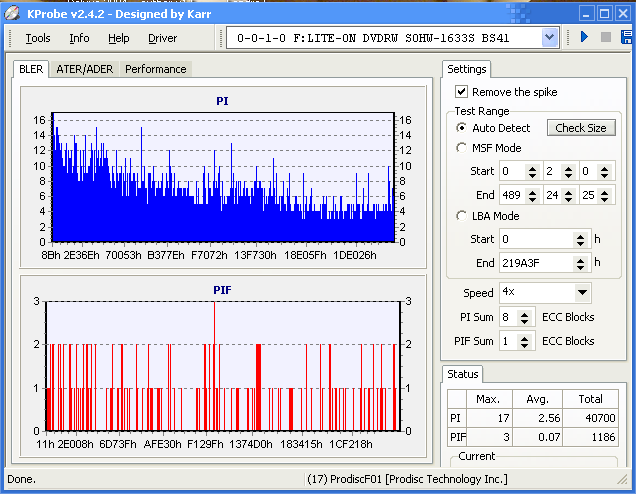
I have used some Fuji -R 8X printable discs that were Prodisc F01. These may be considered poor by some but I get good results in my DVR-109 with them. Low PIE and PIF scans generally.
This message has been edited since posting. Last time this message was edited on 4. April 2005 @ 15:01
|
|
forkndave
Member
|
4. April 2005 @ 17:15 |
Link to this message
|
Here is a scan from one of them. It was burned at 8X on a Pioneer DVR-109. Maybe not the greatest but good enough for me.
This message has been edited since posting. Last time this message was edited on 4. April 2005 @ 17:19
|
|
movies27
Senior Member
|
4. April 2005 @ 19:31 |
Link to this message
|
|
all my fuji discs read TYG02
|
|
movies27
Senior Member
|
4. April 2005 @ 19:31 |
Link to this message
|
|
all my fuji discs read TYG02
|
Senior Member
1 product review
|
4. April 2005 @ 19:39 |
Link to this message
|
|
All the 8x Fuji +R discs made in japan that I own are all TY.(over 500+)
|
|
ScubaPete
AfterDawn Addict
|
5. April 2005 @ 17:56 |
Link to this message
|
|
I received some to day and indeed they are TY02's. My mistake. I still have 2 other Fuji discs that, as saugmon shows, are still made by Prodisc. Thee are all -R discs PLUS I have a disc given to me by my Medic worker, which is a -R Fuji 4X made by Pioneer. I wonder if these are the ones shown as Fuji film. I have not seen any other discs made by Fuji Film so I don't believe they have a "Plant".
If some of you are following my posts you'll see that in another thread I posted my discovery of the TY Fuji discs earlier today. I have no problem when I find I'm in error.
Conclusion - be it right or wrong (as I am from time to time) it would appear that Fuji are all over the board from the very good to the as poor as the rest.
My suggestion at this point - buy online - Newegg, MertLine, etc have an excellent return policy so that if you discover Prodisc you can return them in the hopes of TY's the next time.
Talk about a crapshoot - When will someone step in and regulate this industry ?
|
AfterDawn Addict
|
6. April 2005 @ 03:50 |
Link to this message
|
|
From looking at those fuji codes, I'd take any of them any day of the week. Too bad all their good sales on them are are not nearby.
HP a1118x-b/athlon 64-3300+/BenQ 1650 BCDC/LG 8163B/Modded Wii/Epson-R300 and Ty Watershields!!!
|
|
Advertisement
|
|
|
|
ScubaPete
AfterDawn Addict
|
6. April 2005 @ 14:07 |
Link to this message
|
|
Becareful, those Fuji's that come up as Prodiscs and Pioneer (FujiFilm) will bite you in the butt. They are still in the poor catagory though you certainly cannot complain about the TY's :)
Pete
|


