User User name Password  
   
Tuesday 17.3.2026 / 20:07
Search AfterDawn Forums:        In English   Suomeksi   Pĺ svenska
afterdawn.com > forums > dvd±r discussion > dvd±r for newbies > verbatim dvd+r dl wont burn in samsung ts-l532a
Show topics
 
Forums
Forums
Verbatim DVD+R DL wont burn in Samsung TS-L532A
  Jump to:
 
Posted Message
nosense
Newbie
_
7. June 2005 @ 23:01 _ Link to this message    Send private message to this user   
as you can already tell im having a problem with Verbatim DVD+R DL Advanced AZO media with my Samsung TS-L532A DVD+/- DL Burner... when i go to burn with Nero or any other program it doesnt allow me, all the different programs give me messages that all basically say that a CD cannot be detected or to insert the correct CD... if anyone can help me please reply thanks.
Advertisement
_
__
Member
_
8. June 2005 @ 06:08 _ Link to this message    Send private message to this user   
I was wondering if you have access to the manufacturer's support as I was having a similar problem with "dvds", but then in your post you later mention "cds" so I am a little confused as to what media is the problem.

Mine was with the "dvds" and I have an external BenQ 162I and found out that the media that they support for their drive was what was causing me problems. I contacted the BenQ support line to find this out. Once I changed to the R+ and then the brands of either Imation, Maxell, TDK or Sony and updated my firmware per their Global site I was fine. I was told to stay away from the brands of Kodak, Memorex and Verbatim in the R+ for my burner and not use any brand of R-. Of course this was strictly for my BenQ burner model, I don't know about yours. I am just telling you of my experiences, as I was trying to use R- as suggested at the store where I purchased the external burner.

I got a good buy on Maxell R+ media and that is all I have been using for Back ups at BenQ techs suggestion and I have been doing fine.


I hope that you resolve your problem.

I use Dvd Shrink, Nero Express and Any DVD for longer dvds and since I am just venturing into this area, for straight copy to copy I use 1 Click Dvd copy and Any Dvd which for me as a Noob is excellent.

Good Luck.

Toshiba M50-MX5, 1.86 ghz, Pentium M, 1 Gig; Toshiba 2410, Pentium M; Acer Travelmate; BenQ Ext 162I, DVD Shrink, Any DVD (3 licences), Clone DVD (3 licences), Nero 6.0.0.18 (1 licence/1 notebook), WD 160 gig Storage, Hauppauge Win TV PVR USB 2.0, Canon LIDE 80,Canon 4400F Scanners, Canon 5000 Pixma printer,Canon ip 4300 Printer, Canon printer ES2, Canon printer ip 6700, Panasonic dig cam lz7s, Panasonic cam corder PV-GS300

This message has been edited since posting. Last time this message was edited on 8. June 2005 @ 06:14

Gringle
Suspended due to non-functional email address
_
8. June 2005 @ 06:18 _ Link to this message    Send private message to this user   
Try this tool it's free and very good at giving you information about your discs, and drive http://www.dvdinfopro.com/

without further information we're all guessing.


gringle.

El gringle..
nosense
Newbie
_
9. June 2005 @ 07:25 _ Link to this message    Send private message to this user   
hey sorry bout the CD and DVD thing, its only with DVD's, the dvd burner is in a HP Pavillion Laptop, just got it bout 2 or so weeks ago, ive been burning normal length DVD's with Sony DVD-R and they all work fine, but its when i went to use Verbatim DVD+R DL they don't work so yeh i guess its probably that they arent the right media for my burner, thanks for your help guys ill have a look at that site you recomended, ill let you know if it is of any help.
Moderator
_
9. June 2005 @ 13:54 _ Link to this message    Send private message to this user   
see here - http://www.cdfreaks.com/article/203

it looks like that drive does maximum of 6x DVD+R DL writing.

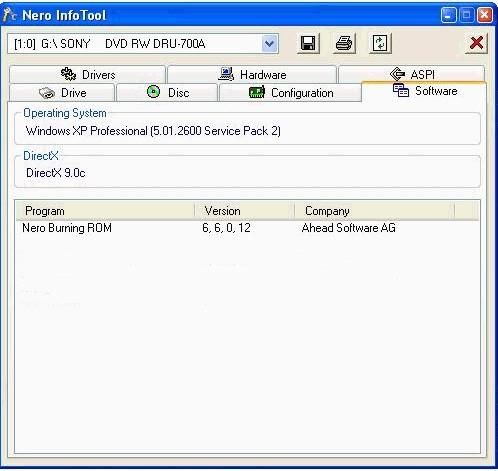
what version of Nero have you got (maybe it's too old). If you don't know how to tell , run Nero's info-tool and report on the version from the software tab -


plus don't forget dvdinfopro information as gringle mentioned..


Main PC ~ Intel C2Q Q6600 (G0 Stepping)/Gigabyte GA-EP45-DS3/2GB Crucial Ballistix PC2-8500/Zalman CNPS9700/Antec 900/Corsair HX 620W
Network ~ DD-WRT ~ 2node WDS-WPA2/AES ~ Buffalo WHR-G54S. 3node WPA2/AES ~ WRT54GS v6 (inc. WEP BSSID), WRT54G v2, WRT54G2 v1. *** Forum Rules ***
nosense
Newbie
_
10. June 2005 @ 00:44 _ Link to this message    Send private message to this user   
im using Nero 6.6.0.8... thats reasonably new isnt it?
Advertisement
_
__
 
_
Moderator
_
10. June 2005 @ 00:48 _ Link to this message    Send private message to this user   
it sure is....but maybe the drive just can't recognise those discs due to the 6x writing of dual layer


Main PC ~ Intel C2Q Q6600 (G0 Stepping)/Gigabyte GA-EP45-DS3/2GB Crucial Ballistix PC2-8500/Zalman CNPS9700/Antec 900/Corsair HX 620W
Network ~ DD-WRT ~ 2node WDS-WPA2/AES ~ Buffalo WHR-G54S. 3node WPA2/AES ~ WRT54GS v6 (inc. WEP BSSID), WRT54G v2, WRT54G2 v1. *** Forum Rules ***

This message has been edited since posting. Last time this message was edited on 10. June 2005 @ 00:49

afterdawn.com > forums > dvd±r discussion > dvd±r for newbies > verbatim dvd+r dl wont burn in samsung ts-l532a
 

Digital video: AfterDawn.com | AfterDawn Forums
Music: MP3Lizard.com
Gaming: Blasteroids.com | Blasteroids Forums | Compare game prices
Software: Software downloads
Blogs: User profile pages
RSS feeds: AfterDawn.com News | Software updates | AfterDawn Forums
International: AfterDawn in Finnish | AfterDawn in Swedish | AfterDawn in Norwegian | download.fi
Navigate: Search | Site map
About us: About AfterDawn Ltd | Advertise on our sites | Rules, Restrictions, Legal disclaimer & Privacy policy
Contact us: Send feedback | Contact our media sales team
 
  © 1999-2026 by AfterDawn Ltd.

  IDG TechNetwork