|
|
|
problem with reading discs
|
|
|
kev01
Newbie

|
9. June 2005 @ 11:42 |
Link to this message

|
|
i have an aopen dvd rom combi drive and an aopen dvd rw i am using nero 6 the problem i have is that sometimes i try to copy a disc and the read buffer goes from 100% down to 0 then back up then down and its slowing my copying right down, sometimes it takes ages to copy a disc any ideas please
|
|
Advertisement
|
 |
|
|
AfterDawn Addict
|
9. June 2005 @ 11:55 |
Link to this message

|
|
hi
on first impression it sounds like your pc is under par, re ram or cpu speed? may need abit more?
or you are doing other stuff aswell at the same time?
or could be a virus?
Nothing here to see, move along folks.
 |
Moderator
|
9. June 2005 @ 13:14 |
Link to this message
|
@kev01 - as per Rotary's question -
we can get some of that info from your Nero logfile, it's in c:\program files\ahead\nero\nerohistory.log. ALL burns, good and bad are appended to this log, so copy/paste the last section (which would be the simulated burn). Anyway, don't paste your serial number which usually begins with '1A21'..
The serial number is a good pointer to look for in the log anyway, as it helps differentiate the sections (ie each section is a different burn).
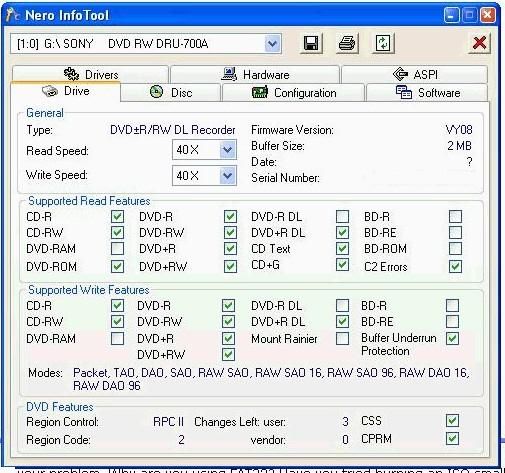
Run Nero's info-tool, note down the following, and paste here. Here's what mine shows -
click on the drive tab, note down the firmware version
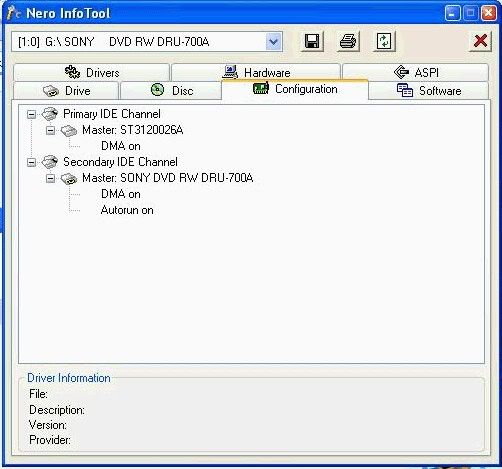
click on configuration tab, note down the DMA fields, ie on or off
it may be worth clicking on the aspi tab, and note down anything that might be missing
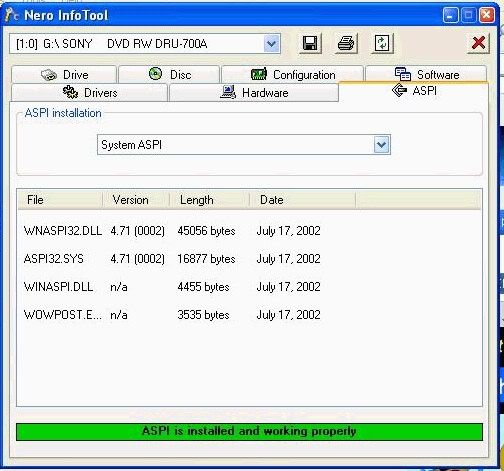
As to ASPI, i'm still not 100% whether it's needed in XP, no matter how many times i read up on it, i'm still none the wiser.
I've always installed it and it doesn't make things worse, plus i never read about installing it making problems so that's good enough for me.
You could post your own pictures - i do this the same way, but i copy/pasted this from one of the moderators' posts -
Step 1: push ctrl + PrintScreen (above the insert button)
Step 2: Open paint .. click start -> programs -> accessories -> paint
Step 3: push ctrl + v
Step 4: crop your image. I crop what I want to show -> cut it -> open new -> paste it. Crop only what you want to keep
Step 5: save as jpeg
Step 6: Host the jpeg here: http://imageshack.us/

Main PC ~ Intel C2Q Q6600 (G0 Stepping)/Gigabyte GA-EP45-DS3/2GB Crucial Ballistix PC2-8500/Zalman CNPS9700/Antec 900/Corsair HX 620W
Network ~ DD-WRT ~ 2node WDS-WPA2/AES ~ Buffalo WHR-G54S. 3node WPA2/AES ~ WRT54GS v6 (inc. WEP BSSID), WRT54G v2, WRT54G2 v1. *** Forum Rules *** |
|
kev01
Newbie
|
10. June 2005 @ 07:34 |
Link to this message
|
|
thanks for the reply i dont think my computer is under powered it is a pentium 4 ht 3.2 ghz with 512 ram and if i copy a disc without doing anything else it doesnt make a difference i will try and get all the info for you so here goes
Kev
Windows XP 5.1
IA32
WinAspi: -
ahead WinASPI: File 'C:\Program Files\Ahead\nero\Wnaspi32.dll': Ver=2.0.1.74, size=164112 bytes, created 26/10/2004 18:35:34
Nero Version: 6.6.0.13
Internal Version: 6, 6, 0, 13c
(Nero Express)
Recorder: <AOPEN DUW1608/ARR> Version: A080 - HA 0 TA 1 - 6.6.0.13
Adapter driver: <atapi> HA 0
Drive buffer : 2048kB
Bus Type : default (0) -> ATAPI, detected: ATAPI
CD-ROM: <AOPEN COM5232/AAH >Version: 1.12 - HA 1 TA 0 - 6.6.0.13
Adapter driver: <atapi> HA 1
=== Scsi-Device-Map ===
DiskPeripheral : Maxtor 6Y160P0 atapi Port 0 ID 0 DMA: On
CdRomPeripheral : AOPEN DUW1608/ARR atapi Port 0 ID 1 DMA: On
CdRomPeripheral : AOPEN COM5232/AAH atapi Port 1 ID 0 DMA: On
=== CDRom-Device-Map ===
AOPEN DUW1608/ARR E: CDRom0
AOPEN COM5232/AAH D: CDRom1
=======================
AutoRun : 1
Excluded drive IDs:
WriteBufferSize: 74448896 (0) Byte
ShowDrvBufStat : 0
BUFE : 0
Physical memory : 511MB (523500kB)
Free physical memory: 189MB (194088kB)
Memory in use : 62
Uncached PFiles: 0x0
Use Inquiry : 1
Global Bus Type: default (0)
Check supported media : Disabled (0)
9.6.2005
DVD-Copy on the fly
20:03:25 #1 Text 0 File Reader.cpp, Line 127
Reader running
20:03:25 #2 Text 0 File Writer.cpp, Line 122
Writer AOPEN DUW1608/ARR running
20:03:25 #3 Text 0 File DVDCopy.cpp, Line 279
DVD Track-Information from source disc
S01 T01 Con 0x04 Start 0 Len 1405552 (gap 0) Blank 0 Res 0 Dmg 0 Open Trk 0 Mode TRM_DATA_MODE1 (0)
20:03:26 #4 Text 0 File DVDCopy.cpp, Line 382
Max -1 tracks of 1 allowed to copy
1: 0 - 1405552 = 1405552, TRM_DATA_MODE1, block size 2048, read opt 0 (no read options)
20:03:26 #5 Text 0 File Burncd.cpp, Line 3167
Turn on Disc-At-Once, using DVD media
20:03:26 #6 Text 0 File DlgWaitCD.cpp, Line 260
Last possible write address on media: 2298495 (510:46.45, 4489MB)
Last address to be written: 1405551 (312:20.51, 2745MB)
20:03:26 #7 Text 0 File DlgWaitCD.cpp, Line 272
Write in overburning mode: NO (enabled: CD)
20:03:26 #8 Text 0 File DlgWaitCD.cpp, Line 2339
Recorder: AOPEN DUW1608/ARR, Media type: DVD-R
Disc Manufacturer: RITEKG - 04
Disc Application Code: 64, Disc Physical Code: 193
20:03:26 #9 Text 0 File DlgWaitCD.cpp, Line 438
>>> Protocol of DlgWaitCD activities: <<<
=========================================
20:03:27 #10 Text 0 File ThreadedTransferInterface.cpp, Line 830
Setup items (after recorder preparation)
0: TRM_DATA_MODE1 (1 - Data (mode 1))
2 indices, index0 (150) not provided
original disc pos #0 + 1405552 (1405552) = #1405552/312:20.52
not relocatable, disc pos for caching/writing not required/not required, no patch infos
-> TRM_DATA_MODE1, 2048, config 0, wanted index0 0 blocks, length 1405552 blocks [AOPEN DUW1608/ARR]
--------------------------------------------------------------
20:03:27 #11 Text 0 File ThreadedTransferInterface.cpp, Line 1043
Prepare recorder [AOPEN DUW1608/ARR] for write in CUE-sheet-DAO
DAO infos:
==========
MCN: ""
TOCType: 0x40; Session Closed, disc fixated
Tracks 1 to 1:
1: TRM_DATA_MODE1, 2048/0x00, FilePos 0 0 2878570496, ISRC ""
DAO layout:
===========
__Start_|____Track_|_Idx_|_CtrlAdr_|_RecDep__________
0 | lead-in | 0 | 0x41 | 0x00
0 | 1 | 0 | 0x41 | 0x00
0 | 1 | 1 | 0x41 | 0x00
1405552 | lead-out | 1 | 0x41 | 0x00
20:03:27 #12 Phase 36 File dlgbrnst.cpp, Line 1832
Burn process started at 4x (5,540 KB/s)
20:03:27 #13 Text 0 File ThreadedTransferInterface.cpp, Line 2609
Verifying disc position of item 0 (not relocatable, no disc pos, no patch infos, orig at #0): write at #0
20:03:27 #14 Text 0 File DVDR.cpp, Line 2267
Recording mode: Sequential Recording Mode
20:03:27 #15 Text 0 File Mmc.cpp, Line 21469
Set BUFE: Buffer underrun protection -> ON , Adapt writespeed to disc : ON
20:03:27 #16 Text 0 File DVDR.cpp, Line 2421
Start write address at LBA 0
DVD high compatibility mode: Yes
20:03:27 #17 Text 0 File Cdrdrv.cpp, Line 8438
---- DVD Structure: Physical Format Information (00h) ----
Layer: 0, Address: 0 (0 h), AGID: 0; Length: 2050
Book Type: DVD-R (2), Part Version: 5
Disc Size: 120 mm, Maximum Rate: <not specified> (F h)
Number of Layers: 1, Track Path: Parallel Track Path (PTP), Layer Type: recordable
Linear Density: 0,267 um/bit, Track Density: 0,74 um/track
Starting Physical Sector Number of Data Area: 30000 h (DVD-ROM, DVD-R/-RW, DVD+R/+RW)
End Physical Sector Number of Data Area: 26127F h
End Sector Number in Layer 0: 0 h (LBN: FFFD0000 h, 4193920 MB)
Data in Burst Cutting Area (BCA) does not exist
Start sector number of the current Border-Out: 0 h
Start sector number of the next Border-In: 0 h
Media Specific [16..63]:
00 00 00 00 00 00 00 00 - 00 00 00 00 00 00 00 00 ................
00 00 00 00 00 00 00 00 - 00 00 00 00 00 00 00 00 ................
00 00 00 00 00 00 00 00 - 00 00 00 00 00 00 00 00 ................
20:17:40 #18 Text 0 File WriterStatus.cpp, Line 116
<AOPEN DUW1608/ARR > start writing Lead-Out at LBA 1405552 (157270h), lenght 0 blocks
20:17:41 #19 Text 0 File ThreadedTransfer.cpp, Line 228
all writers idle, stopping conversion
20:17:41 #20 Text 0 File DVDR.cpp, Line 2658
EndDAO: Last written address was 1405551
20:18:24 #21 Phase 37 File dlgbrnst.cpp, Line 1832
Burn process completed successfully at 4x (5,540 KB/s)
Existing drivers:
File 'Drivers\atapi.sys': Ver=5.1.2600.2180 (xpsp_sp2_rtm.040803-2158), size=95360 bytes, created 03/08/2004 22:59:44 (Adapter driver for rec)
Registry Keys:
HKLM\Software\Microsoft\Windows NT\CurrentVersion\WinLogon\AllocateCDROMs : 0 (Security Option)
====== *** Nero-Burning Rom, History File *** ======
firmware version AO80
primary Ide channel
master:maxtor 6Y160P0
DMA on
Slave:AOPEN DUW1608/ARR
DMA on
autorun on
Secondary IDE Channel
Master:AOPEN COM5232/AAH
DMA on
Autorun on
aspi is not installed
SORRY I HAD TO WRITE IT ALL OUT LIKE THIS BUT I COULDNT COPY THE PICTURES FOR YOU THANKS AGAIN CREAKY HOPE THIS IS WHAT YOU NEED
This message has been edited since posting. Last time this message was edited on 10. June 2005 @ 10:26
|
Moderator
|
10. June 2005 @ 09:35 |
 Link to this message

|
@kev01 - Quote:
1a25**********
- oops :) you've posted your entire nero log. therefore your serial number is repeated thru whole log as each burn is appended to the log. Go thru and chop out all except the last section of log (for the last burn; that's what i've done here) --->
Quote:
Recorder: <AOPEN DUW1608/ARR> Version: A080
- latest version of firmware is R1.08, dated 13th Apr 2005 - http://download.aopen.com.tw:/userdownload_List.aspx?RecNo=9277&M...
(if that link doesn't work here's the main page for your drive) - http://www.aopen.nl/Products/dvd+rw/duw1608arr.htm
Quote:
CD-ROM: <AOPEN COM5232/AAH >Version: 1.12
- this drive has up to date firmware.
Quote:
DVD-Copy on the fly
- i'd leave stuff like that after your pc is setup correctly for burning.. (i still don't do on the fly, though with CD's i have done for a few years now)
Quote:
Last possible write address on media: 2298495 (510:46.45, 4489MB)
Last address to be written: 1405551 (312:20.51, 2745MB)
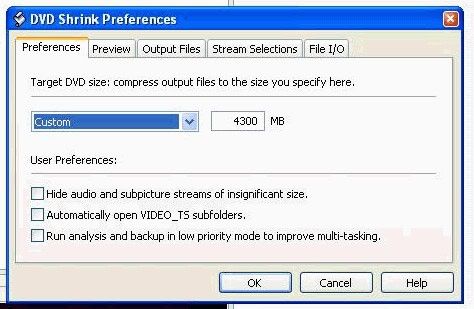
- this is fine as this particular burn is only writing 2745MB to this disc, the 4489MB is the very edge of the disc so you're nowhere near the edge of disc; however just in case you use DVD Shrink sometimes to create movies, set your target size to 4300MB so no films will ever try to go over 4300MB -
Quote:
Disc Manufacturer: RITEKG - 04
Disc Application Code: 64, Disc Physical Code: 193
- i don't know much about Ritek discs i'm afraid...they might be decent, might not be, i'm sure someone else will pop by and comment on them either way..
Quote:
Burn process completed successfully at 4x (5,540 KB/s)
- even though this burn worked, i'd suspect that any burns that had huge buffer fluctuations during the burn will be prone to skipping on playback (i've had that happen to me and it resulted in crap playback)
Quote:
aspi is not installed
it doesn't harm anything to install ASPI - download it here and run it afterwards - http://www.afterdawn.com/software/cdr_software/cdr_tools/aspi.cfm
So to sum up, i'd get that firmware up to date for the DVD burner, and i'd ease off on the on-the-fly stuff 'til you can get stable burns from say, normal burns first, ie from the hard disc. There are ppl who do on-the-fly and have good results but i don't risk it myself, can't afford to make coasters!
Main PC ~ Intel C2Q Q6600 (G0 Stepping)/Gigabyte GA-EP45-DS3/2GB Crucial Ballistix PC2-8500/Zalman CNPS9700/Antec 900/Corsair HX 620W
Network ~ DD-WRT ~ 2node WDS-WPA2/AES ~ Buffalo WHR-G54S. 3node WPA2/AES ~ WRT54GS v6 (inc. WEP BSSID), WRT54G v2, WRT54G2 v1. *** Forum Rules ***
This message has been edited since posting. Last time this message was edited on 10. June 2005 @ 09:42
|
|
kev01
Newbie
|
10. June 2005 @ 10:11 |
Link to this message
|
|
i have run the firmware thanks for that and now deleted all the bits with the serial number lol cheers creaky may you win the lottery this weekend mate
This message has been edited since posting. Last time this message was edited on 10. June 2005 @ 10:27
|
Moderator
|
10. June 2005 @ 10:59 |
Link to this message
|
|
i wish, but like the advert says 'you got to do the Lottery to win'
:)
as for the pc, nice one, my brother has a couple of those, my spec isn't far off. It's probably just the firmware then. I tend to focus more on the logfile than anything else when helping ppl. Just going to venture out (i'm in the UK and it's gone chilly) to fetch some booze
Main PC ~ Intel C2Q Q6600 (G0 Stepping)/Gigabyte GA-EP45-DS3/2GB Crucial Ballistix PC2-8500/Zalman CNPS9700/Antec 900/Corsair HX 620W
Network ~ DD-WRT ~ 2node WDS-WPA2/AES ~ Buffalo WHR-G54S. 3node WPA2/AES ~ WRT54GS v6 (inc. WEP BSSID), WRT54G v2, WRT54G2 v1. *** Forum Rules ***
|
|
Advertisement
|
|
|
|
kev01
Newbie
|
10. June 2005 @ 11:43 |
Link to this message
|
|
im in uk as well well cheers again and enjoy the drink catch u again when i run into a prob lol
|
|


