|
What works best w/ DVD Copy3
|
|
AfterDawn Addict

|
10. June 2005 @ 09:25 |
Link to this message

|
Quote:
I would like to know how to use it w/ Nero so that I can control the writing speed though.
You just set the "target" to a hdd folder(that you make, named whatever you want)then hit the burn button, and afterwards use this guide to burn manually with Nero.
http://www.dvdshrink.info/nero-video.php
|
|
Advertisement
|
 |
|
|
Senior Member

|
10. June 2005 @ 17:30 |
Link to this message

|
Jim_dandy
Tried storing it to HD w/ Copy 3 then using Nero Recode 2 to put it on disc. It worked but, Nero didn't give an option on writting speeds.
It wrote it on to @ only 1X speed. Took a long time??????
How can I make it write @4X ???????
AMD Phenom II X4 3.2Ghz
16GB memory
1TB HDD
AnyDVD & CloneDVD
|
AfterDawn Addict
|
10. June 2005 @ 18:29 |
Link to this message

|
|
Senior Member
|
10. June 2005 @ 19:05 |
Link to this message
|
What I have is Nero Express
& Nero Smart Start.
Which option do I use to put it on a disc??
AMD Phenom II X4 3.2Ghz
16GB memory
1TB HDD
AnyDVD & CloneDVD
|
AfterDawn Addict
|
10. June 2005 @ 19:53 |
Link to this message
|
Nero start smart should get you to Nero burning rom, or you can just use Nero express.Bring up Nero express, and click on dvd files.Then you can either click add and load it up there or drag and drop your VIDEO_TS folder in the white pane at the bottom.Then click next, and there you should have a window where you can name it, and set your burn speed.
|
Senior Member
|
12. June 2005 @ 18:38 |
Link to this message
|
Jimm_dandy,
I'll try it w/ Nero Express and see how it works.
I might be asking you some more questions????????
AMD Phenom II X4 3.2Ghz
16GB memory
1TB HDD
AnyDVD & CloneDVD
|
Senior Member
|
17. June 2005 @ 07:24 |
Link to this message
|
|
After putting it on HD w/ Copy3,
can I use Shrink to put it on disc ???
AMD Phenom II X4 3.2Ghz
16GB memory
1TB HDD
AnyDVD & CloneDVD
|
AfterDawn Addict
|
17. June 2005 @ 07:28 |
Link to this message
|
If you use DVD Shrink to put it on a disc,you just reverse what copy 3 did.
Wont Nero express burn it for you?
Dvd shrink doesnt burn, it works with Nero to burn.
|
Senior Member
|
17. June 2005 @ 10:49 |
Link to this message
|
|
After I burn it w/ dvd copy 3 to HD
When I open Express it doesn't recegonized the file?????????
If it does, it only let's me burn it @ 1X speed......
AMD Phenom II X4 3.2Ghz
16GB memory
1TB HDD
AnyDVD & CloneDVD
|
AfterDawn Addict
|
17. June 2005 @ 11:03 |
Link to this message
|
|
I'm running out of ideas here.
Is this just one dvd your having trouble with?
Also.. this might have already been asked but...have you updated your firmware?
|
AfterDawn Addict
|
17. June 2005 @ 11:05 |
Link to this message
|
|
another thought...do you have the directx 9 it requires?(not sure if that would make a diff or not)
|
AfterDawn Addict
6 product reviews
|
17. June 2005 @ 11:27 |
Link to this message
|
Are you able to burn any other vidio folders with Nero? Can you view the folder you made with DVDCopy3 on yor pc with a player (windvd6, powerdvd6)? You might be better off useing the DVDCopy3 burning rom with some 4x rated media since you are having so many problems with Nero.
Rig #1 Asus Rampage Formula Mobo, Intel Core2Quad Q9450 CPU @ 3.55ghz, 2gb Corsair DDR2 1066 Dominator Ram @ 5-5-5-15, TR Ultra 120 Extreme w/ Scythe 9 blade 110 cfm 120mm Fan HSF, HIS Radeon 512mb HD3850 IceQ TurboX GPU, Corsair 620HX P/S, CM Stacker 830 Evo Case, Rig #2 Asus P5W DH Deluxe Mobo, Intel C2D E6600 CPU @ 3.6ghz, 2gb Corsair XMS2 DDR2 800 Ram @ 4-4-4-12-2t, Zalman CNPS9500LED HSF, Sapphire Radeon X850XT PE GPU, Corsair 620HX P/S, Cooler Master Mystique Case, Viewsonic 20.1" Widescreen Digital LCD Monitor, Klipsch Promedia Ultra 5.1 THX Desktop Speakers, http://valid.x86-secret.com/show_oc.php?id=348351 http://valid.x86-secret.com/show_oc.php?id=236435 |
AfterDawn Addict
|
17. June 2005 @ 11:32 |
Link to this message
|
|
Good point mort
Perhaps if nero doesn't work for anything.Maybe you have Roxio,or a packet writting software such as InCd or Dragtodisc.All of those programs conflict with nero, especially Roxio.
the 4x media and copy3's burner sounds like a plan:)
This message has been edited since posting. Last time this message was edited on 17. June 2005 @ 11:33
|
AfterDawn Addict
6 product reviews
|
17. June 2005 @ 13:25 |
Link to this message
|
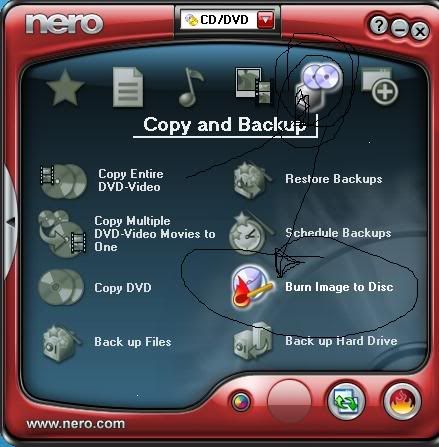
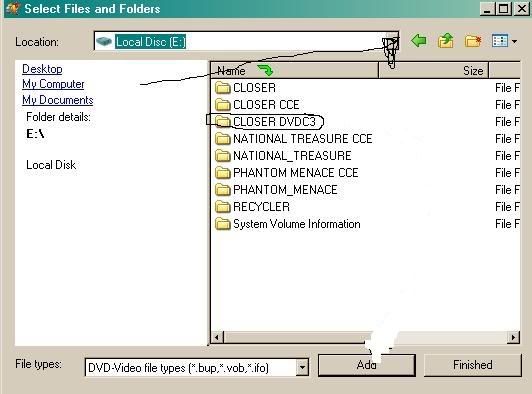
Here's some pics and info on how to burn dvd video folders with nero. Hope it helps as it took some time.
Open nero, put your pointer over copy and backup, click on burn image to disc
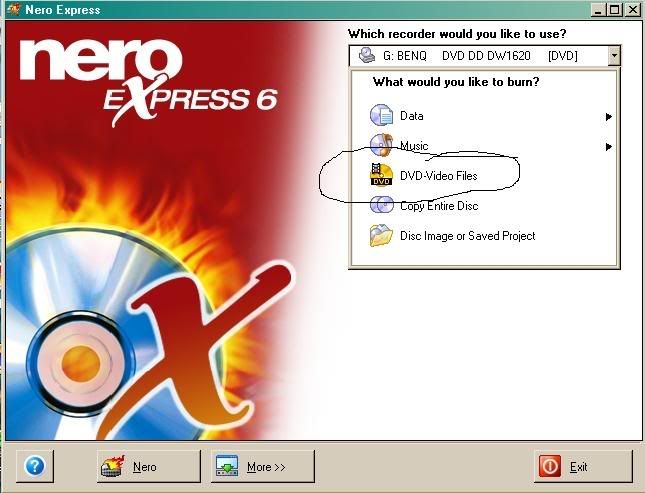
click on dvd-video files.
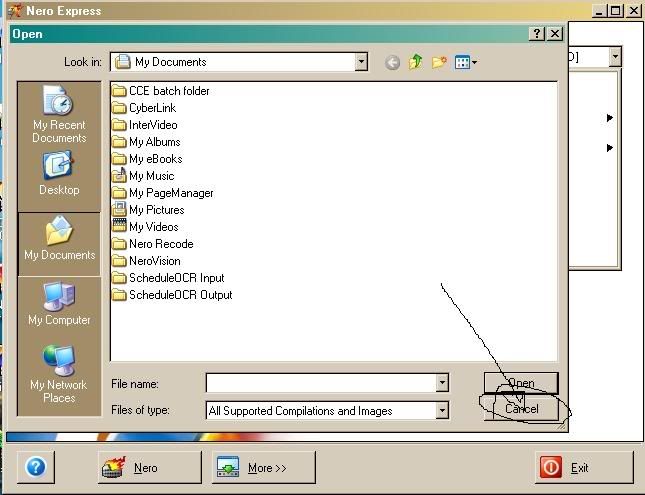
click cancel on the first screen.
click add on the next screen.
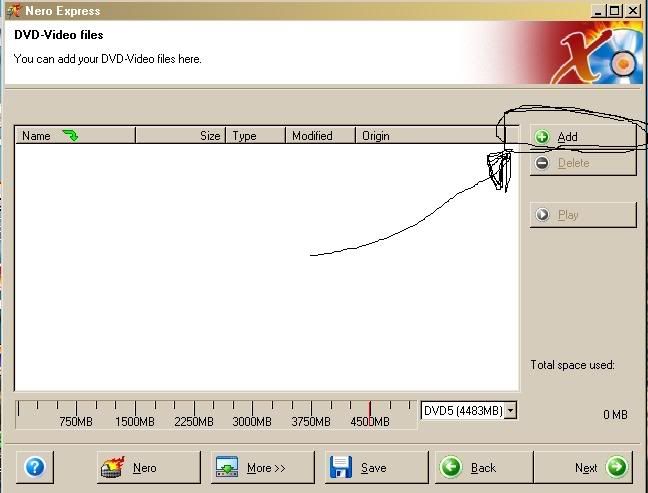
use the dropdown menu to locate where your folder is stored then double click on the folder.
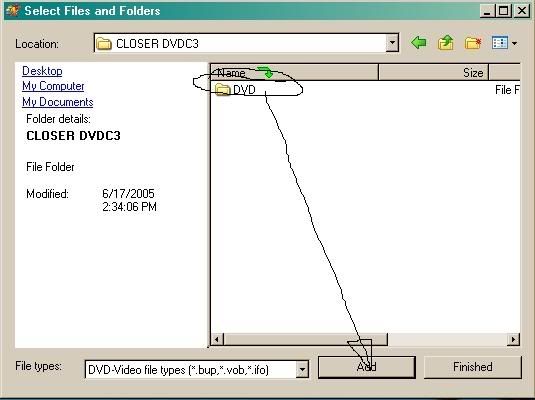
click on dvd to highlight it then click on add.
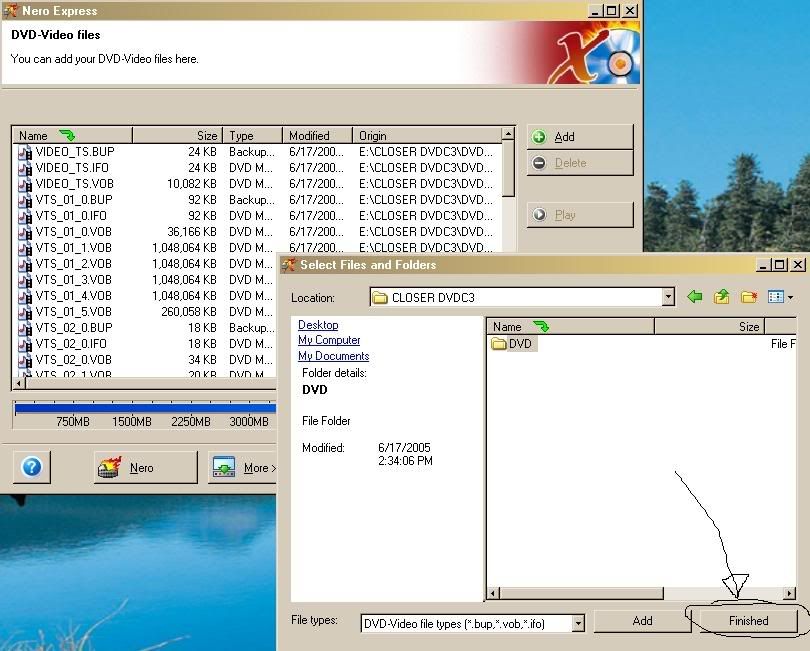
click on finish.
click next.
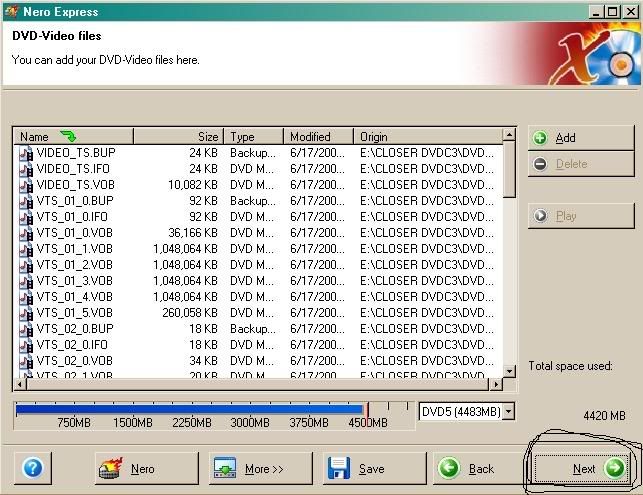
select your dvdrw from the dropdown menu. Name your disc if you want or you can leave it as new. Select burn speed from the dropdown menu. click on burn.
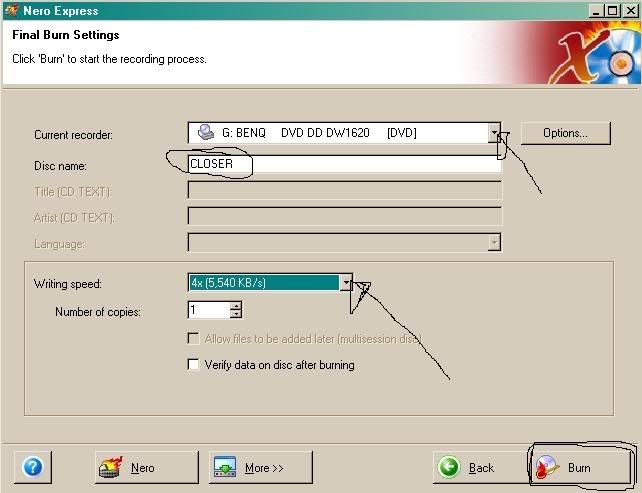
Whew, I hope this helps.
Rig #1 Asus Rampage Formula Mobo, Intel Core2Quad Q9450 CPU @ 3.55ghz, 2gb Corsair DDR2 1066 Dominator Ram @ 5-5-5-15, TR Ultra 120 Extreme w/ Scythe 9 blade 110 cfm 120mm Fan HSF, HIS Radeon 512mb HD3850 IceQ TurboX GPU, Corsair 620HX P/S, CM Stacker 830 Evo Case, Rig #2 Asus P5W DH Deluxe Mobo, Intel C2D E6600 CPU @ 3.6ghz, 2gb Corsair XMS2 DDR2 800 Ram @ 4-4-4-12-2t, Zalman CNPS9500LED HSF, Sapphire Radeon X850XT PE GPU, Corsair 620HX P/S, Cooler Master Mystique Case, Viewsonic 20.1" Widescreen Digital LCD Monitor, Klipsch Promedia Ultra 5.1 THX Desktop Speakers, http://valid.x86-secret.com/show_oc.php?id=348351 http://valid.x86-secret.com/show_oc.php?id=236435This message has been edited since posting. Last time this message was edited on 17. June 2005 @ 13:44
|
Senior Member
|
17. June 2005 @ 20:51 |
Link to this message
|
Mort81,
That's some awesome work on letting me know how to use it w/ Nero.
I'll give it a try.
I've been having nothing but problems burning HITCH w/ DVD Copy 3.
Problems w/ menu or when I hit PLAY MOVIE on main menu it won't play.
I was able to burn it w/ no problem using Decrypter & Shrink though.
Getting really frustrated w/ DVD Copy 3. Having problems burning with I paid for it & wish it would work.
AMD Phenom II X4 3.2Ghz
16GB memory
1TB HDD
AnyDVD & CloneDVD
|
|
aabbccdd
Suspended permanently
|
18. June 2005 @ 02:11 |
Link to this message
|
yes AnyDVD is the way to go iam using it with Intervideo DVDCopy3 myself and I CAN CONTROL the burn speed ,because i have a Plextor712A burner that comes with a program called Plextor Tools that you can adjust the settings which i have set at 4X max. works very well
|
Senior Member
|
18. June 2005 @ 07:24 |
Link to this message
|
|
aabbccdd
That's cool maybe I'll get a DVD writer that does that.
Ideally I want to use those same programs you have together(DVD Copy 3 & AnyDVD).
Are all your copies coming out fine?? Any problems w/ movie menu's ??
AMD Phenom II X4 3.2Ghz
16GB memory
1TB HDD
AnyDVD & CloneDVD
|
|
squizzle
AfterDawn Addict
|
18. June 2005 @ 08:04 |
Link to this message
|
|
I and a few others here have had problems with menus when using DVD Copy 3. That's why I don't use it anymore. But the video quality was great I must say.
Convert PAL to NTSC or NTSC to PAL------>http://forums.afterdawn.com/thread_view.cfm/167922
ScubaPete's guides------>http://www.dvdplusvideo.com/tutorial007.html
Bbmayo's guides------>http://home.comcast.net/~bbmayo/index.html
My ever-growing movie collection------>http://www.intervocative.com/dvdcollection.aspx/squizzle
|
|
aabbccdd
Suspended permanently
|
18. June 2005 @ 08:29 |
Link to this message
|
@ dabig25 I havent had any problem with the meun's BUT i usally just do the movie ONLY . i def. think the Intervideo DVDCopy3 is the way to go because of the ease of use and the GREAT quality, heres the link you can do the free trial then buy it
http://www.intervideo.com/jsp/InterVideoDVDCopy_Profile.jsp
and if you wait a couple days you will get an email from them to buy it for 34.95 . and BTW the Plextor burners are one the best on the market along with pioneer or nec but Plextor is def. my choice. The only other program i would consider would be CloneDVD2 its a package deal along with AnyDVD and its a very good program and easy to use also. shoot us back if you need anymore info. good luck and happy burning
|
Senior Member
|
18. June 2005 @ 08:29 |
Link to this message
|
|
Squizzle
How bout just selecting, the main movie only option????????
AMD Phenom II X4 3.2Ghz
16GB memory
1TB HDD
AnyDVD & CloneDVD
|
|
squizzle
AfterDawn Addict
|
19. June 2005 @ 19:39 |
Link to this message
|
|
I personally like to get the full disc and have never done just movie with DVD Copy 3, but that would take care of the menu problem I was having.
Convert PAL to NTSC or NTSC to PAL------>http://forums.afterdawn.com/thread_view.cfm/167922
ScubaPete's guides------>http://www.dvdplusvideo.com/tutorial007.html
Bbmayo's guides------>http://home.comcast.net/~bbmayo/index.html
My ever-growing movie collection------>http://www.intervocative.com/dvdcollection.aspx/squizzle
|
|
aabbccdd
Suspended permanently
|
19. June 2005 @ 21:36 |
Link to this message
|
dabig i did the movie fine with DVDCopy3 and AnyDVD running in the background ,worked perfectly . have you defraged lately . heres the reason to BUY any dvd
Summary for drive D:
Drive (Hardware) Region: 1
Media is a Data DVD.
Booktype: dvd-rom (version 1), Layers: 2 (opposite)
Video DVD (or CD) label: HITCH
Media is CSS protected!
Video Standard: NTSC
Media is locked to region(s): 1!
Found & removed RCE protection!
Found & removed wrong DVD structure!
Found & removed structural copy protection (Arccos, Puppetlock)!
Autorun not found on Video DVD.
Found & removed 2 bad sector protections!
Emulating RPC-2 drive with region 1!
its the movie Hitch its full of problems but AnyDVD takes care of it
|
|
aabbccdd
Suspended permanently
|
19. June 2005 @ 21:37 |
Link to this message
|
|
and oh yeah i did the MOVIE ONLY
|
Senior Member
|
20. June 2005 @ 19:52 |
Link to this message
|
aabbccdd
I'm seriously thinking bout getting a Plextor writer. Do they all come w/ the plextor tools software that you were saying ??
I think that would solve alot of my problems, don't want to burn faster than 4X.
which one of these @ Newegg would you recommend??
or from somewhere else??
http://www.newegg.com/Product/ProductList.asp?MinPrice=&MaxPrice=...
AMD Phenom II X4 3.2Ghz
16GB memory
1TB HDD
AnyDVD & CloneDVD
|
|
Advertisement
|
|
|
Senior Member
|
20. June 2005 @ 20:06 |
Link to this message
|
Also
Yeah I already bought AnyDVD.
AMD Phenom II X4 3.2Ghz
16GB memory
1TB HDD
AnyDVD & CloneDVD
|




