User User name Password  
   
Monday 16.3.2026 / 08:49
Search AfterDawn Forums:        In English   Suomeksi   Pĺ svenska
afterdawn.com > forums > dvd±r discussion > dvd±r for newbies > using decrypter w/shrink and nero..alternative methods?
Show topics
 
Forums
Forums
using decrypter w/shrink and nero..alternative methods?
  Jump to:
 
Posted Message
artmanr
Suspended due to non-functional email address
_
16. June 2005 @ 08:13 _ Link to this message    Send private message to this user   
I followed a nice tutorial by ScubaPete on how2 use shrink and decrypter. (use decrypter to trans to hd; shrink to select files; burn with shrink; shrink uses nero to burn).

I've tried it twice on the same video_ts files and shrink starts to burn (I assume using nero) and stops at exactly 1%. No error messages are given. But it does appear to be locked up. I let it run overnight for 8 hours. Still 1%.

My system (win98se; athlon 750; 20g/120g hd; dvdrom;dvd burner) might be kind of slow. Is there an alternative method I should try?

My version of Nero is 6.0, both other progs are most recent versions.

Thanks in advance...

Art
Advertisement
_
__
laddyboy
AfterDawn Addict
_
16. June 2005 @ 09:09 _ Link to this message    Send private message to this user   
1. Rip to your hard drive with the latest DVD Decrypter.
2. Use DVD Shrink to encode and shrink and Backup to an iso image file on your hard drive.
3.Then use DVD Decrypter again in File--ISO Write mode to burn the Shrink-created iso image file using a speed of 4x or slower.

Don't use DVD Shrink to do the burn. See if this solves your problem.
DGenerate
Junior Member
_
16. June 2005 @ 09:12 _ Link to this message    Send private message to this user   
Two things may help:

a) high quality media

With DVD media, you pretty much get what you pay for. Check out this forum for help on what media to use:

http://forums.afterdawn.com/forum_view.cfm/47

b) more RAM

Depending on how much you have, and assuming you can't afford more drastic computer upgrades at the moment. I have 512MB, some people recommend at least 1GB.
Moderator
_
16. June 2005 @ 09:17 _ Link to this message    Send private message to this user   
sounds like DMA, well that's a start anyway - http://home.comcast.net/~bbmayo/DMA.html

Also, how much RAM do you have ?

Any reason you use Shrink to burn (it's using your Nero install anyway, why not turn off the auto burn, then each time you Shrink a move you can manually do the burn in Nero by drag/drop. That's what i do and i do lots of burning and it's no hassle.

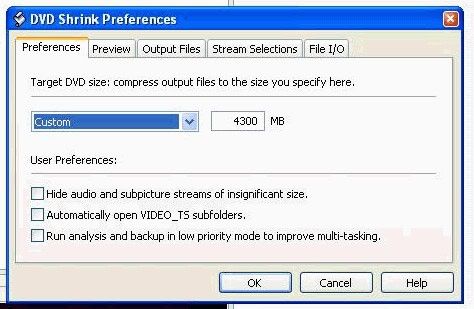
Maybe Shrink is burning too close to edge of disc -


- set the target size to 4300MB as it sacrifices hardly any space.

More Shrink & Decrypter info if you like - http://forums.afterdawn.com/thread_view.cfm/1/200558#1083526
http://forums.afterdawn.com/thread_view.cfm/198921

edit- Seeing previous reply i forgot to mention media - download dvdinfopro (free) and do a media info check and paste results here

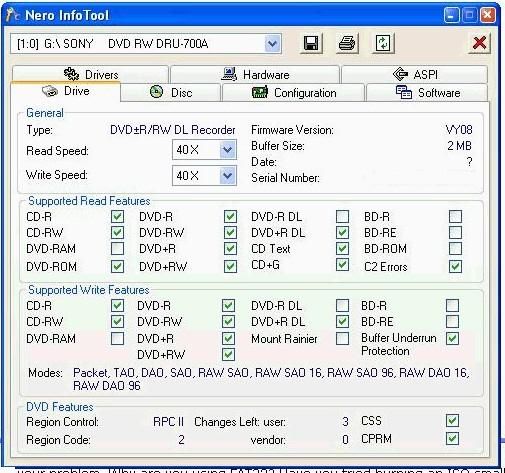
Also, run Nero's info-tool, click on the drive tab, note down the exact dvd burner's name and firmware version, and paste here. Here's what mine shows -


Main PC ~ Intel C2Q Q6600 (G0 Stepping)/Gigabyte GA-EP45-DS3/2GB Crucial Ballistix PC2-8500/Zalman CNPS9700/Antec 900/Corsair HX 620W
Network ~ DD-WRT ~ 2node WDS-WPA2/AES ~ Buffalo WHR-G54S. 3node WPA2/AES ~ WRT54GS v6 (inc. WEP BSSID), WRT54G v2, WRT54G2 v1. *** Forum Rules ***

This message has been edited since posting. Last time this message was edited on 16. June 2005 @ 09:21

artmanr
Suspended due to non-functional email address
_
16. June 2005 @ 11:48 _ Link to this message    Send private message to this user   
I'll do that tonight and post my results. Thanks! AR
Advertisement
_
__
 
_
Moderator
_
16. June 2005 @ 11:49 _ Link to this message    Send private message to this user   
you're welcome, hope it helps (well it should do!)


Main PC ~ Intel C2Q Q6600 (G0 Stepping)/Gigabyte GA-EP45-DS3/2GB Crucial Ballistix PC2-8500/Zalman CNPS9700/Antec 900/Corsair HX 620W
Network ~ DD-WRT ~ 2node WDS-WPA2/AES ~ Buffalo WHR-G54S. 3node WPA2/AES ~ WRT54GS v6 (inc. WEP BSSID), WRT54G v2, WRT54G2 v1. *** Forum Rules ***
Related links
Download DVD Decrypter from here.
 
Related forum topics Posts Last post Forum room
ImgBurn DVD Decrypter won't work with Shrink 3 29. May 2014 DVD Shrink forum
DVD Decrypter No Longer Ripping New DVDs 3 13. October 2012 Convert DVD to another format
decrypter needs internet connection? 2 28. July 2012 Blu-ray
How do I use DVDFab HD Decrypter 2 30. March 2012 Blu-ray
what is the best blu ray ripper/decrypter to make back up copies of my blu ray movies?please help!! 1 19. December 2011 DVD / Blu-ray drives
Trouble with HD Decrypter DVD Fab 1 10. October 2011 Blu-ray
Multiple duplicate copies of all files after ripping with DVD Decrypter 4 1. October 2011 DVD±R for newbies
WinX offers Blu-ray decrypter for free 34 10. September 2011 News comments
DVD Decrypter: File Missing After Decryption? 11 4. August 2011 DVD±R for newbies
DVDFAB Decrypter - Free 3 29. July 2011 Blu-ray

 
afterdawn.com > forums > dvd±r discussion > dvd±r for newbies > using decrypter w/shrink and nero..alternative methods?
 

Digital video: AfterDawn.com | AfterDawn Forums
Music: MP3Lizard.com
Gaming: Blasteroids.com | Blasteroids Forums | Compare game prices
Software: Software downloads
Blogs: User profile pages
RSS feeds: AfterDawn.com News | Software updates | AfterDawn Forums
International: AfterDawn in Finnish | AfterDawn in Swedish | AfterDawn in Norwegian | download.fi
Navigate: Search | Site map
About us: About AfterDawn Ltd | Advertise on our sites | Rules, Restrictions, Legal disclaimer & Privacy policy
Contact us: Send feedback | Contact our media sales team
 
  © 1999-2026 by AfterDawn Ltd.

  IDG TechNetwork