|
|
|
DVD Identifier Assistance
|
|
|
Opus54
Member

|
22. July 2005 @ 06:35 |
 Link to this message

|
|
I have DVD Identifier and the following info was returned on some blank media I have and I need some assistance from someone expert in identifier
what does this tell you about my media? is it only 1x speed capable?
and what is "MODE SENSE"?
===============================================================
** INFO : Drive = DVDR/RW DX162D-A [FW 140F]
** INFO : Write Capabilities = DVD+R DVD+R-DL DVD+RW
** INFO : Write Capabilities = DVD-R DVD-RW
** INFO : Disc = [DVD-R:RITEKG05]
** INFO : Reference Speed : 1x DVD = 1385 kBps
** INFO : An Writeable Disc Is Recommended For Accurate Results
** INFO : Write Speeds (Supported By This Drive On This Disc) Listed Below
** INFO : GET PERFORMANCE Write Speed Descriptor(s)
Descriptor #1 = 11080 kBps ( 8.00x) - [CLV/Non-Pure CAV]
Descriptor #2 = 5540 kBps ( 4.00x) - [CLV/Non-Pure CAV]
Descriptor #3 = 3324 kBps ( 2.40x) - [CLV/Non-Pure CAV]
** INFO : MODE SENSE Write Speed Descriptor(s) [Legacy Command]
** WARNING : MODE SENSE Is Obsolete And Not Always Properly Supported
Descriptor #1 = 11080 kBps ( 8.00x) - [CLV/Non-Pure CAV]
Descriptor #2 = 5540 kBps ( 4.00x) - [CLV/Non-Pure CAV]
Descriptor #3 = 3324 kBps ( 2.40x) - [CLV/Non-Pure CAV]
|
|
Advertisement
|
|
|
|
AfterDawn Addict

|
22. July 2005 @ 06:39 |
Link to this message

|
|
hi
try dvdinfo pro!
Nothing here to see, move along folks.
 |
|
Opus54
Member
|
22. July 2005 @ 06:48 |
Link to this message

|
|
Where is that available at (DVDInfo Pro)
and does that mean your not able to answer the question from the info above?
|
AfterDawn Addict
6 product reviews
|
22. July 2005 @ 07:05 |
Link to this message
|
It says they are ritek G05's and are 8x. That is a strange info window. Mine looks like this.
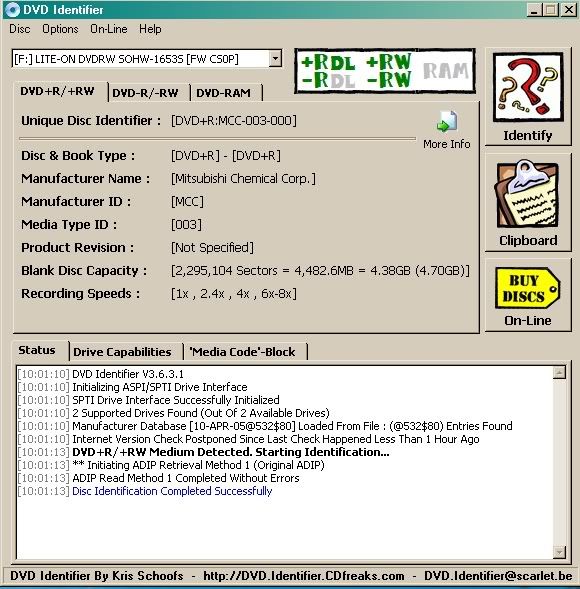
Here's the link to dvdinfopro. http://www.dvdinfopro.com/
Mort
Rig #1 Asus Rampage Formula Mobo, Intel Core2Quad Q9450 CPU @ 3.55ghz, 2gb Corsair DDR2 1066 Dominator Ram @ 5-5-5-15, TR Ultra 120 Extreme w/ Scythe 9 blade 110 cfm 120mm Fan HSF, HIS Radeon 512mb HD3850 IceQ TurboX GPU, Corsair 620HX P/S, CM Stacker 830 Evo Case, Rig #2 Asus P5W DH Deluxe Mobo, Intel C2D E6600 CPU @ 3.6ghz, 2gb Corsair XMS2 DDR2 800 Ram @ 4-4-4-12-2t, Zalman CNPS9500LED HSF, Sapphire Radeon X850XT PE GPU, Corsair 620HX P/S, Cooler Master Mystique Case, Viewsonic 20.1" Widescreen Digital LCD Monitor, Klipsch Promedia Ultra 5.1 THX Desktop Speakers, http://valid.x86-secret.com/show_oc.php?id=348351 http://valid.x86-secret.com/show_oc.php?id=236435 |
AfterDawn Addict
|
22. July 2005 @ 07:20 |
Link to this message
|
|
hi
looks 1x?
** INFO : Reference Speed : 1x DVD = 1385 kBps
Nothing here to see, move along folks.
|
AfterDawn Addict
6 product reviews
|
22. July 2005 @ 07:33 |
Link to this message
|
|
Thats the drive capabilities screen. Ritek G05 is rated at 8x. Here's what the drive capabilities screen shows on mine for 8x verbatum dvd+r's. Same disc as above.
** INFO : Drive = LITE-ON DVDRW SOHW-1653S [FW CS0P]
** INFO : Write Capabilities = DVD+RW DVD+R DVD+R-DL
** INFO : Write Capabilities = DVD-RW DVD-R
** INFO : Disc = [DVD+R:MCC-003-000]
** INFO : An Empty Writable Disc Is Recommended For Accurate Results
** INFO : Write Speeds (Supported By This Drive On This Disc) Listed Below
** INFO : GET PERFORMANCE Write Speed Descriptor(s)
Descriptor #1 = 11080 KBPS ( 8.00x) - [CLV/Non-Pure CAV]
Descriptor #2 = 8310 KBPS ( 6.00x) - [CLV/Non-Pure CAV]
Descriptor #3 = 5540 KBPS ( 4.00x) - [CLV/Non-Pure CAV]
** INFO : MODE SENSE Write Speed Descriptor(s) [Legacy Command]
** INFO : MODE SENSE Is Obsolete And Not Properly Supported By Some Drives
Descriptor #1 = 11080 KBPS ( 8.00x) - [CLV/Non-Pure CAV]
Descriptor #2 = 8310 KBPS ( 6.00x) - [CLV/Non-Pure CAV]
Descriptor #3 = 5540 KBPS ( 4.00x) - [CLV/Non-Pure CAV]
Rig #1 Asus Rampage Formula Mobo, Intel Core2Quad Q9450 CPU @ 3.55ghz, 2gb Corsair DDR2 1066 Dominator Ram @ 5-5-5-15, TR Ultra 120 Extreme w/ Scythe 9 blade 110 cfm 120mm Fan HSF, HIS Radeon 512mb HD3850 IceQ TurboX GPU, Corsair 620HX P/S, CM Stacker 830 Evo Case, Rig #2 Asus P5W DH Deluxe Mobo, Intel C2D E6600 CPU @ 3.6ghz, 2gb Corsair XMS2 DDR2 800 Ram @ 4-4-4-12-2t, Zalman CNPS9500LED HSF, Sapphire Radeon X850XT PE GPU, Corsair 620HX P/S, Cooler Master Mystique Case, Viewsonic 20.1" Widescreen Digital LCD Monitor, Klipsch Promedia Ultra 5.1 THX Desktop Speakers, http://valid.x86-secret.com/show_oc.php?id=348351 http://valid.x86-secret.com/show_oc.php?id=236435This message has been edited since posting. Last time this message was edited on 22. July 2005 @ 07:36
|
|
Opus54
Member
|
22. July 2005 @ 07:58 |
Link to this message
|
|
then why cant I copy to the media using ANY speed?
I have my dvd recorder firmware up to date
|
|
Advertisement
|
|
|
AfterDawn Addict
|
22. July 2005 @ 08:15 |
Link to this message
|
|
hi
that is a totally different issue, so need more facts as to what you need to do, what apps used, how far you get? any error messages? have you checked your dma? is your aspi layer ok, have you burnt ok before etc etc...
-------------------
1. Running Programs
Make sure you quit all running background programs, such as anti-virus software.
Windows 95 Users
Use the Ctrl-Alt-Del function to quit all the programs using the Task Manager, EXCEPT for the Explorer, systray, and your recording software
Windows 98/ME Users
Select [Start] -> [Run], then input "msconfig". Disable everything under the [Startup] tab, except "system tray'.
Windows 2000/XP Users
Open the Task Manager, then select the program/s under the [Application] tab, then click [End Task].
2. Drive Connection
Other devices may be interfering with the CD-R/RW drive. Disconnect all other removable devices, then try recording again. If there is still a problem, try the following.
Optimal Hardware Configuration
All hard drives are placed on the Primary IDE, check that the drives are correctly set as master/slave. CD-ROM/CD-R/RW drives are placed on the Secondary IDE, set the recording drive as the "master". If you are using a USB or IEEE devices, disconnect them.
Update your chipset
Windows 95/98/ME Users
Right click on [My Computer] and select [Properties] from the menu. Click on [Device Manager], then click to open [Hard Disk Controllers]. You will find: the Primary IDE Channel controller, the Secondary IDE Channel controller and a brand name controller, e.g. Intel, SIS, VIA, etc. The brand name controller is what needs to be updated. Please visit their website to obtain these updates.
Windows NT/2000/XP Users
Right click on [My Computer] and select [Properties] from the menu. Click [Device Manager] on the [Hardware] tab, then click to open the [IDE ATA/ATAPI (hard disk) controllers] section. You will find: the Primary IDE Channel controller, Secondary IDE Channel controller, and a brand name controller, e.g. Intel, SIS, VIA, etc. The brand name controller is what needs to be updated. Please visit their website to obtain these updates.
Configure Windows
Make sure that your operating system has been fully updated. Visit the Microsoft website to acquire these updates.
3. ASPI Manager
Check your ASPI layer configuration. Your recording program is likely to use the standard windows ASPI layer, which has been replaced by another ASPI layer of yet another recording program. Make sure you have the original windows ASPI layer in use and retry. If the problem persists, contact the drive maker.
4. DMA Settings
Setting DMA mode:
Windows 95/98/ME Users
Right click on [My Computer] and select [Properties] from the menu. Click on [Device Manager], then click on [CD-ROM]. This will expand to show the CD drives on your system. Right click on a drive and select [Properties] from the menu. Click on the [Settings] tab and check that the [DMA] option is enabled. Repeat this procedure for the remaining CD drives.
Win NT/2000/XP Users
Right click on [My Computer] and select [Properties] from the menu. Click [Device Manager] on the [Hardware] tab, then click to open the [IDE ATA/ATAPI (hard disk) controllers] section. You will find: the Primary IDE Channel controller, Secondary IDE Channel controller. Complete the following procedure:
Right click on the Primary IDE controller and select [Properties] from the menu.
Select the [Advanced Settings] tab. Check that the [Transfer Mode] for both devices is set to [DMA if available].
Repeat this for Secondary IDE controller.
Note: In some cases older CD-ROM drives will not support DMA mode. In that case please set both devices to PIO mode.
5. Disc
Recording errors often occur when the disc is dirty, or has fingerprints or scratches. If an error occurred during test simulation (before actual recording), clean the disc. If you are getting recording errors, try the following.
Use a different blank, recordable disc.
Use a different manufacturer's disc.
Ensure the disc is clean before recording:
Remove all fingerprints, dirt, and dust from the shiny side of your disc using a nonabrasive cloth with a mild, nonabrasive soap solution.
Wipe the disc from the center to the edge of the disc.
Dry the disc completely.
Error during file verification
If an error occurred when the files were being verified, record the same files again using a different disc.
Read error when copying a disc
When copying a disc, if an error occurred while reading data from the original disc, the original disc may be scratched or dirty.
Try cleaning the disc.
Remove all fingerprints, dirt, and dust from the shiny side of your disc using a nonabrasive cloth with a mild, nonabrasive soap solution.
Wipe the disc from the center to the edge of the disc.
Dry the disc completely.
Try using a different source drive.
To change the drive you use to read your disc, click the Change button when asked to insert a source disc into your drive tray.
Select the drive you wish to use from the drop-down menu.
Insert your disc into the new drive.
Try using copying the disc using one drive as both the source and destination drive.
When you use your recorder to both read and write to your disc, B's Recorder GOLD creates an image file of the entire disc to your hard drive and then copies that temporary file onto your blank disc. This can be helpful if the drive you are using to read your original disc is slow or unreliable.
If the problem persists, contact the drive maker.
6. Drive
If you have tried Actions 1 through 5 above, there may be a problem with your drive. Contact the drive maker with details of the error code. If the 5th and 6th digit of the error code is 80 through FF, then the error code is maker unique. The descriptions of these error codes differ depending on the maker.
Nothing here to see, move along folks.
This message has been edited since posting. Last time this message was edited on 22. July 2005 @ 08:16
|
|


