|
DVDShrink and DVDFab Express
|
|
|
abooboo
Newbie

|
22. September 2006 @ 16:45 |
 Link to this message

|
Hi. I was using DVDFab Express but freetrial is over is there any free downloadable version of this one. Also I tried using the DVDFab Decrypter and the DVD Shrink but I can't seem to figure it out. Please help
|
|
Advertisement

|
|
|
|
Moderator
1 product review
|
22. September 2006 @ 16:48 |
Link to this message

|
|
|
abooboo
Newbie
|
22. September 2006 @ 16:50 |
Link to this message

|
Thanks for replying. Do I have to download Nero or can I use the DVD Shrink to do the job?
|
Moderator
1 product review
|
22. September 2006 @ 16:56 |
Link to this message
|
|
|
abooboo
Newbie
|
22. September 2006 @ 17:01 |
Link to this message
|
|
Ok whcih img burn will I download from all of those? Thank you again for your help
|
|
abooboo
Newbie
|
22. September 2006 @ 17:04 |
Link to this message
|
|
LOCOENG where can I download the DVDFab Express that one seems easier for me I do not know a lot about computers
|
Moderator
1 product review
|
22. September 2006 @ 17:07 |
Link to this message
|
|
|
abooboo
Newbie
|
22. September 2006 @ 17:11 |
Link to this message
|
|
Would this work just like the DVDFab Express that after I start copying it I could just insert a black dvd and it will copy it?
|
Moderator
1 product review
|
22. September 2006 @ 17:44 |
Link to this message
|
|
Never used DVDFab Express, couldn't tell you...only Fengtao software I've used in DVDFab Decrypter.
|
AfterDawn Addict
1 product review
|
22. September 2006 @ 18:33 |
Link to this message
|
DVDFab Decrypter is basically just the ripping part of DVDFab Express. ImgBurn is available at imgburn.com and in my opinion (and that of many others)is the most powerful image burning software one can get. But if your looking for DVDFab Express it is available at DVDIdle.com

"Some people have no damn sense." - Nephilim, March 27 2007 @ 18:08 |
|
abooboo
Newbie
|
25. September 2006 @ 21:58 |
Link to this message
|
|
I tried using DVDFab Decrypter I just don't know how to put it on the actual cd. I tried using the process of this one guys guide still can't figure it out. sorry im not that much of a computer person. can anyone help me?
|
Member
|
26. September 2006 @ 00:46 |
Link to this message
|
i'm assuming you want to put the dvd onto a dvd, not a cd as you stated. putting it onto a cd is a whole other thing. to burn a dvd run the dvdfabdecrypter output file through VobBlanker (see download url and guide below). open shrink (read a shrink guide or two... pretty simple if you follow step by step). open file (the VobBlanker output file). choose either full disk or re-author. choose "create iso image". depending on the software you have to burn the dvd, you might choose "burn with nero/dvddecrypter/imgburn". take your time. read the guides a couple of times. take it step by step. after the first few times going through the process it will seem simple. bit of a learning curve at first. hang in there, and ask us as specific questions as possible (i.e. i did this and that happened...). let us know how it goes.
ps another option is ripit4me. it essentially automates all the processes in "one click mode". you do have to download and install several pieces of software, but it is fairly simple and worth the set up time if you like simplicity. of course, the simplest is to download AnyDVD, which is a retail product from slysoft.com, but it does have a 21 day trial period. with AnyDVD you just run shrink while AnyDVD runs in the background taking care of encryption and structural problems.
This message has been edited since posting. Last time this message was edited on 26. September 2006 @ 00:50
|
|
abooboo
Newbie
|
26. September 2006 @ 08:10 |
Link to this message
|
|
yah I mean dvd. ok i'll give it a try tonight, thank you so much, then i'll let you know how it goes.
|
Member
|
26. September 2006 @ 08:28 |
Link to this message
|
give it a shot. like i said, there is a bit of a learning curve at the beginning since all the terminology and software options are all new. if you go the fabdecrypter -> VobBlanker -> shrink route (all freeware), the most intimidating thing can be VobBlanker, since it has tons of advanced options for editing/removing parts of the dvd you don't want. i'd suggest at this point you don't bother with any of that and just click "process" at the bottom (after selecting a destination file location)... and remember, you MIGHT not even need to use VobBlanker, since only some current dvds have structural problems as part of their anti-copy strategy. but it never hurts to use it, and only takes about 5 minutes, and if you do use it you can be sure you have avoided those structural problems which will prevent shrink from working properly. and, again, ripit4me (freeware) has a "one click" option... you should have your successful backup this evening. let us know how it goes.
|
|
abooboo
Newbie
|
26. September 2006 @ 20:47 |
Link to this message
|
ok i had it in my computer (hard drive) now when I put it on DVD Shrink it won't burn it keeps ejecting my blank dvd do I need Nero or imgburn to come with it? i'm starting to get a headache i completely got the first part now, the only thing i need to learn is how to actually put it on the dvd. also when I went to imgburn theres a lot of them which mirror do i need to download just in case? thank you so much for your help i really appreciate it.
|
Member
|
26. September 2006 @ 21:16 |
Link to this message
|
@abooboo
hang in there. so what programs did you use before using shrink? just want to know exactly what is going on. does shrink process (i.e. "analyze" and/or "encode") successfully? shrink does not burn, so IF shrink is working (which likely means that you have gotten all the encryption/structural problems removed via dvdfab/vobblanker/ripit4me/anydvd), then you need a burner. imgburn is free. and if you go to the home site:
http://www.imgburn.com/
select "click here to download" in the top version 2.1.0.0, dated monday sept. 11, 2006.
to use imgburn/dvddecrypter to burn, you need to have had shrink create an iso image (vs. the vts/vob/ifo files used by Nero, etc.). use the drop down menu from the "select backup target" which appears after clicking on "backup" on the top menu.
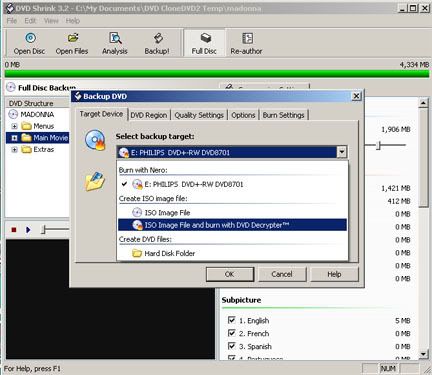
you can 1. download dvddecrypter and have shrink automatically burn with that, or 2. just select "create iso file", when that is done open imgburn and burn, or 3. download the version of shrink that is setup to give you the option to burn automatically with imgburn (which is located here: http://www.digital-digest.com/software/d...23&ssid=0&did=7
another couple of steps and you should be burning successfully.
also, highly recommend using verbatim or taiyo yuden or sony (made in japan, NOT taiwan) disks. not only will you avoid burning problems, but you will avoid playback problems as well, and possibly have a disk of greater longevity. also, best to burn at one half the disk rated speed, i.e., burn 16x dvds at 8x.
This message has been edited since posting. Last time this message was edited on 26. September 2006 @ 23:24
|
|
abooboo
Newbie
|
27. September 2006 @ 08:57 |
Link to this message
|
Ok I used dvdfab decrypter, then I used the shrink, on my shrink it does not give me the option iso image file and burn with DVD Decrypter, theres only the iso image file, i clicked on that one then it starts encoding but I was not burned in my dvd. I tried the link that you gave me but it won't download in my computer so I was stuck with the one i had.
|
AfterDawn Addict
|
27. September 2006 @ 09:02 |
Link to this message
|
|
|
abooboo
Newbie
|
27. September 2006 @ 10:41 |
Link to this message
|
I do not have volblanker so as imgburn only dvdfab decrypter, DVD Shrink and Nero
|
Member
|
27. September 2006 @ 10:54 |
Link to this message
|
@abooboo
download VobBlanker here: VobBlanker: http://www.videohelp.com/tools?tool=580
you might need it prior to using shrink. you might not. but it only takes 5 minutes and is a form of "insurance", as well as providing an opportunity to edit/eliminate/blank unwanted parts of the dvd.
shrink should provide you with the option to auto-burn with Nero if you have Nero installed as stated. if not auto-burn, then just open Nero and select the shrink file to burn.
be sure to read alkohol's newly update guide on how to use these tools:
new "DVDFAB Decrypter + VobBlanker + DVD Shrink + ImgBurn" guide by Alkohol http://forums.afterdawn.com/thread_view.cfm/334154
|
|
Advertisement
|
|
|
|
abooboo
Newbie
|
4. October 2006 @ 20:40 |
Link to this message
|
|
to everybody who had helped me thank you so much, I finally finished my first dvd copy. It took me a while to access my internet it had some problems it says that one program has been affecting my computer it still says it now. I guess when I tried downloading other stuff it has a virus. Thanks again I still need to get familiar with the process, now I need to find a virus protector.
|



