|
Pioneer DVR-105 burning 4x takes 40 minutes
|
|
|
Mulox
Junior Member

|
25. September 2003 @ 11:05 |
 Link to this message

|
|
I have been trying to troubleshoot why my Pioneer DVR-105 is so slow burning at 4x. I made sure I patched Nero and flashed my burner's bios before doing my test. Here is the system it's in right now:
AMD 2800+ XP 333Mhz Barton
Asus A7N8X Deluxe Nforce2
Maxtor 200gb ATA133 7200rpm 8mb cache
512mb (2x256) Corsair Platinum Ultra 2-2-2
WinXP Pro SP1
Nero 5.5.10.28
Pioneer DVR-105, firmware v1.33
At first I thought it might be the media, since this is my first time trying to burn at 4x, but I tried 3 different manufacturers (Sky, Princo, and Ritek) and got the same results using Nero... took 40 minutes to burn a full 4.35gb DVD-video disc from the hard drive... WAY too long! In comparison, it takes me about 50 minutes to burn a 1x DVD-R disc using Nero or DVD Shrink or DVD Decrypter.
Anyone have any thoughts on what is causing the severe slowdown? I thought this burner was supposed to burn in about 15-20 minutes for a full disc? Yes, I know it depends on your hardware/software, system config, etc., but I should be smoking with my setup, and this is frustrating!
|
|
Advertisement

|
|
|
|
|
Discmania
Senior Member
2 product reviews
|
25. September 2003 @ 21:09 |
Link to this message
|
Well the 1x speed is about right. You could try RecordNowMax instead of Nero and see what you get, but if it's still slow I would suggest the drive is faulty and you would need to take it back for an exchange.
|
AfterDawn Addict
|
25. September 2003 @ 21:47 |
Link to this message

|
|
hi
i dont think its software! i think its hardware issue! must be the flash did it change the firmware ok?
is the formware showing up in nero tool?
before and after flashing what was your 2X speed times? 30mins?? before and after?
Thx
Nothing here to see, move along folks.
 This message has been edited since posting. Last time this message was edited on 25. September 2003 @ 21:47
|
|
Mulox
Junior Member
|
26. September 2003 @ 07:05 |
Link to this message
|
Well, I bought the drive in December last year and this is the first time I am burning at 4x (I bought a bunch of 1x discs when 4x was too expensive and just now finished them). The first time I tried to burn at 4x was with original firmware, and Nero showed a 4x disc as 1x, so then I flashed to v1.33, and it shows as 1.33 in Nero info tool and disc shows as 4x now, so everything looks good there. I have never tried burning at 2x Rotary, and only burned at 1x prior to flashing.
I thought about trying some of the following:
1. Re-flash the firmware (useless??)
2. Burn a 4x-rated disc at 2x in Nero just to see what happens
3. What about burning something different besides DVD-video (like a data DVD backup instead)?
4. Try DVD Shrink or RecordNowMax (although I agree with Rotary, I don't think it's software)
5. Remove IDE controller and let Windows reinstall on reboot (saw this online somewhere, no idea if it works).
6. Last resort remove burner and install in a Win2000 machine I have to test it there.
Any thoughts?
|
AfterDawn Addict
|
26. September 2003 @ 07:13 |
Link to this message

|
|
hi there
dont remove the eide cable! only to put it as master drive setting and try to put it on its own eide slot!
the idea is to uninstall the device in devise manager then reboot and let windows find it! sometimes this works! also your system specs are excellant! are you running PIO or UDMA ?
are you on fat32 or NTFS ?
Thx...
|
AfterDawn Addict
|
26. September 2003 @ 07:28 |
Link to this message
|
Nothing here to see, move along folks.
|
|
Discmania
Senior Member
2 product reviews
|
26. September 2003 @ 07:35 |
Link to this message
|
You could try changing to PIA mode instead of DMA. Also check that you are burning disc-at-once in Nero and not using multisession.
|
|
Mulox
Junior Member
|
26. September 2003 @ 09:24 |
Link to this message
|
|
Thanks guys.
Rotary, what I meant was removing in device mgr, sorry for the confusion. I have the Pioneer set as a master drive on secondary IDE channel, and a Samsung CD-RW/DVD-rom combo drive as slave.
I am on NTFS and using UDMA. Also I always use disc at once in Nero. I will give PIA later tonight.
This message has been edited since posting. Last time this message was edited on 26. September 2003 @ 09:30
|
AfterDawn Addict
|
26. September 2003 @ 09:29 |
Link to this message
|
|
hi
Just a quick thing i noticed! your nero is the bugged version!!!!
use the one i use its v5.5.10.42 its the version before this bug ridden v6 new nero!
also on nero what is your ASPI layer version i have the latest 4.71.2 i think?
could be your problem?
Thx..
Nothing here to see, move along folks.
This message has been edited since posting. Last time this message was edited on 26. September 2003 @ 09:31
|
|
Mulox
Junior Member
|
26. September 2003 @ 09:35 |
Link to this message
|
Hmmm, good point. I will have a look and see if Nero needs patching. I may already have this version, and just made a mistake on my original post.
So I will do these in the following order:
1. Patch Nero if it needs it
2. Try PIA mode
3. Remove IDE controller in device mgr & reboot
4. Last resort try flashing bios with hacked version
I will test after each step and only try the next one if my times are still slow.
Thanks
|
AfterDawn Addict
|
26. September 2003 @ 09:36 |
Link to this message
|
hi
also if all works with new Nero nd new aspi layer you can upgrade your firmware then to 1.4 was it?
Thx...
Nothing here to see, move along folks.
|
AfterDawn Addict
|
26. September 2003 @ 09:39 |
Link to this message
|
|
hi
what is your aspi layer as this is a driver for cdrom drives etc !!!!!!
put this in your folder address bar after opening any folder or the command promt!
C:\adaptec\aspi\aspichk.exe
Thx...
i updated to this aspi layer after install of xp pro/sp-1
Nothing here to see, move along folks.
This message has been edited since posting. Last time this message was edited on 26. September 2003 @ 09:44
|
AfterDawn Addict
|
26. September 2003 @ 09:48 |
Link to this message
|
Nothing here to see, move along folks.
This message has been edited since posting. Last time this message was edited on 26. September 2003 @ 09:50
|
|
joblow
Suspended due to non-functional email address
|
26. September 2003 @ 16:21 |
Link to this message
|
Mulox
Nero gave me so much troubles that I switched to RecordNow DX. RecordNow seems also more compatibles for viewing DVD backups on standalone dvd players than Nero. When I was burning with Nero my very old and tricky Golstar couldn't play the movie, but it will on my friend's dvd players, but with RecordNow my backup could play on my Goldstar.
Like I said in the other thread I couldn't burn at 4x using fw 1.33(with recordNow DX), try to downgrade your fw back to 1.00(it's very easy). But first you should try to use RecordNow instead of Nero, because maybe you have a bugged version. Don't install both of them because it can cause conflicts. Uninstall Nero before using RecordNow DX. If you still not able to burn at 4x you can try to downgrade your fw to 1.00.
Specs:
Win XP Professional
A-05
AMD athlon 900 mhz
1000 megs Ram
|
|
joblow
Suspended due to non-functional email address
|
26. September 2003 @ 16:31 |
Link to this message
|
|
Mulox
Just before I had upgraded my A-05 fw to 1.33, I had burn 3 discs at 4x (Pioneer, Princo and Lead Data) all was burning well at 4x with Record Now DX. But imbecile like I am, for absolutely no reason I upgraded my fw to 1.33 and then no more 4x burns(Princo and Lead Data I had no more Pioneer so I couldn't test it). That's why I think it could your fw. And of course try RecordNow with 1.00 fw.
|
|
Mulox
Junior Member
|
26. September 2003 @ 21:04 |
Link to this message
|
Okay, I double-checked and I am in fact running the latest version of Nero, v5.5.10.42. I also noticed that secondary IDE channel shows current transfer mode as UDMA 2, is this correct?
I think I tried RecordNowMax many months ago and did not like it too much. I guess I could try it again for testing purposes, but I would rather try DVD Shrink or DVD Decrypter instead.
So what should I try next guys?
Remove secondary IDE controller in device mgr & reboot?
Try PIO mode?
Uninstall Nero and burn with RecordNowMax?
|
AfterDawn Addict
|
26. September 2003 @ 21:20 |
Link to this message
|
|
hi all
just got up and i cant check udma due to i cant remember where to find it under device manager HELP!
6.00 in morning here!
i will have a think! did you check aspi layer and what is your dvd coping doing saying? any errors now?
Thx...
|
|
Mulox
Junior Member
|
26. September 2003 @ 21:39 |
Link to this message
|
I meant to ask you about that too... what does that ASPI install do exactly? It looks risky since they don't support it. Also, how am I supposed to install it for my AMD cpu? The install instructions only list a switch for Intel...
Quote:
For Windows XP, select Start - Run from the menu, and then the Browse button. Locate the INSTALL.BAT file in the directory the files extracted to and select the OPEN button. In the command box, add a space and either XP32 for Pentium I/II/III/IV processors or XP64 for Itanium processors. The command should look like: c:\adaptec\aspi\install.bat XP32 or c:\adaptec\aspi\install.bat XP64. Then select the OK button to run the XP installer.
Going to bed now, almost 2am here. Will fool with it more tomorrow. Thanks for you help.
This message has been edited since posting. Last time this message was edited on 26. September 2003 @ 21:42
|
AfterDawn Addict
|
26. September 2003 @ 21:46 |
Link to this message
|
|
hi
i am still trying to find in device manager where to check UDMA for the life of me i cant find the dam settings? do you know where to go for?
on the aspi layer just run the extractor and then it will crate a folder C:\adaptec\aspi then just click install.BAT it will load itself! you follow on screnn what it says! then click aspiinst.EXE and your done - reboot!
could you help me find the UDMA settings?
Thx..
Nothing here to see, move along folks.
|
Senior Member
|
26. September 2003 @ 22:06 |
Link to this message
|
|
udma settings are under device manager properties of ide ata/atapi controlers
|
AfterDawn Addict
|
26. September 2003 @ 22:21 |
Link to this message
|
hi
thank you for that on the UDMA but! they used to be thats why i am pulling my hair out!
But i have this tool loaded now that i think loaded with the new via drivers! hyperion ones the tool is called VIADMA TOOL in the start menu!
you click it then it goes to system tray then you click it from there

so got there in the end!
Have to watch out for this if you use the new drivers HYPERION version! (gaming ones i think?) it takes it out of DEVICE MANAGER !!
Thx all!
|
|
Mulox
Junior Member
|
29. September 2003 @ 18:36 |
Link to this message
|
|
Okay guys, I am finally getting around to trying this, and the installation instructions say:
"For Windows XP, select Start - Run from the menu, and then the Browse button. Locate the INSTALL.BAT file in the directory the files extracted to and select the OPEN button. In the command box, add a space and either XP32 for Pentium I/II/III/IV processors or XP64 for Itanium processors. The command should look like: c:\adaptec\aspi\install.bat XP32 or c:\adaptec\aspi\install.bat XP64. Then select the OK button to run the XP installer."
Well, what switch do I use if I am running AMD Athlon Barton??
This message has been edited since posting. Last time this message was edited on 29. September 2003 @ 18:36
|
AfterDawn Addict
|
29. September 2003 @ 22:10 |
Link to this message
|
|
hi all
dont use any switch!
click install.BAT
then click aspilinstal.EXE
and realx! after reboot or course!
Thx..
|
AfterDawn Addict
|
30. September 2003 @ 14:42 |
Link to this message
|
|
I wold just like to suggest Record Now deluxe as i have known other people to get this problem with the same hardware and software mentioned. You can get Record now deluxe somewhere in my signature below.
|
|
Advertisement
|
|
|
|
Mulox
Junior Member
|
30. September 2003 @ 19:40 |
Link to this message
|
Okay Rotary, I did exactly as you said:
Quote:
click install.BAT:
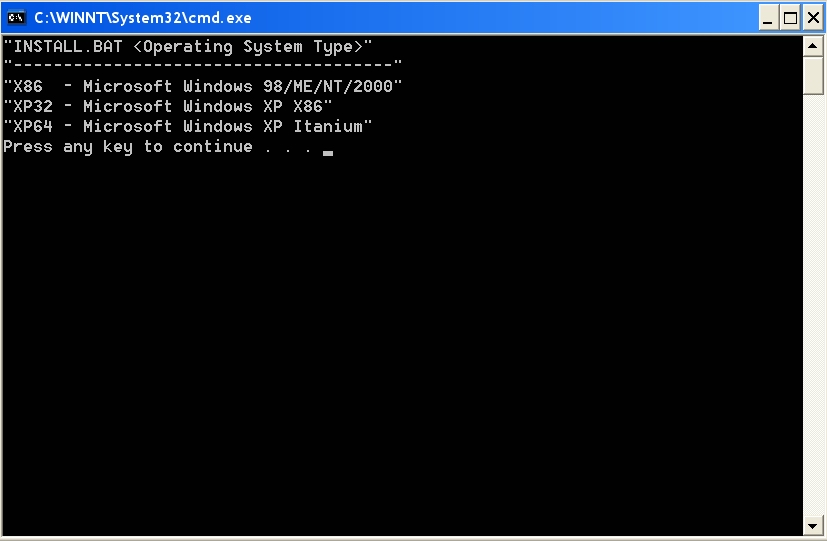
Hmmm, doesn't look right, but I pressed a key and it went away.
Quote:
then click aspilinstal.EXE
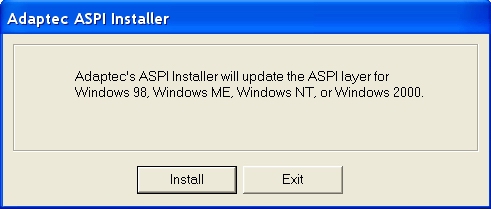
Okay, no mention of WinXP, but I proceeded anyway (hope it doesn't break anything)!
Quote:
... reboot or course!
Now for the burn test. The only other thing I just thought of is possibley patching Nforce2 drivers may help fix the problem. I will let you know how fast it burns with this aspi patch first before I make any more changes.
This message has been edited since posting. Last time this message was edited on 30. September 2003 @ 19:42
|


