|
Trouble with Imgburn
|
|
|
danilyu
Suspended due to non-functional email address

|
30. July 2008 @ 07:28 |
 Link to this message

|
I've tried searching for an answer, but I can't seem to find any.
Alright, here's my problem: I've burned a Wii ISO onto a DVD but my Wii can't read it. The error message tells me to refer to the troubleshooting section of my manual.
I am using the Imgburn program to burn Wii ISO (Fire Emblem: Radiant Dawn NTSC) at 1x speed onto a Memorex DVD-R blank DVD (single-layered) to play on an NTSC Wii with the Argon modchip.
I hope that's all the information you guys will need. Thanks!
|
|
Advertisement

|
|
|
|
|
ggbarnum
Senior Member
|
30. July 2008 @ 08:44 |
Link to this message

|
Well sometimes burning at too slow a speed can be as bad as burning at a high speed. Try 2x or 4x.
Also you don't say if you have successfully burned any other backups or not. It could possibly just be a duff iso.
|
|
danilyu
Suspended due to non-functional email address
|
30. July 2008 @ 09:10 |
Link to this message
|
4x speed didn't work...
My DVD-R is up to 16x write speed (?), so does that have anything to do with it?
Also, can someone post a step-by-step procedure to successfully burn a Wii ISO onto a DVD (as it, what speed, what settings, etc)?
|
|
sivogeluk
Newbie
|
30. July 2008 @ 10:13 |
Link to this message
|
Just a couple of simple questions:
- Does your Wii read other discs that you have burnt, or is this the only one that fails?
- Your Wii is modded, isn;t it?
|
|
danilyu
Suspended due to non-functional email address
|
30. July 2008 @ 10:16 |
Link to this message
|
Originally posted by sivogeluk:
Just a couple of simple questions:
- Does your Wii read other discs that you have burnt, or is this the only one that fails?
- Your Wii is modded, isn;t it?
-It reads my Super Smash Bros Brawl that is burned onto a DVD+R
-Yes, my Wii is modded with the Argon modchip
One question: what's the difference between DVD+R and DVD-R? Sorry, I'm kind of a newbie when it comes to these kind of thing.
|
|
danilyu
Suspended due to non-functional email address
|
30. July 2008 @ 14:12 |
Link to this message
|
Also, I've read that I should write the ISO file at a low speed. However, others say that I should write at a speed equal to half of my DVD write speed (?).
Since my DVD is 16x, should I burn at a speed half of that (8x) or should I go for 2x?
|
AfterDawn Addict
|
30. July 2008 @ 17:37 |
Link to this message

|
|
This message has been edited since posting. Last time this message was edited on 30. July 2008 @ 17:37
|
|
danilyu
Suspended due to non-functional email address
|
30. July 2008 @ 17:40 |
Link to this message
|
Originally posted by dailun:
Start at 4x just like most everyone else on this forum does.
As for the difference between +R and -R, here's a forum just for you.
http://forums.afterdawn.com/forum_view.cfm/44
4x didn't work for me. However, some say that the ISO will work when I burn at half the speed of my DVD media. Mine is 16x, so should I burn at 8x speed?
Also, for ImgBurn, are there any settings I have to change, or could I just use the defaults to successfully burn the ISO image?
|
AfterDawn Addict
|
30. July 2008 @ 17:47 |
Link to this message
|
"Didn't work" is kind of vague.
Didn't burn, or Wii couldn't read it.
Those are two different symptoms with two different probable causes.
Since you apparently have not burned any single layer games successfully, it could be bad media, a bad .iso, lots of other things.
I would suggest trying another media brand, such as verbatim.
As far as the writing speed, 1/2 the rated speed of the drive is, IMHO purely superstition. 1/2 of the rated speed of the media would have more basis in fact.
|
|
danilyu
Suspended due to non-functional email address
|
30. July 2008 @ 17:55 |
Link to this message
|
Originally posted by dailun:
"Didn't work" is kind of vague.
Didn't burn, or Wii couldn't read it.
Those are two different symptoms with two different probable causes.
Since you apparently have not burned any single layer games successfully, it could be bad media, a bad .iso, lots of other things.
I would suggest trying another media brand, such as verbatim.
As far as the writing speed, 1/2 the rated speed of the drive is, IMHO purely superstition. 1/2 of the rated speed of the media would have more basis in fact.
My Wii won't read my game (I believe I've stated this already on the first post).
I have SSBB which is burnt onto a Memorex DVD and works perfectly (although someone else did this for me), so I'm inclined to believe that I could do the same unless if someone proves otherwise.
Anyways, for the Change Automatic Write Speed setting, do I even have to touch that? When I open it, the write speed reads MAX. Does this have anything to do with my problem?
Brb, so sorry if the information is too vague.
|
AfterDawn Addict
|
30. July 2008 @ 18:09 |
Link to this message
|
|
IMHO, you are making a lot of assumptions.
The operative term is that you have not yet successfully burned a SINGLE LAYER game.
I don't believe that you can draw any conclusions since single layer and dual layer media are:
structurally different
Probably not manufactured by the same manufacturer
Memorex relies on several different plants to manufacture their media.
It is remotely possible that your drive isn't burning the single layer discs correctly. You might try using another burner with the same media, this will help.
BTW, not flaming you on the "vague" thing. It is more helpful if you state the result each time in case someone doesn't have time to read the entire thread or otherwise comes in in the middle.
|
|
danilyu
Suspended due to non-functional email address
|
30. July 2008 @ 18:19 |
Link to this message
|
Originally posted by dailun:
IMHO, you are making a lot of assumptions.
The operative term is that you have not yet successfully burned a SINGLE LAYER game.
I don't believe that you can draw any conclusions since single layer and dual layer media are:
structurally different
Probably not manufactured by the same manufacturer
Memorex relies on several different plants to manufacture their media.
It is remotely possible that your drive isn't burning the single layer discs correctly. You might try using another burner with the same media, this will help.
BTW, not flaming you on the "vague" thing. It is more helpful if you state the result each time in case someone doesn't have time to read the entire thread or otherwise comes in in the middle.
The SSBB I have is on a single-layered DVD because it's a scrubbed version (I think that's the right term, as in, not EVERY features are included, such as cinematics). I believe the full version of SSBB requires dual-layered DVD. Sorry, forgot to mention that.
EDIT: Sorry, I wasn't really in the best mood when I made the reference to the first post. I apologise for that. By the way, all four of the DVD's that I've burned the ISO onto yielded the same result. Is there a possibility that my ISO file is messed-up (the size seems to be accurate)?
This message has been edited since posting. Last time this message was edited on 30. July 2008 @ 18:22
|
AfterDawn Addict
|
30. July 2008 @ 19:24 |
Link to this message
|
|
OK, that makes a TON of difference.
If your SSBB is a single layer copy, we can now eliminate the drive and media.
That pretty much leaves one thing.
Where did you get your .iso?
If you don't know that the .iso is good, you can make coasters all day and they will never work.
That having been said, you may want to try this:
Make another copy of your single sided SSBB. If it works, I'll bet you have bad .isos. If it doesn't, then something has changed since the last good write.
This message has been edited since posting. Last time this message was edited on 30. July 2008 @ 19:29
|
|
danilyu
Suspended due to non-functional email address
|
30. July 2008 @ 21:51 |
Link to this message
|
Originally posted by dailun:
OK, that makes a TON of difference.
If your SSBB is a single layer copy, we can now eliminate the drive and media.
That pretty much leaves one thing.
Where did you get your .iso?
If you don't know that the .iso is good, you can make coasters all day and they will never work.
That having been said, you may want to try this:
Make another copy of your single sided SSBB. If it works, I'll bet you have bad .isos. If it doesn't, then something has changed since the last good write.
Isn't it against the forum rules to post where I got my ISO? Anyways, I believe you can do a DVD copy correct? Right now, I'm burning a different ISO file to see if it works. Maybe it's not ImgBurn that's wrong but maybe the ISO file itself...
Anyways, I'll be back after I try out my new burn.
|
|
danilyu
Suspended due to non-functional email address
|
30. July 2008 @ 22:15 |
Link to this message
|
Dang, burning Metroid Prime 3 didn't work. I have some double-layered DVD+R's that I was planning to use for the full version of SSBB, but I'll still have plenty of extras. Would they be any better than the single-layered DVD-R's, or would it even make a difference?
|
AfterDawn Addict
|
30. July 2008 @ 22:41 |
Link to this message
|
It was more of a rhetorical question. It isn't any of my business where you got your .iso, but it you don't know that it's good how can you expect to make good burns.
I backup my own originals so I know exactly where my .isos come from and that they're good.
I don't think that using DL to burn an SL would be a good test. I'm not even sure what the expected behavior would be.
I think that you now have enough information to start changing the variables one at a time to get to a conclusion.
Good Luck!
This message has been edited since posting. Last time this message was edited on 30. July 2008 @ 23:12
|
|
danilyu
Suspended due to non-functional email address
|
1. August 2008 @ 07:03 |
Link to this message
|
Originally posted by dailun:
I think that you now have enough information to start changing the variables one at a time to get to a conclusion.
Good Luck!
*Sigh* As much as I would like to say I do have enough information, it seems I don't, for I'm not making any progress.
I've tried burning my images at various speeds: 2x, 2.4x, and 4x. I even burned my working SSBB (SL copy) onto a blank DVD and that didn't even work...neither did burning SL games onto a DL DVD (was curious, so I decided to try this).
However, my attempts have shed light to even more questions:
-The closest I've gotten to success was when I've burned the full version of Brawl onto a Philips DL DVD+R at 2.4x with ImgBurn (I just recently discovered it's the Philip brand; it seems I didn't read the label thoroughly enough). When I popped it into my Wii, it was able to read the disc at e Disc Channel, but afte the "now loading" message, it leads me to a white screen. The strange thing is that even after I turn the Wii system off (by pressing the power button), it is still "on" because the light on the power button is green and I can't seem to use my normal TV. I fixed this by unplugging the power cord on my Wii and after everything was fine. Did I get a bad ISO or is it possible that this could've happened because I was burning at too high of a speed (I was recommended 2.4x speed by the person who sold me my Wii).
-Due to the fact that my working SSBB cannot work after being burnt onto a Memorex DVD-R, and that the sticky about DVD's says that DVD+R drives only burn DVD+R medias (same goes for DVD-R drives that burn DVD-R medias; I myself have a DVD+R drive according to my computer packaging), I'm inclined to believe that my burns are not working partly because I'm using the wrong drive. Is this true?
-I'm a total noob when it comes to dealing with unfamiliar computer situations, but is there a way that you can check whether your drive is DVD+R or a DVD-R? I tried for something simple and went to "Properties" for the DVD/CD drive, but no success (this proves how simple my computer skills are).
-In ImgBurn, by the option where you select the write speed, there is a green button that gives you access to the settings. Here is the image of the settings page I'm refering to:
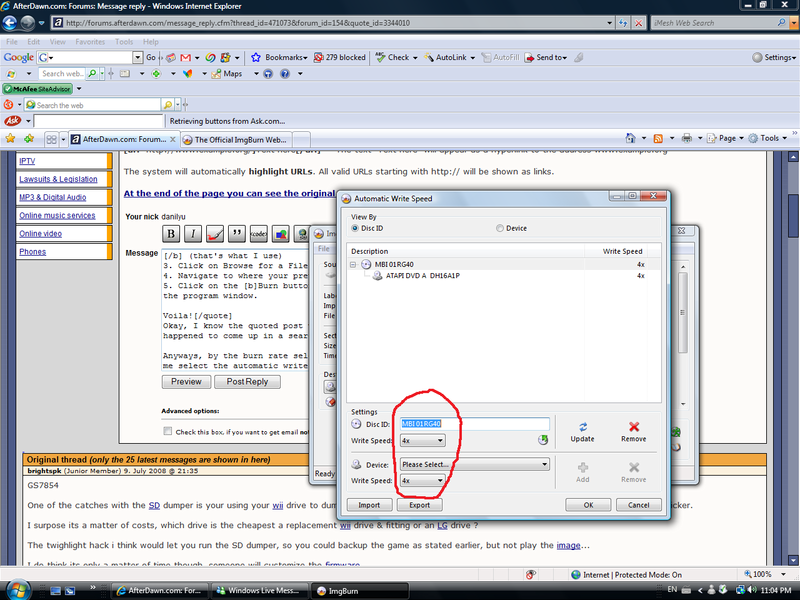
Do I need to modify these settings (the default says "MAX" for write speed)?
Of course, my ISO's could be bad (considering that the image burns onto DL DVD's didn't work), which could be a reason why my burns are unsuccessful, but I want to know if there are other reasons.
I hope that you guys would shed light onto my situation. Thank you for your time! Your help is greatly appreciated!
|
|
Wiifan
Junior Member
|
3. August 2008 @ 01:57 |
Link to this message
|
I had the same problem. When I put the disc in the screen turned black and it told me the same error (troubleshooting section of my manual) and I couldn't do anything on my wii until I ejected the disc. First of all are you trying to play a foreign game? Usually this error occurs when you are trying to play a foreign game. The same thing happened to me when I tried to play a burned Jap game on an U.S.A. NTSC nintendo so I used gecko os on the homebrew channel to properly play it (and it worked). Second there is a difference between slow and too slow try 2.4x-8x not 1x (too slow). Thirdly this error can also occur if the disc is scratched or dirty (I read in the manual this can be the cause of the problem. Try patching the iso with programs such as wum, pp, regionfrii (there are many different patches and which one you should use depends on the iso you are trying to burn). Try a different media (not cheap like Memorex) and usually dvd-r works best. Well best of luck.
|
|
danilyu
Suspended due to non-functional email address
|
3. August 2008 @ 09:44 |
Link to this message
|
Originally posted by Wiifan:
I had the same problem. When I put the disc in the screen turned black and it told me the same error (troubleshooting section of my manual) and I couldn't do anything on my wii until I ejected the disc. First of all are you trying to play a foreign game? Usually this error occurs when you are trying to play a foreign game. The same thing happened to me when I tried to play a burned Jap game on an U.S.A. NTSC nintendo so I used gecko os on the homebrew channel to properly play it (and it worked). Second there is a difference between slow and too slow try 2.4x-8x not 1x (too slow). Thirdly this error can also occur if the disc is scratched or dirty (I read in the manual this can be the cause of the problem. Try patching the iso with programs such as wum, pp, regionfrii (there are many different patches and which one you should use depends on the iso you are trying to burn). Try a different media (not cheap like Memorex) and usually dvd-r works best. Well best of luck.
RegionFrii says that my ISO is NTSC. My Wii is also NTSC, and I believe my DVD is in good condition (used a new DVD out of a batch that I just recently got). The media that I'm using for the full version of SSBB is a Philips DVD+R (DVD+R's still work because the scrubbed version of SSBB I have is on a DVD+R media).
By the way, I'm not sure if you guys would know but would the Staples Business Depot DVD+R media work well? I borrowed some off a friend.
EDIT: The thing about my SSBB burning onto a DL DVD attempt is that my Wii can read the disc (does not show me the error message that tells me to refer to my manual for troubleshooting), but after the game loads the screen goes white. I believe this is the work of a bad ISO file.
This message has been edited since posting. Last time this message was edited on 3. August 2008 @ 09:47
|
AfterDawn Addict
|
3. August 2008 @ 11:57 |
Link to this message
|
@danilyu
The white screen issue with SSBB is a common issue when users do not set the layer break to 2084960. Follow the steps below to set the layer break and re-burn the full SSBB ISO...
Put in a blank Dual layer disc.
Start ImgBurn and select write mode.
Load the SSBB FULL DL ISO to be burned (Do not load the single layer ISO).
Go to Tools, Settings then click on the Write Tab.
On the right hand side under layer break option choose User Specified and in the Sectors in LO: box type 2084960.
Now click OK to close the settings box.
After you do those steps change the write speed to 2X/2.4X for SSBB and burn (You can change the write speed in the drop down menu that is located in the bottom right side of ImgBurn).
This should burn the full SSBB version successfully for you.
---------------------------------------------------------------------
As for the other backups your having issues with.
I think this is a media issue.
Why have I come to this conclusion?
The SSBB Dual layer backup shows in disc channel. As well the single layer backup your friend made works. The only backups that have not worked are the backups burned to the Memorex media you are using.
Your burner and the Phillip's DL disc seems to have burned the SSBB full ISO fine (with the exception of layer break not being set).
Now to clear things up for you...
Most burners these days burn both DVD-R/DVD+R. If your burner only burned DVD+R media you wouldn't be able to burn to DVD-R media at all due to an incompatible format. You would get an error before the burn was even performed.
What is the model# of your burner and the manufactures ID# of the media your using?
Do the below steps to find this information out...
Place a blank Memorex DVD in drive and let it load.
Start ImgBurn.
Choose Write mode.
In the right hand side there should be a list of information (below is an example of my list...
LITE-ON DVDRW SOHW-1693S KS0B (ATA)
Current Profile: DVD-R
Disc Information:
Status: Empty
Erasable: No
Free Sectors: 2,298,496
Free Space: 4,707,319,808 bytes
Free Time: 510:48:46 (MM:SS:FF)
Supported Write Speeds: 4x, 6x, 8x
Pre-recorded Information:
Manufacturer ID: TYG02
Physical Format Information (Last Recorded):
Book Type: DVD-R
Part Version: 5
Disc Size: 120mm
The first part should give you your burner information.
Halfway down the list it gives the Manufacturer ID# of the media.
Find out what the media ID is and let me know or go HERE and look it up. This is a guide that list the quality of blank DVD media by Manufacture ID# of the disc. You should only use media that is 1st class.
Anything below 1st Class could be a hit and miss when it comes to your Wii being compatible with it or your burner outputting good burns.
As stated above in another post all Memorex media is not the same. They outsource to different manufactures and there can be a major difference in quality between manufactures.
It can be hard to find quality media in stores so ordering it on the Internet is your best bet. I get my Tayio Yudens at supermediastore.com which carries verbatim as well.
There is nothing special you need to set up when burning single layer disc for Wii. Just use ImgBurn and burn at 4x speed.
What instillation do you have for the ARGON 13 wire, 17 wire or 9 wire?
This message has been edited since posting. Last time this message was edited on 3. August 2008 @ 13:45
|
|
danilyu
Suspended due to non-functional email address
|
3. August 2008 @ 16:29 |
Link to this message
|
When I put my blank Memorex DVD-R media in there, ImgBurn gives me these info:
Quote:
ATAPI DVD A DH16A1P RG11 (ATA)
Current Profile: DVD-R
Disc Information:
Status: Empty
Erasable: No
Free Sectors: 2,298,496
Free Space: 4,707,319,808 bytes
Free Time: 510:48:46 (MM:SS:FF)
Supported Write Speeds: 6x, 8x, 12x, 16x
Pre-recorded Information:
Manufacturer ID: MBI 01RG40
Physical Format Information (Last Recorded):
Disc ID: 0@P-!-00
Book Type: DVD-R
Part Version: 5
Disc Size: 120mm
Maximum Read Rate: Not Specified
Number of Layers: 1
Track Path: Parallel Track Path (PTP)
Linear Density: 0.267 um/bit
Track Density: 0.74 um/track
First Physical Sector of Data Area: 196,608
Last Physical Sector of Data Area: 2,495,103
Last Physical Sector in Layer 0: 0
I could not find my media's manufacture ID in the site you've provided, which I guess it means that Memorex is beyond crappy. ^_^
Also, I've burned the full version of SSBB using the layer break at 2x speed. The white screen problem is fixed, however, a disc read error message now takes its place. Still, at least there's some improvements right? Thank you for helping me out here :)
I believe my ARGON chip, I can't really make sure, is 13 wire. I'm not very confident in this answer, I'll have to contact the one who sold me my Wii, but I remember him saying that there's 13 wires in it or something like that. Is there a way to find out how many wires it has other than opening up the Wii?
|
|
danilyu
Suspended due to non-functional email address
|
3. August 2008 @ 17:14 |
Link to this message
|
Also, when I've burned a single-layered game onto a Staples DVD+R media and putting it into my Wii, the Disc Channel says that it needs to update (I think this game is working).
The game is Fire Emblem Radiant Dawn and is the PAL version, but I've used RegionFrii to change its region code to USA. This should be fine right considering that the game and the console are now of the same region?
EDIT: I apologize for not researching beforehand. I've updated my Wii and the game works fine! It seems I need DVD+R media to burn games successfully. Thank you all for your help, although if I have problems, I know where to go...
This message has been edited since posting. Last time this message was edited on 3. August 2008 @ 17:23
|
|
Advertisement
|
|
|
AfterDawn Addict
|
3. August 2008 @ 18:14 |
Link to this message
|
It seems allot of users have had issues with DVDA DH-16A1P RG11 (Lite-on OEM).
However it looks like you can crossflash the drive to a LH-16A1P which supports more media and lets you booktype your media.
If you want to try crossflashing the drive go HERE and download the Flash Utility for LiteOn Based Optical Drives.
Download the LH-16A1P firmware from HERE. (There is an executable file that you will need to extract from the firmware download DO NOT RUN THE EXE FILE). You will load the executable file in the Flash Utility.
Run the Flash Utility and make sure you READ FLASH first. A box will come up letting you backup the firmware on the drive. Just save it for safe keeping in case you need to recover the drive.
After you have backed up the firmware via READ FLASH go ahead and choose WRITE FLASH. A box will come up asking if the drive listed is the correct drive. If it is the correct drive then choose to continue.
Now a new box will come up wanting you to load the firmware you want to flash to the drive. Choose the 16A1P.WL06.stock.exe file you extracted from the download above. When you select it click on open. It should then flash your drive with the new LH-16A1P firmware.
After you have done the above steps you can then download this firmware HERE and run the executable file (without the above Flash utility) which will bring you to the latest LH-16A1P firmware.
Below are some links that I got this information from. Even tho users have done this with success there is always a chance of a bad flash and the drive could be messed up. So you take the risk if you try crossflashing the drive.
http://www.videohelp.com/forum/archive/h...ve-t346169.html
http://club.cdfreaks.com/f44/dh-16a1p-info-please-231668/
http://club.cdfreaks.com/f44/help-crossf...h-16a1p-235289/
-----------------------------------------------------------------
Just because you region free a disc and it orignaly was a PAL game dosen't mean your safe.
In certain cases you can brick or semi-brick your Wii if you install a PAL update on your NTSC(U) system. You need to WiiBrickBlock the game disc if it is an out of region game. This will protect your Wii from being region bricked.
This message has been edited since posting. Last time this message was edited on 3. August 2008 @ 18:18
|


