|
When adding extra fans what's the best way?
|
|
Senior Member

|
17. September 2008 @ 07:44 |
Link to this message

|
I'm in one of those situations where I'm over thinking about it.
The question is about the typical fan mod that we've seen on the the 360 where people add a fan to the case where the cpu heatsink is.
Example
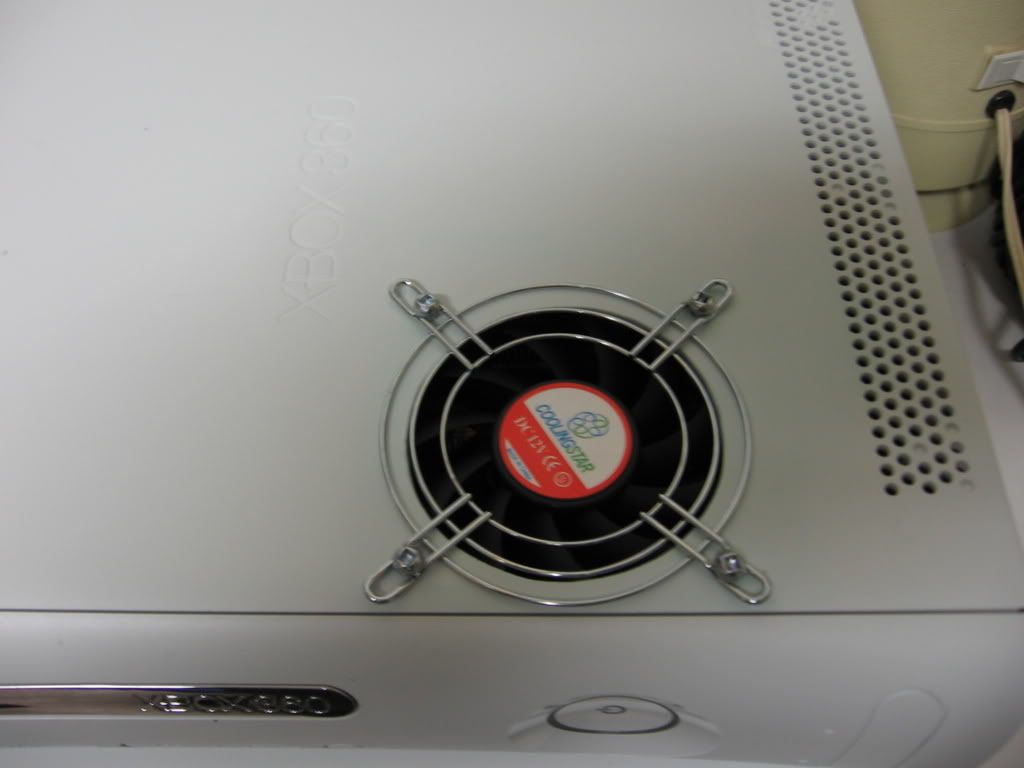
[Edit] If someone would enighten me as to how to shrink the pic I would like to do that asap. I tried the html way but it didn't seem to work. Thanks [end edit]
So should the fan be
A) sucking hot air out of the system?
or
B) Pulling cool air into the system?
I can think of pro's and con's for both ways so I was hoping to have someone with more understanding clarify it for me.
With sucking/pulling hot air out of the system I can imagine you are robbing the heatsinks of cool air for the stock fans to pull from and you might be working against them right? On the other hand there would be less hot air in the system and it might not rob air from the heatsinks as it would just pull in more cool air from the return grills.
With sucking/pulling cool air into the system I can imagine that you are inviting more dust into your system than the normal return grills on the chassis allow. On the other hand it would help the stock fans by not having to work as hard pull cool air through the heatsinks from the return grills.
I'm just not sure if one is better than the other so if you can make it simpler or just tell me why my thinking is incorrect I would greatly appreciate it.
Thanks
XBOX Halo Ed. = DuoX2 w/250gb HD
Xbox 360 Red Elite 120GB HDD = no-stealth 1.6 & XBReboot V3 & 1TB usb hdd
PS2 Slim = freemcboot v1.8 - PSP Black Slim = 5.00m33-6
Wii = w/ Blue XCM ii-case, Wiikey2 & softmodded
This message has been edited since posting. Last time this message was edited on 17. September 2008 @ 07:47
|
|
Advertisement

|
 |
|
|
|
Allegro1
Member
1 product review
|
18. September 2008 @ 19:22 |
Link to this message
|
Try the cardboard fan shroud modification. All it takes is a cereal box or cracker box, some electrical tape and no case mod or wiring. The original fans are powerful enough to pull the heat out of the CPU/GPU hetsinks to where they are cool to the touch. M$ just did a crummy job at implementing the way the air is pulled across the heatsinks.
Build the shrouds around the heatsinks with the cardboard and tape so that all the air flows from the front side of each heatsink and has no where to go except out through the fans.
|
Senior Member
|
18. September 2008 @ 21:05 |
Link to this message
|
|
I appreciate the advice but I actually do the fan shroud mod and covering the gpu heatsink to improve the suction along with the x-clamp replacement, cutting the return and fan grills on the chassis and the penny trick.
However my girl has been putting a serious hurting on one of my systems playing Dead Rising so I want to add this fan to keep it cooler.
The tut I saw at xs had the guy with the fan pulling air into the system but noted that he had it in a fairly dust free environment so that's what I'm going to do unless someone gives me a good reason to do otherwise.
XBOX Halo Ed. = DuoX2 w/250gb HD
Xbox 360 Red Elite 120GB HDD = no-stealth 1.6 & XBReboot V3 & 1TB usb hdd
PS2 Slim = freemcboot v1.8 - PSP Black Slim = 5.00m33-6
Wii = w/ Blue XCM ii-case, Wiikey2 & softmodded
|
AfterDawn Addict
|
18. September 2008 @ 22:12 |
Link to this message
|
If you want to put a fan in the same location as in the pic, I'd say you'd want it pushing air in. In that general area, the rear fans are suckin air out across the heatsinks. So if that fan was also sucking air out, you wouldn't get as good of a flow through the heatsink fins, as both fans would be pulling in opposite directions.
|
|
tavek
Suspended due to non-functional email address
|
18. September 2008 @ 23:07 |
Link to this message

|
Internet gangster
|
Senior Member
|
19. September 2008 @ 00:06 |
Link to this message
|
I thought I said that I cut the return grills out of the chassis?
maybe I wasn't clear but yeah I cut out all the useless metal I can that restricts airflow.
I'm also not using the dvd drive cable but the 12v that's located at the front of the mobo where the rf board is.
Thanks again guys.
XBOX Halo Ed. = DuoX2 w/250gb HD
Xbox 360 Red Elite 120GB HDD = no-stealth 1.6 & XBReboot V3 & 1TB usb hdd
PS2 Slim = freemcboot v1.8 - PSP Black Slim = 5.00m33-6
Wii = w/ Blue XCM ii-case, Wiikey2 & softmodded
|
|
|CL|
Member
|
19. September 2008 @ 05:51 |
Link to this message
|
You want it pulling air in.
The rear fans pull the air out, so by adding that fan and pulling the air in, you have a nice constant flow of cool air being pulled in at the top flowing over the heatsinks. The fans in the rear will pull that hot air out.
With the fan shroud mod, it works awesome. I have one that has been running great for about a year now. It used to heat up bad. It started freezing on me so I replaced the thermal paste with AS5, added the fan and did the fan shroud mod all at the same time. Now it runs super cool. Even a year later.
Edit: yes, you are going to be pulling more dust in. Mine gets pretty dirty (smokers). It's not that hard to open it up once a month to clean it out though.
Actually I don't have it anymore, but I still do the maintenance on it. I traded it to my bro-in-law for a '91 Chevy Silverado truck.
This message has been edited since posting. Last time this message was edited on 19. September 2008 @ 05:57
|
Senior Member
|
19. September 2008 @ 09:02 |
Link to this message
|
|
Yeah I'm thinking of cutting out the right side of the chassis, where all the tiny holes are, so it shouldn't be a bother to take off the gray side and use a shop vac or air compressor to clean it out every now and again.
If i do that I wonder if I would negating what I'm doing by adding the fans since the cool air being brought in?
XBOX Halo Ed. = DuoX2 w/250gb HD
Xbox 360 Red Elite 120GB HDD = no-stealth 1.6 & XBReboot V3 & 1TB usb hdd
PS2 Slim = freemcboot v1.8 - PSP Black Slim = 5.00m33-6
Wii = w/ Blue XCM ii-case, Wiikey2 & softmodded
|
|
tavek
Suspended due to non-functional email address
|
19. September 2008 @ 13:19 |
Link to this message
|
Originally posted by CopperKid:
Yeah I'm thinking of cutting out the right side of the chassis, where all the tiny holes are, so it shouldn't be a bother to take off the gray side and use a shop vac or air compressor to clean it out every now and again.
If i do that I wonder if I would negating what I'm doing by adding the fans since the cool air being brought in?
I thaught u cut out all the metal restricting airflow?
You should articulate yourself silverhawk
As for adding the fan, dont do it, wisdom is priceless.
Internet gangster
|
|
Advertisement
|
|
|
Senior Member
|
19. September 2008 @ 14:42 |
Link to this message
|
I do on others but I haven't on this one because of the question I asked in the previous post.
Thanks for your insightful response though.
[edit] 9/20
I got it installed yesterday and have had her playing with it for about 6 hours straight now and it's pretty awesome. It's actually a little cold on the cpu side and slightly warm on the gpu side. The case isn't hot at all on the bottom like it was before.
The only downside is that the 12v fan is a little louder than I would like it to be. The tut said that you could get 7v instead of 12v so that might be a thought.
I have another 360 with an xcm ocean blue case with a whisper max fan in it and was thinking about adding the set of stock 360 fans on the right hand side, by cutting the chassis where the tiny return holes are, and wiring them to 7v. I'd like to see how that does since the one w/ the 12v fan is working so well. Also that way I wouldn't have to cut on the xcm case.
XBOX Halo Ed. = DuoX2 w/250gb HD
Xbox 360 Red Elite 120GB HDD = no-stealth 1.6 & XBReboot V3 & 1TB usb hdd
PS2 Slim = freemcboot v1.8 - PSP Black Slim = 5.00m33-6
Wii = w/ Blue XCM ii-case, Wiikey2 & softmodded
This message has been edited since posting. Last time this message was edited on 20. September 2008 @ 15:36
|


