This Tutorial os for Starview 1, only. You can tell if you have a starview 1, if you have a silver box and it says only "Starview" on the front.
First Of all your going to need to download WinRar if you haven't already got it
**Beware, there is a fake version of winrar going around which gives your PC a nasty Trojan horse (I got it) Please only download winrar from the site below as i know its 100% safe.**
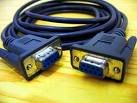
Now like all Starview Boxes you are going to need A null modem cable which looks like the picture Below.
Right Now, Plug the cable into your PC, and then into the back of the Starview 2 box. (Keep the Box Off or on standby though, and it does not have to be connected to the TV when updating it)
Download the latest fix files from here, (The Link Below)
(The files are In the "Starview 1" folder. Then go to "Firmware" and in there you will see another folder thats called "December 08 UK Fix Clone & Genuine" download the file in their that says "CryptStar-v1.5.zip"
Now you will also need to download the GTROM load for this box. It can be found also here:
(Starview 1 folder >> Software folder >> download GTROM v4.00.rar, please download the rar folder as it makes it easier as thats the one I worked with writing the tutorial.
Now to open these files you will need to start Up winrar which I asked you to download at the start.
When you start up winrar it will look like below. (Obviously different Files and folders)
Navigate to were you saved the GTROM loader and click on it.
When you start up tHE GTROM loader, you will see a box that says .bin files (I've highlighted that box in the screenshot below)
Now what I need you to do is go back into winrar (Keep up the GTROM App) and Navigate to the saved Fix Files, you will see two the Same As Below:
Now: If you have Cloned Box drag the file that has core 257 into the GTROM Loader, If you have a genuine Box drag the The core 400 fix into the GTROM Loader.
Make sure "App file" Is selected Like Below, the turn your box on and then press download straight after turning it on.
Wait until the box reached 100% and it says that is finished, and the box reboots, then unplug the box, and jack it back up to the TV.
Please Make sure EMU is turned on by going to menu, and press 1570. You will Now see a new Menu, with nagravison, and emu, go to EMU and Make sure it says on. Then exit to a normally paid channel and let it update.