ok so i have tried extracting the iso from the winrar files but this is what what happened. i went to options integration unchecked the isos and now it is not a winrar file but it is a roxio creator file. how come its not an .iso file?
does the file have the extension of .iso? That's all that matters. It doesn't matter what windows "thinks" is the correct program to associate with that file. All you need to do is make sure the file has .iso on the end of it. Burn it with imgburn regardless if windows thinks its a roxio file or not. Thats just windows file associations (Windows tries to determine what program opens that type of file but you don't have to use that specific program to burn it) You can be sure by going to your folder options and then the view tab and making sure that "hide extensions for known file types" is NOT selected. IF it's checked then uncheck it.
Now you should be able to see the file extension, in this case "iso". Then just burn with IMGburn. Right now your windows thinks that you should be using Roxio to burn it but that doesn't matter. Burn it with imgburn.
Firstly have you extracted it? Im a little confused. If you have and it gave you an error, go into WinRAR, Click command, Extract to file, and check 'keep broken files', then extract. If you have extracted and now its a roxio creator file, I own that software on my other computer and it automatically takes control of .ISOs, so they are still in good order. To make sure, right click the file and select properties, then see if it is a .ISO file. If it is, just pop in the DVD, open IMGburn, select write to DVD and locate the file and click burn. If it is not a .ISO, try renaming it to yournamehere.iso, and it might reconfigure. Hope this helped.
I don't think he's getting an error, just confused on file associations. Roxio doesn't "take control" of anything. It's just a windows file association.
Any time that you install a new program that can read certain types of files, it goes into the operating systems file associations and binds that file type EXTENSION to the new program. That doesn't mean that you have to use that program, it only means that if you double click the file without first opening up the program that you want to use, windows will instead open up the program that it "thinks" it needs to have open.
so forget about the winrar problem. i have successfully extracted the .iso file, but it has an association with roxio now. i dont know how to get rid of that. but for sure it is an .iso file
you don't have to get rid of the association. Just open up imgburn and then burn it from there.
Who cares what windows thinks you should use to burn, just use the program that you want.
The actual file itself hasn't been affected. You can take that same file and copy it to a different computer and it may have a completely different icon and a completely different file association but you can still just open up imgburn and burn it with that.
I realize that, I was simply trying to explain it in a way that is easier to understand. I explained that if it is indeed a .ISO file that he could simply open up image burn and burn the file. Sorry if that was confusing.
Originally posted by Fiilex: I realize that, I was simply trying to explain it in a way that is easier to understand. I explained that if it is indeed a .ISO file that he could simply open up image burn and burn the file. Sorry if that was confusing.
You and I are on the same page.
@tmagic01 - step 1. who cares about roxio
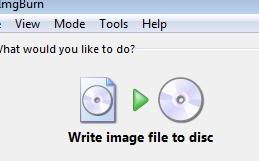
step 2. Open up imgburn first and click on "Write Image file to Disc"
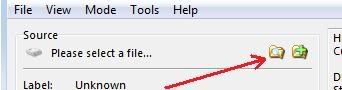
step 3. ON the next screen where it says "select a file..." click on the folder button