|
Post your Nero cd/dvd speed quality scans here
|
|
Moderator

|
19. November 2006 @ 17:05 |
Link to this message

|
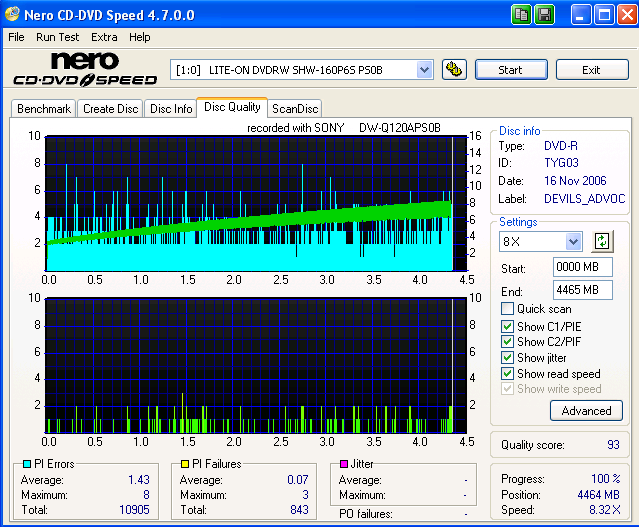
Scan time :) TYG03 - I think burned at 12x (?) A little lower than my normal 95 but still good imho ;)
@cincyrob
Yeah I'm stumped on your problem too - conflict maybe somewhere?
Keep us posted in what SlySoft says.
|
|
Advertisement
|
 |
|
|
|
sinners
Member

|
19. November 2006 @ 17:37 |
Link to this message

|
See mine! It was a test using some media lying around at home. Sucks REAL bad. :P

|
Moderator
|
19. November 2006 @ 17:50 |
Link to this message
|
This message has been edited since posting. Last time this message was edited on 19. November 2006 @ 17:54
|
|
sinners
Member
|
19. November 2006 @ 17:55 |
Link to this message
|
|
The first half hour plays fine, with a few distortions, but soon after (around the hour mark) it keeps freezing up. After that it usually hangs then my DVD player says it can't read the disc any longer.
In short: Not by a long shot!
Edit: There's a new driver for my DVD drive? Who knew. Thanks for it!
This message has been edited since posting. Last time this message was edited on 19. November 2006 @ 17:57
|
Moderator
|
19. November 2006 @ 18:10 |
Link to this message
|
|
I used Ritek GO5's for awhile until the quality of the discs went down hill. The printable ones were the worst. You could see the bad burn spots on the back of the disc.
No problemo on the firmware link :)
|
Senior Member
|
19. November 2006 @ 18:48 |
Link to this message

|
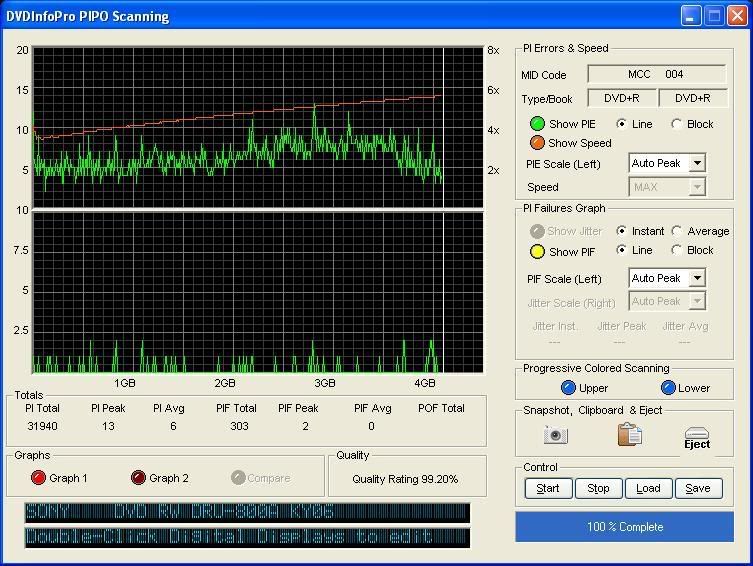
A newly opened fresh Verb.
|
AfterDawn Addict
|
19. November 2006 @ 19:54 |
Link to this message
|
Here comes one of my most trusted media (Hitachi Maxell "MIJ") beside genuine Taiyo Yuden.


|
AfterDawn Addict
|
20. November 2006 @ 01:22 |
Link to this message
|
I noticed that many scans here do not show Jitter results at all.... is it the drive that does not support this test with Nero Speed test?
|
Senior Member
|
20. November 2006 @ 02:16 |
Link to this message
|
|
Neither of my Lite-On drives will support the jitter test, CincyRob reports that his won't even run when that box is checked, mine run but show no results.
|
|
sinners
Member
|
20. November 2006 @ 02:21 |
Link to this message
|
I've done some testing with other media lying around:
Sony AccuCore 16x/1x DVD-R Not quite I had expected (bought it from general store):

TDK DVD+R 1-16x I personally don't like this media (bought it from general store):

Imation DVD+R... err surprised? (bought it from local supermarket):

I have a few more medias at home, I'll test them after my exams.
|
AfterDawn Addict
4 product reviews
|
20. November 2006 @ 03:13 |
Link to this message
|
|
@blivetNC
i see your scan there you didnt booktype?
ive noticed on my new printable verbs i havent set it to booktype and some how they come out booktyped to dvd-rom. i used the booktype135 program that binkie told me about for the liteon, the first 5 or 6 disc i set it but since then i havent touched it. who know? the problems im haveing with this stuff right now, something good happening for me is a blessing...lol
@Binkie7
you would have gotten that 95 if it wasnt for that one spot, that spike that went to 3(pif)
This message has been edited since posting. Last time this message was edited on 20. November 2006 @ 03:14
|
Moderator
|
20. November 2006 @ 16:55 |
Link to this message
|
|
Yeah but I'll still take the 93 :)
I did try burning a +R w/ Clone and it did not booktype it.
I'm curious on how you got the booktype w/ it and w/o the utility running.
|
AfterDawn Addict
4 product reviews
|
20. November 2006 @ 17:08 |
Link to this message
|
|
@binkie7.
i know i did this the lastime i used clone and it booktyped without me useing the utility on it... i ripped the movie to my HD then copied from there. i normally dont do that but it did booktype it to dvd-rom. is there a setting in that booktypeing utility that let you do it automatic???i dont know? when i do open it where you select the bookytype since the first couple times i did it, it is allways in the dvd-rom mode i dont have to choose it like i did the first couple times
|
Moderator
|
20. November 2006 @ 17:18 |
Link to this message
|
You know - now that I think about it I've never used the booktype utility on this drive (older LiteOn used it). Nero just automatically booktype types it.
Hmmm better try the utility 1st :)
|
AfterDawn Addict
4 product reviews
|
20. November 2006 @ 18:08 |
Link to this message
|
|
since ive gotten the 8x+r printable verbs i just keep forgetting to use the utility to booktype. i just open clonedvd2 and let it do its thing.they have every time come out as dvd-rom. IMHO i think the newer dirve does it automaticly.i may be wrong but i know ikeep forgetting to set it up to booktype.
|
AfterDawn Addict
|
20. November 2006 @ 23:16 |
Link to this message
|
Nero (Burning Rom or Express) will automatically "booktyped" both of my burners SONY DRU710A (a rebadged Liteon SOHW-1633S) and LiteOn SHW-160P6S when using any DVD+R disc flawlessly.
ImgBurn will automatically "booktyped" my LiteOn SHW-160P6S because I have it set to booktype via book type settings and it's stored. However, for my SONY DRU710, ImgBurn won't auto booktype, so I'll have to manually change the booktype via settings using LiteOn tab in prior to the burning process.
That is the main reason why nearly 90% of all my backups are burned via Nero and 10% are burned with ImgBurn. I know tons and tons of newbies (other people) are having issues left-to-right when using Nero, but I can honestly say that I'm happy with Nero. Never had any burning issue (or coaster) with Nero whatsoever.
Regards
|
AfterDawn Addict
|
21. November 2006 @ 01:13 |
Link to this message
|
Again, this is my 2nd backup of "UNDERWORLD 2: EVOLUTION" with HITACHI Maxell (MIJ). I customized to 4472MB, this is the max I've ever customized my MB size which I merely leave out 10MB only. It's pretty awesome, I'm quite impressed with the results.


|
AfterDawn Addict
|
21. November 2006 @ 02:24 |
Link to this message
|
For some time now I have seen this tests but have never run any...heres my results...they mean nothing to me so comments welcome.


|
AfterDawn Addict
4 product reviews
|
21. November 2006 @ 04:20 |
Link to this message
|
@gwendolin
first of all how does the disc play? if there isnt any problems with it, then its a perfect burn....
second your PI Errors are a bit high over all.normaly you would want these to be no higher than 280. but your at 293 not much over shouldnt give you a problem. your PI Failure is pretty high also. ive read that they shouldnt be over 8 to have a good readable disc.
you should try the CRC test. in Nero there. just click on the scan disc and run that test. you should get all green box on it when finished.if you do it should be a good readable disc that you have no problems with
what type of media is that. i have some 8x-r memorex that code out as yours did(mcc 02rg20). not the best of media but i got them for free from my dad.and all of my scans on those disc look like the one you posted. but they play good right now..lol
hope this helps some.
@Binkie7/BlivetNC
i just restored my system back to january of this year. im gonna try adnsee if that fixes my problem with these few disc im having all my troubles with. i did get a response back from SLYSOFT. they said they are working with DaVinci Code. as for Click and the other 2 i had problems with(all sony movies) they said there shouldnt be any problem with them... so id say here soon there will be a any dvd update. Here is there reply to me
Hello,
Thank you for your message.
We are currently working on "DaVinci". But Click can be copied. What
copy
program do you use?
Best regards
Bernd Hartings
SlySoft, Inc.
http://slysoft.com
BlivetNC your the man!!!!!. love the SIG thanks
|
AfterDawn Addict
4 product reviews
|
21. November 2006 @ 05:16 |
Link to this message
|
i just burnt the 2nd disc to DaVinci Code. i had the same problem as the 1st disc. so i just got the copy of it i made and was able to use clonedvd2 with it just fine. now that dont makes any kind of logic there
@Binkie7& whoever has the lite-on SHW-160p6s.
i again used the 8x+rprintable verb on this and i did not use the booktypeing utility and it came out booktyped to dvd-rom and i used clonedvd2 on it.i think this drive does automaticly convert to dvd-rom. gotta do some research on it.. here is the snapshot from dvdidentifier after the burn. will post the scan of it soon.
----------------------------------------------------------------------------
Unique Disc Identifier : [DVD+R:MCC-003-000]
----------------------------------------------------------------------------
Disc & Book Type : [DVD+R] - [DVD-ROM]
Manufacturer Name : [Mitsubishi Chemical Corp.]
Manufacturer ID : [MCC]
Media Type ID : [003]
Product Revision : [Not Specified]
Blank Disc Capacity : [2,295,104 Sectors = 4.70 GB (4.38 GiB)]
Recording Speeds : [1x-2.4x , 4x , 6x-8x]
----------------------------------------------------------------------------
[ DVD Identifier V5.0.1 - http://DVD.Identifier.CDfreaks.com ]
----------------------------------------------------------------------------
|
AfterDawn Addict
4 product reviews
|
21. November 2006 @ 05:45 |
Link to this message
|
heres the scan on DaVinci disc2. a copy of a copy.

m] 
i guess if ya go by the score its pretty good. kinda worried about those spikes up around 11-12.got the disc in my player now checking it out.. does show in the CRC test all green sectors so there shouldnt be a problem reading it.
This message has been edited since posting. Last time this message was edited on 21. November 2006 @ 05:50
|
AfterDawn Addict
4 product reviews
|
21. November 2006 @ 11:30 |
Link to this message
|
heres the solution to my problem. i new AnyDVD was gonna come out with a update. here it is...look at the first thing it says they are fixing....yup fixes my problem....
Dear valued customer,
we would like to inform you, that a new version of AnyDVD
has been released. Here the list of fixes and improvements:
6.0.8.5, 2006 11 20
- New: Added support for new versions of the SONY Arccos protection
to the option to remove "Protection based on unreadable Sectors"
- New: Improved fix for DVDs with wrong title set search tables.
- New: Higher compatibility with 3rd party IDE or SATA drivers.
Using AnyDVD's "SafeMode" should no longer be necessary.
- New: Safe/Normal Mode setting now supported on Windows Vista.
- New: Improved removal of bogus title sets
- Change: Improved "Jump directly to Tile Menu" function
- Fix: Removing Macrovision RipGuard didn't work sometimes
- Fix: Bogus title set removal could be triggered without reason
- Fix: Setting subtitle transparency did not work correcly with
some DVD titles
- Fix: Audio-CD protection removal did not work on 64-bit OS like
Windows XP64 professional
- Fix: SPTI I/O-requests from 64-bit processes on 64-bit OS like
Windows XP64 professional were not processed by AnyDVD
|
Moderator
|
21. November 2006 @ 15:21 |
Link to this message
|
@cincyrob
Well hopefully this will fix the problem!
I'm guessing this was the issue New: Higher compatibility with 3rd party IDE or SATA drivers
I did a bunch of dvd's but used -R - no +R's tonight.
My older LiteOn SOHW-832s(still use from time to time)would not auto booktype w/ Nero or the others like ImgBurn, Decrypter, Clone so I always had to set it before hand. New one no problem.
@gwendolin
I have a Pioneer also - one below your - DVR-108. I don't think it's one of the better drives for scans - imho.
But all that really matters is can it play :)
|
Senior Member
|
21. November 2006 @ 15:37 |
Link to this message
|
@CincyRob, no prob for the sig,
I didn't have any problems with the Davinci code, did a DL and a SL disk both using AnyDVD and Clone with no problems whatsoever.
|
|
Advertisement
|
|
|
AfterDawn Addict
4 product reviews
|
21. November 2006 @ 19:56 |
Link to this message
|
Just got home. i insstalled AnyDVD update.still have the same problem. i give up this is driving me nut. i quit the dvd burning game
|






