|
|
|
Controlling Write Speed for DLs in Nero
|
|
Senior Member

|
27. February 2007 @ 09:53 |
Link to this message

|
|
@syxguns
I see now that you were talking about my Sony burner.
Yes, I had flashed it some time ago up to KY06 when I was first having problems with it. Still had problems after the upgrade, so purchased the Benq and instead of replacing the Sony, put it in a newer system.
|
|
Advertisement

|
|
|
|
Senior Member
|
27. February 2007 @ 12:31 |
 Link to this message

|
|
Did you ever give PgcEdit a shot? I don't know if it will help, but I have read on other threads that ImgBurn does a pretty good job, but that PgcEdit does a much better job. Give it a try and let's see if it works. I put the link a few post back.
|
Senior Member
|
27. February 2007 @ 13:01 |
Link to this message
|
No, never got to it. I tried burning another disk with Nero which ended "sucessfuly" but tested miserably on Nero Speed test (62). I then encountered inconsistancies with Speed test, i.e., same disk returning a 0 a second time. Left it this morning running again, initially with a 98 at 15% completion. The majority of errors being reported after the layer break, wherever it is located.
Haven't been home yet to see the final results. Will let you know.
|
Senior Member
|
27. February 2007 @ 14:06 |
Link to this message
|
The layer break should be 50/50. If it is 49/51 that is not good. I read that on another forum. I haven't backed up any DVD-9's successfully because I was trying to use Nero to do it. I learned later that Nero is not good for DVD-9 backups. I read that PgcEdit would make a great layer break for you. Follow that guide and the software is free. Good luck and let us know if you were successful.
|
AfterDawn Addict
|
27. February 2007 @ 16:54 |
Link to this message
|
@syxguns
Burn those DLs discs with ImgBurn rip and burn. It will give you the best options for the layer break. I just select the best one it suggests, never a problem. I'd rather do a DL than a compressed one but they are too expensive. I do them with AnyDVD in background and set it to jump to main title upon insertion. That sounds ribald. LOL
|
Senior Member
|
27. February 2007 @ 17:59 |
Link to this message
|
garmoon-
I agree with the price of good quality DL media. I have over 850 burned backups! I use DVD ReMake Pro so that my compression is always in the 70% and higher range. Only certain titles have more info on them, but with DVD ReMake I can make a separate disk for the extras if I wish to have them. I haven't bothered to do that yet, but as the new TV seasons start coming out I would rather have 8 disk with custom menu's taken from pics withing the movie and some of it recreated. That is going to be my next test with the ReMake Pro!
I have burned certain movies like "The Guardian" for example. I changed the main menu with two other menu's combined and did a little artwork of my own to make it look nice, then put the text back to where the button location is. I removed all the audio that I did not want, changed menu's to not show the option to go to that particular menu, and then hid the menu which only takes 1MB of space! I ended up with a perfect copy of the movie without all of the stuff that nobody ever watches or pays attention to! You can't go wrong with a program like that!
Of course you still have to rip the movie, which I normally use AnyDVD and DVD Decrypter to do. It is very rare that I have to use DVDFab, or RipIt4Me. However, those programs do work if you are having a problem. I always hold off on RipIt4Me till last because it takes so long to get finished. I like using the 15 min. job with AnyDVD and DVDD!
|
Senior Member
|
28. February 2007 @ 05:01 |
Link to this message

|
Well, the disk I was testing on my Benq yesturday came up with a 95 result in Nero Speed, with the majority of errors being shown after the layer break (sorry, didn't save an image). I then tested it with Nero Speed on another machine (the one with the Sony bruner) and got a 94 result. The interesting item was that the Sony report reported the errors as a fairly typical spread, not concentrated after the layer break.
I blew out the Benq with compressed air as I read in another thread and burned a movie, the bad thing being it wasn't a DL. Got a 95 result from Nero (it was a TY disk).
Kind of ran out of time, might be able to spend more attention to it this evening.
I'll have to play with ImgBurn some more. It does look promising, though 2 of the disks I burned withImgBurn had problems writing toward the end. Again, possible drive problems. Have ordered a new drive, LiteOn, which hopefully will be arriving Friday.
I agree that the price of the DLs is high, I generally get them at about 1.60 shipped. I consider it my "part" in helping drive the price down. When I first started I considered myself lucky if I could find them for 2.00 a pop, before shipping!
|
|
Advertisement
|
|
|
Senior Member
|
1. March 2007 @ 16:18 |
Link to this message
|
OK, Did a new burn with Nero blowing out the drive and got an error at the end. Interesting thing is that after the burn, my Benq drive (under Nero Speed) wouldn't even see the disk, reported no media. Blew out the drive again and then it could be seen. Reported lots of errors (under Qsuite). I remembered to save the error file from Nero, here it is:
********** Nero Recode 2 **********
Version: 2.2.6.17
Preferred Customer
1a20
Project type: Copy entire DVD
Target size: DVD9 (4152290)
15:55:40 File LangStreamPatcher.cpp, Line 56
Command table patching started...
15:55:40 File LangStreamPatcher.cpp, Line 101
VTS 1 - VTSM_PGCI_UT - LU 1 - PGC 2 patched!
15:55:40 File LangStreamPatcher.cpp, Line 101
VTS 1 - VTSM_PGCI_UT - LU 1 - PGC 5 patched!
15:55:40 File LangStreamPatcher.cpp, Line 101
VTS 1 - VTSM_PGCI_UT - LU 1 - PGC 9 patched!
15:55:40 File LangStreamPatcher.cpp, Line 101
VTS 2 - VTS_PGCITI - PGC 1 patched!
15:55:40 File LangStreamPatcher.cpp, Line 101
VTS 3 - VTS_PGCITI - PGC 1 patched!
15:55:40 File LangStreamPatcher.cpp, Line 133
All tables successfully patched!
Burn settings:
Target: BENQ DVD LS DW1655
Number of copies: 1
Write speed: 0 KB/s
Temp folder: C:\Temp Files (121983909888 bytes free)
Direct burning: false
Target media: DVD-R DL, DVD+R DL
Shutdown when finished: false
Advanced Analysis: true
Compress Adaptive: true
15:55:55 File burn_dvdfiles.cpp, Line 231
Compile DVD: init
VMG Menus Vobs [55 vobus] 0.55MB -> 0.55MB [R 1.00]
Video: 0.44MB, extra: 0.11MB
Audio: 0 streams
Subpicture: 1 streams
0. 0. Unspecified 0.00MB [enabled]
VTS_01 Menus Vobs [88 vobus] 1.44MB -> 1.44MB [R 1.00]
Video: 0.25MB, extra: 1.19MB
Audio: 1 streams
0. 0. Dolby Digital 2-ch Unspecified 0.98MB [enabled]
Subpicture: 1 streams
0. 0. Unspecified 0.04MB [enabled]
VTS_01 Title Vobs [15253 vobus] 6893.03MB -> 6893.03MB [R 1.00]
Video: 5774.08MB, extra: 1118.95MB
Audio: 3 streams
0. 0. Dolby Digital 5.1-ch English 442.87MB [enabled]
1. 1. Dolby Digital 2-ch English 190.19MB [enabled]
2. 2. Dolby Digital 5.1-ch French 442.87MB [enabled]
Subpicture: 6 streams
0. 0. English 6.10MB [enabled]
1. 1. Spanish 7.12MB [enabled]
2. 2. French 0.00MB [enabled]
3. 3. Unspecified 0.00MB [enabled]
4. 4. Unspecified 0.00MB [enabled]
5. 5. Unspecified 0.00MB [enabled]
VTS_02 Menus Vobs [1 vobus] 0.01MB -> 0.01MB [not compressable]
Video: 0.01MB, extra: 0.00MB
Audio: 0 streams
Subpicture: 1 streams
0. 0. Unspecified 0.00MB [enabled]
VTS_02 Title Vobs [576 vobus] 200.12MB -> 200.12MB [R 1.00]
Video: 191.47MB, extra: 8.65MB
Audio: 1 streams
0. 0. Dolby Digital 2-ch English 7.52MB [enabled]
Subpicture: 0 streams
VTS_03 Menus Vobs [1 vobus] 0.01MB -> 0.01MB [not compressable]
Video: 0.01MB, extra: 0.00MB
Audio: 0 streams
Subpicture: 1 streams
0. 0. Unspecified 0.00MB [enabled]
VTS_03 Title Vobs [45 vobus] 19.23MB -> 19.23MB [R 1.00]
Video: 18.60MB, extra: 0.63MB
Audio: 1 streams
0. 0. Dolby Digital 2-ch English 0.54MB [enabled]
Subpicture: 0 streams
15:55:55 File burn_dvdfiles.cpp, Line 1152
Compile DVD: begin copy 1
15:55:55 File NeroRecorderBase.cpp, Line 488
Writing to disc: DVD+R DL
15:55:55 File NeroRecorderBase.cpp, Line 502
Free capacity on disc: 4152404 sectors (4173824)
15:55:56 File burn_dvdfiles.cpp, Line 684
Compile DVD: begin deep analysis
16:09:30 File burn_dvdfiles.cpp, Line 479
Compile DVD: burning 4152404 sectors (3642703 required)
16:09:30 File burn_dvdfiles.cpp, Line 656
Compile DVD: adjust target size to 8110.16MB (7114.65MB obtained)
16:09:30 File burn_dvdfiles.cpp, Line 524
Compiling DVD Volume started
16:09:31 File burn_dvdfiles.cpp, Line 1058
Compile DVD: finished VMG Menus Vobs
VMG Menus Vobs:
Original 0.55MB -> Expected 0.55MB -> Output 0.55MB
Finished error 0.00MB
Ratio encoded = 0
Original encoded = 55
Slide encoded = 0
StillImage encoded = 0
Output extra size = 0.11MB
Source video size = 0.44MB
Pictures Modified [I 0] [P 0] [B 0]
16:09:31 File burn_dvdfiles.cpp, Line 1058
Compile DVD: finished VTS_01 Menus Vobs
VTS_01 Menus Vobs:
Original 1.44MB -> Expected 1.44MB -> Output 1.44MB
Finished error 0.00MB
Ratio encoded = 0
Original encoded = 88
Slide encoded = 0
StillImage encoded = 0
Output extra size = 1.19MB
Source video size = 0.25MB
Pictures Modified [I 0] [P 0] [B 0]
16:10:30 File NeroRecorder.cpp, Line 593
Added extra file VTS_01_2.VOB
16:11:27 File NeroRecorder.cpp, Line 593
Added extra file VTS_01_3.VOB
16:12:22 File NeroRecorder.cpp, Line 593
Added extra file VTS_01_4.VOB
16:13:13 File NeroRecorder.cpp, Line 593
Added extra file VTS_01_5.VOB
16:14:03 File NeroRecorder.cpp, Line 593
Added extra file VTS_01_6.VOB
16:14:55 File NeroRecorder.cpp, Line 593
Added extra file VTS_01_7.VOB
16:15:27 File burn_dvdfiles.cpp, Line 1058
Compile DVD: finished VTS_01 Title Vobs
VTS_01 Title Vobs:
Original 6893.03MB -> Expected 6893.03MB -> Output 6893.03MB
Finished error 0.00MB
Ratio encoded = 0
Original encoded = 15253
Slide encoded = 0
StillImage encoded = 0
Output extra size = 1092.98MB
Source video size = 5800.05MB
Pictures Modified [I 0] [P 0] [B 0]
16:15:30 File burn_dvdfiles.cpp, Line 1058
Compile DVD: finished VTS_02 Menus Vobs
VTS_02 Menus Vobs:
Original 0.01MB -> Expected 0.01MB -> Output 0.01MB
Finished error 0.00MB
Ratio encoded = 0
Original encoded = 1
Slide encoded = 0
StillImage encoded = 0
Output extra size = 0.00MB
Source video size = 0.01MB
Pictures Modified [I 0] [P 0] [B 0]
16:15:41 File burn_dvdfiles.cpp, Line 1058
Compile DVD: finished VTS_02 Title Vobs
VTS_02 Title Vobs:
Original 200.12MB -> Expected 200.12MB -> Output 200.12MB
Finished error 0.00MB
Ratio encoded = 0
Original encoded = 576
Slide encoded = 0
StillImage encoded = 0
Output extra size = 8.26MB
Source video size = 191.86MB
Pictures Modified [I 0] [P 0] [B 0]
16:15:43 File burn_dvdfiles.cpp, Line 1058
Compile DVD: finished VTS_03 Menus Vobs
VTS_03 Menus Vobs:
Original 0.01MB -> Expected 0.01MB -> Output 0.01MB
Finished error 0.00MB
Ratio encoded = 0
Original encoded = 1
Slide encoded = 0
StillImage encoded = 0
Output extra size = 0.00MB
Source video size = 0.01MB
Pictures Modified [I 0] [P 0] [B 0]
16:15:44 File burn_dvdfiles.cpp, Line 1058
Compile DVD: finished VTS_03 Title Vobs
VTS_03 Title Vobs:
Original 19.23MB -> Expected 19.23MB -> Output 19.23MB
Finished error 0.00MB
Ratio encoded = 0
Original encoded = 45
Slide encoded = 0
StillImage encoded = 0
Output extra size = 0.61MB
Source video size = 18.62MB
Pictures Modified [I 0] [P 0] [B 0]
16:15:44 File burn_dvdfiles.cpp, Line 547
Compile DVD: completed successfuly (7114.65MB)
16:15:44 File NeroRecorderBase.cpp, Line 1096
Burning 21 files with total size of 7460255744 bytes on hard disk
16:15:44 File burn_dvdfiles.cpp, Line 1152
Compile DVD: begin copy 1
1a20-Windows XP 5.1IA32WinAspi: -ahead WinASPI: File 'C:\Program Files\Ahead\NeroVision\NeroFiles\Wnaspi32.dll': Ver=2.0.1.74, size=164112 bytes, created 10/26/2004 5:35:34 PM Nero API version: 6.6.0.18Using interface version: 6.6.0.9Installed in: C:\Program Files\Ahead\NeroVision\NeroFiles\Application: Ahead\Nero Recode
Internal Version: 6, 6, 0, 18e
Recorder: <BENQ DVD LS DW1655> Version: BCIB - HA 1 TA 0 - 6.6.0.18 Adapter driver: <atapi> HA 1 Drive buffer : 2048kB Bus Type : via Inquiry data (1) -> ATAPI, detected: ATAPI Connected to MMC as unknown drive with class-nr : 1 Drive is autodetected - recorder class: Std. MMC recorder=== Scsi-Device-Map ===DiskPeripheral : WDC WD1600SB-01KBC0 atapi Port 0 ID 0 DMA: On DiskPeripheral : WDC WD1200JB-75CRA0 atapi Port 0 ID 1 DMA: On CdRomPeripheral : BENQ DVD LS DW1655 atapi Port 1 ID 0 DMA: On CdRomPeripheral : SAMSUNG CD-R/RW SW-252F atapi Port 1 ID 1 DMA: On === CDRom-Device-Map ===BENQ DVD LS DW1655 S: CDRom0SAMSUNG CD-R/RW SW-252F R: CDRom1=======================AutoRun : 0Excluded drive IDs: WriteBufferSize: 83886080 (0) ByteShowDrvBufStat : 0BUFE : 0Physical memory : 1023MB (1048048kB)Free physical memory: 660MB (676516kB)Memory in use : 35 Uncached PFiles: 0x0Use Inquiry : 1Global Bus Type: default (0)Check supported media : Disabled (0) 1.3.2007NeroAPI4:15:44 PM #1 Phase 112 File APIProgress.cpp, Line 276 DVD-Video files reallocation started 4:15:44 PM #2 Phase 114 File APIProgress.cpp, Line 276 DVD-Video files reallocation completed (no file modified) 4:15:44 PM #3 Phase 111 File APIProgress.cpp, Line 276 DVD-Video files sorted 4:15:44 PM #4 Text 0 File Reader.cpp, Line 127 Reader running 4:15:44 PM #5 Text 0 File Writer.cpp, Line 122 Writer BENQ DVD LS DW1655 running 4:15:44 PM #6 ISO9660GEN -11 File geniso.cpp, Line 3309 First writeable address = 0 (0x00000000) 4:15:44 PM #7 ISO9660GEN -11 File geniso.cpp, Line 3309 First writeable address = 0 (0x00000000) 4:15:44 PM #8 Text 0 File Burncd.cpp, Line 3233 Turn on Disc-At-Once, using DVD media 4:15:45 PM #9 Text 0 File DlgWaitCD.cpp, Line 270 Last possible write address on media: 4173823 (927:30.73, 8151MB) Last address to be written: 3643263 (809:36.63, 7115MB) 4:15:45 PM #10 Text 0 File DlgWaitCD.cpp, Line 282 Write in overburning mode: NO (enabled: CD) 4:15:45 PM #11 Text 0 File DlgWaitCD.cpp, Line 2483 Recorder: BENQ DVD LS DW1655, Media type: DVD+R9 Double Layer 4:15:45 PM #12 Text 0 File DlgWaitCD.cpp, Line 448 >>> Protocol of DlgWaitCD activities: <<< ========================================= 4:15:45 PM #13 Text 0 File ThreadedTransferInterface.cpp, Line 838 Setup items (after recorder preparation) 0: TRM_DATA_MODE1 () 2 indices, index0 (150) not provided original disc pos #0 + 3643264 (3643264) = #3643264/809:36.64 relocatable, disc pos for caching/writing not required/ required, no patch infos -> TRM_DATA_MODE1, 2048, config 0, wanted index0 0 blocks, length 3643264 blocks [BENQ DVD LS DW1655] -------------------------------------------------------------- 4:15:45 PM #14 Text 0 File ThreadedTransferInterface.cpp, Line 1051 Prepare recorder [BENQ DVD LS DW1655] for write in CUE-sheet-DAO DAO infos: ========== MCN: "" TOCType: 0x00; Session Closed, disc fixated Tracks 1 to 1: 1: TRM_DATA_MODE1, 2048/0x00, FilePos 0 0 7461404672, ISRC "" DAO layout: =========== __Start_|____Track_|_Idx_|_CtrlAdr_|_RecDep__________ 0 | lead-in | 0 | 0x41 | 0x00 0 | 1 | 0 | 0x41 | 0x00 0 | 1 | 1 | 0x41 | 0x00 3643264 | lead-out | 1 | 0x41 | 0x00 4:15:45 PM #15 Phase 24 File APIProgress.cpp, Line 276 Caching of files started 4:15:45 PM #16 Text 0 File Burncd.cpp, Line 4122 Cache writing successful. 4:15:45 PM #17 Phase 25 File APIProgress.cpp, Line 276 Caching of files completed 4:15:45 PM #18 Phase 36 File APIProgress.cpp, Line 276 Burn process started at 8x (11,080 KB/s) 4:15:45 PM #19 Text 0 File ThreadedTransferInterface.cpp, Line 2661 Verifying disc position of item 0 (relocatable, disc pos, no patch infos, orig at #0): write at #0 4:15:45 PM #20 SCSI -1066 File Cdrdrv.cpp, Line 1182 SCSI Exec, HA 1, TA 0, LUN 0, buffer 0x08440A00 Status: 0x04 (0x01, SCSI_ERR) HA-Status 0x00 (0x00, OK) TA-Status 0x02 (0x01, SCSI_TASTATUS_CHKCOND) Sense Key: 0x05 (KEY_ILLEGAL_REQUEST) Sense Code: 0x24 Sense Qual: 0x00 CDB Data: 0xAD 0x00 0x00 0x00 0x00 0x00 0x00 0x21 0x08 0x04 0x00 0x00 Sense Data: 0x70 0x00 0x05 0x00 0x00 0x00 0x00 0x12 0x00 0x00 0x00 0x00 0x24 0x00 4:15:45 PM #21 Text 0 File DVDPlusDualLayer.cpp, Line 628 L0 Data Zone Capacity set to 1860144 (1C6230h, 3633MB) -> OK, confirmed setting 4:15:45 PM #22 CDR -1205 File DVDPlusDualLayer.cpp, Line 655 Burning Layer 1 4:15:45 PM #23 Text 0 File DVDPlusDualLayer.cpp, Line 665 Start writing layer 1 at address 0 (0h) Recording mode: unknown Recording Mode 4:15:45 PM #24 SCSI -1066 File Cdrdrv.cpp, Line 1182 SCSI Exec, HA 1, TA 0, LUN 0, buffer 0x08440A00 Status: 0x04 (0x01, SCSI_ERR) HA-Status 0x00 (0x00, OK) TA-Status 0x02 (0x01, SCSI_TASTATUS_CHKCOND) Sense Key: 0x05 (KEY_ILLEGAL_REQUEST) Sense Code: 0x24 Sense Qual: 0x00 CDB Data: 0xAD 0x00 0x00 0x00 0x00 0x00 0x00 0x00 0x08 0x04 0x00 0x00 Sense Data: 0x70 0x00 0x05 0x00 0x00 0x00 0x00 0x12 0x00 0x00 0x00 0x00 0x24 0x00 4:15:45 PM #25 Text 0 File DVDPlusRW.cpp, Line 659 Start write address at LBA 0 DVD high compatibility mode: Yes 4:23:31 PM #26 CDR -1206 File DVDPlusDualLayer.cpp, Line 1909 Burning Layer 2 4:23:31 PM #27 Text 0 File DVDPlusDualLayer.cpp, Line 1920 Perform layer 1 to 2 jump before writing at address 1860144 (1C6230h) 4:24:19 PM #28 SCSI -1135 File Cdrdrv.cpp, Line 1436 SCSI Exec, HA 1, TA 0, LUN 0, buffer 0x06190000 Status: 0x04 (0x01, SCSI_ERR) HA-Status 0x00 (0x00, OK) TA-Status 0x02 (0x01, SCSI_TASTATUS_CHKCOND) Sense Key: 0x03 (KEY_MEDIUM_ERROR) Sense Code: 0x0C Sense Qual: 0x00 CDB Data: 0x2A 0x00 0x00 0x1C 0x63 0xC0 0x00 0x00 0x20 0x00 0x00 0x00 Sense Data: 0x70 0x00 0x03 0x00 0x00 0x00 0x00 0x12 0x00 0x00 0x00 0x00 0x0C 0x00 4:24:19 PM #29 CDR -1135 File Writer.cpp, Line 311 Write error 4:24:19 PM #30 Text 0 File ThreadedTransfer.cpp, Line 228 all writers idle, stopping conversion 4:24:19 PM #31 Text 0 File ThreadedTransfer.cpp, Line 222 conversion idle, stopping reader 4:24:19 PM #32 Phase 127 File APIProgress.cpp, Line 276 Generating DVD high compatibility borders 4:24:19 PM #33 Phase 129 File APIProgress.cpp, Line 276 Generating DVD borders completed successfully 4:24:19 PM #34 Phase 38 File APIProgress.cpp, Line 276 Burn process failed at 8x (11,080 KB/s) Existing drivers:File 'Drivers\PXHELP20.SYS': Ver=2.03.32a, size=20640 bytes, created 6/1/2006 4:11:06 PM (Prassi/Veritas driver for win 2K)Registry Keys:HKLM\Software\Microsoft\Windows NT\CurrentVersion\WinLogon\AllocateCDROMs : 0 (Security Option)
16:24:29 File NeroRecorderBase.cpp, Line 906
Burn failed (3)
16:24:29 File burn_dvdfiles.cpp, Line 301
Compile DVD: exit
I was able to burn sucessfully with ImgBurn (on another disk) and here's the scan:
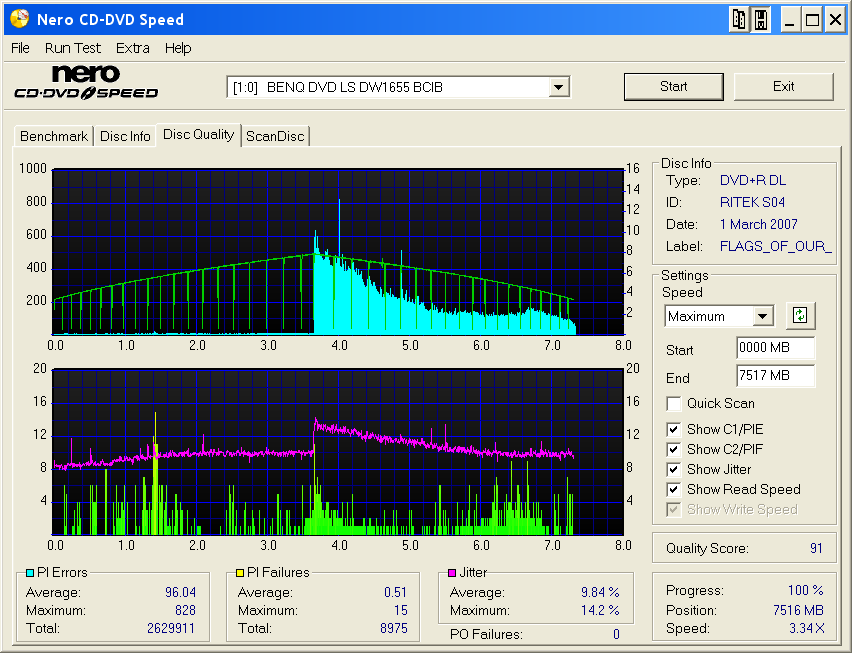
Comments?
|
|





