|
Dropped WD external Drive.
|
|
Member

|
20. March 2008 @ 19:52 |
Link to this message

|
|
ok thankyou for taking the time to help im really hoping this works ill let you know the results as soon as ive attempted it.
|
|
Advertisement

|
 |
|
|
Member
|
21. March 2008 @ 11:31 |
Link to this message

|
Ok ive got the drive out of the casing and its ready to go in the comp as soon as i know how to get it in there as the cable connections are different i took some pics:
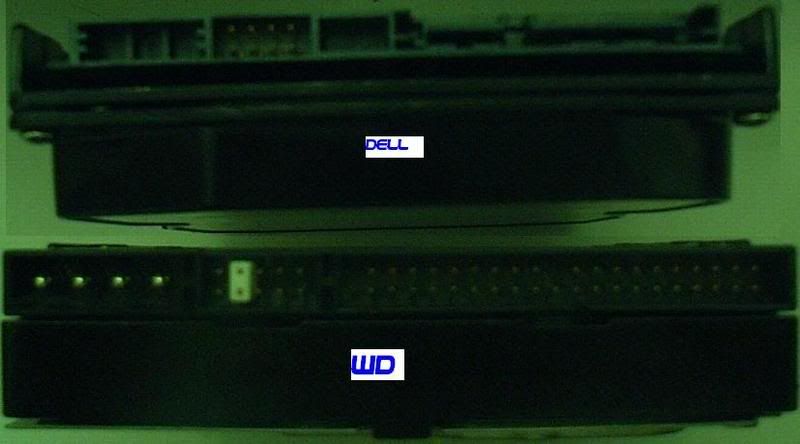

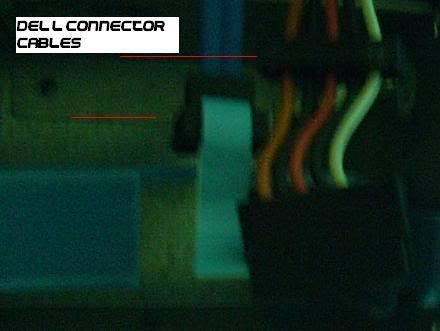
any ideas on how i can connect the WD drive to the PC since it has different cables are there any adapters or anything?
This message has been edited since posting. Last time this message was edited on 21. March 2008 @ 11:33
|
AfterDawn Addict
23 product reviews
|
21. March 2008 @ 11:38 |
Link to this message
|
The WD drive is an IDE hard drive where as your Dell is a SATA hard drive. The connectors on the CD drive should be IDE so you can disconnect the cable in the Dell from the CD drive and put it on the hard drive.
|
Member
|
21. March 2008 @ 11:40 |
Link to this message
|
|
Damn so i loose a CD drive is it possible to buy cables or is the only way to loose a CD drive?
|
AfterDawn Addict
23 product reviews
|
21. March 2008 @ 11:41 |
Link to this message
|
|
Most new computers don't have a second IDE connector on it. First see if the drive works, then if it does I'll show you what additional parts to buy so you don't lose a CD Drive.
|
Member
|
21. March 2008 @ 11:43 |
Link to this message
|
|
ok ill get started now ill turn my comp off get everything done and let you know. thanks again
|
Member
|
21. March 2008 @ 12:38 |
Link to this message
|
|
Done, makes the same sound :( i take it its dead is there anything else i can do? if not im gonna see if i can get the data recovered with all thats on there it should be worth the money
|
AfterDawn Addict
23 product reviews
|
21. March 2008 @ 12:44 |
Link to this message

|
|
Try dropping it again on carpet from about 1 foot or hitting it with a rubber mallet on the 4 corners. That sometimes works.
|
Member
|
21. March 2008 @ 12:52 |
Link to this message
|
|
Ok ill run down the local poundland now and get a mallet if i can. how hard about should i hit it?
|
AfterDawn Addict
23 product reviews
|
21. March 2008 @ 13:25 |
Link to this message
|
Originally posted by Gdot73:
Ok ill run down the local poundland now and get a mallet if i can. how hard about should i hit it?
I don't know how to say that but all we are trying to do is to get the heads unstuck.
|
Member
|
21. March 2008 @ 13:43 |
Link to this message
|
|
ive just hit it with the mallet on all 4 corners several times, and dropped it from around 1 foot and nothing. i see allen key screws on the hard drive could i disasemble it and get the heads unstuck?
|
AfterDawn Addict
23 product reviews
|
21. March 2008 @ 14:19 |
Link to this message
|
|
Don't disassemble a hard drive, then your chances of data recovery are pretty slim. Just take professional help at this point.
|
Member
|
21. March 2008 @ 14:22 |
Link to this message
|
|
ok then ill take it to a computer shop by me tomorrow if not then look on the internet for somewhere reliable to send it. thanks for all your time and help its much appreciated.
|
AfterDawn Addict
23 product reviews
|
21. March 2008 @ 16:07 |
Link to this message
|
|
Welcome. Let me know how it goes and how much they end up charging you.
|
Member
|
21. March 2008 @ 16:10 |
Link to this message
|
|
Well at the moment i have a quote from "data recovery direct" and the quote is:
» Economy Service (4-8 business days*).
Recovery Cost: £290 - £380
i cannot justify that price its unbelievable i wanna know what they are doing that makes it necessary to charge such ammounts.
This message has been edited since posting. Last time this message was edited on 21. March 2008 @ 16:10
|
AfterDawn Addict
23 product reviews
|
21. March 2008 @ 16:44 |
Link to this message
|
I think they actually open up the drive in a clean room and precisely read off the data from the hard drive platters with another head or fix the head so that the data is recoverable. I see that you don't live in the US by your currency but in the US, local electronics stores such as Staples and Circuit City and Best Buy (if you have those there) recover data for you and it might be cheaper.
Try this:
http://www.datarecoverycorp.com/Default....CFQ1aQAodlwuh8A
This message has been edited since posting. Last time this message was edited on 21. March 2008 @ 16:45
|
Member
|
21. March 2008 @ 16:46 |
Link to this message
|
|
We do have Staples over here i will go there tomorrow if necessary ill let you know when/if i get a good offer and decide to take it.
|
|
Spartan28
Member
|
22. March 2008 @ 05:06 |
Link to this message
|
|
I partitioned it but it erased all of the files or something cuz i restarted and pluged it in it says free memory? Is there any software that can recover it or no.
|
AfterDawn Addict
23 product reviews
|
22. March 2008 @ 10:57 |
Link to this message
|
|
I think its called Active @ Recovery
|
|
Spartan28
Member
|
24. March 2008 @ 01:15 |
Link to this message
|
|
Great, now the drive doesnt work anymore. All files are gone. God I hate these cheap crap. I cant even open it since theres no screws on the casing. I might go buy other. I believe it has a year warranty but I dont want to go through the trouble shipping and paying for the shippment and stuff. I think you need a credit card too, but im just a kid. If there is anyone that returned their hdrive to WD support can you tell me how it works?
|
|
Advertisement
|
|
|
AfterDawn Addict
23 product reviews
|
24. March 2008 @ 12:16 |
Link to this message
|
Originally posted by Spartan28:
Great, now the drive doesnt work anymore. All files are gone. God I hate these cheap crap. I cant even open it since theres no screws on the casing. I might go buy other. I believe it has a year warranty but I dont want to go through the trouble shipping and paying for the shippment and stuff. I think you need a credit card too, but im just a kid. If there is anyone that returned their hdrive to WD support can you tell me how it works?
You don't need a credit card, you ship yours out first and then they ship you out a new one. Try that first, if not then look back a in the thread and you will see some links on how to open up the drive. Usually the external drive has a 1 year warranty but the drives that they use inside have a 3 to 5 year warranty. Give them a call, usually they don't even ask for a receipt, just time of purchace. You can tell them like 6 months ago. Dont tell them that you dropped it either. If you want to try to reformat your current drive try this:
Start -> right click my computer -> Manage -> Disk Management
Choose the external drive, it will mostly say unallocated or something
Right click and delete the partition and then format it or just format it. Post a screenshot of your Disk Management page and I can help you.
|


