|
The (new) Official PC building thread!
|
|
AfterDawn Addict
4 product reviews

|
10. February 2008 @ 07:51 |
 Link to this message

|
|
Given the name, i'd expect it to be on par with the HD3850.
|
|
Advertisement
|
|
|
|
Senior Member
|
10. February 2008 @ 08:09 |
 Link to this message
|
|
i don't get it, Why ATI lower the transistors of the gpu? If they increase they can beat Nvidia by far...
SEX
Now Ive got your attention please read my post above
Own: Computer, PS2, PS3, PSP and Asus UX32VD i5 Ultrabook
|
AfterDawn Addict
|
10. February 2008 @ 09:58 |
Link to this message

|
Originally posted by GTR35:
i don't get it, Why ATI lower the transistors of the gpu? If they increase they can beat Nvidia by far...
not always true, and they did increase them from the 2900 series. if the architecture is crap, then more transistor means mor heat and power consumption for nothing.
 MGR (Micro Gaming Rig)
 .|. Intel Q6600 @ 3.45GHz .|. Asus P35 P5K-E/WiFi .|. 4GB 1066MHz Geil Black Dragon RAM .|. Samsung F60 SSD .|. Corsair H50-1 Cooler .|. Sapphire 4870 512MB .|. Lian Li PC-A70B .|. Be Queit P7 Dark Power Pro 850W PSU .|. 24" 1920x1200 DGM (MVA Panel) .|. 24" 1920x1080 Dell (TN Panel) .|. |
|
GregI6
Member
|
10. February 2008 @ 10:11 |
Link to this message
|
|
Senior Member
|
10. February 2008 @ 10:15 |
Link to this message
|
yes, with 666million transistors, ATI is just behind Nvidia. If they do increase to 680 million/700 million they might have a chance beating nvidia, plus they have smaller core which means less heat.
gettin a mobo with PCI-E 2.0 slots will be better:
http://www.anandtech.com/cpuchipsets/showdoc.aspx?i=3192&p=1
SEX
Now Ive got your attention please read my post above
Own: Computer, PS2, PS3, PSP and Asus UX32VD i5 Ultrabook
|
|
e_jones
Suspended due to non-functional email address
|
10. February 2008 @ 10:48 |
Link to this message
|
please help emergency building a computer with 2 8600 gt in pci-e slots on a Asus A8n32-SLI Deluxe. everything worked fine. decided to reroute a few cables. replugged it in powered back on now nothing no video! either card all four dvi spots checked nothing. try the old card a 6600 still nothing any ideas will clearing cmos make any difference? what now? computer is booting into windows I can hear it just can't see anything help please
|
AfterDawn Addict
2 product reviews
|
10. February 2008 @ 11:14 |
Link to this message
|
|
What cables did you re-route?
|
|
e_jones
Suspended due to non-functional email address
|
10. February 2008 @ 13:45 |
Link to this message
|
cleared cmos works fine now. sli mode, everything. Now having issue with mb temp at 52 now. any idea to get lower? here are sys specs
OS-XP PRO[ver.5.1]/Case- Thermaltake Armor"full case"-w/ side fan panel... remove stock fans replaced with SCYTHE 92mm 2 each and scythe/s-flex sff21f/Sunbeam 4 fan controller/Processor-AMD 2.2 Dual-core 4200+/AC Freezer 64 Pro cooler/motherboard-Asus A8n32-SLI Deluxe/Cooler Master rs 850 watt real power pro sli/Sound Card-Creative Sound Blaster X-FI FATAL1ty/Cables-Thermaltake Rounded IDE ATA & ATA2 uv sensitive/Memory- 2 Gig Crucial PC3200 unbuffered NON-ECC DDR400/HDD-WD 320GB 7200rpm Sata/Drives- 3ea. Benq 1655 [Rev.BCDB] 1ea. Lite-on LH-20A1L [rev.BLO5]/52in1 card reader&Writer&USB/ Video cards- 2ea. NVIDIA Geforce XFX 8600GT 256 MB PCIe-SLI/Monitors- 2ea. ACER AL2017 LCD 20 in. ea/HP PSC 1610 All-in-one printer
|
AfterDawn Addict
|
10. February 2008 @ 14:02 |
Link to this message
|
@e_jones,
Your specs look familiar to a friend of mine. ;) Anyway if you're using "standard" cooling on the mobo, which should be passive cooling with heatpipe tech I would consider removing the "old" thermal paste/tape and applying some AS5 or Zalman ZM-STG1 and see if that helps. The next step is to consider some sort of ACTIVE cooling. I added a fan to my Gigabyte GA-P35-DS3P mobo (northbridge) and it brought down the temps about 7*-8*C. There are plenty of after market chipset fans out there but I would give EnzoTech a look first. Check here for some ideas on active cooling for your northbridge. I'm sure if you remove your passive cooling you'll have to look at something for your southbridge too. We can address that when the time comes.
good luck...
....gm
|
Senior Member
|
10. February 2008 @ 14:22 |
Link to this message

|
|
@greensman
LOL those specs do look familiar... do not they- 0 thats because their mine and the mobo I got off ya...man what a bumer, Jones put alot of time into getten ride of the Delta and my temps went up by 20+- I understand the CPU, still has to set but the mobo is at this time 54 and it was 38 with those delta...much quiter though
Win. 7/Case- Thermaltake Armor11 bays "full case"-with side fan panel... removed stock fans replaced with SCYTHE 92mm 2ea. and SCYTHE/s-flex sff21f 120mm 2ea./ sunbeam 4 fan controller/Processor-Intel Core2Duo E6850 3.0 w/ Zalman CNPS7700-CU cooler/motherboard-Asus P5N32-E SLI p680I/PSU-Cooler Master RS 850 watt real power pro sli/Sound Card-Creative Sound Blaster X-FI FATAL1ty/Cables-Thermaltake Rounded IDE ATA & ATA2/Memory- 4 Gig Corsair XMS 800 MH/HDD-1ea. WD 300GB 10K VelociRaptor Sata-1ea.WD 320GB 7200rpm Sata/Drives- 2ea. Benq 1655 [Rev.BCDB]2ea.LG GH24NS70[rev.GN00]/52in1 card reader&Writer&USB/ Video cards- 1ea. EVGA Gforce Nvida GTX 550Ti /Monitors- 2ea. ACER AL2017 LCD 20 in. ea/Printer-
|
Senior Member
|
10. February 2008 @ 14:34 |
Link to this message
|
@ALL
I've checked the memory support list for GA-X38-DS4, G.Skill is not on the list, so i wonder if it supports it?
And where the hell can you get the memory support list for ASUS P5E, i went through asus site and can't find any?
Do you guys think i should go for ASUS mobo or Gigabyte? they both are good brand. I like the design of ASUS mobo but i like the brand gigabyte lol!
SEX
Now Ive got your attention please read my post above
Own: Computer, PS2, PS3, PSP and Asus UX32VD i5 Ultrabook
|
Senior Member
|
10. February 2008 @ 14:39 |
Link to this message
|
|
As for the northbridge cooler...no can do- Vid. cards are in the way...I went and got a extreme spirit 2 from thermaltake,,, man I guess water cooling is next...man with all these good parts and case, one wpuld think it would work---everyone elses does...
Win. 7/Case- Thermaltake Armor11 bays "full case"-with side fan panel... removed stock fans replaced with SCYTHE 92mm 2ea. and SCYTHE/s-flex sff21f 120mm 2ea./ sunbeam 4 fan controller/Processor-Intel Core2Duo E6850 3.0 w/ Zalman CNPS7700-CU cooler/motherboard-Asus P5N32-E SLI p680I/PSU-Cooler Master RS 850 watt real power pro sli/Sound Card-Creative Sound Blaster X-FI FATAL1ty/Cables-Thermaltake Rounded IDE ATA & ATA2/Memory- 4 Gig Corsair XMS 800 MH/HDD-1ea. WD 300GB 10K VelociRaptor Sata-1ea.WD 320GB 7200rpm Sata/Drives- 2ea. Benq 1655 [Rev.BCDB]2ea.LG GH24NS70[rev.GN00]/52in1 card reader&Writer&USB/ Video cards- 1ea. EVGA Gforce Nvida GTX 550Ti /Monitors- 2ea. ACER AL2017 LCD 20 in. ea/Printer-
|
AfterDawn Addict
|
10. February 2008 @ 16:00 |
Link to this message
|
GTR35,
Quote:
Do you guys think i should go for ASUS mobo or Gigabyte? they both are good brand. I like the design of ASUS mobo but i like the brand gigabyte lol!
If the choice with the Asus is the P5E, Go with the Gigabyte! That MB has not been right since they had all the trouble with it about 10-11 months ago, and doesn't OC very well! The old original ones did, but the newer ones stink!
Best Regards,
Russ
GigaByte 990FXA-UD5 - AMD FX-8320 @4.0GHz @1.312v - Corsair H-60 liquid CPU Cooler - 4x4 GB GSkill RipJaws DDR3/1866 Cas8, 8-9-9-24 - Corsair 400-R Case - OCZ FATAL1TY 550 watt Modular PSU - Intel 330 120GB SATA III SSD - WD Black 500GB SATA III - WD black 1 TB Sata III - WD Black 500GB SATA II - 2 Asus DRW-24B1ST DVD-Burner - Sony 420W 5.1 PL-II Suround Sound - GigaByte GTX550/1GB 970 Mhz Video - Asus VE247H 23.6" HDMI 1080p Monitor
 |
AfterDawn Addict
|
10. February 2008 @ 16:08 |
Link to this message
|
herrick & e-jones,
I've been looking and I "think" you should be able to get a southbridge and northbridge cooler from Enzotech but you'll have to find something for the mosfet/memory chips. links to northbridge and southbridge chipset coolers. The southbridge cooler is a Lo-pro type and the northbridge cooler should be fine. I dredged this up too. link to your mobo
I still don't understand the cooling problem you are having. We've discussed this before and I hope that someone here has a clue or at least some ideas that you haven't tried before.
You do have your "additional" power hooked up right? The one for extra power to your PCI-e connectors. Have you messed with the power settings to the mobo or PCI-e bus? Just curious. ;)
hth....
....gm
edit:
Add the fact that you will want to get a fan to add to the northbridge cooler. The one that Russ links too is a good one. There are others but that one has good specs and is inexpensive. ;) link to fan
This message has been edited since posting. Last time this message was edited on 10. February 2008 @ 18:13
|
AfterDawn Addict
2 product reviews
|
10. February 2008 @ 16:46 |
Link to this message
|
|
|
AfterDawn Addict
|
10. February 2008 @ 16:46 |
Link to this message
|
greensman,
Quote:
I've been looking and I "think" you should be able to get a southbridge and northbridge cooler from Enzotech
That list you provided is about 90% bad. Most just don't work the way their supposed to! Most flat ones work poorly because there's no way to turn it 90 degrees to get front to rear cooling from the case's natural airflow. Some sit right up next to the CPU Cooler, where all it does is contribute to the oveall heat of the CPU! Some are little heat sinks with a fan on them, and they don't work well either! My stock heatsink with a Silenx 40mm 5CFM fan screwed to it soes a better job! The problem is keeping the NB from causing the CPU to run higher temps because the heat migrates to the CPU through the metal traces on the MB. The Enzotech should do that with a good high CFM fan like this one! http://www.newegg.com/Product/Product.aspx?Item=N82E16835129036 2200 RPM and 6.5CFM! If it can cool the NB down, the CPU temp should drop as well! A lot better and quieter than those 5000 or 7200 RPM fans that have a different pitch (scream!) to them! Should last a lot longer too!
Best Regards,
Russ
GigaByte 990FXA-UD5 - AMD FX-8320 @4.0GHz @1.312v - Corsair H-60 liquid CPU Cooler - 4x4 GB GSkill RipJaws DDR3/1866 Cas8, 8-9-9-24 - Corsair 400-R Case - OCZ FATAL1TY 550 watt Modular PSU - Intel 330 120GB SATA III SSD - WD Black 500GB SATA III - WD black 1 TB Sata III - WD Black 500GB SATA II - 2 Asus DRW-24B1ST DVD-Burner - Sony 420W 5.1 PL-II Suround Sound - GigaByte GTX550/1GB 970 Mhz Video - Asus VE247H 23.6" HDMI 1080p Monitor
|
AfterDawn Addict
|
10. February 2008 @ 16:50 |
Link to this message
|
abuzar1,
Quote:
Hey Pinksman, do you think this will work well with my motherboard?
Tried one! They suck! Just the NB stock heat sink runs cooler! Without the fan!
Best Regards,
Russ
GigaByte 990FXA-UD5 - AMD FX-8320 @4.0GHz @1.312v - Corsair H-60 liquid CPU Cooler - 4x4 GB GSkill RipJaws DDR3/1866 Cas8, 8-9-9-24 - Corsair 400-R Case - OCZ FATAL1TY 550 watt Modular PSU - Intel 330 120GB SATA III SSD - WD Black 500GB SATA III - WD black 1 TB Sata III - WD Black 500GB SATA II - 2 Asus DRW-24B1ST DVD-Burner - Sony 420W 5.1 PL-II Suround Sound - GigaByte GTX550/1GB 970 Mhz Video - Asus VE247H 23.6" HDMI 1080p Monitor
|
AfterDawn Addict
2 product reviews
|
10. February 2008 @ 16:57 |
Link to this message
|
|
So Russ, how do you fit than fan you linked to on your Chipset? Does it come with screws and stuff.
|
AfterDawn Addict
|
10. February 2008 @ 17:49 |
Link to this message
|
abuzar1,
Quote:
So Russ, how do you fit than fan you linked to on your Chipset? Does it come with screws and stuff.
Nah! I just took some screws from the ton of old heatsinks I have lying around! LOL!! Must have 20 at least! LOL!! I'll have to buy some for the Antec one, as it's a thicker 25mm fan! I'll just get the same size only longer! Two screws is all you need as you'll see how it screws to the outside 2 fins of the heat sink. I really think that the Enzotech with that fan will have a real chance be the first to beat my present setup! When I can afford it! Things are slow right now as always for this time of year! Whatever, that cooler combined with the high case airflow I have should work real well! I've set the RPM to 1200 and then turned the control of the 80mm Silverstone over to the computer. It sort of controls the airflow of the whole case and does a better job than I can do manually. I have great respect for how well the DS3R automatically handles the fans, once you figure out where to plug them in. I discovered all of them are for different parts of the motherboard and have their own different temperature limits. I plugged the 80mm into the Chassis header and the chipset fan into the power supply header and it all works great!
Best Regards,
Russ
GigaByte 990FXA-UD5 - AMD FX-8320 @4.0GHz @1.312v - Corsair H-60 liquid CPU Cooler - 4x4 GB GSkill RipJaws DDR3/1866 Cas8, 8-9-9-24 - Corsair 400-R Case - OCZ FATAL1TY 550 watt Modular PSU - Intel 330 120GB SATA III SSD - WD Black 500GB SATA III - WD black 1 TB Sata III - WD Black 500GB SATA II - 2 Asus DRW-24B1ST DVD-Burner - Sony 420W 5.1 PL-II Suround Sound - GigaByte GTX550/1GB 970 Mhz Video - Asus VE247H 23.6" HDMI 1080p Monitor
|
AfterDawn Addict
2 product reviews
|
10. February 2008 @ 18:00 |
Link to this message
|
|
Damn it I just don't see where the damn fan would screw in. I need to take this thing apart anyway, I think the chipset Heatsink has come loose.
|
|
sytyguy
Senior Member
|
10. February 2008 @ 18:05 |
Link to this message
|
Originally posted by theonejrs:
Quote:
Two screws is all you need as you'll see how it screws to the outside 2 fins of the heat sink.
Russ,
I don't see how it connects either, can you take a picture of it connected?
TIA
|
AfterDawn Addict
2 product reviews
|
10. February 2008 @ 18:09 |
Link to this message
|
|
Look one big quote lol. It first I thought it would screw in where the heatsink connects to the motherboard, but that can't be it right?
|
AfterDawn Addict
|
10. February 2008 @ 18:28 |
Link to this message
|
Originally posted by theonejrs:
greensman,
Quote:
I've been looking and I "think" you should be able to get a southbridge and northbridge cooler from Enzotech
That list you provided is about 90% bad. Most just don't work the way their supposed to! Most flat ones work poorly because there's no way to turn it 90 degrees to get front to rear cooling from the case's natural airflow. Some sit right up next to the CPU Cooler, where all it does is contribute to the oveall heat of the CPU! Some are little heat sinks with a fan on them, and they don't work well either! My stock heatsink with a Silenx 40mm 5CFM fan screwed to it soes a better job! The problem is keeping the NB from causing the CPU to run higher temps because the heat migrates to the CPU through the metal traces on the MB. The Enzotech should do that with a good high CFM fan like this one! http://www.newegg.com/Product/Product.aspx?Item=N82E16835129036 2200 RPM and 6.5CFM! If it can cool the NB down, the CPU temp should drop as well! A lot better and quieter than those 5000 or 7200 RPM fans that have a different pitch (scream!) to them! Should last a lot longer too!
Best Regards,
Russ
Russ I only supplied that page to give them an idea of the possibilities on chipset coolers. On my next post I directly link them to Enzotech coolers and even added the Antec fan you linked too. ;) I fully understand that most of those coolers are "questionable" at best but the Enzotech "seem" like great coolers for the money. :D
One reason I chose the "heat sinks" that I did is because of the "restrictions" from his mobo. That particular ASUS mobo limits the southbridge possibilities but it does look like the northbridge cooler I chose should work just fine.
As I stated in the other post I think he should first try removing, cleaning, and re-applying a GOOD thermal paste to his present cooling apparatus. I hope this clarifies some of the things I was getting at. :)
@boozer,
Russ is right that cooler is "suspect" at best. ;) If Russ doesn't supply US with some pics then I can do my best too. I've added a chipest fan to my DS3P mobo and it seems to have helped a few degrees.
....gm
|
|
sytyguy
Senior Member
|
10. February 2008 @ 19:26 |
Link to this message
|
Originally posted by abuzar1:
Look one big quote lol. It first I thought it would screw in where the heatsink connects to the motherboard, but that can't be it right?
IIRC, there are two holes on the heatsink, so I am guessing that's where it would go.
|
|
Advertisement
|
|
|
Senior Member
|
10. February 2008 @ 19:32 |
Link to this message
|
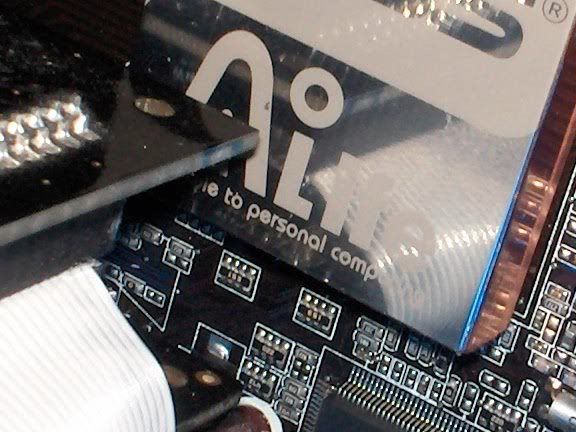
@greensman how can I use a northbridge cooler when the pipe seems to connect across the mb. This is the problem the sound card sits over the heatsink.
Win. 7/Case- Thermaltake Armor11 bays "full case"-with side fan panel... removed stock fans replaced with SCYTHE 92mm 2ea. and SCYTHE/s-flex sff21f 120mm 2ea./ sunbeam 4 fan controller/Processor-Intel Core2Duo E6850 3.0 w/ Zalman CNPS7700-CU cooler/motherboard-Asus P5N32-E SLI p680I/PSU-Cooler Master RS 850 watt real power pro sli/Sound Card-Creative Sound Blaster X-FI FATAL1ty/Cables-Thermaltake Rounded IDE ATA & ATA2/Memory- 4 Gig Corsair XMS 800 MH/HDD-1ea. WD 300GB 10K VelociRaptor Sata-1ea.WD 320GB 7200rpm Sata/Drives- 2ea. Benq 1655 [Rev.BCDB]2ea.LG GH24NS70[rev.GN00]/52in1 card reader&Writer&USB/ Video cards- 1ea. EVGA Gforce Nvida GTX 550Ti /Monitors- 2ea. ACER AL2017 LCD 20 in. ea/Printer-
|


