|
System Freezes With Looping Sound
|
|
|
ericddog
Newbie

|
20. January 2006 @ 20:22 |
 Link to this message

|
|
ike the title says, while i am playing bf2 and even when im not or on the internet or anything basically the computer will freeze up and whatever sound that was playing at the same time will keep repeating and its only like 1-2secs long fragment then i have to trun off my computer so any suggestions would be great and much appreciated although i know this doesnt relate to bf2 i know you guys are pretty much experts at Comps so though i'd give it a try but i have tried updating my drivers for my vid card and tried the latest chipset drivers which are nForce2 drivers for the mobo here are my specs
AMD Athlon 2800+ 2.1GHz
1.5GB of DDR RAM
ATI X850XT AGP
40GB Maxtor HD
Gigabyte K7 mobo #GA-7N400
i've pretty much tried everythig from the latest drivers for video card to mobo chipset drivers to making sure everything was in place and this used to happen like 4 months ago then i fixed the problem by Resetting the CMOS and then the computer worked fine for the longest time then i accidently uninstalled the nvidia nForce drivers from the control panel and that's when my X850 wasn't being read so i reinstalled the nForce drivers cause i needed the SM BUS thingy from the nForce to see that i had a card in there and i went and installed the latest drivers again and now whenever im on my COMPUTER for like 2hrs i'll just freeze and have that repeating sound i have tried different versions of nForce and still Nothing.......PLEASE HELP!!
|
|
Advertisement
|
|
|
|
|
ericddog
Newbie
|
21. January 2006 @ 20:33 |
Link to this message

|
|
SOMEONE REPLY PLEASE NEED HELP!!!!!!!!!!!!!
|
|
trgrpullr
Member

|
21. January 2006 @ 21:46 |
Link to this message

|
|
Is it possible your computer or videocard is overheating since it happens after the comp has been on for ~2 hours?
Athlon64 San Diego core 3700+, ASUS A8N-E, Sapphire X1900XT, 320GB WD SATAII HD, 2GB Gskill mem. Win XP Pro SP2. Pioneer DVR111D. Nero 6.6.1.4, DVD decrypter 3.5.4.0. ,PS2 V7 w/no-solder and swap magic
|
AfterDawn Addict
4 product reviews
|
21. January 2006 @ 23:58 |
Link to this message
|
|
Download a program called Hmonitor and another called ATiTool. These are temperature monitoring programs for the main computer (CPU, motherboard and disk drive) and the GPU respectively. Run these programs and a short while before the crash usually occurs, close the game and see what the temperature readings are.
If the CPU is near 70 or if the motherboard or hard disk are over 45 or if the GPU is over 75 then you may have a cooling problem. If temperatures are fine, try updating the drivers for the graphics and sound card. If still no luck, try looking around on help forums specifically for BF2 and see if anyone there has had your problem. With a computer of your specification there should be no problem with performance or compatibility issues.
|
|
ScubaBud
AfterDawn Addict
|
22. January 2006 @ 04:39 |
Link to this message
|
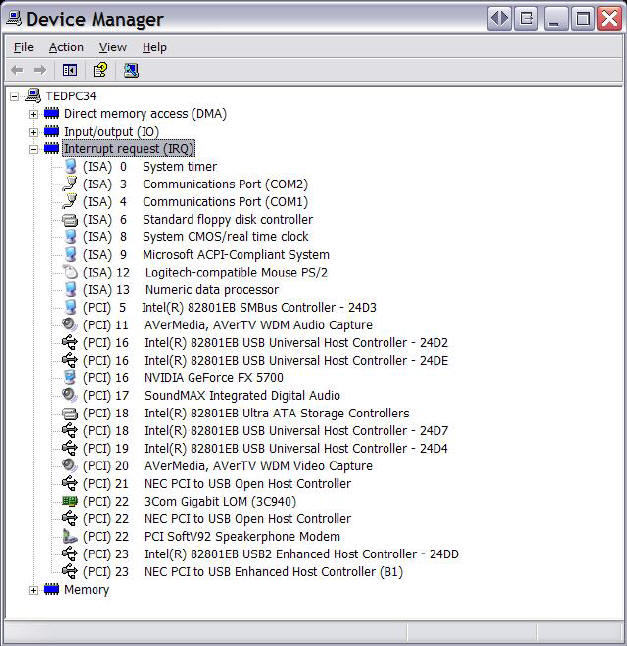
In device manager there is a view for "Resources by type". Under that is a heading for Interrupt request (IRQ). Can you take a screen shot of that and post it here?
It looks like this under Windows XP:
|
|
ericddog
Newbie
|
23. January 2006 @ 00:14 |
Link to this message
|
|
i do have abunch or Interrupt Request but i dont know how to take a screenshot of it cause i dont have any kind of camera or anything
|
|
trgrpullr
Member
|
23. January 2006 @ 19:26 |
Link to this message
|
|
Look and see if any 2 devices share the same interrupt request. (ETA) Occasionally a problem occurs if,say, the videocard and soundcard share the same IRQ.
Post the results of whichever IRQ are assigned to more than one device.
Athlon64 San Diego core 3700+, ASUS A8N-E, Sapphire X1900XT, 320GB WD SATAII HD, 2GB Gskill mem. Win XP Pro SP2. Pioneer DVR111D. Nero 6.6.1.4, DVD decrypter 3.5.4.0. ,PS2 V7 w/no-solder and swap magic
This message has been edited since posting. Last time this message was edited on 23. January 2006 @ 21:13
|
|
ddp
Moderator
|
23. January 2006 @ 19:34 |
Link to this message
|
|
trgrpullr, you can have irq sharing with different devices including videocard & sound card.
ericddog, disable your soundcard to see if problem happens still. also when restarting computer, go into the bios to hardware monitor to see what the cpu temp is.
|
|
trgrpullr
Member
|
23. January 2006 @ 20:19 |
Link to this message
|
|
Right, sorry if I wasn't clear. I did not mean that you CAN'T have shared IRQ, only that sometimes that can cause a conflict resulting in instability. When that's been a problem for me, I usually had to move my soundcard to a different slot, but usually that problem manifests itself immediately. Given that the problem rears its ugly head after being on for 2 hours, I still think the problem is overheating, as I originally stated
Athlon64 San Diego core 3700+, ASUS A8N-E, Sapphire X1900XT, 320GB WD SATAII HD, 2GB Gskill mem. Win XP Pro SP2. Pioneer DVR111D. Nero 6.6.1.4, DVD decrypter 3.5.4.0. ,PS2 V7 w/no-solder and swap magic
|
AfterDawn Addict
4 product reviews
|
24. January 2006 @ 03:09 |
Link to this message
|
|
If it's as long as 2 hours I'd think a shared IRQ problem is extremely unlikely. Look at heat.
|
|
ScubaBud
AfterDawn Addict
|
24. January 2006 @ 03:14 |
Link to this message
|
Quote:
and now whenever im on my COMPUTER for like 2hrs i'll just freeze
I'll have to agree on it not being an IRQ issue. I missed the 2hrs written at the end of the post, my bad!
|
|
ericddog
Newbie
|
24. January 2006 @ 06:57 |
Link to this message
|
|
thanks everyone for the replies but something wierd has happened...my system hasnt froze up in like 4 days and i've been on it for like 5-6 hrs at a time and thats WAY past the time of when it used to freeze but what i did was disable all of my start up items and uninstalled my nForce drivers and reeinstalled them but without AUDIO, IDE Drivers and Ethernet Drivers and now it hasnt froze cause alot of people say that most of the time it's either the nForce IDE drivers or Ethernet Drivers but i also got rid of a program called CPUidle Extreme which is supposed to turn off certain parts of your CPU and cool it down and that program might have been the problem as well so i'll keep you guys updated on this solution to see if its ROCK SOLID but i used to have a temp problem before i wwent out and bought a NICE heatsink and fan for my CPU but like i said this problem only occured when i uninstalled my nForce drivers on accident
|
AfterDawn Addict
4 product reviews
|
24. January 2006 @ 22:56 |
Link to this message
|
|
Quite possibly applications that reduce and increase load to the CPU based on command and temperature inputs could cause instability at various points. But hey, if it stays like that we have a result!
|
|
Advertisement
|
|
|
|
ericddog
Newbie
|
25. January 2006 @ 08:19 |
Link to this message
|
|
indeed we do have a good result
|


