|
PSP FASTLOADER AND ISO
|
|
|
evnflow
Suspended due to non-functional email address

|
2. January 2006 @ 12:05 |
Link to this message

|
|
hhmmm...i snoop around to see if i can find anything to help you on it...but the rest of the game plays fine?

Dolla Dolla Bill Ya'll
 |
|
Advertisement

|
 |
|
|
|
Babolat
Suspended due to non-functional email address
|
2. January 2006 @ 13:12 |
Link to this message

|
|
thanx evnflow but could you plz give me a guide of how to install fastloader v0.7 and use it
thanx for your help
|
|
Babolat
Suspended due to non-functional email address
|
2. January 2006 @ 13:16 |
Link to this message

|
|
also i didnt mention any specific iso's so would i still need wab or do iso's not need them at all???
thnx
|
|
ludachris
Newbie
|
2. January 2006 @ 17:24 |
Link to this message
|
|
@evnflow, your howtos are awesome
NEEDS THE HELP
i'm trying to backup a umd using fastloader v.7. i have a 512mb stick. so when i dumped the umd i had 4 parts. how do i put them all together
|
|
queenzkid
Suspended due to non-functional email address
|
2. January 2006 @ 23:11 |
Link to this message
|
|
ok look i have the games downloaded from my computer now how do i transfer them in to my psp or my memry stik? ???
|
|
pspmania
Newbie
|
3. January 2006 @ 04:22 |
Link to this message
|
|
i searched for ages trying to get and upgrader from psp 1.5 to 2.0 but all that comes up is bleedin 2.0 to 1.5 downgrader.can any1 give me a link for it or a website mayb?
|
|
mlukic
Suspended due to non-functional email address
|
3. January 2006 @ 07:16 |
Link to this message
|
Can someone help! I have the fastloader V.8 and all of my folders are set up properly like in the diagram. When I went to load a game file, I checked the properties which said it was a RAR file. I then used WinRAR to extract the ISO files. I'm doing something wrong as it doesn't work. I do get the green cog wheel, but I also have on that list on the screen a Updater icon remove
Use boot.bin off
Regioncode override off, and where it says "Disctype ISO," it reads after it, "game", the same for the Disctype Umd. Where did I go wrong? When I loaded the game file to the ISO folder, I loaded the file that said "ISO." What are the "ISOMISC" AND "ISOSPLIT?" I've been working on this for about a week and I'm getting really frustrated. Thanks.
|
|
Babolat
Suspended due to non-functional email address
|
3. January 2006 @ 07:19 |
Link to this message
|
|
can anyone put up a post of how to use fastloader v0.7 for me
any help would be grateful
thanx
|
|
dizzyb
Suspended due to non-functional email address
|
3. January 2006 @ 08:31 |
Link to this message
|
|
hi everyone i am new 2 dis but i hve a psp 1003(uk model) nd iz der way of putting fastloader v woteva with out downgrading it 2 1.5 as i hve 2.6 nd i dnt want 2 tk der risk of downgrading
ade
|
|
evnflow
Suspended due to non-functional email address
|
3. January 2006 @ 16:37 |
Link to this message
|
|
guide for installing fastloader V0.07(but i recommend umdemulator(fastloader V0.08)):
Once you have downloaded and extracted the Fastloader V0.7 to your
Desktop..you should have have an initial folder that
says "Fastloader-PSp Layout"...double click on this folder and you
will see another folder "PSP Layout"...double click on this folder
and you will see three more folders "ISO, ISOMISC, and PSP"...copy
the "ISO" and "ISOMISC" folders to the PSP directory,your psp folder
not the one that appears with the two other folders(the first window
that pops up when you plug in your PSP system)...now double click on
the "PSP" folder from the fastloader download(NOT the psp folder for
your psp), then double click on the game folder and copy
the "Fastloader" and "Fastloader%" folders and paste them into YOUR
PSP\GAME directory(double click on YOUR PSP folder and then double
click on YOUR Game folder)...now take the iso image file you have
from your backup of YOUR game and place the ISO image file(the dvd
icon looking file) to the "ISO" folder that you placed on your PSP
directory...now that you're done with that back out of USB mode and
go to your memory card stick icon(the one under the umd icon) and
look for the Smiley face icon...press x...and it should bring up a
SpongeBob background image up...if you have a umd disc in the drive
it will ask you to take the disc out...once this is done or you
didn't have a disc inserted in the first place it will state the
name of the iso that you placed into the "ISO" folder...now press
x...it should say initialisizing..and it should launch your game...
i will keep this guide updated with new games...good luck.. ;)
P.S. to return to the menu for Fastloader from the game press L Trigger + R Trigger + Start...to return to home menu..do the previous and once at that menu press L Trigger + R Trigger + Home
@dizzyb...sorry you are out of luck, no downgraders for 2.60...
for some reason ALL iso's for psp use the RAR icon for their symbol, but they are usually in iso format...if you have Winrar or Winace...open the suspicious file with it, if you get a PSP_GAME folder and a UMD_DATA.BIN file then it is in ISO format and you DO NOT have to extract it anymore, if you however get an iso file when you open with Winrar or Winace, Extract one more time to get the ISO...
@ludachris...what umd are you trying to backup?
Dolla Dolla Bill Ya'll
This message has been edited since posting. Last time this message was edited on 3. January 2006 @ 16:42
|
|
ludachris
Newbie
|
3. January 2006 @ 17:52 |
Link to this message
|
|
x men legends II. it's around 1.3-1.4gb
|
|
axelarx
Suspended due to non-functional email address
|
3. January 2006 @ 18:44 |
Link to this message
|
|
Hey. I'm having trouble, can anyone help.
I have successfully downgraded my PSP to 1.5, and I can run the fastloader program and the iso games from a memory stick. But my PSP will no longer let me play my games that are on UMD discs.
I d/led the WAB version changer 2.5 and tricked the psp into thinking its running 2.0, and that works fine to run the iso games that require that system, but when i try to load UMD games, it gives me an error message and wont load them unless I fake the system into going into a lower version than 1.5, then upgrading to 2.0 with the the upgrade the disc comes with. Is there a way around this, can i play umd discs as well as keeping my system downgraded to run fastloader?? thanks.
|
|
ZeeZee
Newbie
|
3. January 2006 @ 18:54 |
Link to this message
|
|
Hi guys i use video 9 to convert some of the movies i have on my comp but since i have 1gb memory i cant put few movies which are 2 hours long... is there any program that can may be divide the movie into two parts so i can atleast watch half on the psp .... thnk u
|
|
axelarx
Suspended due to non-functional email address
|
3. January 2006 @ 19:11 |
Link to this message
|
|
PSP MOVIE CREATOR. I think its great, you can rip an entire 2 hour dvd into about 700MB, and the quality is excellent.
you can buy it online or find it through a torrent downloading program.
|
|
evnflow
Suspended due to non-functional email address
|
3. January 2006 @ 21:36 |
Link to this message
|
@ludachris...try this file joiner...might work for ya http://www.snapfiles.com/get/sfj.html or you can Use a dos command window and the COPY command.
copy /b file1+file2 outputfile
(NOTE: b is the directory...i.e. c:\ or j:\, and you would use the directory where you have the files saved at and you would need the Specific file name)
may be easier to use the file joiner link i offered, but it is possible manually...
Dolla Dolla Bill Ya'll
|
|
Babolat
Suspended due to non-functional email address
|
4. January 2006 @ 01:50 |
Link to this message
|
|
@ evnflow
thanx for the guide if i get umdemulator do i install and use it the same way or is it different?
|
|
freeman12
Newbie
|
4. January 2006 @ 03:03 |
Link to this message
|
|
hi i need some help to start a downloaded game i have fastloader0.7 system ver1.52 i moved the iso isomisc folders on the psp and the fastloder fastloder% folders on the psp game folder i put the iso file in the iso folder and start fastloader on the psp but it tells me that the game cant be started error 80020148
|
|
evnflow
Suspended due to non-functional email address
|
4. January 2006 @ 06:57 |
Link to this message
|
|
@babolat...you would install umdemulator the same as fastloader 7
@freeman12...you will need to MANUALLY update your psp to a 2.0 firmware and then downgrade to a 1.50..you can't run any loaders on any firmwares over 1.50...
to manually update your psp to 2.0 status:
Create a folder named "UPDATE" in the PSP\GAME directory...place the 2.0 eboot file into that folder(the UPDATE folder)..then back out of USB mode and then go to the memory stick icon on your psp and run the update folder...(WARNING: MAKE SURE THAT YOUR PSP IS FULLY CHARGED AND PLUGGED INTO THE AC ADAPTER WHEN UPDATING AND DOWNGRADING!!!)
to downgrade once updated:
Steps to use the MPH downgrader: - Create an UPDATE folder in the /PSP/GAME/ folder of your memory stick - Copy EBOOT.PBP (update 1.50) in /PSP/GAME/UPDATE folder - Unpack MPHDowngrader.zip - Copy overflow.tif in your /PSP/PHOTO/ folder of your memory stick - Copy h.bin to root of your memory stick (meaning in ms0:/) - Copy index.dat in root of your memory stick (meaning in ms0:/ as well) - Plug the AC adaptor You memory stick filesystem should look like this (where X is your memory sticks directory): X:/h.bin X:/index.dat X:/PSP/PHOTO/overflow.tif (with no other pictures in there) X:/PSP/GAME/UPDATE/EBOOT.PBP (the 1.50 Firmware update eboot) What you do next is go into the Photo Menu on the PSP and it will show some jumbled text, which is normal. Wait about 30 seconds and then restart your PSP. From there you will now have a new file in your PSP?s root directory called ms0:/index.dat.bak. In the next step you will go to your Game Menu, Then Memory Stick, and then Launch ?PSP Update ver 1.50.? It will then ask you if you really want to downgrade and then lead you along to the actual installing. Here is where I got scared. It installed to 99% then errored. This is OK. Restart your PSP and turn it back on. It will come up with another error which is OK as well. Restart it again and you will have PSP firmware version 1.50, and it will lead you through setting up language and time etc.
You can grab the MPH downgrader and 2.0 firmware Eboot file from the link in my sig...good luck and if you need anymore help, just ask....holla ;)
Dolla Dolla Bill Ya'll
|
|
axelarx
Suspended due to non-functional email address
|
4. January 2006 @ 08:45 |
Link to this message
|
|
Anybody know why my GTA and Battlefront discs won't play on their own? I have the fastloader installed, and i used WAB 2.5 to fake the psp into version 2.0. Star Wars will play thru the fastloader, but not GTA? anyone have a way around this? thanks.
|
|
burnpiano
Newbie
|
4. January 2006 @ 11:46 |
Link to this message
|
ok i followed all your helpful guides and did everything they said but still cant figure out how to play isos.
i have fastloader and i am trying to play a spiderman 2 iso. i put the game in the iso folder like you said. i have a umd in the drive and i go to my ms and it comes up with 1 corrupted data file and fastloader. i press on fastoader and the psp begining thing loads and then it says "the game could not be started (80020148)".
im not really sure what to do next so if you could help me. im almost postive that all the folders are in the right place. here:
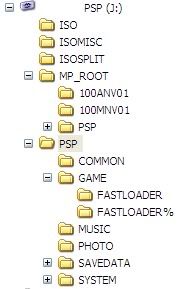
what should i do to get it to work?
thanks
This message has been edited since posting. Last time this message was edited on 4. January 2006 @ 11:47
|
|
mofos
Junior Member
|
4. January 2006 @ 16:56 |
Link to this message
|
|
ok is it v 0.8 or 0.8c and how do u config ur psp thing like change the mhz n stuff cuz 0.8c is spose to be off for direct load i had my fifa 06 work on my 0.7 but not 0.8c how come plz help me out evevflow!!! ur a god! plz
|
|
mofos
Junior Member
|
4. January 2006 @ 17:48 |
Link to this message
|
|
ok nvm i config everything to wat v0.8c wants but now when i try n load up madden 06 the thing goes black then it like exits back to the home menu.. wats goin on?
|
|
freeman12
Newbie
|
5. January 2006 @ 05:17 |
Link to this message
|
|
THANK YOU!!!!!!! but now what do i do i open fastloader and it tells me to start or to dump the umd that i inserted please help me
This message has been edited since posting. Last time this message was edited on 5. January 2006 @ 10:05
|
|
williamf
Junior Member
|
5. January 2006 @ 17:27 |
Link to this message
|
|
@freeman12
If you wanna start the inserted UMD in your PSP you choose -Start Inserted UMD-
If u wanna dump the UMD in the PSP you choose -Dump UMD-
If wanna play an ISO game you select the game. If you put the ISO in the Memory Stick and the game doesn't show up, it means that you either havnt put the ISO into the right place or the ISO is corupted.
You suppose to put the ISO file into the folder called ISO (Which should be in the root of your Memory Stick!).
|
|
Advertisement
|
|
|
|
chubs189
Newbie
|
5. January 2006 @ 17:43 |
Link to this message
|
|
well i have been able to play my games for about 2 weeks now thanx to everyone in this thread with the great info.but for some reason my main screen now is all white instead of normal red.should i be worried ?
|


