User User name Password  
   
Saturday 2.5.2026 / 05:30
Search AfterDawn Forums:        In English   Suomeksi   På svenska
afterdawn.com > forums > software, operating systems and more > windows - software discussion > new installed windows xp keeps crashing
Show topics
 
Forums
Forums
New installed Windows Xp Keeps crashing
  Jump to:
 
Posted Message
skorpio81
Newbie
_
14. May 2006 @ 08:06 _ Link to this message    Send private message to this user   
Good day people,

My new pc keeps crashing when im trying to install Dungeon And Dragon, not only that but other times too.

Processor
Model : AMD Athlon(tm) 64 FX-57 Processor
Speed : 2.81GHz
Model Number : 4421 (estimated)
Perfomance rating : PR4221 (estimated)
Cores per Processor : 1 Unit(s)
Threads per Core : 1 Unit(s)
Internal Data Cache : 64kB Synchronous, Write-Back, 2-way Set, 64 byte line size
L2 On-board cache : 1MB ECC Synchrone, Write-Back, 16-way Set, 64 btyle line size

MotherBoard
Bus : PCI PCIe USB FireWire/1394 i2c/SMBus
Mp Support : 1 Processor(s)
Mp APIC : No
System BIOS : Phoenix Technologies, LTD ASUS A8N-SLI Premium ACPI BIOS Revision 1009
Systeme : System manufacturer System Product Name
Motherboad : ASUSTeK Computer INC. A8N-SLI Premium
Total Memory : 2GB DDR-SDRAM

Chipset 1
Model : Advanced Micro Devices (AMD) Athlon 64 / Opteron HyperTransport Technology Configuration
Front Size Bus Speed : 2x 1005MHz (2010MHz data rate)
Total Memory : 2GB DDR-SDRAM
Vitesse du Bus Mémoire : 2x 165MHz (330MHz data rate)

Video System
Monitor/Panel : SONY CPD-E220/E220E
Adapter : NVIDIA GeForce 7800 GTX

Physical Storage Devices
Removable Drive : Floppy disk drive
Hard Disk : ST3300622AS (279GB)
CD-ROM/DVD : PLEXTOR DVD-ROM PX-130A (CD 16X Rd) (DVD 2X Rd)
CD-ROM/DVD : _NEC DVD_RW ND-3551A (CD 48X Rd, 48X Wr) (DVD 6X Rd, 6X Wr)

Logical Storage Devices

Hard Disk (C:) : 279GB (270GB, 97% Free Space) (NTFS)
Dungeons and Dragons Online (tm) (D:) : 2.5GB (UDF)
CD-ROM/DVD (E:) : N/A

Peripherals
Serial/parallel Port(s) : 1 COM / 1 LP
USB Controller/Hub : Standard OpenHCD USB Host Controller
USB Controller/Hub : Standard Enhanced PCI to USB Host Controller
USB Controller/Hub : USB Root Hub
Controller/Hub FireWire/1394 : Texas Instruments OHCI Compliant IEEE 1394 Host Controller
keyboard : Standard 101/102-Key or Microsoft Natural PS/2 Keyboard
mouse : PS/2 Compatible Mouse

Multimedia Devices
Device : MPU-401 Compatible MIDI Device
Device : Standard Game Port
Device : Realtek AC'97 Audio

Power Management
Etat de la Ligne AC : Connecté

Operating System
Windows System : Microsoft Windows XP/2002 Professionnel 5.01.2600 (Service Pack 2)

I've installed different types of Windows Xp but they all keep crashing. I don't know this problem is software or hardware.
Been stuck on this ever since I got it :(

Should I also post the event logs of application,security,system?

This message has been edited since posting. Last time this message was edited on 14. May 2006 @ 10:19

Advertisement
_
__
tocool4u
Suspended permanently
_
14. May 2006 @ 09:32 _ Link to this message    Send private message to this user   
No need to post your logs if they are in French........We need what you just posted in English
skorpio81
Newbie
_
14. May 2006 @ 12:27 _ Link to this message    Send private message to this user   
I've edited it
dejahboi
Member
_
15. May 2006 @ 09:10 _ Link to this message    Send private message to this user   
what else are you installing???
skorpio81
Newbie
_
15. May 2006 @ 12:38 _ Link to this message    Send private message to this user   
anything, it hates setup.
Im getting sucessive BSODs. Need help
dejahboi
Member
_
15. May 2006 @ 20:37 _ Link to this message    Send private message to this user   
it can be bad ram
Senior Member
_
18. May 2006 @ 11:31 _ Link to this message    Send private message to this user   
Could be overheating, most likely bad ram though from your symptoms.

I'd test the memory, if you'r still in garuntee period let them do it because if you procede you'r garuntee will become vioded..which really is a kick in the nuts.

Anyway, first off you've gotta determine how many memory modules you in there, from ya log i can tell you got 2gb in total buy you must note both the number of installed memory modules and the amount of free slots.

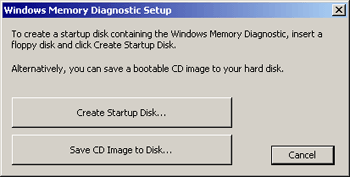
Test your ram with this : http://oca.microsoft.com/en/windiag.asp
Quote:
The program can sometimes identify which memory module is the source of problems on a system which has more than one module installed.

To use the Windows Memory Diagnostic first run the executable file and choose either a CD or floppy disk install. If you chose CD, you will be prompted for a location to save a CD image file. Remember the location and use the file to create a CD with Nero or other CD burning programs.


If you choose floppy, simply insert a disk and follow the prompts to create a bootable disk.

Now restart your system with the CD or floppy inserted. The Memory Diagnostic will start up and begin running the basic tests. The program will loop forever unless interrupted with 'x'. Any errors in your memory will be listed at the bottom of the screen.


Yours Truly; Rav
BitTorrent Safety Guide: http://forums.afterdawn.com/thread_view.cfm/395674
Free Security Software: http://forums.afterdawn.com/thread_view.cfm/292257
The cleverest of all, in my opinion, is the man who calls himself a fool at least once a month. - Fyodor Dostoevsky

This message has been edited since posting. Last time this message was edited on 18. May 2006 @ 11:33

ddp
Moderator
_
18. May 2006 @ 12:22 _ Link to this message    Send private message to this user   
memory tester. http://www.memtest86.com/
Advertisement
_
__
 
_
orb.fl
Suspended due to non-functional email address
_
20. May 2006 @ 15:15 _ Link to this message    Send private message to this user   
I agree with the memory diagnostic. Are there four banks with 512 or two with 1024? Some motherboards don?t like all the banks filled. If you have 1024?s make sure they are staggered 1,3 or 2,4 (with four bank).
afterdawn.com > forums > software, operating systems and more > windows - software discussion > new installed windows xp keeps crashing
 

Digital video: AfterDawn.com | AfterDawn Forums
Music: MP3Lizard.com
Gaming: Blasteroids.com | Blasteroids Forums | Compare game prices
Software: Software downloads
Blogs: User profile pages
RSS feeds: AfterDawn.com News | Software updates | AfterDawn Forums
International: AfterDawn in Finnish | AfterDawn in Swedish | AfterDawn in Norwegian | download.fi
Navigate: Search | Site map
About us: About AfterDawn Ltd | Advertise on our sites | Rules, Restrictions, Legal disclaimer & Privacy policy
Contact us: Send feedback | Contact our media sales team
 
  © 1999-2026 by AfterDawn Ltd.

  IDG TechNetwork