User User name Password  
   
Thursday 26.2.2026 / 03:04
Search AfterDawn Forums:        In English   Suomeksi   På svenska
afterdawn.com > forums > software specific discussion > nero discussion > wmv
Show topics
 
Forums
Forums
WMV
  Jump to:
 
Posted Message
vcoz
Newbie
_
13. June 2006 @ 16:23 _ Link to this message    Send private message to this user   
Im trying to burn a Windows Media Audio/Video and nero is telling me the file is not compatible. Im a newie at this so can anyone throw me some advice? Can you burn these files or not???Do i need to convert them....?Thanks in advance
Advertisement
_
__
Moderator
_
13. June 2006 @ 16:43 _ Link to this message    Send private message to this user   
Hi vcoz
You'll need to use Nero Vision for wmv files.
Here's a guide for .AVI files but you can use it for .wmv files.
http://forums.afterdawn.com/thread_view.cfm/272946


Forum Rules
Do this before posting
Do not click this link...
vcoz
Newbie
_
13. June 2006 @ 17:17 _ Link to this message    Send private message to this user   
Thanks heaps...im not at home at the moment but i will try it tonight and see how far i get.
I really appreciate your response.

Thanks
Moderator
_
13. June 2006 @ 17:48 _ Link to this message    Send private message to this user   
You're welcome!
Post back if you have any questions or problems!


Forum Rules
Do this before posting
Do not click this link...
vcoz
Newbie
_
14. June 2006 @ 03:07 _ Link to this message    Send private message to this user   
Hey again..

I've clicked on the Nero vision link....im a little confused, do i download an actual sofeware called Nero Vision or is there a plugin i should be looking for.
Im sorry to be a pain, as i mentioned earlier, im new to all this stuff.
Thanking you in advance.
VCOZ
Moderator
_
14. June 2006 @ 16:05 _ Link to this message    Send private message to this user   
Not a problem vcoz.
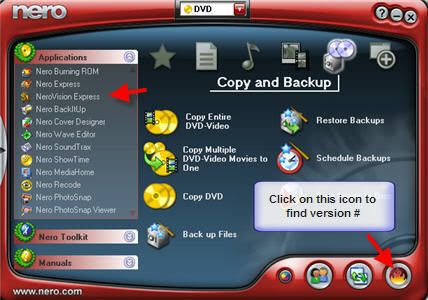
Which version of Nero do you have? Did it come w/ your drive or did you buy it separately?
You can check the product center to see which version you have.
When you open Nero's SmartStart -look for vision here (see pic below)


Forum Rules
Do this before posting
Do not click this link...

This message has been edited since posting. Last time this message was edited on 14. June 2006 @ 16:05

vcoz
Newbie
_
14. June 2006 @ 16:41 _ Link to this message    Send private message to this user   
After i sent you that email i downloaded Nero Vision Xpress.Things started to go well, untill the burning process was just about to finish and it shot up a message saying my 'the disk you are trying burn to is not suitable'. I was using a DVD-R.....
Thanks heaps for your assistance.
Moderator
_
14. June 2006 @ 17:19 _ Link to this message    Send private message to this user   
All is not lost yet!
You can post the last Nero log and we can take a look.
Looks like your using 6. Look here for the log:
Program Files>Ahead>Nero>NeroHistory.txt
If you using 7 it would be here:
Program Files>Nero>Nero 7>Core>NeroHistory.txt
Just be sure to edit out your serial # - they usually begin w/ 1A, 1C, 5C.
vcoz
Newbie
_
14. June 2006 @ 21:18 _ Link to this message    Send private message to this user   
I do that tonight, at work at the moment. So am i using the correct DVD's then? Gee i never realised how complex this stuff is....
Ill be in touch.
vcoz
Newbie
_
15. June 2006 @ 02:57 _ Link to this message    Send private message to this user   
ive had a look in program files and there is no sign of Nero. Going back on one of your previous questions, Nero was already installed when i purchased my PC (oem). Then a couple of nights ago i installed Nero digital (i think). Now i think not only have i confused myself....your going to be even further confused!
Moderator
_
15. June 2006 @ 14:29 _ Link to this message    Send private message to this user   
lol - we'll still try and get you burning!
Depending on the file size you may just need a cd.
But let's see if we can find the log - it's there somewhere.

My quess is your using 6 so go to your hard drive (usually c)- program files (sounds like you were on the right path)open the Ahead folder then Nero folder then scroll down and look for a file called NeroHistory.txt.
Check you version of Nero Burning also - you may need an update to that too.
vcoz
Newbie
_
15. June 2006 @ 16:27 _ Link to this message    Send private message to this user   
Cool. Will do it tonight...Ill be in touch. I owe you!
Advertisement
_
__
 
_
Moderator
_
15. June 2006 @ 16:40 _ Link to this message    Send private message to this user   
Nah - well at least not until we get this burned :0)

Remember to edit out the serial # too. Logs are separated by something like this - look fo the last one:
====== *** NeroAPI, History File *** ======
afterdawn.com > forums > software specific discussion > nero discussion > wmv
 

Digital video: AfterDawn.com | AfterDawn Forums
Music: MP3Lizard.com
Gaming: Blasteroids.com | Blasteroids Forums | Compare game prices
Software: Software downloads
Blogs: User profile pages
RSS feeds: AfterDawn.com News | Software updates | AfterDawn Forums
International: AfterDawn in Finnish | AfterDawn in Swedish | AfterDawn in Norwegian | download.fi
Navigate: Search | Site map
About us: About AfterDawn Ltd | Advertise on our sites | Rules, Restrictions, Legal disclaimer & Privacy policy
Contact us: Send feedback | Contact our media sales team
 
  © 1999-2026 by AfterDawn Ltd.

  IDG TechNetwork