|
Post your Nero cd/dvd speed quality scans here
|
|
AfterDawn Addict
4 product reviews

|
22. February 2007 @ 02:57 |
 Link to this message

|
well i swithced around the drives again to see if that made a differnece...NOT...wasted another TY.. so i put the original disc in the 18x drive to read and rip, then burned with the 16x liteon.. burnt the TY perfectly with no problem the 18x has... it will be going back today... heres the scan of the 16x liteon burn to TY media..
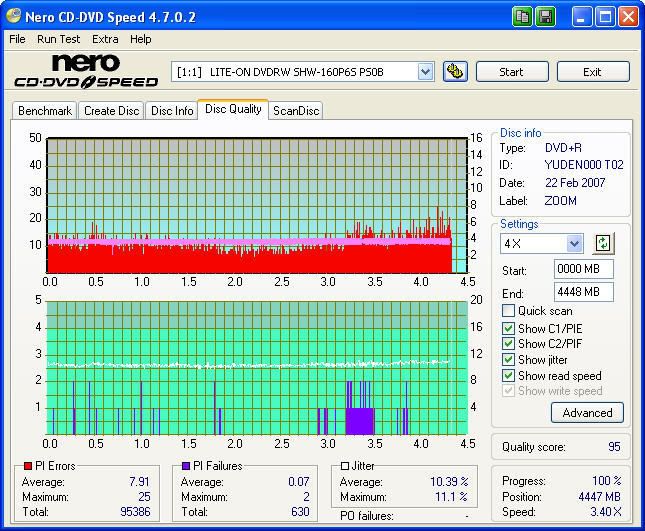
it dont have the great numbers that the 18x has had but its consistant and burns everything with every program i have....lol
|
|
Advertisement

|
|
|
|
AfterDawn Addict
4 product reviews
|
22. February 2007 @ 03:03 |
Link to this message
|
|
going to use the 18x litey to rip BABEL as a ISO and then use imageburn to burn a TY on the 18x drive
|
AfterDawn Addict
|
22. February 2007 @ 06:27 |
Link to this message
|
Did some more movies last and this morning. :)
MCC004, not to shabby and very consistent PIE's.

Ritek R03 typical scan for me on my system, little spike at about the 3 GB mark. :)

I wanted to post a typical scan by a TYG03 burned at 8X and 12X. I think the batch of TYG03's that I got "prefer" the 12X speed. ;-)Changed the color and the media type (TYG03) again just to give some comparisons. Whatcha think about the new colors cincyrob? Notice you been playin with the options tab too. LOL.
Burned at 8X on TYG03 with IMGBURN.

Burned at 12X on TYG03 with IMGBURN.

EDIT: I forgot throughout my posts to mention that I'm burning everything with a LITEON LH-18A1P and scanning with the same drive. HTH someone. ;-)
This message has been edited since posting. Last time this message was edited on 22. February 2007 @ 06:31
|
AfterDawn Addict
4 product reviews
|
22. February 2007 @ 06:39 |
Link to this message
|
|
got the 18x drive out and packaged up ready to be sent back got the HP back in ready to burn. did reorder another 18x drive. shoule have it monday or tuesday not sure yet.
|
AfterDawn Addict
|
22. February 2007 @ 09:03 |
Link to this message
|
I know that I'm driving you guys crazy with these things but cincyrob started it. :P
No really I'm posting a scan with Kprobe and a re-scan of the Home on the Range 98 scan just for comparisons sake and to get rob all excited on what he's missing out on. hehehe.
Kprobe, nice little scan except for the spike. :)

Nero, same thing and got a score of 98 rescanning which amazes me since these things very seldom return the same score especially on a 98. ;-)

I haven't watched this backup yet but I'm sure it's ok, I've had much worse looking scans and they played like a champ. :)
|
|
aabbccdd
Suspended permanently
|
22. February 2007 @ 09:03 |
Link to this message
|
|
lol @ you guys and your drives my PX-716As keep going and going and going , after about 2000 plus burns
|
AfterDawn Addict
|
22. February 2007 @ 09:13 |
Link to this message

|
yeh yeh yeh,
I have 7 drives now and the only 2 with more than 200 burns are the Pioneer 106D (retired with 1000+) and the LITEON SOHW-1693S with maybe 500+ burns. LOL. The LITEON is in my old Dell and I retired the Pioneer because the f/w is no longer updated, at least I couldn't find a newer version than 2004. Now the 1693S still burns/rips like a champ and it's performance drove me to try the LH-18A1P and the SHW-160P6S, both good drives btw. The other 3 are a Samsung S182D and 2 BENQ's DW-1650 & DW-1655. I've got plenty of drives now. rofl. Just need to do a new build to utilized what I got. LOL.
....gm
edit: Adding some scans. :)
A TYG02 just to show another TY disc. Not to bad but I think the DVD+R discs give better scores. Well at least with my system. :)

Nero CD/DVD Speed wouldn't even finish this disc so I tried Kprobe and it forced right on thru. This is a Verbatim DataLife (RitekG03) It's one of the kiddies backups so no big deal just make another one. ;-) For info this disc was one of the first backups I made, Jan 2004 I think. :)

This message has been edited since posting. Last time this message was edited on 22. February 2007 @ 19:55
|
AfterDawn Addict
4 product reviews
|
23. February 2007 @ 06:53 |
Link to this message

|
back to ole faithful SHW-160P6S.
did zoom minus extras... just over 3 gig mark... very very nice burn, yes onto my new 8x+r hubprintables... im a happy camper..lol
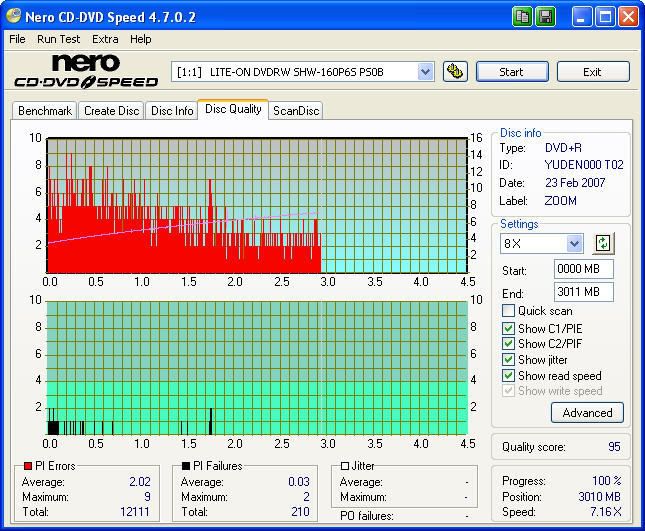
i did post this over in docTY's thread... i got a feeling after a few of this run through this drive its really gonna like these TY's.. might not buy anything but...lol(man still have 200 16x+r verbs)might have to have me a auction or something..lol.... NOT!!!! can never have enough of something so good...lol
|
|
Unjust2u
Member
|
23. February 2007 @ 10:54 |
Link to this message
|
Hello All . :) Well it's been awhile ,but i've been busy. anyways just bought some of the office depot 16x +r's, heres my first try on those. Did this movie at 8x on my NEC scanned on my Liteon. Getting ready to put in some new hard drives switching to sata then i can use my liteons for burning :) /Unjust


Unjust |
AfterDawn Addict
|
23. February 2007 @ 11:25 |
Link to this message
|
|
Unjust2u,
Which NEC are you using and do you use it to burn/rip in your system? Also what role does your LH-18A1P play in your setup? Just curious as to the great scans you have been getting and which drive you used to burn those scans. ;-) tia. :)
.......gm
|
AfterDawn Addict
4 product reviews
|
23. February 2007 @ 17:38 |
Link to this message
|
|
ill be leaving work here soon. gonna go home and burn a few.. will post the scans... talked to the UPS guy who comes here to my work, he lookedin his palmpilot and found my drive its comeing from columbus ohio to the sharonville UPS which is 2 hours drive.. said i might get it in the morning if the get it unloaded by midnight
|
AfterDawn Addict
|
23. February 2007 @ 19:02 |
Link to this message
|
Thought that I would post a quickie. LOL. Did this one this afternoon for the kiddies. ;-)

This is a normal scan on the MCC 004 Verb's. Not to bad but not as good as the YUDEN T02 imo. I may need to tweak the settings a bit to get a little better burn. :) Those 2 98's a day or so ago have me wanting more. O_o
|
AfterDawn Addict
4 product reviews
|
24. February 2007 @ 14:33 |
Link to this message
|
looks like i should just buy more TY's instead of another drive.. burnt on my liteon SHW-160P6S..
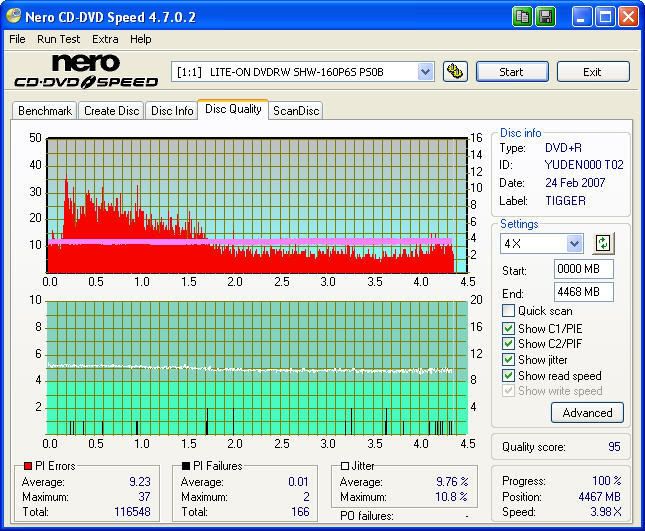
This message has been edited since posting. Last time this message was edited on 24. February 2007 @ 15:02
|
AfterDawn Addict
|
24. February 2007 @ 16:29 |
Link to this message
|
BIG ol HOWDY from Texas cincyrob,
Nice to see you posting again with some scans. :) Burned a couple on some MCC 003's, not as good as expected for great media but not crap fo sho. ;-)
Ripped to the HDD with RI4M then used Shrink to take out the unwanted stuff. Then burned with IMGBURN to the MCC 003.

Ripped to HDD with RI4M then burned with Nero Express directly from video files. Had one spiked area up to 3 but still a 93. :)

....gm
|
AfterDawn Addict
4 product reviews
|
24. February 2007 @ 16:52 |
Link to this message
|
|
Greensman
when you use ripit4me do you rip as a iso then run that through shrink then image burn?
|
AfterDawn Addict
|
24. February 2007 @ 17:36 |
Link to this message
|
I use RI4M to create a folder with the VIDEO_TS and AUDIO_TS files in the folder. Same thing on the DVD if you right click on the drive with the source DVD and left click explore. The only thing that will be different is if you didn't do entire DVD. Depends on what you choose; movie & menus, movie only, or all of the DVD.
You then can use DVDShrink, Nero Recode2/4, DVD-RB Pro, CloneDVD2, or the application of your choice to 'shrink' your movie if need be.
If you don't have to 'shrink' the movie you can use Nero Express to write/burn the Video Files from the HDD directly to a DVD-5 or if you please a DVD-9 if you like all the extras or have a large movie and don't want to loose quality with the compression tool of your choice.
NOW if you want to create an ISO image you can use IMGBURN, folder2iso, MagicISO, or what ever application you want to use and build the ISO. ;-) Then of course you take that ISO image and stick it in........OH sorry.....on a blank DVD with what ever burning program you want to use.
I know this was long-winded but it could have been A LOT LONGER. hehehe.
HTH in some way. If not I can direct you to some tutorials here at AD or help you in a PM. :)
.....gm
|
AfterDawn Addict
4 product reviews
|
24. February 2007 @ 17:45 |
Link to this message
|
|
no i understand all that i do it all the time. what im wanting to know is. you need a iso file to use with imageburn. you cant burn with imageburn unless its in the iso format. so i guess what i want to know is if you use RI4M and then use imageburn do you rip a iso with RI4M do you then run that through shrink ???i have only used imageburn a handfull of times so its still new to me
|
AfterDawn Addict
4 product reviews
|
24. February 2007 @ 17:57 |
Link to this message
|
here another scan. but on a MCC004(16x+r verb) i used CloneDVD to rip a ISO to my HDD, then used imageburnto burn the iso to disc..
got some high PIE's but low PIF's not a bad burn.
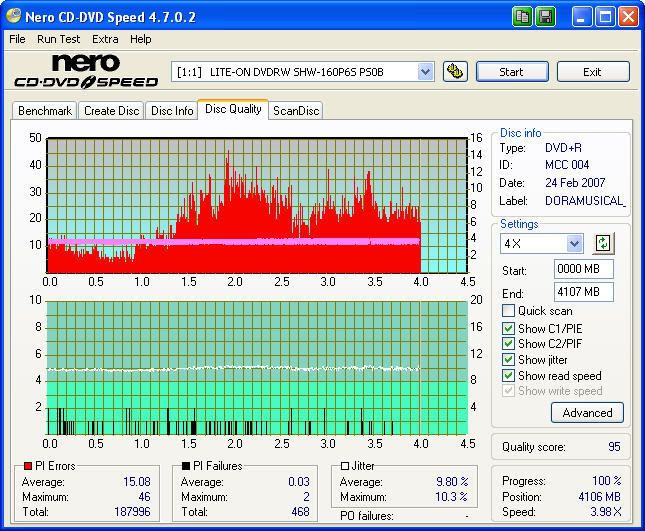
oh yea and burnt at 12x
This message has been edited since posting. Last time this message was edited on 24. February 2007 @ 17:59
|
AfterDawn Addict
|
24. February 2007 @ 18:32 |
Link to this message
|
|
A-ha.....lol
No I've never used RI4M to create an ISO. That would do the entire DVD which in my book defeats the purpose of movie and menu only. :) CloneDVD2 (what you use most of the time) will take out what you don't want and then create the ISO for you. I think that's right isn't it? ;)
Yes you are right about IMGBURN burning iso only, as far as I know. But most of the recoders will create the iso image for you or you can use the aforementioned iso builders to create that iso image and then burn with IMGBURN or any iso image burning progie.
......gm
Am I helping or just making matters worse? LOL.
|
AfterDawn Addict
4 product reviews
|
24. February 2007 @ 18:36 |
Link to this message
|
|
oh your a big help.. iwas just wanting to make sure i was correct in my thinking here..lol
i havent used dvdshrink alot either can you create a iso with it? might try it out now and see
|
AfterDawn Addict
|
24. February 2007 @ 19:00 |
Link to this message
|
Yep Shrink will do it. :P
Quick and dirty here:
Make sure you already have DVDDecrypter and DVDShrink installed. :)
Use RI4M 1-Click Mode, then choose movie & menus, start rip. RI4M will take it from there and create the folder on the HDD. When done RI4M will open up DVDShrink for you and then you can take out any extras that may be there, like extra audio or do movie only if you change your mind. lol. When Shrink is done there will be an ISO image wherever you designated it to go. And if you have the newest update/version of DVDShrink it will open IMGBURN and burn to DVD if you have one in. :)
Shrink link w/ IMGBURN
hth......
....gm
This message has been edited since posting. Last time this message was edited on 24. February 2007 @ 19:02
|
Moderator
|
24. February 2007 @ 19:50 |
Link to this message
|
@cincyrob
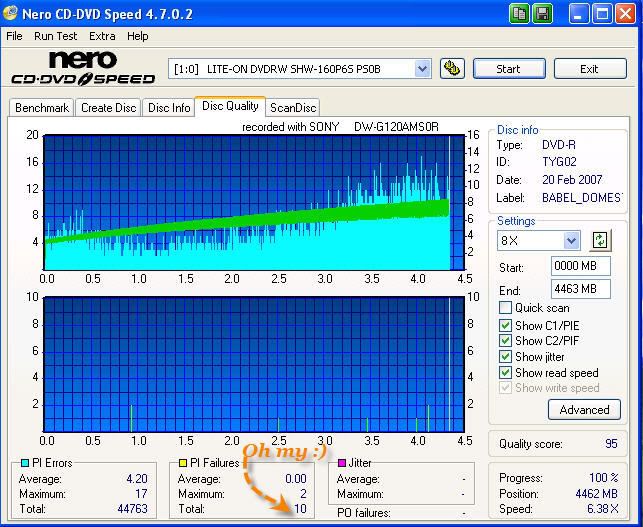
ImgBurn will do non iso files too - just use the build mode.
Here's one for your boys :) Burned on the external LiteOn to the edge and at 8x.
Great movie too!
|
AfterDawn Addict
4 product reviews
|
25. February 2007 @ 02:20 |
Link to this message
|
sweet scan binkie7 now your up there with unjust2u...lol
ive done that ,ocivelastnight havent watched it yet.
i need to do some reading on imageburn. so i an just rip movie to HDD regularly and imageburn burn the VOB files??
|
Moderator
|
25. February 2007 @ 12:59 |
Link to this message
|
Yep that's it - then you add the folder with the files in build mode.
Here's some screen shots from imgburn on the different modes. link
I was going to link you to a guide there but looks like the forum section where they are is down right now.
|
|
Advertisement
|
|
|
AfterDawn Addict
|
25. February 2007 @ 19:25 |
Link to this message
|
Hey there binkie7 nice to see you show us boys up like you don't anyway. ;-)
Took the rip and did an ISO build with IMGBURN then burned with IMGBURN and got this for a result on a YUDEN T02, man I love these things. :) Gonna miss 'em when they're gone. Is that the title of a song? lol.
Used RI4M to rip files to HDD then (since it was smaller than 4460MB) I built the ISO with IMGBURN and then wrote/burned the ISO with IMGBURN. Very nice results in my book. :) Not as good as Ms. binkie7 but I like it. ;-)

Per the forum rules established by Mr. cincyrob I waited the week to post another scan score of 98. roflmao........hehehe. Thought you might like this cincyrob since you waiting patiently for that new LITEY. ;-)
|




