User User name Password  
   
Friday 6.2.2026 / 16:36
Search AfterDawn Forums:        In English   Suomeksi   På svenska
afterdawn.com > forums > pc hardware > other pc hardware > disk drives arent there
Show topics
 
Forums
Forums
Disk Drives arent there
  Jump to:
 
Posted Message
Senior Member
_
16. August 2006 @ 07:26 _ Link to this message    Send private message to this user   
Hi, can anyone please help me?
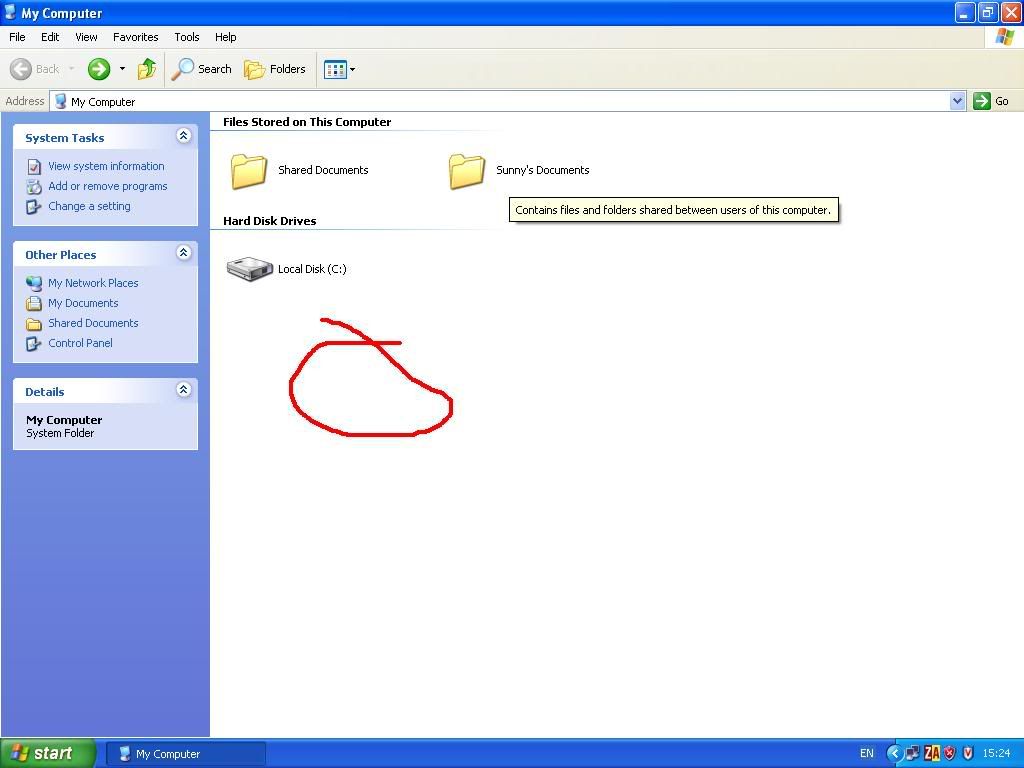
I have two Disk drives in my computer, and they show up on my computer but now suddenly they dont.
why?
I cant play games because they think there is no disc and stuff.
here is a screenshot you nkow the place where they are supposed to show you drives well its not showing them though it did show before.


Thanks in advance.

"He who asks is a fool for five minutes, but he who does not ask remains a fool forever." - Chinese Proverb BluRay.

This message has been edited since posting. Last time this message was edited on 15. September 2006 @ 10:03

Advertisement
_
__
ddp
Moderator
_
16. August 2006 @ 08:16 _ Link to this message    Send private message to this user   
what does it show in device manager? is there an error code like 39?
Senior Member
_
16. August 2006 @ 08:31 _ Link to this message    Send private message to this user   
I was just about to edit saying there is a error code saying "Windows cannot load the device driver for this hardware. The driver may be corrupted or missing. (Code 39)"I have tried doing this, but it never worked.
I went to device manager and i right clicked the name of the Disk Drive, which by the way had a yellow mark near it, i chose uninstall then restarted comp and i thought it would reinstall it or something but it still is the same.
@ddp yes, sorry i should have mentioned that there is a code sayind 39.

"He who asks is a fool for five minutes, but he who does not ask remains a fool forever." - Chinese Proverb BluRay.
ddp
Moderator
_
16. August 2006 @ 08:32 _ Link to this message    Send private message to this user   
Senior Member
_
16. August 2006 @ 08:41 _ Link to this message    Send private message to this user   
Thank you ddp, thank you very much, it worked, I just used that Guide thing they had, now I just need to know how to get rid of the automatic guide thing.

One more thing, did I place this thread in the correct room, or should I have posted it somewhere else?

"He who asks is a fool for five minutes, but he who does not ask remains a fool forever." - Chinese Proverb BluRay.
ddp
Moderator
_
16. August 2006 @ 08:50 _ Link to this message    Send private message to this user   
correct forum.what do you mean by get rid of the automatic guide thing?
Senior Member
_
16. August 2006 @ 10:48 _ Link to this message    Send private message to this user   
Automatic Guide Thingie
The link you gave me, it had a guide to follow to correct the problem, but rather then follow it they gave something that does it for you automaticaly which you had to download and run, I did that and it worked.

Thank You Very Much ddp.

Kind Regards BluRay

"He who asks is a fool for five minutes, but he who does not ask remains a fool forever." - Chinese Proverb BluRay.
Advertisement
_
__
 
_
ddp
Moderator
_
16. August 2006 @ 11:24 _ Link to this message    Send private message to this user   
teach & learn
afterdawn.com > forums > pc hardware > other pc hardware > disk drives arent there
 

Digital video: AfterDawn.com | AfterDawn Forums
Music: MP3Lizard.com
Gaming: Blasteroids.com | Blasteroids Forums | Compare game prices
Software: Software downloads
Blogs: User profile pages
RSS feeds: AfterDawn.com News | Software updates | AfterDawn Forums
International: AfterDawn in Finnish | AfterDawn in Swedish | AfterDawn in Norwegian | download.fi
Navigate: Search | Site map
About us: About AfterDawn Ltd | Advertise on our sites | Rules, Restrictions, Legal disclaimer & Privacy policy
Contact us: Send feedback | Contact our media sales team
 
  © 1999-2026 by AfterDawn Ltd.

  IDG TechNetwork