|
|
|
DVD burn error - "buffer too large"
|
|
|
luisramos
Newbie

|
19. August 2006 @ 08:41 |
Link to this message

|
Hello everyone!
Here is my problem.
I just bought a DVD-RW LG GSA 4166B, and this works fine to read DVDs, but when I try to write one, an error come out:

Here is the things I already tried:
- I tried to burn a DVD using the old and new driver (5.1 and 1.02)
- I updated the asp:
LOG0143: *****************************************************************
LOG0144: Starting ASPICHK installer on Sat Aug 19 13:37:18 2006
ASPICHK0438: OS = Windows NT (5.01.2600)
UPGRADE1004: c:\windows\system32\wnaspi32.dll dated 07/17/2002 12:20:56, 45056 bytes.
UPGRADE1062: c:\windows\system32\wnaspi32.dll version 4.71.2.0
UPGRADE1004: c:\windows\system\winaspi.dll dated 07/17/2002 19:22:26, 5600 bytes.
UPGRADE1062: c:\windows\system\winaspi.dll version 4.6.0.1021
UPGRADE1004: c:\windows\system32\drivers\aspi32.sys dated 07/17/2002 11:53:02, 16877 bytes.
UPGRADE1062: c:\windows\system32\drivers\aspi32.sys version 4.71.2.0
UPGRADE1004: c:\windows\system\wowpost.exe dated 07/17/2002 19:22:34, 4672 bytes.
UPGRADE1062: c:\windows\system\wowpost.exe version 4.6.0.1021
ASPICHK0522: Inconsistent version numbers among components
ASPICHK0592: ASPI installation has problems
LOG0218: Closing installer log on Sat Aug 19 13:37:18 2006
LOG0219: *****************************************************************
- I installed the IDETool and it's running as Ultra-DMA already
- I already saw all the threads about it (I made a search here and on google), and I spend a huge time reading all, but nothing worked.
What can I do?? I'm affraid that I'll need to buy a new one.
Thanks a lot!
|
|
Advertisement
|
 |
|
|
Moderator

|
19. August 2006 @ 10:20 |
Link to this message
|
Hi luisramos
1st make check your firmware and see if it is up tp date. NeroToolKit>Info Tool>drive tab. A field for the firmware version is there. The latest for you drive is 1.02.
http://forum.rpc1.org/dl_firmware.php?download_id=2209
For the aspi this is in your log: ASPICHK0592: ASPI installation has problems . You can also check to see if they are corrupted in InfoTool - click on the aspi tab.
What brand of media are you using?
Take it down to 4x and see if that helps.
If this fails - post the last failed log from Nero. Just be sure to edit out your serial # - usually begins w/ 1A,1C or 5C.
You can find them here: program files>Nero>Nero 7>Core>NeroHistory.
|
|
luisramos
Newbie
|
19. August 2006 @ 10:57 |
Link to this message

|
Thanks man!
How can I fix that aspi problem?
Check the infotool log out:

And I didn't found this "core".
Another problem came out: I can't update the firmware now. On the device manager, the version is 5.1, but on the updater says 1.02 already. What?


*EDIT: I fixed the aspi problem installing the old version:
LOG0143: *****************************************************************
LOG0144: Starting ASPICHK installer on Sat Aug 19 16:31:21 2006
ASPICHK0438: OS = Windows NT (5.01.2600)
UPGRADE1004: c:\windows\system32\wnaspi32.dll dated 09/10/1999 15:06:00, 45056 bytes.
UPGRADE1062: c:\windows\system32\wnaspi32.dll version 4.6.0.1021
UPGRADE1004: c:\windows\system\winaspi.dll dated 09/10/1999 15:06:00, 5600 bytes.
UPGRADE1062: c:\windows\system\winaspi.dll version 4.6.0.1021
UPGRADE1004: c:\windows\system32\drivers\aspi32.sys dated 09/10/1999 15:06:00, 25244 bytes.
UPGRADE1062: c:\windows\system32\drivers\aspi32.sys version 4.6.0.1021
UPGRADE1004: c:\windows\system\wowpost.exe dated 09/10/1999 15:06:00, 4672 bytes.
UPGRADE1062: c:\windows\system\wowpost.exe version 4.6.0.1021
ASPICHK0582: ASPI is properly installed and is fully operational. A total of 3 host adapters have been detected.
LOG0218: Closing installer log on Sat Aug 19 16:31:22 2006
LOG0219: *****************************************************************
Thanks a lot again!
This message has been edited since posting. Last time this message was edited on 19. August 2006 @ 11:32
|
Moderator
|
19. August 2006 @ 11:34 |
Link to this message
|
You aspi looks fine from InfoTool. None show as corrupted.
The firmware is good too - you have the latest version now - 1.02. The 5.01 driver is the windows driver (ok there too).
For the log go into your hard drive (usually c drive)>programs files.
then follow the path: Nero>Nero 7>Core>Nerohistory. It will be a text file.
The logs are separated by something like this:
====== *** Nero-Burning Rom, History File *** ======
Your serial # will be at the top - just be sure to edit it out - don't need someone else using it.
|
|
luisramos
Newbie
|
19. August 2006 @ 12:00 |
Link to this message
|
Here is the log:
luis ramos
*
Windows XP 5.1
IA32
WinAspi: File 'Wnaspi32.dll': Ver=4.60 (1021), size=45056 bytes, created 10/9/1999 12:06:00
ahead WinASPI: File 'C:\Arquivos de programas\Nero\Nero 7\Core\Wnaspi32.dll': Ver=2.0.1.74, size=164112 bytes, created 2/11/2004 13:54:32
NT-SPTI used
Nero Version: 7.2.3.2
Internal Version: 7, 2, 3, 2
Recorder: <HL-DT-ST DVDRRW GSA-4166B>Version: 1.02 - HA 1 TA 1 - 7.2.3.2
Adapter driver: <IDE> HA 1
Drive buffer : 2048kB
Bus Type : default (0) -> ATAPI, detected: ?
CD-ROM: <HL-DT-ST CD-RW GCE-8480B >Version: 1.03 - HA 1 TA 0 - 7.2.3.2
Adapter driver: <IDE> HA 1
=== Scsi-Device-Map ===
DiskPeripheral : Maxtor 6E040L0 NAR6 viadsk Port 0 ID 0 DMA: Off
DiskPeripheral : ST380011A 3.06 viadsk Port 0 ID 1 DMA: Off
CdRomPeripheral : HL-DT-STCD-RW GCE-8480B 1.03 viadsk Port 1 ID 0 DMA: Off
CdRomPeripheral : HL-DT-STDVDRRW GSA-4166B1.02 viadsk Port 1 ID 1 DMA: Off
=== CDRom-Device-Map ===
HL-DT-ST CD-RW GCE-8480B F: CDRom0
HL-DT-ST DVDRRW GSA-4166B G: CDRom1
=======================
AutoRun : 1
Excluded drive IDs:
WriteBufferSize: 74448896 (0) Byte
BUFE : 0
Physical memory : 511MB (523808kB)
Free physical memory: 146MB (149944kB)
Memory in use : 71
Uncached PFiles: 0x0
Use Inquiry : 1
Global Bus Type: default (0)
Check supported media : Disabled (0)
19.8.2006
ISO compilation
17:02:38 #1 Text 0 File Isodoc.cpp, Line 6427
Iso document burn settings
------------------------------------------
Determine maximum speed : FALSE
Simulate : FALSE
Write : TRUE
Finalize CD : TRUE
Multisession : FALSE
Burning mode : DAO
Mode : 1
ISO Level : 1 (Max. of 11 = 8 + 3 char)
Character set : ISO 9660
Joliet : TRUE
Allow pathdepth more than 8 directories : TRUE
Allow more than 255 characters in path : TRUE
Write ISO9660 ;1 file extensions : TRUE
17:02:38 #2 Text 0 File ThreadedTransfer.cpp, Line 531
ReadBuffer-Pipe got 72704KB of Memory
17:02:38 #3 Text 0 File Reader.cpp, Line 124
Reader running
17:02:38 #4 Text 0 File Writer.cpp, Line 113
Writer G: HL-DT-ST DVDRRW GSA-4166B running
17:02:38 #5 ISO9660GEN -11 File Geniso.cpp, Line 3312
First writeable address = 0 (0x00000000)
17:02:38 #6 Text 0 File Burncd.cpp, Line 3400
Turn on Disc-At-Once, using DVD media
17:02:39 #7 Text 0 File DlgWaitCD.cpp, Line 289
Last possible write address on media: 2298495 (510:46.45, 4489MB)
Last address to be written: 543663 (120:48.63, 1061MB)
17:02:39 #8 Text 0 File DlgWaitCD.cpp, Line 301
Write in overburning mode: NO (enabled: CD)
17:02:39 #9 Text 0 File DlgWaitCD.cpp, Line 2715
Recorder: HL-DT-ST DVDRRW GSA-4166B, Media type: DVD-R
Disc Manufacturer: GSC003 -
Disc Application Code: 64, Disc Physical Code: 193
17:02:39 #10 Text 0 File DlgWaitCD.cpp, Line 473
>>> Protocol of DlgWaitCD activities: <<<
=========================================
17:02:39 #11 Text 0 File ThreadedTransferInterface.cpp, Line 847
Setup items (after recorder preparation)
0: TRM_DATA_MODE1 ()
2 indices, index0 (150) not provided
original disc pos #0 + 543664 (543664) = #543664/120:48.64
relocatable, disc pos for caching/writing not required/ required, no patch infos
-> TRM_DATA_MODE1, 2048, config 0, wanted index0 0 blocks, length 543664 blocks [G: HL-DT-ST DVDRRW GSA-4166B]
--------------------------------------------------------------
17:02:39 #12 Text 0 File ThreadedTransferInterface.cpp, Line 1059
Prepare recorder [G: HL-DT-ST DVDRRW GSA-4166B] for write in CUE-sheet-DAO
DAO infos:
==========
MCN: ""
TOCType: 0x00; Session Closed, disc fixated
Tracks 1 to 1:
1: TRM_DATA_MODE1, 2048/0x00, FilePos 0 0 1113423872, ISRC ""
DAO layout:
===========
__Start_|____Track_|_Idx_|_CtrlAdr_|_RecDep__________
0 | lead-in | 0 | 0x41 | 0x00
0 | 1 | 0 | 0x41 | 0x00
0 | 1 | 1 | 0x41 | 0x00
543664 | lead-out | 1 | 0x41 | 0x00
17:02:39 #13 Text 0 File SCSIPassThrough.cpp, Line 39
SPTILockVolume - completed successfully for FCTL_LOCK_VOLUME
17:02:39 #14 Text 0 File SCSIPassThrough.cpp, Line 84
SPTIDismountVolume - completed successfully for FSCTL_DISMOUNT_VOLUME
17:02:39 #15 Phase 24 File dlgbrnst.cpp, Line 1730
Caching of files started
17:02:39 #16 Text 0 File Burncd.cpp, Line 4231
Cache writing successful.
17:02:39 #17 Phase 25 File dlgbrnst.cpp, Line 1730
Caching of files completed
17:02:39 #18 Phase 36 File dlgbrnst.cpp, Line 1730
Burn process started at 4x (5.540 KB/s)
17:03:09 #19 Text 0 File ThreadedTransferInterface.cpp, Line 2707
Verifying disc position of item 0 (relocatable, disc pos, no patch infos, orig at #0): write at #0
17:03:09 #20 Text 0 File DVDR.cpp, Line 2869
Recording mode: Sequential Recording Mode
17:03:09 #21 Text 0 File DVDR.cpp, Line 3025
Start write address at LBA 0
DVD high compatibility mode: Yes
17:03:09 #22 Text 0 File Cdrdrv.cpp, Line 8995
---- DVD Structure: Physical Format Information (00h) ----
Media Type: 0, Layer: 0, Address: 0 (0 h), AGID: 0; Length: 2050
Book Type: DVD-R (2), Part Version: 2.0x (5), Extended Part Version: 0.0 (0)
Disc Size: 120 mm, Maximum Rate: <not specified> (F h)
Number of Layers: 1, Track Path: Parallel Track Path (PTP), Layer Type: recordable
Linear Density: 0,267 um/bit, Track Density: 0,74 um/track
Starting Physical Sector Number of Data Area: 30000 h (DVD-ROM, DVD-R/-RW, DVD+R/+RW)
End Physical Sector Number of Data Area: 26127F h
End Sector Number in Layer 0: 0 h (LBN: FFFD0000 h, 4193920 MB)
Data in Burst Cutting Area (BCA) does not exist
Start sector number of the current Border-Out: 2FE10 h
Start sector number of the next Border-In: 2FFA0 h
Media Specific [16..63]:
00 20 01 02 04 06 08 00 - 00 00 00 00 00 00 00 00 ................
00 02 FE 10 00 02 FF A0 - 00 00 00 00 00 00 00 00 ................
00 00 00 00 00 00 00 00 - 00 00 00 00 00 00 00 00 ................
17:03:12 #23 SPTI -31 File SCSIPassThrough.cpp, Line 291
G: CdRom1: SCSIStatus(x00) WinError(87) NeroError(-31)
Sense Key: 0x00 (KEY_NO_SENSE)
Sense Code: 0x00
Sense Qual: 0x00
CDB Data: 0x2A 00 00 00 00 00 00 00 20 00 00 00
Sense Area: 0x00 00 00 00 00 00 00 00 00 00 00 00 00
Buffer x0a7e0000: Len x10000
0x00 00 00 00 00 00 00 00 00 00 00 00 00 00 00 00
0x00 00 00 00 00 00 00 00 00 00 00 00 00 00 00 00
0x00 00 00 00 00 00 00 00 00 00 00 00 00 00 00 00
17:03:12 #24 SPTI -31 File SCSIPassThrough.cpp, Line 291
G: CdRom1: SCSIStatus(x00) WinError(87) NeroError(-31)
Sense Key: 0x00 (KEY_NO_SENSE)
Sense Code: 0x00
Sense Qual: 0x00
CDB Data: 0x2A 00 00 00 00 00 00 00 20 00 00 00
Sense Area: 0x00 00 00 00 00 00 00 00 00 00 00 00 00
Buffer x0abb3e00: Len x10000
0x00 00 00 00 00 00 00 00 00 00 00 00 00 00 00 00
0x00 00 00 00 00 00 00 00 00 00 00 00 00 00 00 00
0x00 00 00 00 00 00 00 00 00 00 00 00 00 00 00 00
17:03:12 #25 Text 0 File MMC.cpp, Line 19747
Writer-Buffer for G: HL-DT-ST DVDRRW GSA-4166B reduced to 32768Bytes
17:03:12 #26 SPTI -31 File SCSIPassThrough.cpp, Line 291
G: CdRom1: SCSIStatus(x00) WinError(87) NeroError(-31)
Sense Key: 0x00 (KEY_NO_SENSE)
Sense Code: 0x00
Sense Qual: 0x00
CDB Data: 0x2A 00 00 00 00 00 00 00 10 00 00 00
Sense Area: 0x00 00 00 00 00 00 00 00 00 00 00 00 00
Buffer x0abb3e00: Len x8000
0x00 00 00 00 00 00 00 00 00 00 00 00 00 00 00 00
0x00 00 00 00 00 00 00 00 00 00 00 00 00 00 00 00
0x00 00 00 00 00 00 00 00 00 00 00 00 00 00 00 00
17:03:12 #27 CDR -31 File Writer.cpp, Line 302
Buffer too large
G: HL-DT-ST DVDRRW GSA-4166B
17:03:12 #28 Text 0 File ThreadedTransfer.cpp, Line 228
all writers idle, stopping conversion
17:03:12 #29 Text 0 File ThreadedTransfer.cpp, Line 222
conversion idle, stopping reader
17:03:13 #30 Text 0 File DVDR.cpp, Line 3265
EndDAO: Last written address was -1
17:03:13 #31 Phase 38 File dlgbrnst.cpp, Line 1730
Burn process failed at 4x (5.540 KB/s)
Existing drivers:
File 'Drivers\ASPI32.SYS': Ver=4.60 (1021), size=25244 bytes, created 10/9/1999 12:06:00
File 'Drivers\PXHELP20.SYS': Ver=2.03.28a, size=20640 bytes, created 5/12/2005 03:12:26 (Prassi/Veritas driver for win 2K)
Registry Keys:
HKLM\Software\Microsoft\Windows NT\CurrentVersion\WinLogon\AllocateCDROMs : 0 (Security Option)
====== *** Nero Burning ROM, History File *** ======
Thanks!
This message has been edited since posting. Last time this message was edited on 19. August 2006 @ 12:05
|
Moderator
|
19. August 2006 @ 13:01 |
Link to this message

|
|
|
luisramos
Newbie
|
19. August 2006 @ 13:10 |
Link to this message
|
Thanks man, I'll try to use the clean pack.
And I already did the uninstallation of the IDE, but when I uninstall the secondary (the only that it can be done), all the drivers (CD-RW and the DVD-RW), disapear! And them I install the "IDE_MPD3014" file (that I download a time ago, to fix some HD problems), the drivers appears again. So I can't do the same way that tutorial does.
I don't know what to do, I'm desperate!
Thanks for your help!
|
|
luisramos
Newbie
|
19. August 2006 @ 13:31 |
Link to this message
|
|
Still nothing. I tried to use the clean, but nothing.
I tried to install the 1.01 version, instead of 1.02, but nothing, an IDE error come out, and when the installation finished, nothing happens.
There is some chance to work with the 1.01 driver? How can I install that, because when I unninstall the DVD-RAM, and reboot, the windows automatically install the 1.02 version.
Thanks.
|
Moderator
|
19. August 2006 @ 13:50 |
Link to this message
|
|
Ok the 1.01 I think you're talking about is the firmware - the version you have 1.02 is the latest and is in the drive's memory. You are okay there.
Anything change pc wise at all since you were last able to burn dvd's besides getting a new drive?
|
|
luisramos
Newbie
|
19. August 2006 @ 14:29 |
Link to this message
|
|
This drive is new, I bought yesterday, and since I put on the pc, I couldn't bur any DVD. I never burn with this drive and nothing else on the pc have changed.
I think there is no way to burn with this drive, maybe it's broken. Is possible that you can do anything but burn a dvd with a drive?
And another thing, I have only 1,34gb free on the drive C:, 1,01gb on D: and 812mb on E:, that can influence?
Thanks.
This message has been edited since posting. Last time this message was edited on 19. August 2006 @ 14:43
|
Moderator
|
19. August 2006 @ 15:06 |
Link to this message
|
I don't think the drive/burner is broken - more of a conflict w/ the pc probably.
The hard drive space may come into play - not a whole lot left free.
Delete anything you no longer need, run a disc cleanup than do a system defrag.
Also try this registry cleaner (free):
http://www.ccleaner.com/
What are you trying to burn? Might want to try another burn program or take Nero down a step.
|
|
luisramos
Newbie
|
19. August 2006 @ 15:16 |
Link to this message
|
|
I'm trying to burn some files, some are .iso and .avi. I tried to burn a 500 mb file only, but nothing.
I'll delete some files, and defrag the disk. I already use ccleaner.
I'll try to burn an image disc, and try another software too.
Thanks.
|
Moderator
|
19. August 2006 @ 15:36 |
Link to this message
|
Here's a free one to try - imgburn for the iso. Program only takes up 1.07 mbs.
http://imgburn.com
Keep us posted
|
|
luisramos
Newbie
|
19. August 2006 @ 16:09 |
Link to this message
|
It worked!!
Thanks for you attention man! Very good software, on Alcohol it doesn't work, but with this one, worked perfectly!
But why I can't burn data with Nero? Very strange.
Thanks man!
|
Moderator
|
19. August 2006 @ 16:21 |
Link to this message
|
Yeah at least some progress :)
ImgBurn is a less complicated burner.
So Nero and Alcohol both give you a buffer too large error?
Most of what I found on your error - all dealt w/ Nero from version 6 on up and Via chipset giving this error - driver conflicts. Most said the windows drivers fixed it instead of the via drivers. You could try and update the driver for via controllers and see if that makes a diff.
Or try another version of Nero - if interested.
Do you have any other burning software for data?
|
|
luisramos
Newbie
|
19. August 2006 @ 16:33 |
Link to this message
|
Nero gives me the "large buffer", but Alcohol just ignore the disc.
I've updated the via controllers too, I installed the "VIA_HyperionPro_V509A".
I don't know why I can't burn on Nero, I thougt the problem was the DVD drive, but since I successful burned the image on imgburn, I don't have any idea about what can be wrong. And I don't have another for data, are you recommend one for test?
Thanks.
|
Moderator
|
19. August 2006 @ 17:07 |
Link to this message
|
|
|
luisramos
Newbie
|
19. August 2006 @ 20:54 |
Link to this message
|
I tried, but it didn't worked :(.
I made it following these steps, and using this version of Nero, but nothing. I don't know what to do, and I can't format the pc, because I need to save some files on DVD before format.
Thanks a lot!
|
Moderator
|
19. August 2006 @ 21:42 |
Link to this message
|
I'm thinking a reformat may be your best option. I don't think this is a drive issue - another may give you the same problem.
Same error w/ the earlier version of Nero?
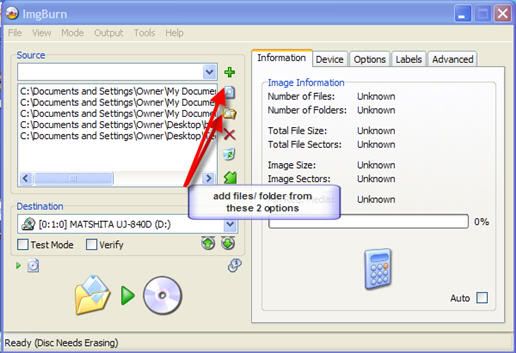
I did a little test w/ ImgBurn's new option 'build'. Looking like you can get the files you need off you hard drive you need via ImgBurn.
In ImgBurn go to mode>build. Add your files & folders then click the burn button. I was able to burn different files types and folders.
One caveat it did hang on me when done writing - using a crappy rw disc. Cancelled but was able to put the disc back in and see & open all the files I burned to it.
|
|
luisramos
Newbie
|
21. August 2006 @ 09:26 |
Link to this message
|
|
Thanks man! It worked perfectly! This is a very good software!
I'll reformat my pc this week, and I'll come back here to say if it worked or not.
Thank you very much for your attention man, this forum is very cool!
|
Moderator
|
21. August 2006 @ 16:51 |
Link to this message
|
|
No problemo luisramos :)
Yep ImgBurn is a great burner!
Keep us posted - good, bad or otherwise.
|
|
luisramos
Newbie
|
27. August 2006 @ 11:04 |
Link to this message
|
|
It worked! I reformated my pc, and everything is normal now. The problem was really on the files, and the reformat fixed it!
Thanks for your huge help man, thank you very much!
|
|
Advertisement
|
|
|
Moderator
|
27. August 2006 @ 13:29 |
Link to this message
|
You're very welcome luisramos :)
Good to here it's sorted out and you can burning w/ Nero.
|
|



