|
Nero 3.2.3.2 error burns?
|
|
|
rc1489
Member

|
16. July 2007 @ 15:35 |
Link to this message

|
|
|
|
Advertisement
|
 |
|
|
Moderator
|
16. July 2007 @ 15:50 |
Link to this message

|
I think I'm following you - you mean ffdshow?
That's a codec pack that will give pretty much all you'll need - well at least in my experience and needs :)
|
|
rc1489
Member

|
16. July 2007 @ 18:54 |
Link to this message
|
|
no, the one for media classic.
|
Moderator
|
16. July 2007 @ 19:44 |
Link to this message

|
Ok here's the link for media classic - link.
But if the files not play, there's no audio or made playback then you may need addt'l codecs installed - that's where ffdshow comes in.
Media Classic doesn't have a separate download for any addt'l codecs it might need.
|
|
rc1489
Member
|
17. July 2007 @ 17:28 |
Link to this message
|
I downloaded media classic last night, , it only is in a "file format" not a program, when i use it it says do you want to run this file? yes, then you open it in a 3 or 4 x 4 window to enlarge, then browse for the files you want, both format and your own, some open better than others, one froze, and i had to shut the system down unplugging the power. is this the way this is supposed to be installed and run? not real impressed. If i drag and drop them they play, but hardly get them open by browsing.
Media Player Classic [version 6.4.9.0 rev 611]
i installed it from a link on afterdawn.
it is not under program files, when downloading i asked to save it to desktop being i could scan it first, then install it, is it supposed to be under programs or just run as a file? there was no install to it.
either i need uninstall it and get the right link or the right link for the codecs?
vista home premium 32 bit
needed for .mov files
This message has been edited since posting. Last time this message was edited on 17. July 2007 @ 17:33
|
Moderator
|
17. July 2007 @ 18:03 |
Link to this message
|
Ok I just downloaded it - you just run the file will you want to use it.
No install involved so if you don't want it just delete it.
I opened an avi in it with the 'quick open file'. Find on this end but I'm not running XP or trying an mov files.
I can't find where ffdshow has support for mov files but that's not saying it might not. If you have QuickTime installed that would have the codecs already. I'm also not running into much luck finding a codec pack that is Vista compatible and also says it supports mov files.
|
|
rc1489
Member
|
17. July 2007 @ 18:37 |
Link to this message
|
so the alternative for quicktime does not have codecs for media classic player for vista home premium? so if you are not running vista home premium or do not have .mov files, then i am just grasping at straws? is there a way i can post a jpeg to show you what quicktime looks like when i ope it outside of easy share software?
This message has been edited since posting. Last time this message was edited on 17. July 2007 @ 18:40
|
Moderator
|
17. July 2007 @ 19:01 |
Link to this message
|
No not really grasping at straws :)
Same concept on XP as Vista just need to find ones compatible for you and your set up.
Yes you can post a pic. You'll need to upload it to a server like photobucket.com then post the url to it. When you click 'reply' here there are instructions on how to post the picture.
|
|
rc1489
Member
|
17. July 2007 @ 19:49 |
Link to this message
|
|
deleted
This message has been edited since posting. Last time this message was edited on 17. July 2007 @ 20:41
|
Moderator
|
17. July 2007 @ 20:07 |
Link to this message
|
Nope nothing - remember you need to upload it to a site like photobucket then get the url for the image.
When you reply again the instructions will be there on posting the pic.
You can also click on the add image icon (2nd from right) - just remove the [IMG] tag's that photobucket creates.
|
|
rc1489
Member
|
17. July 2007 @ 20:26 |
Link to this message
|
|
i have a link there but have only used it once in 2 years, which one do i put the radio dot in ?
please delete if it doesn't work.
This message has been edited since posting. Last time this message was edited on 18. July 2007 @ 14:41
|
Moderator
|
18. July 2007 @ 13:36 |
Link to this message
|
I can't delete the post - only you can edit it :)
The photo album is private in your link - good thing.
Pick the picture then down the bottom click 'generate html and img code'.
Copy and paste in your post the one from 'img for message boards'
Change the img tags ([IMG] & [/IMG]) to lower case.
|
|
rc1489
Member
|
18. July 2007 @ 14:44 |
Link to this message
|
|
can you do an example, i looked at it last night but the link i was getting was in the address bar? vista home premium, google tool bar, thats the way it comes now,
|
Moderator
|
18. July 2007 @ 15:22 |
Link to this message
|
|
Ate you having problems getting a screen pic or posting the screen pic to show in your post?
|
|
rc1489
Member
|
18. July 2007 @ 15:34 |
Link to this message
|
just trying to figure it out, only used it a year ago,
this is how quick time looks if i open it outside of kodak easy share, if i open it in easy share it's ok, but screen will not enlarge
try this

This message has been edited since posting. Last time this message was edited on 18. July 2007 @ 15:37
|
Moderator
|
18. July 2007 @ 16:06 |
Link to this message
|
Yeah that's pretty crappy looking.
Hmmm do you have the latest version of Quicktime - 7.2 I think it is.
What's the source of these files?
|
|
rc1489
Member
|
18. July 2007 @ 16:29 |
Link to this message
|
7.1.5 version, .mov's from dowmload from my kodak dx 6490 camera, files in various places on pc, folders, also on cd's- dvd's
i was told that quicktime was not compatible with vista yet?
checkthis out== http://www.geekzone.co.nz/hadders/2273
i can not ge an email to nero without a serial # regards buying the plugin, unless you know how?
google in quicktime for vista, see what you see that i did, more than this
thanks
i think i am going to convert the .mov files, so what s the best format to convert them to, what player for the pc is best, vista home premium os, and to be able to play them in a dvd plater for tv also.
thanks
This message has been edited since posting. Last time this message was edited on 18. July 2007 @ 17:28
|
Moderator
|
18. July 2007 @ 19:07 |
Link to this message
|
Hmmm Apple list Quicktime as being Vista compatible.
In the link you gave - that person used QuickTime Alternative and it worked for them but I didn't see Vista listed as being supported. Go figure :)
See my post a couple back on where to find the serial # for Nero. You would use that one.
I'd give DivXtoDVD a go on them. It will convert them to the right format to play on a dvd player.
|
|
rc1489
Member
|
18. July 2007 @ 19:35 |
Link to this message
|
What happens if i down load this, do i have to unistall what i have or what kind of a mess would that be?
vista home premium, and still for the .mov file
http://www.nero7.info/?gclid=CNWHsoLHso0CFQGPWAodl2zo0Q
why will quick time not play my .mov files, only under the sample i posted, when i open them with a default choice, and not in easy share software?
thanks
afer i read this it soumds like mu;tiple files can not be burned to dvd?
VSO DivxToDVD guide
At the time of writing VSO Software are offering a free program called VSO DivxToDVD to quickly and easily encode files to DVD. DivxToDVD accepts many different formats including AVI (DivX/XviD), MPEG files, VOB files, MOV files AMV and DV files. The program only has a few steps and will create a VIDEO_TS folder for you for your encoded files to be easily burned to DVD. Quote:
While the program at this time does support encoding multiple files and putting them on the same DVD, it does not yet have the ability to create a menu to allow you select separate files, which can cause some playback problems with some DVD Players.
DivxToDVD will also encode your audio files to 2CH AC3 format, which is a better option than MP2 for NTSC DVD's.
This message has been edited since posting. Last time this message was edited on 18. July 2007 @ 19:40
|
Senior Member
|
18. July 2007 @ 19:54 |
Link to this message
|
If you wish to convert your mov files to avi here's a free program called MP4Cam2AVI to try, no codecs needed (link)
Supposed to be a lossless conversion. Haven't tried it myself but I think I will, I'm not a big fan of quicktime.
|
Moderator
|
18. July 2007 @ 19:57 |
Link to this message
|
That's not the Nero official site so I wouldn't download anything from there. It looks really bogus.
Nero's Official Site.
You can add multiple files in DivX - just keep clicking on the folder to add more. You won't have a menu though.
|
|
rc1489
Member
|
19. July 2007 @ 12:34 |
Link to this message
|
i got this from Nero, Apparently the nero i have is nero essentials
any thoughts
----------------------
thank you for your e-mail.
Do you already own a serial number for Nero 7? { NO}
If so you need to enter the serial number into Nero 7 StartSmart to inlock the trial version.
Please enter the serial number in version 7.5.1.1 or higher by the following way:
Launch Nero StartSmart and open the Nero ProductCenter by clicking
on the 'Nero' logo in the upper left corner. The Nero ProductSetup opens. Click on "License" on the left side, click on the "add" button and then you can enter your serial number.
Did you lost your serial number for Nero ? {DID NOT HAVE}
"You can find your Nero 7 serial number on a white sticker on the back of the cd cover. " {NONE}
"If you do not have this cover anymore, a reinstallation of Nero 7 is only possible, if you saved the serial number yourself or registered it on www.nero.com. "
In this case please login with your email address and password.
https://register.nero.com/eng/login1.asp?rpid=not_logged_in_sn
Please click the link "Resend order mail" and you will receive the order confirmation which includes your serial number again by e-mail.
"We do not have any record of the serial numbers of CD versions, because of the individual packages. "
There is no automatic online registration by installing the product on your PC.
Should you have any further queries, please do not hesitate to contact us again.
Yours sincerely,
http://www.nero.com
________________________________________________
My Nero - As a member of our online community, you can create your own blog and upload videos!
Curious? Find more information here:
http://my.nero.com/
|
Moderator
|
19. July 2007 @ 13:44 |
Link to this message
|
Ok if everything is functionally in Nero except Vision and probably Recode (your getting the trial expired on these) then looks like you do have Nero Essentials.
So you would have a serial # - see this post on where to find it - link
I could be wrong but I don't think you need the serial # to buy the plug-in. Try this link to buy the plug-in - link.
It from the US site. If it doesn't work then go to nero.com - click on buy now - scroll down to the dvd plug in to buy.
What did the builder tell say you have with nero?
|
|
rc1489
Member
|
19. July 2007 @ 17:50 |
Link to this message
|
I'm not pleased with the builder-- no comments
i found this under regedit
OS_MajorVersion REG_DWORD 0X00000006 (6)
OS_MinorVersion REG_DWORD 0X00000000(0)
DEFAULT REG_SZ
NO SERIAL 7 FOUND
I saw a list of plugins there whie i was looking around, but not knowing -what-
|
|
Advertisement
|
|
|
Moderator
|
19. July 2007 @ 18:31 |
Link to this message
|
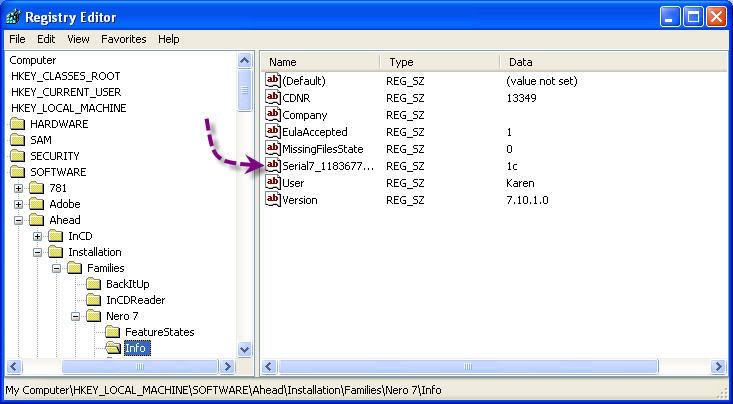
Ok - follow that path in regedit to find the serial #.
Here's a pic which shows the path also - for obvious reasons :) the serial has been erased in this pic. Even trials have serial #'s.
|





