|
7.5.7.0 now available
|
|
|
Platy767
Member

|
17. October 2006 @ 04:52 |
 Link to this message

|
|
|
|
Advertisement
|
 |
|
|
AfterDawn Addict
|
17. October 2006 @ 09:34 |
Link to this message

|
Thanks for the update. I personally don't think people should be budging from 7.8.0.2 (i think that is it - can't remember off the top of my head) the most stable version of Nero 7. That's until this one is tried and tested.
Me, I use Nero 6 so couldn't care less, but thanks anyway. :)
|
AfterDawn Addict
|
17. October 2006 @ 13:27 |
Link to this message

|
|
@Ripper , There has been a few versions released since 7.0.8.2 that are as stable , if not more stable than 7.0.8.2, one being 7.2.7.0.
|
Moderator
|
17. October 2006 @ 15:43 |
Link to this message
|
|
Yep I hate it when they don't put release notes out. I think this one may support Vista but I have no plans in the near future of using Vista :)
Downloaded the latest night just haven't installed it yet.
|
|
janshim
Newbie
|
17. October 2006 @ 15:58 |
Link to this message
|
I've read in more places than one that 7.0.8.2 is the "most stable" version of Nero 7. I use Nero Vision 4 heavily for my DVD Authoring needs and wonder if anyone knows which version is the most stable. It's unfortunate Nero doesn't release component updates that you can install with 7.0.8.2 for instance.
Are there third party plugins/effects for Vision 4? I googled this and found none.
|
Moderator
|
17. October 2006 @ 17:01 |
Link to this message
|
|
hmmm for the effects like animated templates, buttons etc I just downloaded Nero's template package.
If I want something different I usually just download an image and tweak it in paint shop.
Most stable version of Vision - well I use it frequently not heavily but imho stick w/ what works for you and your needs.
If it ain't broke don't fix it :)
|
Senior Member
|
17. October 2006 @ 17:35 |
Link to this message
|
|
I'm still happy with 7.5.1.1,
waiting on the good word from Binkie or Gwen to say it is safe to further upgrade.
|
Moderator
|
17. October 2006 @ 17:46 |
Link to this message
|
|
lol - just updated to 7.5.7.0 tonight from 7.5.1.1. Should have installed it earlier today but oh well I'll have some more dvd's to do tomorrow :)
|
|
janshim
Newbie
|
17. October 2006 @ 18:13 |
Link to this message
|
I'm running Nero 7.2.0.3b a version that is seen to be most stable in some camps not found on Google. I produce a lot of DVD for my corporate clients. The MPEG2 files are produced in CodeJam's MOTV PRO 3.1.4 and then imported into Vision 4 where the rest of the magic begins and ends in High Quality, Dolby Digital AC-3 2.0, 2-pass burns.
All this work is produced on a Dell Dimension 9150, P4 3.0GHz Dual Core, 256Mb nVidia GF 6800, 2GB RAM, 24-inch Wide LCD and Windows XP PRO SP2. Burner is a HL-DT-ST DVD +-RW GWA4164B. Before I begin the trancoding process, I disable LAN, disable AVAST Pro antivirus, disable SpyStopper Pro but leave System Restore running.
Because of limited printable choices we have in my country, I use IMATION 8X White printable DVD-R. I produce High Definition DVD Slideshows for my clients and my work includes printing DVD labels as much as making sure the end result is excellent. What I've noticed when playing back on a Philips DVP 3005 DVD player is there are instances where the screen would pause for a good 2-3 seconds than continue playing whereas on a Philips 625K player it's smooth sailing. I've also been lead to believe that in this business with so many different player specs involved, it's impossible to expect a perfect play ?
If there's anything you think I'm doing wrong feel free to let me know. There are factors such as availability of better DVD media, or better DVD burner that are out of my reach.
|
Moderator
|
17. October 2006 @ 18:56 |
Link to this message
|
Quote:
I've also been lead to believe that in this business with so many different player specs involved, it's impossible to expect a perfect play ?
100% of the time on all the different player specs - yes almost impossible even using the best media.
Dusty lens on a players for one thing can cause skipping/pausing. Something out of your control.
Imation uses different manufacturers so you never really know who may be manufacturing the discs and the quality control like the dye application.
An imperfection in the dye or applicaton of it - even unseen to our eye - can cause playback problems. Some players lens may pick right up on it while others will just pass over it w/o a hitch.
Too bad you are limited on the availability of printable discs - Taiyo Yudens would be the ones to use to help reduce chances of problems.
The only suggestions might be to take the burn speed down a notch if burning at max speed and keep the firmware of the drive up to date. Dell would be the ones supporting the drive.
|
Senior Member
|
17. October 2006 @ 18:59 |
Link to this message
|
|
Nope, your problem is most likely caused by poor media, try burning he disks at one half the rated speed of the disk to improve the chances of a good burn, secondly try not to burn to the edge of the disk, limit the size of the project if at all possible. Defrag your harddrive whenever possible, everything else you seem to be doing fine with.
|
|
ford074
Junior Member
|
18. October 2006 @ 04:41 |
Link to this message
|
|
This version does indeed work with Vista Beta 2 (5744). Now if I could just get my new HP3180 printer to work it would all be good.
|
|
rayrou
Newbie
|
18. October 2006 @ 05:30 |
Link to this message
|
With this version, the «Book type» selection is gone in NV4. So it doesn't work for me since the only setting my machine accept is «actual burner» (or something like that in english. All other settings, like «automatic» for example, make a failed burned. Had the same prob with Nero 6, i.e. NV3.
|
AfterDawn Addict
|
19. October 2006 @ 20:24 |
Link to this message
|
So far, I'm good with the new Nero 7.5.7.0. I haven't had/experienced any issues (bugs) yet. I'll try more applications and report back. But then again, I guess I'm the few that never had any issues regardless if it's Nero Burning Rom, Nero Express, Nero Vision, Nero Recode/Digital and Nero ShowTime.
|
AfterDawn Addict
|
19. October 2006 @ 20:41 |
Link to this message
|
Thats it folks, if alkohol is using 7.5.7.0 then
IT IS SAFE TO UPGRADE!!!
This member certainly knows about Nero.
|
Moderator
|
19. October 2006 @ 21:21 |
Link to this message
|
@gwen
Ready to upgrade to the newer 7? (or maybe you have I'm just lost :0)
@alkohol
I never had burns fails or have coasters (playback) when do the 1 or 2 copies option w/ the early versions of 7. If I put more than 2 copies under number of copies (cd or dvd) after 2 burns Nero would just crash. or throw out a c++ error (hmmmm).
What also surprised me after using Nero for years - was when I switched to 7 the mp3 audio conversion - sucked - skipped, scratchy sounding. That's why I started using Nero back in the day.
Now I could get rid of the version I was using & go back to 6.6.0.18 and all was right again. Same pc/drives - clean too built just to do the dvd/cd stuff.
The later versions of 7.2 on have stopped these 2 pains for me (of course I did bug them with emails too not like they made the fixes any faster but they finally said they 'thought' they found the problem since they could reproduce it)
|
|
janshim
Newbie
|
19. October 2006 @ 22:04 |
Link to this message
|
I upgraded to 7.5.7.0 two days ago, cannot produce any constructive reports yet as I've not used it for any critical work. This morning, I ran Convert Audio CDs to Audio Files, chose mp3/mp3PRO, Settings, Encoding Quality=Highest, noticed the Enable mp3PRO checkbox had a tick but strange thing is this-the highest quality is 96 kbit, 44100 Hz, Stereo whereas if I uncheck the box, 320kbit, 44100 Hz, Stereo. What's up with that?
Earlier Nero versions work normally. Enabling mp3PRO means getting PRO settings not the other way around.
|
AfterDawn Addict
|
19. October 2006 @ 23:06 |
Link to this message
|
@gwen
I think it's safe and good. Well, at least for me, LOL! Been using Nero Recode (3 times to transcoded), Nero Burning Rom (3 times to burn movies/dvds), Nero ShowTime (to play movies/dvds). So far Nero Vison 4 and Nero Express seems to be pretty good too. I guess it won't hurt to upgate it, afterall if you don't like it, you can always go back to it's most stable version 7.0.8.2.
@binkie
Yeah, me too. I never had any failured or coasters whatsoever. According to my experiences with both Nero Burning Rom and Express, all of my backups (burnings) are flawless, meaning no playback issues. The fact that I prefer Nero to burn is simply because it (both Burning Rom & Express) automatically "booktyped" any of my DVD+R or DVD+R DL into DVD-ROM beautifully.
Hmmm... I hardly burned Audio CD nowadays, but I don't remembered having any scratchy sounds. Does the issue still persist?
|
Member
|
19. October 2006 @ 23:17 |
Link to this message
|
@janshim
This is the correct way MP3pro should be working. MP3pro is supposed to achieve better quality with a lower bitrate. I believe 96 with Pro is equivalent to 128 non-pro. You may want to check the older versions of Nero that you used, these options should be the same with 96 being the highest when using MP3pro.
|
|
Platy767
Member
|
20. October 2006 @ 03:21 |
Link to this message
|
Hi all,
Got my October edition of Nero News today (We all subscribe to Nero News, don't we?) and I was surprised to see this included-
"Beginning with the October free monthly update available online, Nero 7 Premium Reloaded will be compatible with Windows Vista."
I knew there have been some frequent updates, but hadn't realised they were part of a regular, monthly update program, but there you go. Nice to know.
|
Moderator
|
20. October 2006 @ 16:01 |
Link to this message
|
@alkohol
The mp3 audio conversion was finally fixed in 7.2.3.2b for some and 7.2.7.0. Not everyone had the problem - I just happened to be one of the lucky ones that did :0)
@Platy767
No Nero news here. How about you keep on posted on the Nero happenings?
|
AfterDawn Addict
|
20. October 2006 @ 16:25 |
Link to this message
|
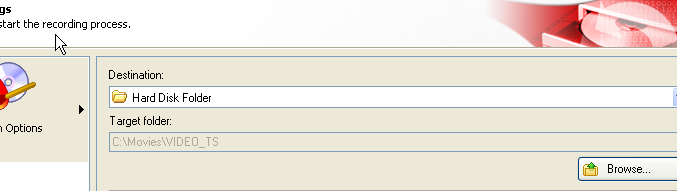
Hi to all, well tried this version of Nero and my encode problems finally are solved, it encodes to MP3 just fine, no longer freezes at 99%. However, now I got a problem with Nero Recode that I never had before, I choose save to HDD and my target source is greyed out. I can use the browse tab and it will show the directory and save it to that directory, it just does not show it in Nero. Any ideas on this one, Nero support as you all know leaves something to be desired.
|
Moderator
|
20. October 2006 @ 17:00 |
Link to this message
|
|
Hey arniebear
Was just doing a movie in Recode but picked the burner. Looked when I saw your post and target folder and browse also is greyed out.
I'll have to check on the next one and see if I can figure it out.
|
AfterDawn Addict
|
20. October 2006 @ 17:24 |
Link to this message
|
|
Hi Karen, hope all is well in your world. If I choose my burner it is not greyed, only if I choose HDD. I had ripped School House Rock for my gkids, actually watched it myself, lol. Anyway I tried to use Recode but it gave me an error, yet Shrink breezed right through. Gonna have to wait until I get something else to try tomorrow and see if this one has a few bugs.
|
|
Advertisement
|
|
|
Moderator
1 product review
|
20. October 2006 @ 17:34 |
Link to this message
|
|
Silly ole me is still using 7.0.0.0...its still running strong with no problems, so I'm not updating yet.
|







