User User name Password  
   
Tuesday 3.3.2026 / 20:28
Search AfterDawn Forums:        In English   Suomeksi   På svenska
afterdawn.com > forums > software specific discussion > nero discussion > nero & fabdecrypter
Show topics
 
Forums
Forums
Nero & Fabdecrypter
  Jump to:
 
Posted Message
Shado36
Suspended due to non-functional email address
_
22. October 2006 @ 10:14 _ Link to this message    Send private message to this user   
I recently decrypted a dvd using fab. When I went to burn the movie using Nero I had to find the file and when I went to "click" on it the file spilit into 2 audio & video and will not move into the "open" box, so at this stage I am unable to burn it! Anyone point me in the right direction, please?
Advertisement
_
__
Moderator
_
22. October 2006 @ 12:19 _ Link to this message    Send private message to this user   
Hi Shado36
You just need to add the video_ts folder. The audio_ts folder is usually empty.
If you need to compress the file to fit on a single layer disc use Nero's Recode.
If it doesn't need compression then you can use Express- DVD Video option and add the video_ts folder.


Forum Rules
Do this before posting
Do not click this link...
Shado36
Suspended due to non-functional email address
_
23. October 2006 @ 06:23 _ Link to this message    Send private message to this user   
Thanks for your reply , thats what I thought I needed to do but I could not get either box to "move" to open. I hope that makes sense.
Moderator
_
23. October 2006 @ 16:41 _ Link to this message    Send private message to this user   
Sorry Shado36 not following you (or I'm just brain dead tonite :))

So how about this - what's the size of the video_ts folder? Just find the folder where you saved it & roll your mouse over it - file size will show.
Which part of Nero are you trying to use - Express, Burning Rom or Recode?


Forum Rules
Do this before posting
Do not click this link...
Shado36
Suspended due to non-functional email address
_
23. October 2006 @ 16:56 _ Link to this message    Send private message to this user   
I am brain dead most of the time mainly due to lack of sleep, working nights & having 7 dogs!! And thats before we mention kids!!! What I did was to decode using fab etc, I then closed it. I then opened up Nero and tried to burn. I was asked where to burn from so I had to locate fab on my pc. On finding it when I clicked on it the file split into audio/video and if I remeber correctly (my old timer gets to me!!) neither of them would "move" into the "open" box for Nero to burn. Make any sense?


Shado36
Suspended due to non-functional email address
_
23. October 2006 @ 17:04 _ Link to this message    Send private message to this user   
Sorry I am unable to give you the file size as its now been deleted & washed.I can tell you that I have plenty of h/d space and a 1.5gig of ram.


Senior Member
_
23. October 2006 @ 17:20 _ Link to this message    Send private message to this user   
it puzzles me why you are going to Nero after dvdfab and not shrink?

This message has been edited since posting. Last time this message was edited on 23. October 2006 @ 17:36

Moderator
_
23. October 2006 @ 17:48 _ Link to this message    Send private message to this user   
lol - sounds like you have you're hands full!

My guess is that the file you ripped w/ DVDFab needs to be compressed to fit on a single layer disc. So Recode would be what you use to do that.
Here' a guide:
http://www.dvd-guides.com/content/view/17/59/

Or you could use Shrink (same developer as Recode) as born2ride suggested. Shrink doesn't have a burn engine - uses Nero's.

See if that helps - if not just let us know & we'll go from there!


Forum Rules
Do this before posting
Do not click this link...
Senior Member
_
23. October 2006 @ 18:00 _ Link to this message    Send private message to this user   
hi binkie
i was thinking that there was a step missing or shado had another way to copy. but seeing your answer we still need to use some sort of compression program before burning.

have you used Nero recode yet?
Moderator
_
23. October 2006 @ 18:11 _ Link to this message    Send private message to this user   
Hi born2ride
Yes I've been using it for a few years now. A little faster than Shrink and a little better handling the conmpression imho.
But I still pull out Shrink and use it too.


Forum Rules
Do this before posting
Do not click this link...
Senior Member
_
23. October 2006 @ 18:18 _ Link to this message    Send private message to this user   
Nero recode free?
Moderator
_
23. October 2006 @ 18:44 _ Link to this message    Send private message to this user   
Nope not free but if you have a full version of Nero you should have it.

Do you have Nero?


Forum Rules
Do this before posting
Do not click this link...
Senior Member
_
23. October 2006 @ 18:56 _ Link to this message    Send private message to this user   
i have Nero but never notice recoder i will have to look tomorrow
Moderator
_
23. October 2006 @ 19:07 _ Link to this message    Send private message to this user   
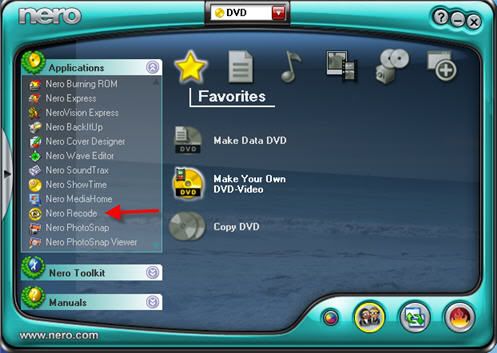
Ok - look here for it in SmartStart. I usually use Recode w/ AnyDVD running in the background.

Ripping w/ DVDFab 1st is fine too. If Recode gives you an error than you should run the files thru VobBlanker or FixVTS (both free) then open those in Recode.


Forum Rules
Do this before posting
Do not click this link...
Senior Member
_
23. October 2006 @ 19:14 _ Link to this message    Send private message to this user   
i have the red boarder it does not look like yours
Moderator
_
23. October 2006 @ 19:22 _ Link to this message    Send private message to this user   
I just changed mine to blue and added a pic.

When you open smartstart under applications do you see "recode"?

Did your version of Nero come w/ your drive or did you buy it separately?


Forum Rules
Do this before posting
Do not click this link...
Senior Member
_
23. October 2006 @ 19:24 _ Link to this message    Send private message to this user   
.did you get the message i sent you?
nope i don't have it. i went to go look

This message has been edited since posting. Last time this message was edited on 24. October 2006 @ 06:13

Moderator
_
23. October 2006 @ 19:50 _ Link to this message    Send private message to this user   
Hmmm then sounds like an oem disc that came w/ a drive.
OEm discs don't always (usually don't) give you Recode.


Forum Rules
Do this before posting
Do not click this link...
Shado36
Suspended due to non-functional email address
_
24. October 2006 @ 04:08 _ Link to this message    Send private message to this user   
Thanks for the suggestions, I will give it a try once I have "recovered" from all the stress with my sig (Don't ask!!!)


Advertisement
_
__
 
_
Moderator
_
24. October 2006 @ 15:44 _ Link to this message    Send private message to this user   
lol
After your 'recovery' give it a go and post back if you need more help!


Forum Rules
Do this before posting
Do not click this link...
Related links
Download Nero from here.
How to burn DVDs with Nero? Read our guide from here.
Support AfterDawn and purchase your copy of Nero from here!
 
Related forum topics Posts Last post Forum room
My Nero 6 OEM not compatable with Windows 8.1 4 2. June 2014 Windows - Software discussion
nero 2014 3 24. May 2014 Nero discussion
need to download Nero 9 5 9. May 2014 Nero discussion
read errors on disc verify in nero 12 2 3. May 2014 Nero discussion
I lose sound when I join files on Nero 12 Platinum? 9 29. April 2014 Nero discussion
Nero 12 activation 3 15. January 2014 Nero discussion
Help with NERO burning BluRay 2 22. December 2013 Nero discussion
DVD-DL Media keeps failing with Nero Platinum 12 6 7. December 2013 Nero discussion
A better way to burn Blu Ray disks...than using Nero! 3 30. October 2013 Blu-ray
which version of Nero to get for windows 7 OS ?? 2 26. October 2013 Nero discussion

 
afterdawn.com > forums > software specific discussion > nero discussion > nero & fabdecrypter
 

Digital video: AfterDawn.com | AfterDawn Forums
Music: MP3Lizard.com
Gaming: Blasteroids.com | Blasteroids Forums | Compare game prices
Software: Software downloads
Blogs: User profile pages
RSS feeds: AfterDawn.com News | Software updates | AfterDawn Forums
International: AfterDawn in Finnish | AfterDawn in Swedish | AfterDawn in Norwegian | download.fi
Navigate: Search | Site map
About us: About AfterDawn Ltd | Advertise on our sites | Rules, Restrictions, Legal disclaimer & Privacy policy
Contact us: Send feedback | Contact our media sales team
 
  © 1999-2026 by AfterDawn Ltd.

  IDG TechNetwork