|
Recording a TV show (DVR-MS) file
|
|
Member

|
8. November 2006 @ 19:34 |
 Link to this message

|
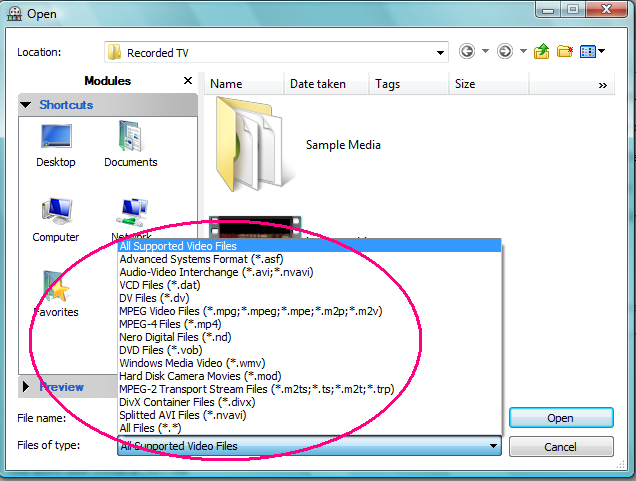
Does anyone know if Nero took out support for this file type? When I go to make a SVCD or DVD and look for the file, I notice that it's not in the drop down box with the other supported files. Can someone verify this for me? I'm using the 7.5.7.0 version.
Thanks.
Wyman
Custom built PC - WinXP MCE - P4 3.2ghz(overclocked) - 2gb of PC3200 ram - Maxtor 250gb - Sony DRU-800A - Sony DW-D22A DVD+/-RW - Clone DVD2 - DVD Fab Decrypter - Nero 7 - Epson R320 Stylus Photo Printer - Gigabyte mobo(model 8IPE1000P-G) - Hauppage WinTV PVR-150MCE tv tuner - ATI AIW 9600XT vid card
|
|
Advertisement
|
 |
|
|
Member
|
9. November 2006 @ 04:22 |
Link to this message

|
newtechie, I'm using the same version and I just made a DVD from a DVR-MS file. I'm using Nero Vision for this.
HP Pavilion, AMD Athlon 64 X2 Dual Core 3800+ (2 CPUs), 4GB RAM, Windows 7 Professional.
This message has been edited since posting. Last time this message was edited on 10. November 2006 @ 14:35
|
Member
|
9. November 2006 @ 05:20 |
Link to this message

|
Originally posted by jmcole:
newtechie, I'm using the same version and I just made a DVD from a DVR-MS file. I'm using Nero Vision for this.
Hi jmcole - I'm using Nero also, but what version are you using? I have the latest version.
Wyman
Custom built PC - WinXP MCE - P4 3.2ghz(overclocked) - 2gb of PC3200 ram - Maxtor 250gb - Sony DRU-800A - Sony DW-D22A DVD+/-RW - Clone DVD2 - DVD Fab Decrypter - Nero 7 - Epson R320 Stylus Photo Printer - Gigabyte mobo(model 8IPE1000P-G) - Hauppage WinTV PVR-150MCE tv tuner - ATI AIW 9600XT vid card
|
Member
|
9. November 2006 @ 12:48 |
Link to this message
|
I am using the latest version, 7.5.1.1. Within that version, Nero Vision is version 4.7.0.9. Do you need me to walk you through the process?
HP Pavilion, AMD Athlon 64 X2 Dual Core 3800+ (2 CPUs), 4GB RAM, Windows 7 Professional.
This message has been edited since posting. Last time this message was edited on 10. November 2006 @ 14:36
|
Member
|
9. November 2006 @ 12:59 |
Link to this message
|
Originally posted by jmcole:
I am using the latest version, 7.5.1.1. Within that version, Nero Vision is version 4.7.0.9. Do you need me to walk you through the process?
See that may be the problem right there. The latest version is 7.5.7.0 but the Nero Vision is the same version. Could you attempt to do a project and look in the drop down box where it lists all the file types and let me know if you see DVR-MS as an option? If you're not sure what I'm talking about then I'll post a screen print when I get home. I probably should add also that I'm using Vista RC2 and not XP but I don't think that should make a difference when this version supports Vista.
Thanks.
Wyman
Custom built PC - WinXP MCE - P4 3.2ghz(overclocked) - 2gb of PC3200 ram - Maxtor 250gb - Sony DRU-800A - Sony DW-D22A DVD+/-RW - Clone DVD2 - DVD Fab Decrypter - Nero 7 - Epson R320 Stylus Photo Printer - Gigabyte mobo(model 8IPE1000P-G) - Hauppage WinTV PVR-150MCE tv tuner - ATI AIW 9600XT vid card
|
Member
|
10. November 2006 @ 03:08 |
Link to this message
|
Actually, the latest version of Nero is 7.5.1.1. The different programs within the app have different version numbers.
http://ww2.nero.com/nero7/enu/versions.php
Nero Burning ROM 7.5.7.0
Nero Home 1.5.0.18
Nero StartSmart 3.5.5.0
Nero Express 7.5.7.0
Nero CoverDesigner 2.5.3.0
Nero PhotoSnap 1.2.0.19
Nero PhotoSnap Viewer 1.2.0.19
Nero Vision 4.7.0.9
Nero Recode 2.3.2.0
Nero MediaHome 2.0.0.18
InCD 5.5.0.5
Nero ShowTime 3.2.3.0
Nero7 Online 7.2.7.0
Nero ImageDrive 3.0.0.11
Nero BackItUp 2.6.6.0
Nero WaveEditor 3.5.6.0
Nero SoundTrax 2.5.6.0
Nero Fast CD Burning Plugin 2.0.2.6
Nero7 Webinstaller 1.0.9.15
Nero Sipps 2.1.6.27
Nero Mobile 1.2.0.5
Nero Toolkit 2.3.0.47
Nero InfoTool 4.1.0.8
Nero BurnRights 2.1.0.3
Nero CD-DVD Speed 4.6.1.2
Nero DriveSpeed 3.0.6.0
Nero ProductSetup 1.5.25.0
Post a screen print and we'll see what we can do.
HP Pavilion, AMD Athlon 64 X2 Dual Core 3800+ (2 CPUs), 4GB RAM, Windows 7 Professional.
This message has been edited since posting. Last time this message was edited on 10. November 2006 @ 14:36
|
Member
|
10. November 2006 @ 05:14 |
Link to this message
|
|
I tried using screenshots through Imageshack.us, but it kept giving me small thumbnails.
HP Pavilion, AMD Athlon 64 X2 Dual Core 3800+ (2 CPUs), 4GB RAM, Windows 7 Professional.
This message has been edited since posting. Last time this message was edited on 10. November 2006 @ 14:36
|
Member
|
10. November 2006 @ 05:41 |
Link to this message
|
Originally posted by jmcole:
Actually, the latest version of Nero is 7.5.1.1. The different programs within the app have different version numbers.
http://ww2.nero.com/nero7/enu/versions.php
Nero Burning ROM 7.5.7.0
Nero Home 1.5.0.18
Nero StartSmart 3.5.5.0
Nero Express 7.5.7.0
Nero CoverDesigner 2.5.3.0
Nero PhotoSnap 1.2.0.19
Nero PhotoSnap Viewer 1.2.0.19
Nero Vision 4.7.0.9
Nero Recode 2.3.2.0
Nero MediaHome 2.0.0.18
InCD 5.5.0.5
Nero ShowTime 3.2.3.0
Nero7 Online 7.2.7.0
Nero ImageDrive 3.0.0.11
Nero BackItUp 2.6.6.0
Nero WaveEditor 3.5.6.0
Nero SoundTrax 2.5.6.0
Nero Fast CD Burning Plugin 2.0.2.6
Nero7 Webinstaller 1.0.9.15
Nero Sipps 2.1.6.27
Nero Mobile 1.2.0.5
Nero Toolkit 2.3.0.47
Nero InfoTool 4.1.0.8
Nero BurnRights 2.1.0.3
Nero CD-DVD Speed 4.6.1.2
Nero DriveSpeed 3.0.6.0
Nero ProductSetup 1.5.25.0
Post a screen print and we'll see what we can do.
Jmcole - see my screen print. You will notice that the Microsoft DVR-MS file type is not in the drop down box. I know how the burn the files but it's type is not in the box. You follow me? I checked the same in another computer and it would be located right above the MPEG Video files.
Wyman
Custom built PC - WinXP MCE - P4 3.2ghz(overclocked) - 2gb of PC3200 ram - Maxtor 250gb - Sony DRU-800A - Sony DW-D22A DVD+/-RW - Clone DVD2 - DVD Fab Decrypter - Nero 7 - Epson R320 Stylus Photo Printer - Gigabyte mobo(model 8IPE1000P-G) - Hauppage WinTV PVR-150MCE tv tuner - ATI AIW 9600XT vid card
|
Member
|
10. November 2006 @ 07:01 |
Link to this message
|
Try using the All Files(*.*) and see if you can pick it up.

And by looking at the differences in our screenshots, I would say that Nero for Vista is different than Nero for XP.
HP Pavilion, AMD Athlon 64 X2 Dual Core 3800+ (2 CPUs), 4GB RAM, Windows 7 Professional.
This message has been edited since posting. Last time this message was edited on 10. November 2006 @ 14:35
|
|
Advertisement
|
|
|
Member
|
10. November 2006 @ 07:38 |
Link to this message
|
Originally posted by jmcole:
Try using the All Files(*.*) and see if you can pick it up.
And by looking at the differences in our screenshots, I would say that Nero for Vista is different than Nero for XP.
Yes that does work. I tried it last night but I'm still baffled to why the file type doesn't show up.
Wyman
Custom built PC - WinXP MCE - P4 3.2ghz(overclocked) - 2gb of PC3200 ram - Maxtor 250gb - Sony DRU-800A - Sony DW-D22A DVD+/-RW - Clone DVD2 - DVD Fab Decrypter - Nero 7 - Epson R320 Stylus Photo Printer - Gigabyte mobo(model 8IPE1000P-G) - Hauppage WinTV PVR-150MCE tv tuner - ATI AIW 9600XT vid card
|


