User User name Password  
   
Thursday 5.3.2026 / 11:34
Search AfterDawn Forums:        In English   Suomeksi   På svenska
afterdawn.com > forums > software specific discussion > nero discussion > best way to update ? ok to have two versions in stalled?
Show topics
 
Forums
Forums
Best way to update ? OK to have two versions in stalled?
  Jump to:
 
Posted Message
mtbgtr
Newbie
_
25. November 2006 @ 16:25 _ Link to this message    Send private message to this user   
What is the best way to update Nero (7.5.7.0 to 7.5.9.0). Uninstall and re-install after using the clean tools ?

What bad things could happen if I just update over the old version?

Is it OK to have both installed at the same time?

Thanks A Bunch !
Advertisement
_
__
Moderator
_
25. November 2006 @ 16:48 _ Link to this message    Send private message to this user   
Hi mtbgtr
Don't think Nero will let you have 2 different versions installed at the same time - you'll get an error and it won't install.

Plus if you download 7.5.9.0 it will just install over top of 7.5.7.0.
It's what I usually do - install over the last one.

No problems on my end doing it that way - plus I keep whatever settings or the few templates I have. No need to do them over.


Forum Rules
Do this before posting
Do not click this link...
AfterDawn Addict
_
25. November 2006 @ 16:55 _ Link to this message    Send private message to this user   
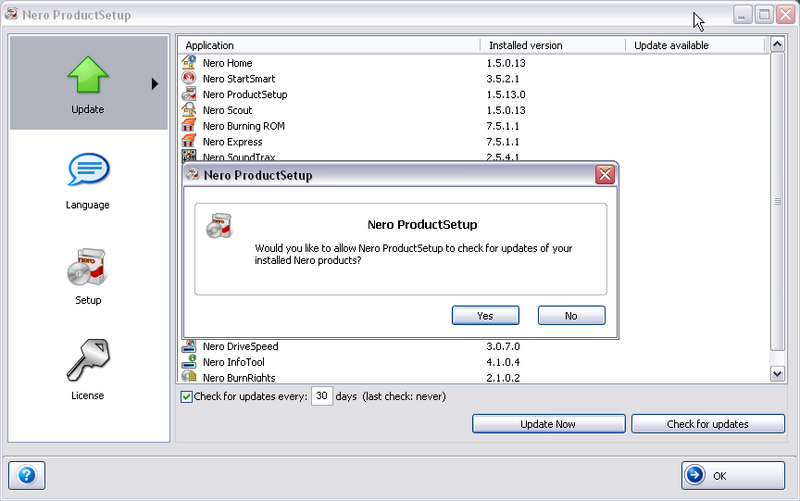
Open Nero StartSmart, click on the FLAME and you should get this


Nero 7.5.7.0 does not contain any bugs so no need to uninstall.

@binkie7

Wow I dont believe it took me 7 minutes to post this reply, Cheers.


guide by ScubaPete http://www.dvdplusvideo.com/tutorial007.html Nero guide by alkohol http://www.dvdplusvideo.com/Guides/alkohol_guide3.html

New RipIt4Me + DVD Shrink + ImgBurn guid <==== Rip any DVDs http://forums.afterdawn.com/thread_view.cfm/422740 Guides by bbmayo..... http://webpages.charter.net/bacitup/

This message has been edited since posting. Last time this message was edited on 25. November 2006 @ 16:56

Moderator
_
25. November 2006 @ 17:07 _ Link to this message    Send private message to this user   
lol - I've been known to be even slower :)


Forum Rules
Do this before posting
Do not click this link...
Advertisement
_
__
 
_
AfterDawn Addict
_
25. November 2006 @ 17:20 _ Link to this message    Send private message to this user   
Here's what I do when I updated:

* downloaded the latest Nero version
* run Nero 7 CleanTool to wipe/clean out everything
* run CCleaner to clean out all registries, etc.
* restart computer
* run CClean one more time (yes... there are lots of Nero junks left behind)
* install the latest version
* restart computer
* presto! everything is clean/fresh and should be good now.

I know it's a bit long process, but I prefer going with this method instead of "uninstalling" and reinstall or simply updated over the old version. To each of his/her own, so the choice is yours.

Best of luck to all!!

WARNING: Do not "update/upgrade" your SAMSUNG BD-D5XXX series (Bluray Player), or else you cant enjoy any of your movie files.
How 2 downgrade Samsung BD-D5XXX Series Bluray player http://forum.samygo.tv/viewtopic.php?f=18&t=4244
afterdawn.com > forums > software specific discussion > nero discussion > best way to update ? ok to have two versions in stalled?
 

Digital video: AfterDawn.com | AfterDawn Forums
Music: MP3Lizard.com
Gaming: Blasteroids.com | Blasteroids Forums | Compare game prices
Software: Software downloads
Blogs: User profile pages
RSS feeds: AfterDawn.com News | Software updates | AfterDawn Forums
International: AfterDawn in Finnish | AfterDawn in Swedish | AfterDawn in Norwegian | download.fi
Navigate: Search | Site map
About us: About AfterDawn Ltd | Advertise on our sites | Rules, Restrictions, Legal disclaimer & Privacy policy
Contact us: Send feedback | Contact our media sales team
 
  © 1999-2026 by AfterDawn Ltd.

  IDG TechNetwork