|
burning pictures to a dvd
|
|
Senior Member

|
28. December 2006 @ 09:19 |
 Link to this message

|
|
is there a way to put pictures on a dvd and watch in dvd player/slideshow /with nero
 I AM A DUMPSTER DIVER AND PROUD OF IT..
Reach Down & Grab it Or Walk in & Get Some !!!!!!!!!!!!!!!} |
|
Advertisement
|
|
|
|
AfterDawn Addict

|
28. December 2006 @ 15:21 |
Link to this message
|
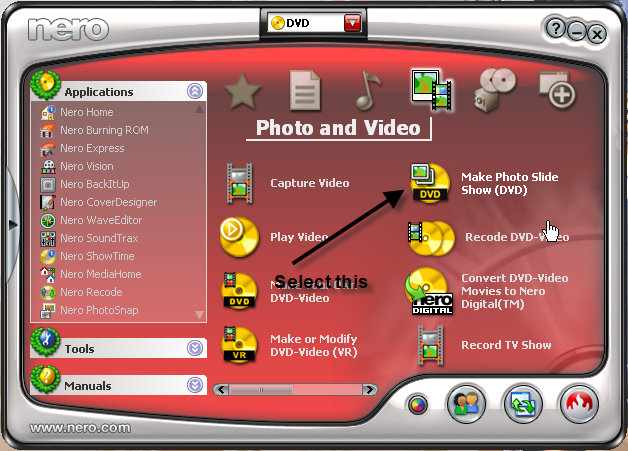
Open Nero StartSmart and select as shown.
|
Senior Member
|
28. December 2006 @ 15:58 |
Link to this message
|
already tried that and get this

am i doing something wrong ?
I AM A DUMPSTER DIVER AND PROUD OF IT..
Reach Down & Grab it Or Walk in & Get Some !!!!!!!!!!!!!!!} |
AfterDawn Addict
|
28. December 2006 @ 16:50 |
Link to this message
|
|
Sorry, I cant help with this one as I have NEVER done this before, good luck.
|
Senior Member
|
28. December 2006 @ 17:11 |
Link to this message

|
|
thanks gwendolin :) maybe someone has done this i have tried ulead program and that is total junk
I AM A DUMPSTER DIVER AND PROUD OF IT..
Reach Down & Grab it Or Walk in & Get Some !!!!!!!!!!!!!!!} This message has been edited since posting. Last time this message was edited on 28. December 2006 @ 17:22
|
|
Platy767
Member
|
29. December 2006 @ 18:51 |
Link to this message

|
I made a DVD slideshow the other day. It's a great way of viewing a photo collection in reasonable time.
I notice you have NeroVision3. I used NeroVision4, included in the 7.5.0.9A update, but this may not be an issue. What version of Nero Burning ROM are you using?
From your screenshot, it looks like you are able to browse to and select a .jpg file to add, but then it crashes. Looks like you are doing things right, but not getting very far.
Are you able to do other NeroVision tasks, like make a DVD movie?
|
AfterDawn Addict
|
29. December 2006 @ 19:04 |
Link to this message
|
This message has been edited since posting. Last time this message was edited on 29. December 2006 @ 19:05
|
Senior Member
|
30. December 2006 @ 05:22 |
Link to this message
|
thanks for the help guys . i never usually have problems with Nero 6.i tried Nero 7 on vista and works great with the pictures :). only reson i still have Nero 6 on xp is because i tried to backup dvd with 7 and burned failed :) so dont know if i should put 7 back on xp. and can i add music with my pictues ?. also can i slow the pictures down a little bit . thanks . btw i added 39 pictures and there was alot more space left on the dvd. how many pics can u fit on one 200?
I AM A DUMPSTER DIVER AND PROUD OF IT..
Reach Down & Grab it Or Walk in & Get Some !!!!!!!!!!!!!!!} This message has been edited since posting. Last time this message was edited on 30. December 2006 @ 05:23
|
AfterDawn Addict
|
30. December 2006 @ 05:35 |
Link to this message
|
|
Each slideshow can have up to 99 pictures. It is not a space issue, but a DVD structure issue. Each pix has it's own VTS number. The maximum allowed VTSs on a DVD title is 99. You can add titles together to get more, but each title has to be completed as a separate slideshow.
|
|
Platy767
Member
|
30. December 2006 @ 11:55 |
Link to this message
|
|
Correct. 99 piccies per title, but you can have lots of titles.
The most recent I did had 15 titles and had less than 180Mb used on the DVD.
|
Senior Member
|
30. December 2006 @ 12:18 |
Link to this message
|
|
so after the 99th picture it will go to new title?one more ? i have to add each picture one at a time arhhhh is there a way i can add all at once say in one folder .thanks again
I AM A DUMPSTER DIVER AND PROUD OF IT..
Reach Down & Grab it Or Walk in & Get Some !!!!!!!!!!!!!!!} |
|
Platy767
Member
|
30. December 2006 @ 22:33 |
Link to this message
|
|
Sure. Just browse and add to project. It will ask you if you want to finish at 99 or let it make another title, but be aware the sequence may not be sorted / sequenced exactly as you want it to be.
I still think it is easy to use.
|
Senior Member
|
31. December 2006 @ 04:11 |
Link to this message
|
thank you Platy767. i know to hit browse and add to project but i can only add one picture at a time. is there a way i can add every picture that is in a folder at once ?

I AM A DUMPSTER DIVER AND PROUD OF IT..
Reach Down & Grab it Or Walk in & Get Some !!!!!!!!!!!!!!!} This message has been edited since posting. Last time this message was edited on 31. December 2006 @ 04:19
|
|
Platy767
Member
|
31. December 2006 @ 14:27 |
Link to this message
|
|
OK neptune. I think we are nearly there. We do the same for list selection as we do in other applications.
Select the first .jpg you want to add by left clicking on it. Go to the end of your list of files and while holding down the shift key, left click on the last .jpg file in the list. This will highlight all selected files in your list.
For example: from your screenshot, left click on 789.jpg. Move the cursor to barney.jpg and while holding the shift key, left click on barney.jpg. All files between and including will be highlighted.
Hit open and all the files will be added into your project.
Hope this works for you.
|
Senior Member
|
31. December 2006 @ 14:52 |
Link to this message
|
|
Platy767 thank you again:) now i know how to add all of them :) but today i added one by one what a pain .now i am set.
added 99 to one title today then it asked to make more or something and i ended up with 3 more titles with only three more pictures . what do i do after the 99 one? thanks.
I AM A DUMPSTER DIVER AND PROUD OF IT..
Reach Down & Grab it Or Walk in & Get Some !!!!!!!!!!!!!!!} |
|
Platy767
Member
|
31. December 2006 @ 15:32 |
Link to this message
|
You have now reached the outer limit of my experience! Previously when I selected more than 99. Nero just added another title for me with the excess over 99 in an additional title.
I just now did a test and added 985 photos in one go - and Nero made 10 titles for me.
But, like I said a while ago, I am using Nero Version 7.5.9.0A
You might try the tutorial for some help
http://www.nero.com/nero7/ena/Tutorial_Photo_Video.html
|
|
Advertisement
|
|
|
Senior Member
|
31. December 2006 @ 16:10 |
Link to this message
|
|
thanks i got it:)
I AM A DUMPSTER DIVER AND PROUD OF IT..
Reach Down & Grab it Or Walk in & Get Some !!!!!!!!!!!!!!!} |




