User User name Password  
   
Tuesday 10.3.2026 / 18:39
Search AfterDawn Forums:        In English   Suomeksi   På svenska
afterdawn.com > forums > software specific discussion > nero discussion > burning speed problem
Show topics
 
Forums
Forums
Burning Speed Problem
  Jump to:
 
Posted Message
alexmtz
Newbie
_
27. January 2007 @ 16:39 _ Link to this message    Send private message to this user   
So, I transcoded this AVI movie to DVD VIDEO_TS and saved it to my hard drive. I did all of this with Nero Vision.

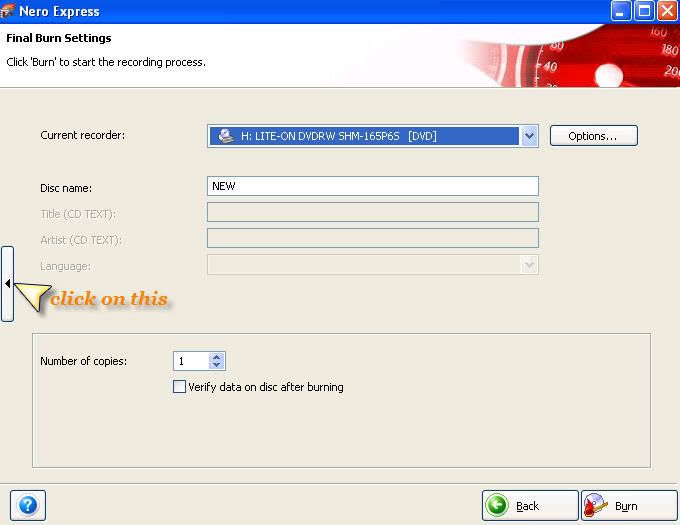
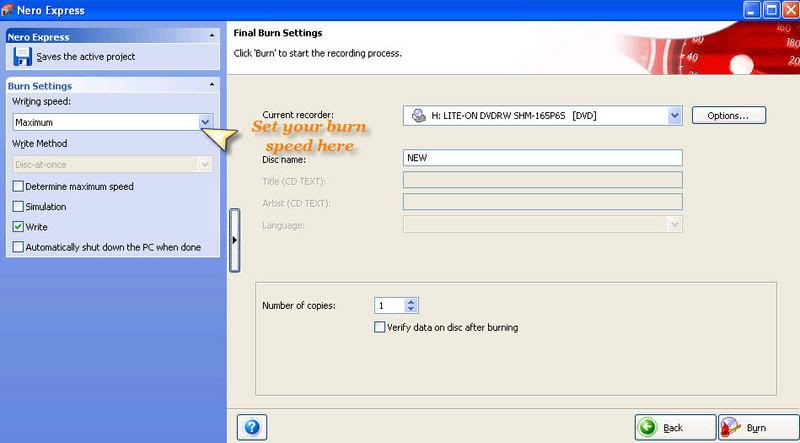
Now I want to burn the files to a DVD with Nero Express but I can't find a DVD burning speed option. It always burns the DVD at 16X.

Is there a way to change the DVD burning speed? Or are there other programs that you would recomend to do this?

Tanks in advance
Advertisement
_
__
Moderator
_
27. January 2007 @ 19:40 _ Link to this message    Send private message to this user   
Hi alexmtz
Yes you change your burn speed in Express. Sounds like you're using 7 cause in the last screen of Nero 6 the burn is on the same page (no need to 'expand' the screen unlike 7)
Look here:


Forum Rules
Do this before posting
Do not click this link...
scotboy7
Newbie
_
5. February 2007 @ 12:41 _ Link to this message    Send private message to this user   
Can anybody tell me if I can burn at slower speeds than are offered in Nero 7. I read somewhere the slower the burn the better the end product.
Any help would be appreciated
Moderator
_
5. February 2007 @ 13:08 _ Link to this message    Send private message to this user   
The lower burn offering a better end product it not always the case.
For lower quality media maybe but using a good drive and good media 8x should be fine.
Some of the newer 16x media does better at 8x & higher not lower. All depends on the firmware of the drive.

What's the make and model of your burner? Media you are using?


Forum Rules
Do this before posting
Do not click this link...
scotboy7
Newbie
_
5. February 2007 @ 13:44 _ Link to this message    Send private message to this user   
First of all cheers for responding so quickly. The media type I am using is Philips. As for make & model of burner I dont know (is there a way to find out?), I have an Acer Aspire T180 machine with installed dvd burner if thats any help.
Moderator
_
5. February 2007 @ 13:59 _ Link to this message    Send private message to this user   
Not a problem scotboy7 - you caught me at the right time ;)

Nero can give you that info & let's check the disc manufacturer too.

Pop a blank in the drive. Now in Nero SmartStart go to Tools (called that in 7) or ToolKit (called that in Nero 6)the InfoTool.
The burner's make & model will be listed in the drop down.
Check the firmware version too - the drive tab will list which version you have. Click on the disc tab and the manufacturer info will be listed there.

Post this info back (make, model, firmware & disc manufacturer) and we can go from there.


Forum Rules
Do this before posting
Do not click this link...
scotboy7
Newbie
_
5. February 2007 @ 14:19 _ Link to this message    Send private message to this user   
1. Disc Man. INFOME R30
2. Only drop down I can see shows E:\HL-DT-ST DVD+-RW GSA-H21n
3. Firmware version- 1.00
Does this info help cause its all foreign to me
P.S. I now see using Nero info that my speeds are limited by the media type

This message has been edited since posting. Last time this message was edited on 5. February 2007 @ 14:43

Moderator
_
5. February 2007 @ 15:06 _ Link to this message    Send private message to this user   
Yes it's exactly what I was looking for!

Ok the media is not one of the better manufacturers. So look at burning these at 6x or lower. I'm guessing Nero won't give you a lower option than 6x on these?
Good media to use would be Verbatim or made in Japan Sony, Fuji or Maxell.

LG usually makes a good burner. Might need a firmware update but a quick search couldn't find one. Probably Acer would be the ones to provide the firmware updates so you can check their site.

One thing firmware does it update the media id's in the burner so that's it has the proper read & write strategies - good to keep up to date on.
Yes your speeds can be limited by media type - this is also where firmware comes into play - if it has the media id in it it will list all the supported speeds. If not the speeds will be limited.


Forum Rules
Do this before posting
Do not click this link...
scotboy7
Newbie
_
5. February 2007 @ 16:26 _ Link to this message    Send private message to this user   
Thanks for your help Binkie, next time you are over this side of the water the beer is on me.
Advertisement
_
__
 
_
Moderator
_
5. February 2007 @ 16:42 _ Link to this message    Send private message to this user   
You're welcome scotboy7
Need any thing just let us know!

(may take you up on the beer too if I ever get across the pond :) )


Forum Rules
Do this before posting
Do not click this link...
afterdawn.com > forums > software specific discussion > nero discussion > burning speed problem
 

Digital video: AfterDawn.com | AfterDawn Forums
Music: MP3Lizard.com
Gaming: Blasteroids.com | Blasteroids Forums | Compare game prices
Software: Software downloads
Blogs: User profile pages
RSS feeds: AfterDawn.com News | Software updates | AfterDawn Forums
International: AfterDawn in Finnish | AfterDawn in Swedish | AfterDawn in Norwegian | download.fi
Navigate: Search | Site map
About us: About AfterDawn Ltd | Advertise on our sites | Rules, Restrictions, Legal disclaimer & Privacy policy
Contact us: Send feedback | Contact our media sales team
 
  © 1999-2026 by AfterDawn Ltd.

  IDG TechNetwork