|
Simple question
|
|
|
cr91rider
Newbie

|
29. January 2007 @ 14:11 |
Link to this message

|
I am using DVD Shrink and Nero 7. Now i will shrink the movie and put it to my HD, but i cannot figure out how to burn the movie from Nero.(i cant find the file from Nero.) Any help would be appreciated.
thanks
|
|
Advertisement

|
 |
|
|
Senior Member
|
29. January 2007 @ 14:33 |
Link to this message

|
|
|
|
cr91rider
Newbie
|
29. January 2007 @ 15:27 |
Link to this message

|
yes i have tried these guides as well and still cant get it to work. This is what i do.
I initially do to shrink and save it to my HD, then i cannot find the file in Nero. Also, i keep getting an error in Decrypter so i do not use it anymroe.
|
Senior Member
|
31. January 2007 @ 14:06 |
Link to this message
|
cr91rider
what movie are you doing? what error code?
if you use shrink to rip to hd then open in Nero do you get a protection error?
open Nero,then recode,then either full/main dvd,then import dvd.
now is this where you cant find ?
This message has been edited since posting. Last time this message was edited on 31. January 2007 @ 14:08
|
|
cr91rider
Newbie
|
31. January 2007 @ 16:44 |
Link to this message
|
OK
i have used many differnt DVD's. Old ones that i have already burned and new ones that i have not burned. What i would do it use shrink and decrypeter and that is all. I did not have Nero untill recently. As of right now, I cannot burn ANY dvd's. I have tried many differnt ways but still wont work. I dont know how to take a snapshot of the error or i would post it
thanks
|
Senior Member
|
1. February 2007 @ 15:03 |
Link to this message
|
|
what error message are you getting.
|
|
cr91rider
Newbie
|
2. February 2007 @ 12:27 |
Link to this message
|
OK like i have said i will go to shrink and try and shrink the movie. I was advised to get AnyDVD. So first off i shrink the dvd and it will basically finish, and then i will get this error.
4C
Windows XP 5.1
IA32
WinAspi: -
ahead WinASPI: File 'C:\Program Files\Nero\Nero 7\Core\Wnaspi32.dll': Ver=2.0.1.74, size=164112 bytes, created 11/2/2004 1:54:32 PM
NT-SPTI used
Nero API version: 7.2.3.3
Using interface version: 6.3.1.4
Installed in: C:\Program Files\Nero\Nero 7\Core\
Application: ahead\Nero - Burning Rom
Internal Version: 7, 2, 3, 3
Recorder: <PIONEER DVD-RW DVR-109> Version: 1.09 - HA 1 TA 1 - 7.2.3.3
Adapter driver: <IDE> HA 1
Drive buffer : 2000kB
Bus Type : default (0) -> ATAPI, detected: ?
=== Scsi-Device-Map ===
DiskPeripheral : HDS728080PLAT20 atapi Port 0 ID 0 DMA: On
CdRomPeripheral : HL-DT-ST RW/DVD GCC-4481B atapi Port 1 ID 0 DMA: Off
CdRomPeripheral : PIONEER DVD-RW DVR-109 atapi Port 1 ID 1 DMA: On
=== CDRom-Device-Map ===
HL-DT-ST RW/DVD GCC-4481B D: CDRom0
PIONEER DVD-RW DVR-109 E: CDRom1
=======================
AutoRun : 1
Excluded drive IDs:
WriteBufferSize: 83886080 (0) Byte
BUFE : 0
Physical memory : 1014MB (1039088kB)
Free physical memory: 577MB (591536kB)
Memory in use : 43 %
Uncached PFiles: 0x0
Use Inquiry : 1
Global Bus Type: default (0)
Check supported media : Disabled (0)
2.2.2007
NeroAPI
2:15:15 PM #1 Phase 112 File APIProgress.cpp, Line 278
DVD-Video files reallocation started
2:15:15 PM #2 DVDREALLOC -21 File DVDVideoCompilation.cpp, Line 1217
Required file 'VTS_11_0.VOB' is not present
2:15:15 PM #3 Phase 115 File APIProgress.cpp, Line 278
DVD-Video files reallocation failed
2:15:15 PM #4 Text 0 File NeroAPIBurnFS.cpp, Line 213
Failed to realloc DVD video files
Existing drivers:
Registry Keys:
HKLM\Software\Microsoft\Windows NT\CurrentVersion\WinLogon
Also, after the shrink i use decrypter and normally it would just go to decrypter from shrink. It does not do that now. Also when i look in my HD for any of the files of the movie, There is a folder with what seems to be the files but nothing is in there. Hope this helps i am so frustrated with this.
This message has been edited since posting. Last time this message was edited on 2. February 2007 @ 20:54
|
|
cr91rider
Newbie
|
2. February 2007 @ 18:43 |
Link to this message
|
|
bump
|
Moderator
|
2. February 2007 @ 19:58 |
Link to this message
|
Hi cr91rider
1st let's edit out the serial # - top of log begins w/ 4C.
There's a few movies (sony & lionsgate one - like Saw 3, Open Season, Grudge 2) that AnyDVD and Shrink won't work with. Reason you're getting this error.
Nero API version: 7.2.3.3
Update Nero to the latest - here's a link
You should be able to run AnyDVD (version 6.1.1.4) w/ Nero's Recode instead of Shrink.
A few more suggestions:
°You can use AnyDVD companion - CloneDVD - has a 21 day trial.
°Rip 1st w/ DVDFab Decrypter then open those files in Shrink or Recode. link
°RipIt4Me - which also uses Shrink and Decrypter and gives them the they need to handle the newer copy protections. link
CdRomPeripheral : HL-DT-ST RW/DVD GCC-4481B atapi Port 1 ID 0 DMA: Off Turn DMA back on for this drive. Here's a guide.
Recorder: <PIONEER DVD-RW DVR-109> Version: 1.09
Firmware is a bit behind too - update it to the latest 1.58.
If this is a Medion pc the latest is 1.57.
Give that a go and let us know.
|
|
cr91rider
Newbie
|
2. February 2007 @ 21:39 |
Link to this message
|
|
Not to be a bug, But i am having a hard time understanding this. I have downloaded all the appropriate hardware. Is there a guide somewhere for these programs? I have DVD FAB,Rip it for me, and ANY DVD.
Thanks a lot guys you have been a huge help so far.
|
|
Saltgrass
Senior Member
|
3. February 2007 @ 10:46 |
Link to this message
|
When you get all the other stuff figured out, you might check on the following:
Quote:
CdRomPeripheral : HL-DT-ST RW/DVD GCC-4481B atapi Port 1 ID 0 DMA: Off
CdRomPeripheral : PIONEER DVD-RW DVR-109 atapi Port 1 ID 1 DMA: On
Having a slave with a master and the DMA is off(as binkie7 said), may not be a good deal. Try to get the DMA on for the Master (GCC-4481B), and you might even think about making the Burner (Pioneer) the master and setting the other one to slave.
Nero 7 v7.10.1.0
P4 2.4GHz 1 Gig RAM
NEC ND3550A DVD Burner
This message has been edited since posting. Last time this message was edited on 3. February 2007 @ 10:48
|
Moderator
|
3. February 2007 @ 11:50 |
Link to this message
|
You're not being a bug cr91rider - no worries.
In the link for RipIt4Me is a step by step guide on set it up and how to use.
Here's a guide for for DVDFab Decrypter - you can just use the 1st part to show you how to use then open those files in Shrink. link
Have AnyDVD turned off when you use either of these programs.
Keep us posted!
|
Senior Member
|
4. February 2007 @ 14:21 |
Link to this message
|
binkie
you gave out my favorite link....lol
you wrote
"Update Nero to the latest - here's a link" link was underlined thats what i been trying to do still.
cr91rider. how are you making out?
|
Moderator
|
4. February 2007 @ 19:19 |
Link to this message
|
@born2ride
Maybe this pic will help:
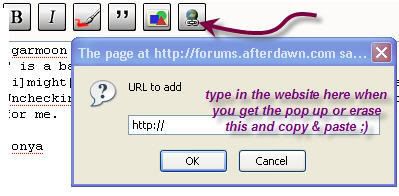
Then you will get something like this (remove the asterisks)and type in what you want the link to say between the brackets.
[*url=http://afterdawn.com]Afterdawn[/url*]
That will look like this when displayed
Afterdawn
|
|
cr91rider
Newbie
|
7. February 2007 @ 06:42 |
Link to this message
|
OK Guys first off, i really want to thank all you that helped me out. You guys helped me sooo much. I just wanted to give an update and another question. I have successfully burned 2 dvds(for the first time in about 3/4 months)So my next question is I am using DVDFAB,VobBlanker,Shrink, and IMGburn........with this guide
http://forums.afterdawn.com/thread_view.cfm/334154
It has worked great. But i am just wondering how do you know in BLANKER what you ae deleting. THe guide does not go in depth for this. Should i even be messing with it?
Thanks
|
Senior Member
|
7. February 2007 @ 07:47 |
Link to this message
|
cr91rider
see if this helps you out link
thanks binkie i am learning so much... hehehehe
This message has been edited since posting. Last time this message was edited on 7. February 2007 @ 07:51
|
|
cr91rider
Newbie
|
7. February 2007 @ 10:20 |
Link to this message
|
|
Ya i have read that guide, but i am wondering how you know what to delete and what not to delete. I dont want to delete some of the menu or something like that ya know?
|
Senior Member
|
7. February 2007 @ 13:55 |
Link to this message
|
cr91rider
unfortunately i never used VobBlanker. one of theses say i will get around to it.if no one responses start a new thread or search your not the first one to ask i am sure..
if you do find out more keep me up to date so i can learn.. thanks
|
|
cr91rider
Newbie
|
7. February 2007 @ 14:27 |
Link to this message
|
|
Ya i will for sure, all these programs work great so far. Hopefully i dont have any problems down the road
|
Moderator
|
7. February 2007 @ 16:43 |
Link to this message
|
@cr91rider
Here's another guide that may help you out - link
You can can click on a title then preview it - it will also be listed under the PGC screen. if you don't want it you can click on blank at the right.
May take just a bit of playing w/ to get the hang of.
You can always start small.
Also the files will be saved to your hard drive so you can always preview them before you burn them to make sure all ok.
@born2ride
Yep you sure are - great job!
|
|
Advertisement
|
|
|
Senior Member
|
8. February 2007 @ 06:29 |
Link to this message
|
|
binkie
thats good link just browsed it. have to save that one
|



