|
Weird PC problem
|
|
|
Horiz
Junior Member

|
10. April 2007 @ 13:01 |
 Link to this message

|
|
Bought a new PC that still needs a harddrive and a GFX card (it was a barebones system) and decided to test it out.
So, to take out my harddrive, because my old PC was a pre built piece of crap I had to remove the processor and fan (which are both stuck together).
Also took out my GFX card but discovered it wouldn't fit in my new one (too old apparently)
When it came time to put everything back in, it all went well, HDD, GFX card and processor + fan all went in as easy as they came out (Note: I have never removed or put a processor/fan back in, so that bit was a learning experience, but I didn't exactly use any force or anything, just found the 2 levers and it came out with ease)
Turned the PC on and the monitor didn't come on, but the PC did. No problem I thought, had this problem loads of times, the GFX card must not be in correctly.
So I took it out and in, even screwed it in this time (I never do that) and still the monitor refused to notice that my comp was telling it to turn on. Tried a few more times and still nothing.
Tried taking the processor/fan in and out a few times, still the error persists.
I'm going mental, I just can't figure out what the problem is! Have I fried my processor or something?
Note: PLEASE do not post "is your monitor plugged in? lalalalalalalaalalalalalalalala^^ xD lol" or I may infact cry.
Note2: sorry about the long post, I fail at summerising.
OH one more thing before I forget, when my PC is on (and the monitor is infact not) I've noticed that my mouse doesn't light up neither does the keyboard (aka, num lock etc are not able to be toggled). I'm not sure if that makes any difference or not, just I've never noticed it before when the problem was the GFX card
|
|
Advertisement
|
 |
|
|
|
REAM
Suspended permanently
|
10. April 2007 @ 13:28 |
Link to this message
|
|
not sure if this is true, but dont you need to put thermal paste when you replace a cpu?
|
Member
|
10. April 2007 @ 13:32 |
Link to this message
|
Quote:
not sure if this is true, but dont you need to put thermal paste when you replace a cpu?
Yes; it's required--otherwise you more than likely can damage-if not fry your cpu.
But; the first thing to do is check if you can at least hear the hdd/case fans spinning so you know that your psu is at least working.
This message has been edited since posting. Last time this message was edited on 10. April 2007 @ 13:39
|
|
Horiz
Junior Member
|
10. April 2007 @ 13:45 |
Link to this message
|
|
Well I haven't replaced the processor, just took it out and in again, if that counts as replacing?
But yeah, the fans and everything still start as normal.
Oh also, I don't hear any beeps at all from the internal speaker, which is why I'm confused.
This message has been edited since posting. Last time this message was edited on 10. April 2007 @ 13:47
|
|
REAM
Suspended permanently
|
10. April 2007 @ 14:21 |
Link to this message

|
|
you may have shor circuited something.
did you wear static gloves or a anti-static wrist band?
if you have a spare or can use a friends computer, try change each part one by one, and see if it works.
|
|
Horiz
Junior Member
|
10. April 2007 @ 14:28 |
Link to this message

|
|
Nope I didn't, because I don't have any anti static gear and no-one has ever told me that the whole static thing is even slightly important.
I have a spare GFX card that I will try tomorow when I go home.
|
AfterDawn Addict
|
10. April 2007 @ 14:39 |
Link to this message
|
|
Make sure everything is seated properly. Some video cards need to really be pushed down hard to get all the way into thier slots. Also make sure you didn't knock the memory (RAM) loose.
 My Guides--------->http://webpages.charter.net/bacitup/
Newbies------------>http://forums.afterdawn.com/thread_view.cfm/183136
Software ------->http://webpages.charter.net/bacitup/software.htm |
|
Horiz
Junior Member
|
10. April 2007 @ 14:47 |
Link to this message
|
Originally posted by bbmayo:
Make sure everything is seated properly. Some video cards need to really be pushed down hard to get all the way into thier slots. Also make sure you didn't knock the memory (RAM) loose.
Omw to check right now. But surely my internal speaker would beep if it was something like that?
Edit: all are in properly
This message has been edited since posting. Last time this message was edited on 10. April 2007 @ 14:56
|
AfterDawn Addict
|
10. April 2007 @ 15:22 |
Link to this message
|
|
Are you 100% sure your processor is in and seated correctly? It would usually be hard to put it in wrong also take out the processor and look at the pins to make sure you didn't bend any of them.
My Guides--------->http://webpages.charter.net/bacitup/
Newbies------------>http://forums.afterdawn.com/thread_view.cfm/183136
Software ------->http://webpages.charter.net/bacitup/software.htm
|
|
Horiz
Junior Member
|
10. April 2007 @ 15:36 |
Link to this message
|
|
The processor basically "drops" into where it should go, all of the pins are completely straight.
I appreciate all of the replies so far btw
|
|
Horiz
Junior Member
|
11. April 2007 @ 05:04 |
Link to this message
|
|
Tested with old GFX card, I even tried placing the card INCORRECTLY to make a beeping sound, still nothing...not even the beeping sound!
/wrist
This message has been edited since posting. Last time this message was edited on 11. April 2007 @ 05:54
|
|
Horiz
Junior Member
|
11. April 2007 @ 06:27 |
Link to this message
|
|
Getting desperate now so I offer 20 US Dollars to who posts the solution.
I will send via PayPal
edit- by creaky - don't be stupid
This message has been edited since posting. Last time this message was edited on 17. April 2007 @ 09:17
|
AfterDawn Addict
|
11. April 2007 @ 08:05 |
Link to this message
|
|
Sounds like your processor to me.
My Guides--------->http://webpages.charter.net/bacitup/
Newbies------------>http://forums.afterdawn.com/thread_view.cfm/183136
Software ------->http://webpages.charter.net/bacitup/software.htm
|
|
Horiz
Junior Member
|
11. April 2007 @ 08:59 |
Link to this message
|
Originally posted by bbmayo:
Sounds like your processor to me.
What're you saying? It's **bleeped**?
How can it be **bleeped** though? It's not like I took it for a bath or something, only removed it and returned it carefully.
This message has been edited since posting. Last time this message was edited on 17. April 2007 @ 09:16
|
AfterDawn Addict
|
11. April 2007 @ 10:47 |
Link to this message
|
|
It might be ducked as you put it, but the only way to be sure is to try another processor. You have done this with the video card so it probably isn't that. It could also be your motherboard? What about the power supply connector? You didn't knock that loose by chance. It will all come down to trial and error. The only thing you need to get your PC to POSt is the RAM, CPU, and Video card. Try unhooking everything but those from the motherboard and see if you can get the PC to at least start (see the POST screen on your monitor)
You may have statically electricuted your board or processor or both!
My Guides--------->http://webpages.charter.net/bacitup/
Newbies------------>http://forums.afterdawn.com/thread_view.cfm/183136
Software ------->http://webpages.charter.net/bacitup/software.htm
|
|
Horiz
Junior Member
|
11. April 2007 @ 11:14 |
Link to this message
|
|
Well I don't have any other processors available, and quite frankly, I'm too paranoid to try one if I did. Since apparently I don't know how to handle a processor.
Anyone know a guide on how to "remove a processor safely"?
Also, I will try unhooking everything else.
|
|
bagofcrap
Junior Member
|
11. April 2007 @ 16:16 |
Link to this message
|
|
there is no real art to taking a processor out, and the only piece of hardware that is really suseptable to static is the hard drive,
lets just make sure that the motherboard that came with it doesnt have onboard graphics does it,
i had a problem similar to this when i was setting up my first custom pc.
but if you turn it on, you say all the fans spin up, and that you dont get any beeps.
****please please check this.****
if you are using a pentium chip
when putting the thing together make sure that the 4pin power supply is plugged into the slot (usually in the top left of the motherboard.
for pentium chips it requires an extra 4pin power supply as well as the main 20/24 pin one that plugs in.
if it is plugged in make sure that it is plugged in securly as that is what i had done, i plugged it in first but then as i was putting other things in i knocked it loose, it still looked like it was in but it made me have the exact same problem that you are having here.
|
Senior Member
|
11. April 2007 @ 22:50 |
Link to this message
|
|
this might sound like a stoopid question but....is your cpu and mobo the same socket?
|
|
Horiz
Junior Member
|
12. April 2007 @ 02:52 |
Link to this message
|
Originally posted by bagofcrap:
there is no real art to taking a processor out, and the only piece of hardware that is really suseptable to static is the hard drive,
lets just make sure that the motherboard that came with it doesnt have onboard graphics does it,
i had a problem similar to this when i was setting up my first custom pc.
but if you turn it on, you say all the fans spin up, and that you dont get any beeps.
****please please check this.****
if you are using a pentium chip
when putting the thing together make sure that the 4pin power supply is plugged into the slot (usually in the top left of the motherboard.
for pentium chips it requires an extra 4pin power supply as well as the main 20/24 pin one that plugs in.
if it is plugged in make sure that it is plugged in securly as that is what i had done, i plugged it in first but then as i was putting other things in i knocked it loose, it still looked like it was in but it made me have the exact same problem that you are having here.
Thanks for all the replies again. First off, no my mobo doesn't have internal graphics. And yes it is a Pentium (P4 2.66GHZ to be exact)
I had a brief look for this 4 pin power supply but I'm not entirely sure what I'm looking for, I'm more of a software guy you see. But anyway, the only thing I can see that's on the edge of any side of my mobo that's anything to do with power is a the 4 LED things, Power LED, HDD LED, RESET SW and ATX SW. I doubt these are what you're talking about.
Oh btw incase you hadn't noticed yet, I know practically nothing about motherboards, so if you could post a picture of a mobo and highlight what this power supply might look like, I would very much appreciate it
|
|
Obike
Newbie
|
12. April 2007 @ 03:46 |
Link to this message
|
|
The four pin power connector looks along the lines of the 20/24 pin power connecter. The four pins should be in a square formation with the plastic being white.
I might be worth taking the processor, ram and graphics card off the motherboard. Put the processor back first with the heatsink and turn on if it beeps turn the machine off and put the graphics card back in and turn on it should hopefully beep again then put the ram back in. If it fails to beep on any of these that where your problem lies. If it beeps with the processor in try turning the machine on with out the processor in.
|
AfterDawn Addict
|
12. April 2007 @ 05:57 |
Link to this message
|
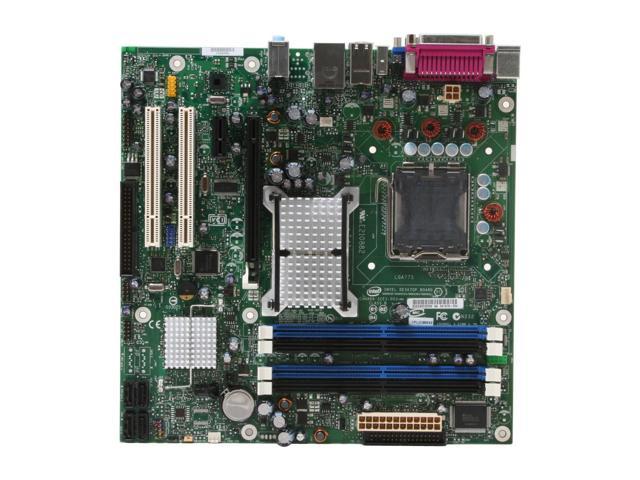
The 4 pin power connector is loacated at the top right in this picture :-)
My Guides--------->http://webpages.charter.net/bacitup/
Newbies------------>http://forums.afterdawn.com/thread_view.cfm/183136
Software ------->http://webpages.charter.net/bacitup/software.htm
|
|
Horiz
Junior Member
|
12. April 2007 @ 06:45 |
Link to this message
|
|
Thanks guys. Found it, it was in securely, took it out and in again just to be sure. Still no change.
Will test taking CPU, GFX and RAM out individually soon.
|
|
Advertisement
|
|
|
Moderator
|
17. April 2007 @ 09:18 |
Link to this message
|
|
Profanities edited out, let's keep it clean in future

Main PC ~ Intel C2Q Q6600 (G0 Stepping)/Gigabyte GA-EP45-DS3/2GB Crucial Ballistix PC2-8500/Zalman CNPS9700/Antec 900/Corsair HX 620W
Network ~ DD-WRT ~ 2node WDS-WPA2/AES ~ Buffalo WHR-G54S. 3node WPA2/AES ~ WRT54GS v6 (inc. WEP BSSID), WRT54G v2, WRT54G2 v1. *** Forum Rules ***This message has been edited since posting. Last time this message was edited on 17. April 2007 @ 09:18
|


