User User name Password  
   
Monday 26.1.2026 / 13:41
Search AfterDawn Forums:        In English   Suomeksi   På svenska
afterdawn.com > forums > pc hardware > other pc hardware > overclocking cpu
Show topics
 
Forums
Forums
overclocking cpu
  Jump to:
 
Posted Message
Senior Member
_
17. May 2007 @ 17:09 _ Link to this message    Send private message to this user   
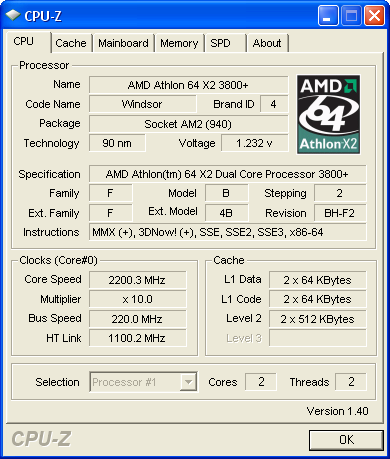
i can over clock my cpu by 10 % by selecting al overclocking .i get my amd from 2.0ghz to 2.2ghz .why is it that if i choose manual and select say 230 ghz it wont boot.is there something i need to change ?thanks ..


I AM A DUMPSTER DIVER AND PROUD OF IT..
Reach Down & Grab it Or Walk in & Get Some !!!!!!!!!!!!!!!}
Advertisement
_
__
Senior Member
_
17. May 2007 @ 18:07 _ Link to this message    Send private message to this user   
it could be a few things making it fall over.

have you changed any other settings in your bios?

did you turn off all the unneeded options in your bios.
Senior Member
_
17. May 2007 @ 18:31 _ Link to this message    Send private message to this user   
Originally posted by marsey99:
it could be a few things making it fall over.

have you changed any other settings in your bios?

did you turn off all the unneeded options in your bios.

not sure what i could have changed besides the ram voltage from auto to 1.9

unneeded options in your bios. >>>>> hmmmmmmm like what


I AM A DUMPSTER DIVER AND PROUD OF IT..
Reach Down & Grab it Or Walk in & Get Some !!!!!!!!!!!!!!!}

This message has been edited since posting. Last time this message was edited on 17. May 2007 @ 18:32

Senior Member
_
17. May 2007 @ 23:32 _ Link to this message    Send private message to this user   
drives ports, settings you dont use.

hold on i will have a look for some more nfo on your mobo and see wht i can find.
Senior Member
_
17. May 2007 @ 23:46 _ Link to this message    Send private message to this user   
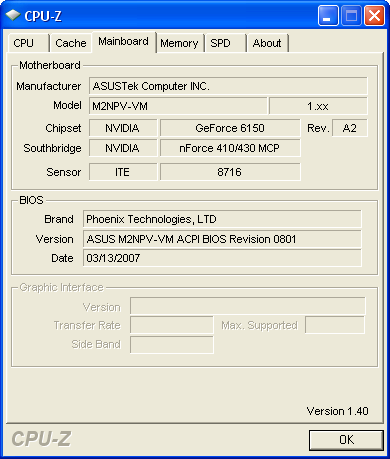
if you are using the onboard graphics then 10% is about as much as you will get as it will be the reason for the crashes. if not you could try turning off things like cnq, spectrum spread and any ports and slots you dont use. then drop the ht link multi to 3 and your ram to 667. you most likly will also need to give your cpu a little bit more voltage too.


overclocking and over volting cause more heat which needs better cooling. monitor your temps before you start so you can gauge how for they have increased.


overclocking can cause damage and will void your warrenty, do it at your own risk and dont blame me if you break it as i didnt make you do it :)


the offical overclocking thread at the top of the threads list is also full of people who will try to help you atain a better oc too.

good luck and happy clocking.
Advertisement
_
__
 
_
Senior Member
_
18. May 2007 @ 04:23 _ Link to this message    Send private message to this user   
i am using the onboard graphics.
quote>try turning off things like cnq, spectrum spread and any ports and slots you dont use

under what setting in the bios can i turn these off


thanks again marsey99

and my cpu temp is at 86F ?is this normal


I AM A DUMPSTER DIVER AND PROUD OF IT..
Reach Down & Grab it Or Walk in & Get Some !!!!!!!!!!!!!!!}

This message has been edited since posting. Last time this message was edited on 18. May 2007 @ 08:39

afterdawn.com > forums > pc hardware > other pc hardware > overclocking cpu
 

Digital video: AfterDawn.com | AfterDawn Forums
Music: MP3Lizard.com
Gaming: Blasteroids.com | Blasteroids Forums | Compare game prices
Software: Software downloads
Blogs: User profile pages
RSS feeds: AfterDawn.com News | Software updates | AfterDawn Forums
International: AfterDawn in Finnish | AfterDawn in Swedish | AfterDawn in Norwegian | download.fi
Navigate: Search | Site map
About us: About AfterDawn Ltd | Advertise on our sites | Rules, Restrictions, Legal disclaimer & Privacy policy
Contact us: Send feedback | Contact our media sales team
 
  © 1999-2026 by AfterDawn Ltd.

  IDG TechNetwork