|
|
|
Nero (or is it my computer in general?) thinks my DVD-RW drive is a CD drive only, help please
|
|
|
ultcomics
Newbie

|
20. May 2007 @ 15:03 |
 Link to this message

|
I'm desperate here.
Ok here's the story
I have an external, USB, LITEON DVD burner model SOHW-1673SX
I've had it for a while and it's always worked just fine. Today, for some odd reason, it decided "hey I don't want to be a DVD burner anymore. I'll read DVDs and CDs just fine and I might even burn CDs, but not DVDs"
If I stick in a blank DVD+R or DVD-R (tried different brands), the drive's name (in My Computer) goes from DVD-RW drive to CD Drive. When I try to burn something with Nero or DVD Shrink, it fails.
One time a failed disc, after re inserting it, had part of the file name of what I tried burning written on the DVD but that was it.
I've already tried different firmwares, it's currently at it's most recent firmware (Drivers are nonexistant, its plug n play I guess).
Tried system restore, same thing...
Tried reinstalling Nero, same thing...
I really don't know what to do
Now if I try burning something under like 500MB (in other words, a CD sized file) it works fine... but over that it won't ever start burning..
|
Moderator
|
20. May 2007 @ 15:34 |
Link to this message

|
The burner may just be on the way out. Usually dvd burning goes before cd burning.
When you insert a disc in and windows changes it to a cd drive - that's normal - no worries there.
Yes the drive is plug and play so you're good there too.
Have another pc you can try this burner with?
What different brands of media have you tried?
You could try crossflashing to the 1693S if you like - link.
You can also post the last Nero log - just be sure to edit out the serial # - they begin w/ 1A, 1C or 5C.
You can find them here:
Nero 6 - program files>ahead>nero>nerohistory
Nero 7 - program files>nero>nero 7>core>nerohistory.
|
|
ultcomics
Newbie

|
20. May 2007 @ 16:00 |
Link to this message

|
"The burner may just be on the way out. Usually dvd burning goes before cd burning.
When you insert a disc in and windows changes it to a cd drive - that's normal - no worries there. "
Well when I stick a blank DVD in and it changes it to a CD Drive, that's not normal.. it never happened before yesterday.
"Have another pc you can try this burner with? "
Yes tried it on multiple PCs, same thing
"What different brands of media have you tried? "
Imation, Sony, Verbatim
both DVD+R and DVD-R
"You could try crossflashing to the 1693S if you like - link. "
Didn't do anything
"You can also post the last Nero log - just be sure to edit out the serial # - they begin w/ 1A, 1C or 5C.
You can find them here:
Nero 6 - program files>ahead>nero>nerohistory
Nero 7 - program files>nero>nero 7>core>nerohistory."
not sure if this is it. Dvd burner is E drive
====== *** Nero-Burning Rom, History File *** ======
Windows XP 5.1
IA32
WinAspi: -
ahead WinASPI: File 'C:\Program Files\Ahead\nero\Wnaspi32.dll': Ver=2.0.1.68, size=160016 bytes, created 7/22/2004 6:33:44 PM
Nero version: 6.3.1.26 (Nero Express)
Recorder: <LITE-ON DVDRW SOHW-1673S>Version: JS0D - HA 2 TA 0 - 6.3.1.26
Adapter driver: <> HA 2
Drive buffer : 2048kB
Bus Type : default (0) -> ATAPI, detected: ?
CD-ROM: <HL-DT-ST CD-ROM GCR-8483B>Version: 1.07 - HA 1 TA 0 - 6.3.1.26
Adapter driver: <atapi> HA 1
=== Scsi-Device-Map ===
DiskPeripheral : WDC WD400BB-75JHC0 atapi Port 0 ID 0 DMA: On
CdRomPeripheral : HL-DT-ST CD-ROM GCR-8483B atapi Port 1 ID 0 DMA: On
=== CDRom-Device-Map ===
HL-DT-ST CD-ROM GCR-8483 D: CDRom0
=======================
AutoRun : 1
Excluded drive IDs:
WriteBufferSize: 74448896 (0) Byte
ShowDrvBufStat : 0
BUFE : 0
Physical memory : 509MB (522224kB)
Free physical memory: 68MB (69936kB)
Memory in use : 86 %
Uncached PFiles: 0x0
Use Static Write Speed Table: 0
Use Inquiry : 1
Global Bus Type: default (0)
Check supported media : Disabled (0)
20.5.2007
ISO compilation
12:33:28 AM #1 Text 0 File Isodoc.cpp, Line 6083
Iso document burn settings
------------------------------------------
Determine maximum speed : FALSE
Simulate : FALSE
Write : TRUE
Finalize CD : TRUE
Multisession : FALSE
Burning mode : DAO
Mode : 1
ISO Level : 1 (Max. of 11 = 8 + 3 char)
Character set : ISO 9660
Joliet : TRUE
Allow pathdepth more than 8 directories : TRUE
Allow more than 255 characters in path : TRUE
Write ISO9660 ;1 file extensions : TRUE
12:33:28 AM #2 Text 0 File Reader.cpp, Line 126
Reader running
12:33:28 AM #3 Text 0 File Writer.cpp, Line 124
Writer LITE-ON DVDRW SOHW-1673S running
12:33:28 AM #4 ISO9660GEN -11 File geniso.cpp, Line 3899
First writeable address = 0 (0x00000000)
12:33:28 AM #5 Text 0 File Burncd.cpp, Line 3152
Turn on Disc-at-once, using DVD media
12:33:29 AM #6 Text 0 File DlgWaitCD.cpp, Line 247
Last possible write address on media: 2295103 (510:01.28, 4482MB)
Last address to be written: 1049551 (233:14.01, 2049MB)
12:33:29 AM #7 Text 0 File DlgWaitCD.cpp, Line 259
Write in overburning mode: NO (enabled: CD)
12:33:29 AM #8 Text 0 File DlgWaitCD.cpp, Line 2162
Recorder: LITE-ON DVDRW SOHW-1673S, Media type: DVD+R
Disc Manufacturer ID: DAXON, Media Type ID: AZ3, Product revision number: 0
Disc Application Code: 0, Extended Information Indicators: 7
12:33:29 AM #9 Text 0 File DlgWaitCD.cpp, Line 420
>>> Protocol of DlgWaitCD activities: <<<
=========================================
12:33:29 AM #10 Text 0 File ThreadedTransferInterface.cpp, Line 813
Setup items (after recorder preparation)
0: TRM_DATA_MODE1 (CTransferItem)
2 indices, index0 (150) not provided
original disc pos #0 + 1049552 (1049552) = #1049552/233:14.2
relocatable, disc pos for caching/writing not required/required, no patch infos
-> TRM_DATA_MODE1, 2048, config 0, wanted index0 0 blocks, length 1049552 blocks [LITE-ON DVDRW SOHW-1673S]
--------------------------------------------------------------
12:33:29 AM #11 Text 0 File ThreadedTransferInterface.cpp, Line 984
Prepare recorder [LITE-ON DVDRW SOHW-1673S] for write in CUE-sheet-DAO
DAO infos:
==========
MCN: ""
TOCType: 0x00; Session Closed, disc fixated
Tracks 1 to 1:
1: TRM_DATA_MODE1, 2048/0x00, FilePos 0 0 2149482496, ISRC ""
DAO layout:
===========
__Start_|____Track_|_Idx_|_RecDep_|_CtrlAdr_
0 | lead-in | 0 | 0x00 | 0x41
0 | 1 | 0 | 0x00 | 0x41
0 | 1 | 1 | 0x00 | 0x41
1049552 | lead-out | 1 | 0x00 | 0x41
12:33:29 AM #12 Phase 24 File dlgbrnst.cpp, Line 1855
Caching of files started
12:33:30 AM #13 Text 0 File Burncd.cpp, Line 4163
Cache writing successful.
12:33:30 AM #14 Phase 25 File dlgbrnst.cpp, Line 1855
Caching of files completed
12:33:30 AM #15 Phase 36 File dlgbrnst.cpp, Line 1855
Burn process started at 16x (22,160 KB/s)
12:33:30 AM #16 Text 0 File ThreadedTransferInterface.cpp, Line 2344
Verifying disc position of item 0 (relocatable, disc pos, no patch infos, orig at #0): write at #0
12:33:30 AM #17 Text 0 File Cdrdrv.cpp, Line 8228
---- DVD Structure: Physical Format Information (00h) ----
Layer: 0, Address: 0 (0 h), AGID: 0; Length: 2050
Book Type: DVD+R (10), Part Version: 1
Disc Size: 120 mm, Maximum Rate: <not specified> (F h)
Number of Layers: 1, Track Path: Parallel Track Path (PTP), Layer Type: recordable
Linear Density: 0,267 um/bit, Track Density: 0,74 um/track
Starting Physical Sector Number of Data Area: 30000 h (DVD-ROM, DVD-R/-RW, DVD+R/+RW)
End Physical Sector Number of Data Area: 26053F h
End Sector Number in Layer 0: 0 h
Data in Burst Cutting Area (BCA) does not exist
Disc Application Code: 0 / 0 h
Extended Information indicators: 7 h
Disc Manufacturer ID: DAXON...
Media type ID: AZ3
Product revision number: 0
Number of Physical format information bytes in use in ADIP up to byte 63: 56
Media Specific [16..63]:
00 00 07 44 41 58 4F 4E - 00 00 00 41 5A 33 00 38 ...DAXON...AZ3.8
23 54 37 14 00 23 6F 00 - 7D 6A 17 19 0C 0C 0A 0B #T7..#o.}j......
01 19 1B 0B 0B 0E 0F 01 - 00 00 00 00 00 00 00 00 ................
12:33:30 AM #18 Text 0 File dlgbrnst.cpp, Line 1713
Set remaining time: 1:46,563 (106563ms) -> OK
12:33:30 AM #19 Text 0 File DVDPlusRW.cpp, Line 628
Start write address at LBA 0
DVD high compatibility mode: Yes
12:34:58 AM #20 Phase 40 File dlgbrnst.cpp, Line 1550
Aborted by user
12:35:06 AM #21 SCSI -500 File Cdrdrv.cpp, Line 1445
SCSI Exec, HA 2, TA 0, LUN 0, buffer 0x0AB80000
Status: 0x02 (0x03, SCSI_ABORTED)
HA-Status 0x10 (0x0A, SCSI_HASTAT_REQUEST_SENSE_FAILED)
TA-Status 0x00 (0x00, OK)
Sense Key: 0x05 (KEY_ILLEGAL_REQUEST)
Sense Code: 0x26
Sense Qual: 0x02
CDB Data: 0x2A 0x00 0x00 0x00 0x00 0x00 0x00 0x00 0x20 0x00 0x00 0x00
Sense Data: 0xF0 0x00 0x05 0x00 0x00 0x00 0x00 0x00
0x00 0x00 0x00 0x00 0x26 0x02
12:35:06 AM #22 CDR -500 File Writer.cpp, Line 304
SCSI command aborted
LITE-ON DVDRW SOHW-1673S\H2 T0
12:35:11 AM #23 SCSI -500 File Cdrdrv.cpp, Line 1191
SCSI Exec, HA 2, TA 0, LUN 0, buffer 0x03D75000
Status: 0x02 (0x03, SCSI_ABORTED)
HA-Status 0x10 (0x0A, SCSI_HASTAT_REQUEST_SENSE_FAILED)
TA-Status 0x00 (0x00, OK)
Sense Key: 0x05 (KEY_ILLEGAL_REQUEST)
Sense Code: 0x26
Sense Qual: 0x02
CDB Data: 0xAD 0x00 0x00 0x00 0x00 0x00 0x00 0x00 0x08 0x04 0x00 0x00
Sense Data: 0xF0 0x00 0x05 0x00 0x00 0x00 0x00 0x00
0x00 0x00 0x00 0x00 0x26 0x02
12:35:11 AM #24 SCSI -500 File Cdrdrv.cpp, Line 1191
SCSI Exec, HA 2, TA 0, LUN 0
Status: 0x02 (0x03, SCSI_ABORTED)
HA-Status 0x10 (0x0A, SCSI_HASTAT_REQUEST_SENSE_FAILED)
TA-Status 0x00 (0x00, OK)
Sense Key: 0x05 (KEY_ILLEGAL_REQUEST)
Sense Code: 0x26
Sense Qual: 0x02
CDB Data: 0x35 0x02 0x00 0x00 0x00 0x00 0x00 0x00 0x00 0x00 0x00 0x00
Sense Data: 0xF0 0x00 0x05 0x00 0x00 0x00 0x00 0x00
0x00 0x00 0x00 0x00 0x26 0x02
12:35:11 AM #25 Text 0 File dlgbrnst.cpp, Line 1713
Set remaining time: 0:00,000 (0ms) -> OK
12:35:11 AM #26 CDR -500 File WriterStatus.cpp, Line 164
SCSI command aborted
LITE-ON DVDRW SOHW-1673S\H2 T0
12:35:11 AM #27 TRANSFER -24 File WriterStatus.cpp, Line 164
Could not perform end of Disc-at-once
12:35:11 AM #28 SCSI -500 File Cdrdrv.cpp, Line 1191
SCSI Exec, HA 2, TA 0, LUN 0, buffer 0x03D722A8
Status: 0x02 (0x03, SCSI_ABORTED)
HA-Status 0x10 (0x0A, SCSI_HASTAT_REQUEST_SENSE_FAILED)
TA-Status 0x00 (0x00, OK)
Sense Key: 0x05 (KEY_ILLEGAL_REQUEST)
Sense Code: 0x26
Sense Qual: 0x02
CDB Data: 0x5A 0x00 0x05 0x00 0x00 0x00 0x00 0x00 0x48 0x00
Sense Data: 0xF0 0x00 0x05 0x00 0x00 0x00 0x00 0x00
0x00 0x00 0x00 0x00 0x26 0x02
12:35:12 AM #29 Text 0 File dlgbrnst.cpp, Line 1713
Set remaining time: 0:00,000 (0ms) -> OK
12:35:12 AM #30 CDR -600 File WriterStatus.cpp, Line 169
Device not available
LITE-ON DVDRW SOHW-1673S\H2 T0
12:35:12 AM #31 TRANSFER -39 File WriterStatus.cpp, Line 169
Could not perform EndSession
12:35:12 AM #32 Phase 39 File dlgbrnst.cpp, Line 1855
Burn process aborted
Existing drivers:
File 'Drivers\ADPU160M.SYS': Ver=v3.60a (Lab01_N(johnstra).010529-2218), size=101888 bytes, created 8/17/2001 12:07:32 PM
File 'Drivers\CDRALW2K.SYS': Ver=8.0.0.212 , size=2560 bytes, created 10/18/2006 3:00:00 AM
File 'Drivers\PXHELP20.SYS': Ver=3.00.43J, size=36624 bytes, created 10/18/2006 3:00:00 AM (Prassi/Veritas driver for win 2K)
File 'Drivers\atapi.sys': Ver=5.1.2600.2180 (xpsp_sp2_rtm.040803-2158), size=95360 bytes, created 8/3/2004 8:59:44 PM (Adapter driver for src)
Registry Keys:
HKLM\Software\Microsoft\Windows NT\CurrentVersion\WinLogon\AllocateCDROMs : 0 (Security Option)
====== *** Nero-Burning Rom, History File *** ======
The file is huge, is there a part
|
|
Advertisement
|
|
|
Moderator
|
20. May 2007 @ 16:50 |
Link to this message
|
Check out drive D is in this pic - this is a LiteOn SHW-16OP6S with a blank disc inserted showing as a cd drive. I can put a disc in any of the others and it will show the same thing. Once the disc is out it will show as a dvd drive again.
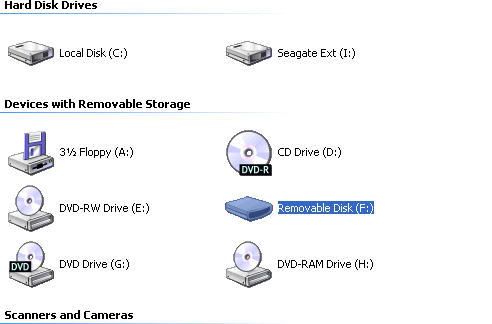
The other pc's that you tried what software did you try burning with - Nero also?
In the log you're getting a communication error - here's a few suggestions.
Update Nero - quite a few fixes and enhancements since the version you're using. Update package 1 (6.6.1.15a)- link
Have another usb cable you can try or another usb port if you haven't tried this already?
Try ImgBurn. A good free burner. For non image files use the build mode to add what to what to burn.
Take the burn speed down to 8x.
In this log you have 86% memory in use. Alot - so no multitasking and close any unneeded programs.
File 'Drivers\CDRALW2K.SYS
Roxio driver that doesn't always play well with Nero - if you've had a Roxio product installed before this started happening than may not be a problem. You can try uninstalling Roxio and running the zap tool
|
|




