|
|
|
Illegal Disc error with Nero 7.9.6.0 for Sony DRU-800A
|
|
|
Anupe
Newbie

|
3. June 2007 @ 18:20 |
Link to this message

|
I have been unable to burn dvds at even 6x speeds ( which is the lowest speed selectable) and keep getting the illegal disc error. This problem exists only with DVD R's I'm presuming, because I am able to sucessfully write the same data at 2x speed on DVD RWs. But since there is no provision to burn DVD R's at a lower speed than 6x, I am unable to burn any dvds. I am using Sony DVD media which are capable of 16x speeds. I am including the log, if somebody could help me solve this problem, I'd be most grateful. Thanks.
Anupe Vincent
Windows XP 5.1
IA32
WinAspi: -
NT-SPTI used
Nero Version: 7.9.6.0
Internal Version: 7, 9, 6, 0
Recorder: <SONY DVD RW DRU-800A> Version: KY06 - HA 1 TA 0 - 7.9.6.0
Adapter driver: <IDE> HA 1
Drive buffer : 2048kB
Bus Type : default (0) -> ATAPI, detected: ?
CD-ROM: <SONY DVD RW DRU-800A >Version: KY06 - HA 1 TA 0 - 7.9.6.0
Adapter driver: <IDE> HA 1
=== Scsi-Device-Map ===
CdRomPeripheral : SONY DVD RW DRU-800A atapi Port 0 ID 0 DMA: On
DiskPeripheral : HDT722525DLA380 atapi Port 1 ID 0 DMA: On
=== CDRom-Device-Map ===
SONY DVD RW DRU-800A J: CdRom0
=======================
AutoRun : 1
Excluded drive IDs:
WriteBufferSize: 83886080 (0) Byte
BUFE : 0
Physical memory : 1023MB (1047792kB)
Free physical memory: 580MB (594204kB)
Memory in use : 43 %
Uncached PFiles: 0x0
Use Inquiry : 1
Global Bus Type: default (0)
Check supported media : Disabled (0)
3.6.2007
ISO compilation
5:26:04 PM #1 Text 0 File SCSIPTICommands.cpp, Line 424
LockMCN - completed sucessfully for IOCTL_STORAGE_MCN_CONTROL
5:26:04 PM #2 Text 0 File Isodoc.cpp, Line 6663
Iso document burn settings
------------------------------------------
Determine maximum speed : FALSE
Simulate : TRUE
Write : FALSE
Finalize CD : TRUE
Multisession : FALSE
Burning mode : DAO
Mode : 1
ISO Level : 1 (Max. of 11 = 8 + 3 char)
Character set : ISO 9660
Joliet : TRUE
Allow pathdepth more than 8 directories : TRUE
Allow more than 255 characters in path : TRUE
Write ISO9660 ;1 file extensions : TRUE
5:26:05 PM #3 ISO9660GEN -11 File Geniso.cpp, Line 3343
First writeable address = 0 (0x00000000)
5:26:05 PM #4 Text 0 File Burncd.cpp, Line 3508
Turn on Disc-At-Once, using DVD media
5:26:05 PM #5 Text 0 File DlgWaitCD.cpp, Line 307
Last possible write address on media: 2298495 (510:46.45, 4489MB)
Last address to be written: 2078767 (461:56.67, 4060MB)
5:26:05 PM #6 Text 0 File DlgWaitCD.cpp, Line 319
Write in overburning mode: NO (enabled: CD)
5:26:05 PM #7 Text 0 File DlgWaitCD.cpp, Line 2964
Recorder: SONY DVD RW DRU-800A, Media type: DVD-R
Disc Manufacturer: SONY16 - D1
Disc Application Code: 64, Disc Physical Code: 193
5:26:05 PM #8 Text 0 File DlgWaitCD.cpp, Line 493
>>> Protocol of DlgWaitCD activities: <<<
=========================================
5:26:05 PM #9 Text 0 File ThreadedTransferInterface.cpp, Line 793
Setup items (after recorder preparation)
0: TRM_DATA_MODE1 ()
2 indices, index0 (150) not provided
original disc pos #0 + 2078768 (2078768) = #2078768/461:56.68
relocatable, disc pos for caching/writing not required/ required
-> TRM_DATA_MODE1, 2048, config 0, wanted index0 0 blocks, length 2078768 blocks [J: SONY DVD RW DRU-800A]
--------------------------------------------------------------
5:26:05 PM #10 Text 0 File ThreadedTransferInterface.cpp, Line 995
Prepare [J: SONY DVD RW DRU-800A] for write in CUE-sheet-DAO
DAO infos:
==========
MCN: ""
TOCType: 0x00; Session Closed, disc fixated
Tracks 1 to 1: Idx 0 Idx 1 Next Trk
1: TRM_DATA_MODE1, 2048/0x00, FilePos 0 0 4257316864, ISRC ""
DAO layout:
===========
___Start_|____Track_|_Idx_|_CtrlAdr_|_____Size_|______NWA_|_RecDep__________
0 | lead-in | 0 | 0x41 | 0 | 0 | 0x00
0 | 1 | 0 | 0x41 | 0 | 0 | 0x00
0 | 1 | 1 | 0x41 | 2078768 | 0 | 0x00
2078768 | lead-out | 1 | 0x41 | 0 | 0 | 0x00
5:26:05 PM #11 Text 0 File SCSIPTICommands.cpp, Line 215
SPTILockVolume - completed successfully for FSCTL_LOCK_VOLUME
5:26:05 PM #12 Text 0 File Burncd.cpp, Line 4294
Caching options: cache CDRom or Network-Yes, small files-No (<64KB)
5:26:05 PM #13 Phase 24 File dlgbrnst.cpp, Line 1762
Caching of files started
5:26:05 PM #14 Text 0 File Burncd.cpp, Line 4413
Cache writing successful.
5:26:05 PM #15 Phase 25 File dlgbrnst.cpp, Line 1762
Caching of files completed
5:26:05 PM #16 Phase 32 File dlgbrnst.cpp, Line 1762
Simulation started at 6x (8,310 KB/s)
5:26:05 PM #17 Text 0 File ThreadedTransferInterface.cpp, Line 2721
Verifying disc position of item 0 (relocatable, disc pos, no patch infos, orig at #0): write at #0
5:26:05 PM #18 Text 0 File DVDR.cpp, Line 3225
Recording mode: Sequential Recording Mode
5:26:05 PM #19 Text 0 File DVDR.cpp, Line 3381
Start write address at LBA 0
DVD high compatibility mode: Yes
5:26:05 PM #20 Text 0 File Cdrdrv.cpp, Line 9872
---- Disc Structure: Physical Format Information (00h) ----
Media Type: 0, Layer: 0, Address: 0 (0 h), AGID: 0; Length: 2050
Book Type: DVD-R (2), Part Version: 2.0x (5), Extended Part Version: 2.1 (33)
Disc Size: 120 mm, Maximum Rate: <not specified> (F h)
Number of Layers: 1, Track Path: Parallel Track Path (PTP), Layer Type: recordable
Linear Density: 0,267 um/bit, Track Density: 0,74 um/track
Starting Physical Sector Number of Data Area: 30000 h (DVD-ROM, DVD-R/-RW, DVD+R/+RW)
End Sector Number in Layer 0: 0 h (LBN: FFFD0000 h, 4193920 MB)
Data in Burst Cutting Area (BCA) does not exist
Revision number of maximum recording speed: 6.0
Revision number of minimum recording speed: -
Revision number table of recording speed: 1.0 2.0 3.0 4.0 5.0 - -
Class: 0
Start sector number of the current Border-Out: 0 h
Start sector number of the next Border-In: 0 h
Media Specific [16..63]:
00 60 00 10 20 30 40 50 - 00 00 00 21 00 00 00 00 .`...0@P...!....
00 00 00 00 00 00 00 00 - 00 00 00 00 00 00 00 00 ................
00 00 00 00 00 00 00 00 - 00 00 00 00 00 00 00 00 ................
5:26:05 PM #21 Text 0 File ThreadedTransfer.cpp, Line 269
Pipe memory size 83836800
5:26:06 PM #22 Text 0 File Cdrdrv.cpp, Line 1352
17:26:06.984 - J: SONY DVD RW DRU-800A : Queue again later
5:28:57 PM #23 SPTI -1046 File SCSIPassThrough.cpp, Line 179
CdRom0: SCSIStatus(x02) WinError(0) NeroError(-1046)
Sense Key: 0x02 (KEY_NOT_READY)
Sense Code: 0x30
Sense Qual: 0x05
CDB Data: 0x2A 00 00 00 04 E0 00 00 20 00 00 00
Sense Area: 0x70 00 02 00 00 00 00 0A 00 00 00 00 30 05
Buffer x09560a00: Len x10000
0xEA 8C 44 F7 95 AC 18 E2 14 06 23 D2 91 F7 5E 54
0xA2 97 69 A3 11 E7 A3 47 49 34 13 A0 F9 D2 C6 23
0xD2 48 81 97 B4 EE B4 67 BB A1 17 49 E7 FD AC 1F
5:28:57 PM #24 CDR -1046 File Writer.cpp, Line 303
Illegal disc
J: SONY DVD RW DRU-800A
5:29:04 PM #25 Text 0 File DVDR.cpp, Line 3783
EndDAO: Last written address was 1247 (4DFh)
5:29:09 PM #26 Phase 34 File dlgbrnst.cpp, Line 1762
Simulation failed at 6x (8,310 KB/s)
5:29:09 PM #27 Text 0 File SCSIPTICommands.cpp, Line 261
SPTIDismountVolume - completed successfully for FSCTL_DISMOUNT_VOLUME
5:29:11 PM #28 Text 0 File Cdrdrv.cpp, Line 11185
DriveLocker: UnLockVolume completed
5:29:11 PM #29 Text 0 File SCSIPTICommands.cpp, Line 424
UnLockMCN - completed sucessfully for IOCTL_STORAGE_MCN_CONTROL
Existing drivers:
Registry Keys:
HKLM\Software\Microsoft\Windows NT\CurrentVersion\WinLogon\AllocateCDROMs : 0 (Security Option)
|
|
Advertisement
|
  |
|
|
Moderator
|
3. June 2007 @ 19:36 |
Link to this message

|
Hi Anupe
The Sony discs may not be compatible with the drive - their a bit newer and the last update on the drive was 12/05 - usually the illegal disc error is caused by the firmware not supporting the media.
Some options - switch the media to Taiyo Yuden, Verbatim or made in Japan only Fuji or Maxell.
Burn the iso w/ ImgBurn. ImgBurn will should allow you to go down to 4x - try that speed.
Try flashing the drive w/ patched firmware - this Sony is actually a Liteon SOHW 1693S.
You can try the KC4B - link
|
|
Anupe
Newbie
|
3. June 2007 @ 19:40 |
Link to this message
|
Originally posted by binkie7:
Hi Anupe
The Sony discs may not be compatible with the drive - their a bit newer and the last update on the drive was 12/05 - usually the illegal disc error is caused by the firmware not supporting the media.
Some options - switch the media to Taiyo Yuden, Verbatim or made in Japan only Fuji or Maxell.
Burn the iso w/ ImgBurn. ImgBurn will should allow you to go down to 4x - try that speed.
Try flashing the drive w/ patched firmware - this Sony is actually a Liteon SOHW 1693S.
You can try the KC4B - link
Thank you binkie7, I'll try your suggestion and post the results here.
|
Moderator
|
3. June 2007 @ 19:50 |
Link to this message

|
|
Not a problem Anupe
Hopefully one of them will do the trick!
|
|
Anupe
Newbie
|
4. June 2007 @ 17:43 |
Link to this message
|
Originally posted by binkie7:
Burn the iso w/ ImgBurn. ImgBurn will should allow you to go down to 4x - try that speed.
Try flashing the drive w/ patched firmware - this Sony is actually a Liteon SOHW 1693S.
You can try the KC4B - link
These two methods havent helped, I still keep getting the same error. Tried rolling back to an earlier version of Nero.. (I have a 6.6.0.8 OEM version with me as well) That didnt work too..
Now all I can do is try different media, I dont know if Fuji or Maxell is available here, I've tried Moserbaer and it didnt work, I guess I'll just have to keep trying different media and hope one of them works :(
|
Moderator
|
4. June 2007 @ 18:08 |
Link to this message
|
|
What brands of media is available where you are?
It might just be easier ( & cheaper too) to pick up a new drive. It's getting up there in burner years :) and at some point they just start to go.
|
|
Anupe
Newbie
|
4. June 2007 @ 18:23 |
Link to this message
|
|
I'm going to ransack the nearest dvd media shop and try one from every available brand there lol.... if it doesnt work, I guess I'll have to bury this drive.
The sad part is, it works fine for every other reason including burning DL discs
The brands I saw yesterday were TDK and a few unheard of ones that only have a max burn speed of 8 x... think they'd work?? I guess I'll just give em all a spin
|
Moderator
|
4. June 2007 @ 18:51 |
Link to this message
|
|
What the heck if the price is right pick up some different ones. Go for the 8x ones and see if you can find any that say made in Japan.
Hopefully one will do the trick.
Yeah if you can still burn DL then maybe just the 2 you've tried were bad for this drive or a bad batches? Kinda of a coincidence but you never know :)
|
|
Anupe
Newbie
|
20. June 2007 @ 06:26 |
Link to this message
|
|
Thanks for all the help binkie7, I got myself a new Sony drive AWG-170A and its working like a dream!!. Thanks you once again :-)
|
Moderator
|
20. June 2007 @ 13:59 |
Link to this message
|
|
Your welcome Anupe
Good to hear you are back in business!
Happy Burning
|
Senior Member
|
20. June 2007 @ 20:41 |
Link to this message
|
@Anupe
I have the very same drive that you do, and the same Nero version, and have no problem burning DVD-R disks from Sony, The DRU-800A is a 16X burner and can burn at 16X with quality scores in the low 90's. I use it mainly as a ripper drive now, and always to burn music CD's and Game CD back-ups for the kids, and have never had any problems with this drive??? What type of computer is the drive located in? Set on cable select or master? (Both have worked for me)
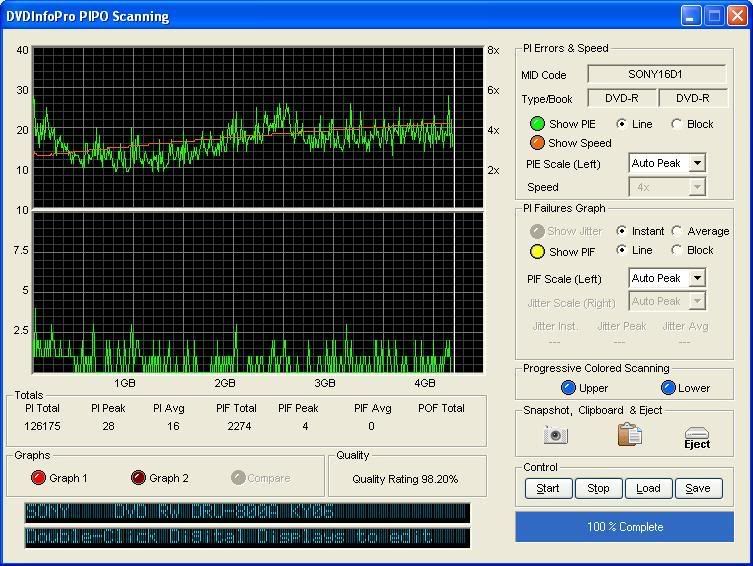
Just curious, 'cuz this drive will burn anything I throw in it.
|
|
Anupe
Newbie
|
20. June 2007 @ 23:06 |
Link to this message
|
Originally posted by blivetNC:
@Anupe
I have the very same drive that you do, and the same Nero version, and have no problem burning DVD-R disks from Sony, The DRU-800A is a 16X burner and can burn at 16X with quality scores in the low 90's. I use it mainly as a ripper drive now, and always to burn music CD's and Game CD back-ups for the kids, and have never had any problems with this drive??? What type of computer is the drive located in? Set on cable select or master? (Both have worked for me)
Just curious, 'cuz this drive will burn anything I throw in it.
The DRU-800A is set as master on the primary IDE with no slave attached to the same IDE. The computer is run on an AMD Athlon 64 Processor 3200+, 2.00 Ghz with 1 GB DDR RAM.
As mentioned earlier in the thread, I have no problems burning CD's at 48x or DVD RWs at 2 x, but DVD-R writing results in a coaster. I would've loved to turn down my writing speed for DVD-R media to 2x as well but that option isnt there in Nero.
Now I've hooked up a AW-G170A as master on the secondary IDE as well. The new drive is burning 16x DVD-R media at 18x!! Did 10 discs so far, no problems at all!!
But... how I wish my 800A worked too! lol
|
Senior Member
|
21. June 2007 @ 04:21 |
Link to this message
|
|
I do all my 16X media burns at 12X, you have more horsepower than I do, 1.9GHZ Pentium IV, 1 Gig Ram, you should be smokin' those Sony disks, I've had this burner for almost 3 years now and it works awesomely. wish I knew what was causing your problems.
|
|
Advertisement
|
|
|
|
Anupe
Newbie
|
21. June 2007 @ 06:09 |
Link to this message
|
No idea boss! I send out a log report to Nero too and they dont seem to be able to fix it. I guess it qualifies for Ripley's Believe it or Not! lol
|
|





