User User name Password  
   
Wednesday 18.3.2026 / 04:59
Search AfterDawn Forums:        In English   Suomeksi   På svenska
afterdawn.com > forums > software specific discussion > nero discussion > please help!!
Show topics
 
Forums
Forums
please help!!
  Jump to:
 
Posted Message
angel1417
Newbie
_
3. June 2007 @ 18:54 _ Link to this message    Send private message to this user   
i was about to burn an AVI file to dvd file in Nero 6..when i add the AVI file, it would not open but the size of the video would just show up..i tried to wait for it but then the video does not show up. i tried other files, it worked. but there are two files that would not show up..what to do?? i'm really desperate to finish these movies so that i can watch them on dvd..

can someone help me?
Advertisement
_
__
Senior Member
_
3. June 2007 @ 19:09 _ Link to this message    Send private message to this user   
will they play on ur pc.

http://www.dvdplusvideo.com/tutorial007.html
http://www.afterdawn.com/guides/
any country that sacrafices liberty for security deserves neither---ben franklin.
angel1417
Newbie
_
3. June 2007 @ 21:47 _ Link to this message    Send private message to this user   
yes, they will play on my pc..But when i add the file to the Nero, it wont show up..
AfterDawn Addict
_
3. June 2007 @ 21:51 _ Link to this message    Send private message to this user   
Have you tried to "Drag and Drop" them into NeroVision.


guide by ScubaPete http://www.dvdplusvideo.com/tutorial007.html Nero guide by alkohol http://www.dvdplusvideo.com/Guides/alkohol_guide3.html

New RipIt4Me + DVD Shrink + ImgBurn guid <==== Rip any DVDs http://forums.afterdawn.com/thread_view.cfm/422740 Guides by bbmayo..... http://webpages.charter.net/bacitup/
angel1417
Newbie
_
4. June 2007 @ 03:54 _ Link to this message    Send private message to this user   
how to drag nd drop?
AfterDawn Addict
_
4. June 2007 @ 14:44 _ Link to this message    Send private message to this user   
Open NeroVision....locate the files you wish to burn....highlight them...control C and then control V into NeroVision


guide by ScubaPete http://www.dvdplusvideo.com/tutorial007.html Nero guide by alkohol http://www.dvdplusvideo.com/Guides/alkohol_guide3.html

New RipIt4Me + DVD Shrink + ImgBurn guid <==== Rip any DVDs http://forums.afterdawn.com/thread_view.cfm/422740 Guides by bbmayo..... http://webpages.charter.net/bacitup/
angel1417
Newbie
_
4. June 2007 @ 18:07 _ Link to this message    Send private message to this user   
i tried to.. but still doesnt work
AfterDawn Addict
_
4. June 2007 @ 18:21 _ Link to this message    Send private message to this user   
You say you are using Nero 6, do you know which version of 6 you are using...and are you able to play the AVI files on your comp.


guide by ScubaPete http://www.dvdplusvideo.com/tutorial007.html Nero guide by alkohol http://www.dvdplusvideo.com/Guides/alkohol_guide3.html

New RipIt4Me + DVD Shrink + ImgBurn guid <==== Rip any DVDs http://forums.afterdawn.com/thread_view.cfm/422740 Guides by bbmayo..... http://webpages.charter.net/bacitup/

This message has been edited since posting. Last time this message was edited on 4. June 2007 @ 18:22

angel1417
Newbie
_
5. June 2007 @ 21:10 _ Link to this message    Send private message to this user   
i dont know wat version is it because wen i bought the dvd writer it was already free..yes, i can play the AVI file in my comp..i already put sub in it..but wen i try to burn it, it doesnt show up..
Senior Member
_
6. June 2007 @ 09:44 _ Link to this message    Send private message to this user   
angel1417

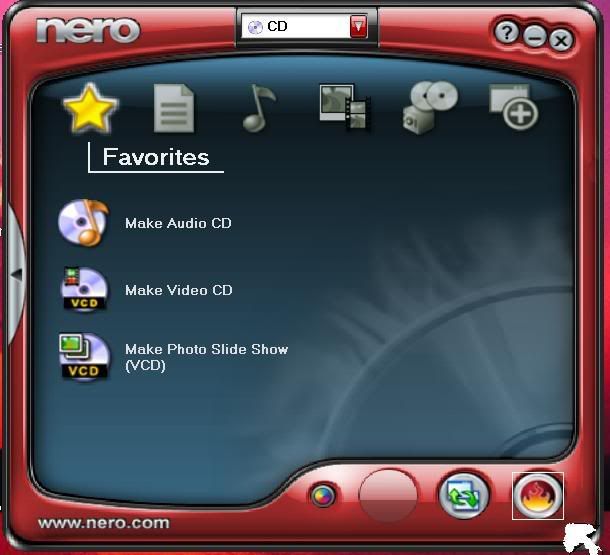
If you use the Nero Smartstart, click on the "fire" button on the lower right. This will then display what version of Nero you have.


angel1417
Newbie
_
6. June 2007 @ 17:25 _ Link to this message    Send private message to this user   
Nero digital 3.1.0.16
nero OEM 6.6.0.17
Advertisement
_
__
 
_
Senior Member
_
7. June 2007 @ 12:37 _ Link to this message    Send private message to this user   
Hey Angel,

I'm not the Nero expert, far from it, but I seem to think the recommended (i.e., most bug-free) version of Nero 6 is 6.6.0.18. There might be a download link under the Software tab here.

BEFORE UNINSTALLING your current version, go back to Nero Smartstart, click on the "fire" button (where you got your version numbers) and click on the serial number tab and WRITE DOWN YOUR SERIAL NUMBER(s). More than likely you have an OEM version of Nero which doesn't have the serial number written on the disk/envelope/jacket. I'd do this anyway and put it in a safe place, "just in case".

If you do decide to upgrade, besure to use the Nero Clean tools after doing an uninstall and before installing the new version.

Beside that, I think there is a possibility that the 2 AVI files that won't open in Nero might be corrupted. They might play ok in Media Player or another player with only a "glitch" or "ghost" but this could be enough corruption to stop Nero. I had a problem with some mpegs that stopped Nero cold.

Do you have another source for the AVIs? If so, you might try new versions of them before doing the uninstall.

Anyone know of a program that "cleans" AVI's???


afterdawn.com > forums > software specific discussion > nero discussion > please help!!
 

Digital video: AfterDawn.com | AfterDawn Forums
Music: MP3Lizard.com
Gaming: Blasteroids.com | Blasteroids Forums | Compare game prices
Software: Software downloads
Blogs: User profile pages
RSS feeds: AfterDawn.com News | Software updates | AfterDawn Forums
International: AfterDawn in Finnish | AfterDawn in Swedish | AfterDawn in Norwegian | download.fi
Navigate: Search | Site map
About us: About AfterDawn Ltd | Advertise on our sites | Rules, Restrictions, Legal disclaimer & Privacy policy
Contact us: Send feedback | Contact our media sales team
 
  © 1999-2026 by AfterDawn Ltd.

  IDG TechNetwork