|
Nero 7 Ultra Edition- Nero Express- Data DVD: Problem is slow burning and verifying of data.
|
|
Senior Member

|
27. June 2007 @ 10:32 |
 Link to this message

|
Hello,
This is how the problem goes-
I have been using Nero Express for burning Data DVDs for a long time now, and have not encountered any serious problems with anything thus far.
But recently Nero Express, and I think only this program (I have not tried Nero burning rom for a while or anything else for that matter) has been acting up.
Usually it would take me 15-20 minutes to burn 4 gigabytes of data onto a 4gb 8x speed Aone DVD disc. And it would write the data at exactly that speed. It would then verify the data at about the same speed. THe fact is that the whole process would take 20 minutes or so to complete. I was happy with this.
Only until recently have I noticed that it takes me well over one and a half hours to burn data onto a 4 gigabyte disc.
Now you see there is the problem, why has Nero Express suddenly become so slow? I mean it says it is burning at 8x speed, but by the time it has finished an hour has already passed.
Then the verification, that says it is verifying at 1.2 or so x speed. Now that is slow.
My question is how do I fix this problem and go back to the way it used to be?
I do not know what kind of information I have to provide, but what I can say is that this problem is sort of recent, and I have not made any major changes to my computer software wise, neither hardware wise, everything is to my knowledge the same as before the problem occured.
I am waiting for an answer, and all is welcome.
I thank you all in advance for all help.
BluRay.
ps. Just to makes sure, I am not trying to burn and encode or anything, I am just burning normal everyday sorts of files onto a DVD disc to free up space on my puny hdd. Stuff like pics, vids, blah blah, the list goes on.
"He who asks is a fool for five minutes, but he who does not ask remains a fool forever." - Chinese Proverb BluRay.
This message has been edited since posting. Last time this message was edited on 27. June 2007 @ 10:46
|
|
Advertisement
|
 |
|
|
Moderator
|
27. June 2007 @ 12:21 |
Link to this message

|
Hi BluRay
Have you checked and made sure all the drives transfer modes say DMA and not the slow PIO mode? Here's a guide.
You may just want to uninstall the ide channels anyhow reboot and let windows reinstall - can't hurt.
Is the firmware on the drive up to date too?
|
Senior Member
|
27. June 2007 @ 12:55 |
Link to this message
|
How do I uninstall the IDE channels? And no I do not have the most updated firmwire :(
EDIT:
I have checked IDE and transfer modes it is set to Ultra DMA Mode 5
But what confuses me is this, why have I got Primary IDE Channel listed twice?
As shown in thsi screenshot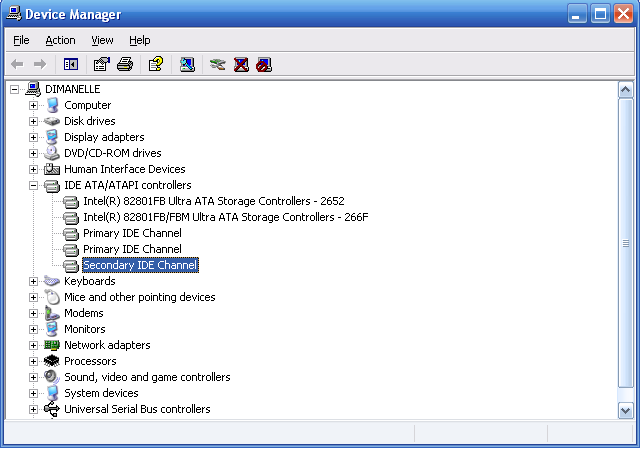
"He who asks is a fool for five minutes, but he who does not ask remains a fool forever." - Chinese Proverb BluRay.
This message has been edited since posting. Last time this message was edited on 27. June 2007 @ 13:02
|
Senior Member
|
27. June 2007 @ 13:55 |
Link to this message
|
Yay, all thanks goes to Binkie7.
:) Thanks m8
The problem is fixed, it turned out that one of the primary IDE was set to PIO only, and the other primary IDE was Ultra DMA 5, I uninstalled all IDE, rebooted, Win XP did the rest, then I rebooted, and then I used Nero, and I got a full 4gig disc done in 14 minutes, including the verification. (both at 8x speed)
Thats faster than before.
yay.
Thanks man I owe you and Afterdawn a lot. I love AD wooohooo, sigining up on to this website was one of the best things I have ever done on the web.
I wish I had posted earlier, that way I wont have wasted 4 hours yesturday trying to fix Nero, :( becuase it was not Nero but the DMA thingy.
Anyway once again thanks man.
best of Luck in whatever you want that luck in.
Woohoo.
BluRay.
ps. I still do not understand though, why Primary IDE is listed TWICE?
Screenshot
"He who asks is a fool for five minutes, but he who does not ask remains a fool forever." - Chinese Proverb BluRay.
This message has been edited since posting. Last time this message was edited on 27. June 2007 @ 13:56
|
Moderator
|
27. June 2007 @ 14:47 |
Link to this message
|
|
You're welcome BluRay - glad that did the trick!
If you're ever running slow again now you know what to check.
Hmmm the dual primary ide channels - have a dual core processor?
|
Senior Member
|
27. June 2007 @ 15:27 |
Link to this message
|
|
I wish I had a dual core processor, but no I dont :(
when I uninstalled those IDE, I uninstalled both primary IDE aswell. and all was gone, but it came back after.
I have a theory though, maybe it is because mine is one of those combo drive thingies :S I dunno just a theory.
Thanks again Binkie.
"He who asks is a fool for five minutes, but he who does not ask remains a fool forever." - Chinese Proverb BluRay.
|
Moderator
|
27. June 2007 @ 16:39 |
Link to this message

|
|
Not a problem BlueRay
Curious on the primary ide listed 2x too - let me see what I can find (a little beyond my knowledge :) )
|
Senior Member
|
28. June 2007 @ 02:07 |
Link to this message
|
|
Thank you Binkie, please let me know what you find =P
"He who asks is a fool for five minutes, but he who does not ask remains a fool forever." - Chinese Proverb BluRay.
|
|
ddp
Moderator
|
28. June 2007 @ 07:53 |
Link to this message
|
|
how many physical ide connectors are on your motherboard because i think you have 3 which i have seen before recently.
|
Senior Member
|
3. July 2007 @ 17:30 |
Link to this message
|
|
To be honest ddp, I do not know how many physical IDE connecters I have on my computer, but I can check for you inside the comp, only I might need some help on knowing whether I am looking at the right things or not.
"He who asks is a fool for five minutes, but he who does not ask remains a fool forever." - Chinese Proverb BluRay.
|
|
ddp
Moderator
|
3. July 2007 @ 18:26 |
Link to this message
|
|
what is the make & model# of your computer or motherboard?
|
Senior Member
|
9. July 2007 @ 16:31 |
Link to this message
|
|
Dunno the make of the motherboard, but the comp is a Dell :( :S
Thats about all, the DVD RW Drive thing is a samsung HD080HJ/P.
btw, sorry for getting back so late, I was away at my mums house :)
EDIT:
Dimension 3100, i guess is the model number??
"He who asks is a fool for five minutes, but he who does not ask remains a fool forever." - Chinese Proverb BluRay.
This message has been edited since posting. Last time this message was edited on 9. July 2007 @ 16:32
|
|
ddp
Moderator
|
9. July 2007 @ 17:55 |
Link to this message
|
|
mb has 1 ide connector for rom drives & 2 sata connectors for hd's.
|
Senior Member
|
10. July 2007 @ 01:09 |
Link to this message
|
|
I might sound dumb asking this, but what the heck, what is mb?
And if I have 1 ide connector how comes I got two primary ide channels?
:)
Thanks ddp, I appreciate you helping me
"He who asks is a fool for five minutes, but he who does not ask remains a fool forever." - Chinese Proverb BluRay.
|
|
ddp
Moderator
|
10. July 2007 @ 08:31 |
Link to this message
|
|
mb is short for motherboard. i think the two primary ide channels are the sata connectors as they have 2 different numbers, 2562 & 266f.
|
Senior Member
|
10. July 2007 @ 13:14 |
Link to this message
|
|
I see, actually I never got any of that, numbers and stuff, but lets just leave it at that, I guess :-)
Things work fine now anyway (touch wood)
Thanks ddp.
:D
"He who asks is a fool for five minutes, but he who does not ask remains a fool forever." - Chinese Proverb BluRay.
|
|
ddp
Moderator
|
10. July 2007 @ 13:23 |
Link to this message
|
|
look at your device manager picture at the intel controllers & you'll see the numbers.
|
Senior Member
|
11. July 2007 @ 05:02 |
Link to this message
|
|
oh yeah, I never noticed, but I see 'em now.
Thanks again, :-)
Ever grateful, yet again, BluRay
"He who asks is a fool for five minutes, but he who does not ask remains a fool forever." - Chinese Proverb BluRay.
|
|
Advertisement
|
|
|
|
ddp
Moderator
|
11. July 2007 @ 07:59 |
Link to this message
|
|
no problem, teach & learn
|




