|
|
|
Can someone please review my burn error log?
|
|
|
LDLDL
Junior Member

|
29. June 2007 @ 09:35 |
 Link to this message

|
I can back up a movie using my XP computer, however, with the Vista computer, I get errors. My XP computer is using Nero 6.6.15a and the Vista computer is using Nero 7 which I paid $49.99 to upgrade yesterday because Nero 6 would not load on the Vista machine. Can anyone explain what's going on?
Thanks.
|
|
Advertisement
|
|
|
|
Senior Member

|
29. June 2007 @ 09:54 |
Link to this message

|
What error/s are you now getting, explain?
Can you post a Nero log, if possible to see why Nero isn't burning/working?
|
|
LDLDL
Junior Member
|
29. June 2007 @ 09:57 |
Link to this message
|
Originally posted by johnl123:
What error/s are you now getting, explain?
Can you post a Nero log, if possible to see why Nero isn't burning/working?
I will if you can show me how to get the error log. I've never done this before.
Thanks.
|
Senior Member
|
29. June 2007 @ 10:20 |
Link to this message
|
Look here:
C:\Program Files\Nero\Nero 7\Core\ look for the nerohistory.txt file or nerolog.txt file.
This is where it would be if you were using XP, it might be slightly different with vista, but look for the programs folder find the Nero folder and goto the core folder, in there will be the log/history file. Copy/paste it here.
|
|
LDLDL
Junior Member
|
29. June 2007 @ 14:55 |
Link to this message
|
Originally posted by johnl123:
Look here:
C:\Program Files\Nero\Nero 7\Core\ look for the nerohistory.txt file or nerolog.txt file.
This is where it would be if you were using XP, it might be slightly different with vista, but look for the programs folder find the Nero folder and goto the core folder, in there will be the log/history file. Copy/paste it here.
In Vista, those .txt files are not there. So I decided to copy from the burn log that showed on the screen after the burn failed. By the way, it burned all the way up to 100% and failed after the burner was writing out.
Also, why does it say "Windows XP 6.0" below?
One more thing.... (I must have edited this post about six times)
I shared my Nero folder from my XP machine. I've since canceled that and will try burning another disk again.
Windows XP 6.0
IA32
WinAspi: -
ahead WinASPI: File 'C:\Program Files\Nero\Nero 7\Core\Wnaspi32.dll': Ver=2.0.1.74, size=169792 bytes, created 3/14/2007 12:43:16 PM
NT-SPTI used
Nero API version: 7.9.6.0
Using interface version: 6.3.1.4
Installed in: C:\Program Files\Nero\Nero 7\Core\
Application: ahead\Nero - Burning Rom
Internal Version: 7, 9, 6, 0
Recorder: <TSSTcorp CD/DVDW TS-H652M>Version: 0414 - HA 1 TA 0 - 7.9.6.0
Adapter driver: <IDE> HA 1
Drive buffer : 2048kB
Bus Type : default (0) -> ATAPI, detected: ?
=== Scsi-Device-Map ===
=== CDRom-Device-Map ===
TSSTcorp CD/DVDW TS-H652M E: CdRom0
=======================
AutoRun : 1
Excluded drive IDs:
WriteBufferSize: 83886080 (0) Byte
BUFE : 0
Physical memory : 1526MB (1563392kB)
Free physical memory: 852MB (872752kB)
Memory in use : 44 %
Uncached PFiles: 0x0
Use Inquiry : 1
Global Bus Type: default (0)
Check supported media : Disabled (0)
29.6.2007
NeroAPI
6:09:48 PM #1 Phase 112 File APIProgress.cpp, Line 285
DVD-Video files reallocation started
6:09:48 PM #2 Phase 114 File APIProgress.cpp, Line 285
DVD-Video files reallocation completed (no file modified)
6:09:48 PM #3 Phase 111 File APIProgress.cpp, Line 285
DVD-Video files sorted
6:09:48 PM #4 Text 0 File SCSIPTICommands.cpp, Line 424
LockMCN - completed sucessfully for IOCTL_STORAGE_MCN_CONTROL
6:09:48 PM #5 Text 0 File AudioCompilationImpl.cpp, Line 838
DRM: StartDrmRecording(RealRec:1, ImageRec:0, Copies:1)
DRM: Beginning burn process.
6:09:48 PM #6 ISO9660GEN -11 File Geniso.cpp, Line 3343
First writeable address = 0 (0x00000000)
6:09:48 PM #7 ISO9660GEN -11 File Geniso.cpp, Line 3343
First writeable address = 0 (0x00000000)
6:09:48 PM #8 Text 0 File Burncd.cpp, Line 3508
Turn on Disc-At-Once, using DVD media
6:09:49 PM #9 Text 0 File DlgWaitCD.cpp, Line 307
Last possible write address on media: 2295103 (510:01.28, 4482MB)
Last address to be written: 2227743 (495:03.18, 4351MB)
6:09:49 PM #10 Text 0 File DlgWaitCD.cpp, Line 319
Write in overburning mode: NO
6:09:49 PM #11 Text 0 File DlgWaitCD.cpp, Line 2964
Recorder: TSSTcorp CD/DVDW TS-H652M, Media type: DVD+R
Disc Manufacturer ID: MCC, Media Type ID: 004, Product revision number: 0
Disc Application Code: 0, Extended Information Indicators: 7
6:09:49 PM #12 Text 0 File DlgWaitCD.cpp, Line 493
>>> Protocol of DlgWaitCD activities: <<<
=========================================
6:09:49 PM #13 Text 0 File ThreadedTransferInterface.cpp, Line 793
Setup items (after recorder preparation)
0: TRM_DATA_MODE1 ()
2 indices, index0 (150) not provided
original disc pos #0 + 2227744 (2227744) = #2227744/495:3.19
relocatable, disc pos for caching/writing not required/ required
-> TRM_DATA_MODE1, 2048, config 0, wanted index0 0 blocks, length 2227744 blocks [E: TSSTcorp CD/DVDW TS-H652M]
--------------------------------------------------------------
6:09:49 PM #14 Text 0 File ThreadedTransferInterface.cpp, Line 995
Prepare [E: TSSTcorp CD/DVDW TS-H652M] for write in CUE-sheet-DAO
DAO infos:
==========
MCN: ""
TOCType: 0x00; Session Closed, disc fixated
Tracks 1 to 1: Idx 0 Idx 1 Next Trk
1: TRM_DATA_MODE1, 2048/0x00, FilePos 0 0 4562419712, ISRC ""
DAO layout:
===========
___Start_|____Track_|_Idx_|_CtrlAdr_|_____Size_|______NWA_|_RecDep__________
0 | lead-in | 0 | 0x41 | 0 | 0 | 0x00
0 | 1 | 0 | 0x41 | 0 | 0 | 0x00
0 | 1 | 1 | 0x41 | 2227744 | 0 | 0x00
2227744 | lead-out | 1 | 0x41 | 0 | 0 | 0x00
6:09:49 PM #15 Text 0 File SCSIPTICommands.cpp, Line 215
SPTILockVolume - completed successfully for FSCTL_LOCK_VOLUME
6:09:49 PM #16 Text 0 File Burncd.cpp, Line 4294
Caching options: cache CDRom or Network-No, small files-Yes (<32KB)
6:09:49 PM #17 Phase 24 File APIProgress.cpp, Line 285
Caching of files started
6:09:49 PM #18 Text 0 File Burncd.cpp, Line 4413
Cache writing successful.
6:09:49 PM #19 Phase 25 File APIProgress.cpp, Line 285
Caching of files completed
6:09:49 PM #20 Phase 36 File APIProgress.cpp, Line 285
Burn process started at 16x (22,160 KB/s)
6:09:49 PM #21 Text 0 File ThreadedTransferInterface.cpp, Line 2721
Verifying disc position of item 0 (relocatable, disc pos, no patch infos, orig at #0): write at #0
6:09:49 PM #22 Text 0 File Cdrdrv.cpp, Line 9869
---- Disc Structure: Physical Format Information (00h) ----
Media Type: 0, Layer: 0, Address: 0 (0 h), AGID: 0; Length: 2050
Book Type: DVD+R (10), Part Version: 1.0x (1)
Disc Size: 120 mm, Maximum Rate: <not specified> (F h)
Number of Layers: 1, Track Path: Parallel Track Path (PTP), Layer Type: recordable
Linear Density: 0,267 um/bit, Track Density: 0,74 um/track
Starting Physical Sector Number of Data Area: 30000 h (DVD-ROM, DVD-R/-RW, DVD+R/+RW)
End Sector Number in Layer 0: 0 h (LBN: FFFD0000 h, 4193920 MB)
Data in Burst Cutting Area (BCA) does not exist
Disc Application Code: 0 / 0 h
Extended Information indicators: 7 h
Disc Manufacturer ID: MCC.....
Media type ID: 004
Product revision number: 0
Number of Physical format information bytes in use in ADIP up to byte 63: 56
Media Specific [16..63]:
00 00 07 4D 43 43 00 00 - 00 00 00 30 30 34 00 38 ...MCC.....004.8
23 54 00 00 00 00 00 00 - 00 00 00 00 00 00 00 00 #T..............
00 00 00 00 00 00 00 00 - 00 00 00 00 00 00 00 00 ................
6:09:49 PM #23 Text 0 File Cdrdrv.cpp, Line 9869
---- Disc Structure: Physical Format Information (00h) ----
Media Type: 0, Layer: 0, Address: 0 (0 h), AGID: 0; Length: 2050
Book Type: DVD+R (10), Part Version: 1.0x (1)
Disc Size: 120 mm, Maximum Rate: <not specified> (F h)
Number of Layers: 1, Track Path: Parallel Track Path (PTP), Layer Type: recordable
Linear Density: 0,267 um/bit, Track Density: 0,74 um/track
Starting Physical Sector Number of Data Area: 30000 h (DVD-ROM, DVD-R/-RW, DVD+R/+RW)
End Sector Number in Layer 0: 0 h (LBN: FFFD0000 h, 4193920 MB)
Data in Burst Cutting Area (BCA) does not exist
Disc Application Code: 0 / 0 h
Extended Information indicators: 7 h
Disc Manufacturer ID: MCC.....
Media type ID: 004
Product revision number: 0
Number of Physical format information bytes in use in ADIP up to byte 63: 56
Media Specific [16..63]:
00 00 07 4D 43 43 00 00 - 00 00 00 30 30 34 00 38 ...MCC.....004.8
23 54 00 00 00 00 00 00 - 00 00 00 00 00 00 00 00 #T..............
00 00 00 00 00 00 00 00 - 00 00 00 00 00 00 00 00 ................
6:09:49 PM #24 Text 0 File Cdrdrv.cpp, Line 9869
---- Disc Structure: Physical Format Information (00h) ----
Media Type: 0, Layer: 0, Address: 0 (0 h), AGID: 0; Length: 2050
Book Type: DVD+R (10), Part Version: 1.0x (1)
Disc Size: 120 mm, Maximum Rate: <not specified> (F h)
Number of Layers: 1, Track Path: Parallel Track Path (PTP), Layer Type: recordable
Linear Density: 0,267 um/bit, Track Density: 0,74 um/track
Starting Physical Sector Number of Data Area: 30000 h (DVD-ROM, DVD-R/-RW, DVD+R/+RW)
End Sector Number in Layer 0: 0 h (LBN: FFFD0000 h, 4193920 MB)
Data in Burst Cutting Area (BCA) does not exist
Disc Application Code: 0 / 0 h
Extended Information indicators: 7 h
Disc Manufacturer ID: MCC.....
Media type ID: 004
Product revision number: 0
Number of Physical format information bytes in use in ADIP up to byte 63: 56
Media Specific [16..63]:
00 00 07 4D 43 43 00 00 - 00 00 00 30 30 34 00 38 ...MCC.....004.8
23 54 00 00 00 00 00 00 - 00 00 00 00 00 00 00 00 #T..............
00 00 00 00 00 00 00 00 - 00 00 00 00 00 00 00 00 ................
6:09:49 PM #25 Text 0 File DVDR.cpp, Line 8369
Drive: TSSTcorp CD/DVDW TS-H652M
Book Type request [TSST]: DVD-ROM
Changing the Book Type was finished successfully, return code 0
6:09:49 PM #26 CDR -1211 File DVDR.cpp, Line 6453
Book Type set to: DVD-ROM
6:09:49 PM #27 Text 0 File DVDPlusRW.cpp, Line 675
Start write address at LBA 0
DVD high compatibility mode: Yes
6:09:49 PM #28 Text 0 File ThreadedTransfer.cpp, Line 269
Pipe memory size 83836800
6:15:24 PM #29 Text 0 File WriterStatus.cpp, Line 113
<E: TSSTcorp CD/DVDW TS-H652M> start writing Lead-Out at LBA 2227744 (21FE20h), length 0 blocks
6:15:26 PM #30 SPTI -500 File SCSIPassThrough.cpp, Line 179
CdRom0: SCSIStatus(x00) WinError(1117) NeroError(-500)
Sense Key: 0x00 (KEY_NO_SENSE)
Sense Code: 0x00
Sense Qual: 0x00
CDB Data: 0x00 00 00 00 00 00 00 00 00 00 00 00
Sense Area: 0x00 00 00 00 00 00 00 00 00 00 00 00 00
6:15:26 PM #31 SPTI -1169 File SCSIPassThrough.cpp, Line 179
CdRom0: SCSIStatus(x02) WinError(0) NeroError(-1169)
Sense Key: 0x02 (KEY_NOT_READY)
Sense Code: 0x04
Sense Qual: 0x08
CDB Data: 0x5B 01 06 00 00 00 00 00 00 00 00 00
Sense Area: 0x70 00 02 00 00 00 00 0A 00 00 00 00 04 08 00 80 FF FF
6:15:30 PM #32 Text 0 File DVDPlusRW.cpp, Line 935
EndDAO: Last written address 2227744
6:15:30 PM #33 CDR -500 File ThreadedTransferInterface.cpp, Line 1893
SCSI command aborted
E: TSSTcorp CD/DVDW TS-H652M
6:15:30 PM #34 TRANSFER -24 File ThreadedTransferInterface.cpp, Line 1893
Could not perform end of Disc-at-once
6:15:34 PM #35 Phase 127 File APIProgress.cpp, Line 285
Generating DVD high compatibility borders
6:15:51 PM #36 Text 0 File DVDPlusRW.cpp, Line 935
EndDAO: Last written address 0
6:15:51 PM #37 Phase 129 File APIProgress.cpp, Line 285
Generating DVD borders completed successfully
6:15:51 PM #38 Phase 38 File APIProgress.cpp, Line 285
Burn process failed at 16x (22,160 KB/s)
6:15:51 PM #39 Text 0 File AudioCompilationImpl.cpp, Line 863
DRM: DRM burn session terminated.
6:15:51 PM #40 Text 0 File AudioCompilationImpl.cpp, Line 892
DRM: Closing entire DRM handling. Bye.
6:15:51 PM #41 Text 0 File SCSIPTICommands.cpp, Line 261
SPTIDismountVolume - completed successfully for FSCTL_DISMOUNT_VOLUME
6:15:55 PM #42 Text 0 File Cdrdrv.cpp, Line 11185
DriveLocker: UnLockVolume completed
6:15:55 PM #43 Text 0 File SCSIPTICommands.cpp, Line 424
UnLockMCN - completed sucessfully for IOCTL_STORAGE_MCN_CONTROL
Existing drivers:
File 'Drivers\ADPU160M.SYS': Ver=6.4.645.100 (NT.051018-1332), size=98408 bytes, created 11/2/2006 5:50:35 AM
File 'Drivers\CDRALW2K.SYS': Ver=8.0.0.212 , size=2560 bytes, created 7/24/2006 7:00:00 AM
File 'Drivers\PXHELP20.SYS': Ver=3.00.40a, size=36528 bytes, created 7/24/2006 7:00:00 AM (Prassi/Veritas driver for win 2K)
Registry Keys:
HKLM\Software\Microsoft\Windows NT\CurrentVersion\WinLogon
This message has been edited since posting. Last time this message was edited on 29. June 2007 @ 15:34
|
Senior Member
|
30. June 2007 @ 05:16 |
Link to this message
|
LDLDL
Quote:
Also, why does it say "Windows XP 6.0" below?
This may be why:
Nero API version: 7.9.6.0
Using interface version: 6.3.1.4
Looks like you installed nero7 over a nero6 installation, this isn't a very good practice and can cause problems at times. You should of uninstalled nero6 first before installing a new version (as recommended by the Nero guys). I suggest you start over, the best way to do this is to use nero's general clean tool to remove Nero from your system, you can get it here.. http://www.nero.com/nero7/enu/General_CleanTool.html
Unzip it then run it and reboot. Reinstall Nero 7.
Next, your burner may need a firmware update
Recorder: <TSSTcorp CD/DVDW TS-H652M>Version: 0414
Here's a link to the update @ version SC02
http://drivers.softpedia.com/get/FIRMWAR...ware-SC02.shtml
The update is a binary file (.bin), in order to update using this file type you'll need a binary file flasher or BinFlash, you can get it here: http://binflash.cdfreaks.com/#download
or directly: http://binflash.cdfreaks.com/disclaimer/1/5
Quote:
By the way, it burned all the way up to 100% and failed after the burner was writing out.
Here in your log...
6:15:51 PM #38 Phase 38 File APIProgress.cpp, Line 285
Burn process failed at 16x (22,160 KB/s)
You're burning at 16X, this maybe too fast for the burner and/or the media you're using. Slow it down to 4X or maybe 8x (keep it at 1/2 the rated speed of the media).
Start with these suggestions ans see how it goes.
Note: It looks like you have or may of had Roxio installed as shown here:
File 'Drivers\CDRALW2K.SYS': Ver=8.0.0.212 , size=2560 bytes, created 7/24/2006 7:00:00 AM
If you're not using it, remove it, it can at times cause problems when Nero and roxio are both installed on the same system (not always). You can use the zap tool for the removal.
zap
http://www.softpedia.com/get/Tweak/Uninstallers/Roxio-Zap.shtml
This message has been edited since posting. Last time this message was edited on 30. June 2007 @ 08:00
|
|
LDLDL
Junior Member
|
30. June 2007 @ 07:14 |
Link to this message
|
John 123...
Thanks so much for replying...
As for Nero 6, I tried to install it and Vista would not let me. So I don't understand why it would be on the system.
I will do the clean tool and reinstall.
Firmware update will be done, although I don't understand why this has to be done when this computer was released in 2/07.
As for Roxio, was this installed already with my new computer?
I think I will try to uninstall it first and see what happens. I've read in other posts that this is a problem.
Will keep you updated.
Thanks so much again!!!!!
|
Senior Member
|
30. June 2007 @ 07:27 |
Link to this message
|
Quote:
As for Nero 6, I tried to install it and Vista would not let me. So I don't understand why it would be on the system.
It's possible that some of it's components were indeed installed, they should be removed as suggested.
Quote:
Firmware update will be done, although I don't understand why this has to be done when this computer was released in 2/07.
Although new, you don't know how long the PC was sitting on the shelf, in the mean time the burner's manufacturer will continue to try and better the performance of the device and so produce firmware updates that will implement the enhancements (some produce updates quickly and some once in a while).
Quote:
As for Roxio, was this installed already with my new computer?
It's possible that the computer came with roxio preinstalled, it looks like roxio version 8 is on your system. In my opinion Nero is better, so getting rid of Roxio will be no big loss.
|
|
LDLDL
Junior Member
|
2. July 2007 @ 14:35 |
Link to this message
|
Quote:
[quote]As for Nero 6, I tried to install it and Vista would not let me. So I don't understand why it would be on the system.
It's possible that some of it's components were indeed installed, they should be removed as suggested.
Quote:
Firmware update will be done, although I don't understand why this has to be done when this computer was released in 2/07.
Although new, you don't know how long the PC was sitting on the shelf, in the mean time the burner's manufacturer will continue to try and better the performance of the device and so produce firmware updates that will implement the enhancements (some produce updates quickly and some once in a while).
Quote:
As for Roxio, was this installed already with my new computer?
It's possible that the computer came with roxio preinstalled, it looks like roxio version 8 is on your system. In my opinion Nero is better, so getting rid of Roxio will be no big loss.[/quote]I re-installed Nero after using the clean tool.
I removed Roxio completely.
I can't update the firmware because Samsung says that it does not support this device. HP-Compaque must have received a shipload of this burner for next to nothing!!!
My next question is how do I change the burn speed?
This message has been edited since posting. Last time this message was edited on 2. July 2007 @ 15:03
|
|
LDLDL
Junior Member
|
2. July 2007 @ 15:02 |
Link to this message
|
|
I finally found my problem!!!!
Being that the burn would always fail at the "writing lead out" part, I decided to change the "target DVD size from 4350, which I've used for a couple of years in my XP machine, to 4300 and the burn was successfull.
|
Senior Member
|
2. July 2007 @ 15:47 |
Link to this message
|
Quote:
I finally found my problem!!!!
Great!!
To answer some of your questions:
Quote:
I can't update the firmware because Samsung says that it does not support this device.
I wouldn't worry about it, your Nero log shows that your burner does recognize the media.
Quote:
My next question is how do I change the burn speed?
If you're using shrink to autoburn with Nero, shrink will allow you to select your choice of burn speed. Slow it down to 8x and I'm sure you'll be more successful with your burns.
The speed can be changed here using shrink, make sure you have media inserted first before you attempt to make a change. Select your burn speed from the dropdown menu.
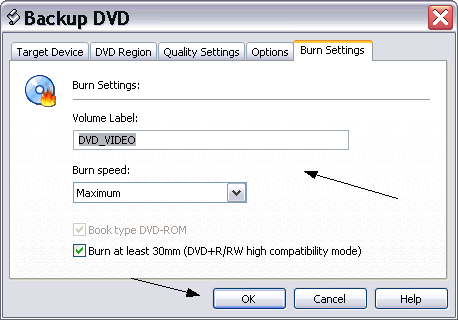
Selecting a smaller target size can help, but selecting the proper burn speed can have a greater effect.
This message has been edited since posting. Last time this message was edited on 2. July 2007 @ 16:15
|
|
LDLDL
Junior Member
|
2. July 2007 @ 16:49 |
Link to this message
|
|
I spoke too soon! Burning at 8x still produced the same error. While writing lead out, I get Disc at once error.
The strangest thing is that I do not have 10 coasters. All of the movies play in the DVD player all the way to the end. I'm stumped. I guess I could live with the error since the movies do record. I really would like to get this resolved though.
|
Senior Member
|
2. July 2007 @ 17:21 |
Link to this message

|
Try burning at 4x speed and see if it helps.
also:
Quote:
Disc Manufacturer ID: MCC, Media Type ID: 004, Product revision number: 0
These are 16X Verbatim disks which if real are considered good media, but if they're giving you problems, try Sony disks instead.
This message has been edited since posting. Last time this message was edited on 3. July 2007 @ 01:24
|
|
PacMan777
AfterDawn Addict
|
2. July 2007 @ 21:28 |
Link to this message
|
This looks like a good thread for the Nero forum instead of Shrink. You'd probably get more response there.
Read up on DRM and you'll understand why the older software isn't working with the new OS. If Nero 6 is appearing on the Vista machine, even though you only tried intalling it, that means some of the parts didn't get cleaned out. Nero has a cleaner tool you can download from the internet site. Roxio isn't the only program that sometimes needs a special cleaner to get rid of problematic remnants.
Since the burning software is delivering a playable copy, to state the obvious, that means it's not giving you the "finished" message. Maybe using the Nero cleaner tool and doing a clean install of the latest Nero 7 will fix the problem. You should have already used the Roxizap. Another thing you mentioned is Disc-At-Once. I suggest not using that and let the PC create an HD file to write from.
|
|
Advertisement
|
|
|
|
ddp
Moderator
|
3. July 2007 @ 08:18 |
Link to this message
|
|
moved to correct forum
|
|




