User User name Password  
   
Tuesday 24.3.2026 / 14:21
Search AfterDawn Forums:        In English   Suomeksi   På svenska
afterdawn.com > forums > software specific discussion > nero discussion > recode vs vision (fit to disk)
Show topics
 
Forums
Forums
Recode vs Vision (fit to disk)
  Jump to:
 
Posted Message
jeffmahar
Suspended due to non-functional email address
_
3. August 2007 @ 14:40 _ Link to this message    Send private message to this user   
Ok so I just burned my first DVD using recode. I put all the settings to quality, advanced analisis, slow burn, ect. This is all after I converted the DVD from an AVI file using Vision. In vision I also had the quality set to High. Needless to say the quality of the DVD after recode sucked hard. Am I better off just selecting fit to disk in Vision, and just burning it to the disk there? Or is there another way that I am overlooking. I just want to know the best way to get the best quality onto a DVD.
Advertisement
_
__
AfterDawn Addict
_
3. August 2007 @ 14:45 _ Link to this message    Send private message to this user   
If you are starting off with AVI files then all you need to use is NeroVision...just allow it to transcode and burn. Nero Recode is normally used for backing up existing Discs.

Quote:
Am I better off just selecting fit to disk in Vision
Answer: Yes!!


guide by ScubaPete http://www.dvdplusvideo.com/tutorial007.html Nero guide by alkohol http://www.dvdplusvideo.com/Guides/alkohol_guide3.html

New RipIt4Me + DVD Shrink + ImgBurn guid <==== Rip any DVDs http://forums.afterdawn.com/thread_view.cfm/422740 Guides by bbmayo..... http://webpages.charter.net/bacitup/
raven1083
Newbie
_
3. August 2007 @ 22:28 _ Link to this message    Send private message to this user   
tv series on dvd is one of the best trend in dvd

This message has been edited since posting. Last time this message was edited on 4. August 2007 @ 11:53

jeffmahar
Suspended due to non-functional email address
_
4. August 2007 @ 08:42 _ Link to this message    Send private message to this user   
Ok now that with that out of the way, my next question is about quality while using Vision. I was under the impression that if you keep the quality setting on "automatic (fit to disk), and keep the lenght of content on the DVD under 2hours, then you should have an excellent quality end result? However I just converted a AVI file of a DVD that was only about 1h35min, and I can only get a good quality rating (that is 2 steps down from, verygood--->excellent)? Any ideas on how to keep the quality as good as possible, while maintaining less than 2hours of video?
jeffmahar
Suspended due to non-functional email address
_
5. August 2007 @ 16:45 _ Link to this message    Send private message to this user   
anyone got any input on my last question?
AfterDawn Addict
_
5. August 2007 @ 17:50 _ Link to this message    Send private message to this user   
The end quality depends a LOT on the quality of the AVI files that you commence with.


guide by ScubaPete http://www.dvdplusvideo.com/tutorial007.html Nero guide by alkohol http://www.dvdplusvideo.com/Guides/alkohol_guide3.html

New RipIt4Me + DVD Shrink + ImgBurn guid <==== Rip any DVDs http://forums.afterdawn.com/thread_view.cfm/422740 Guides by bbmayo..... http://webpages.charter.net/bacitup/
jeffmahar
Suspended due to non-functional email address
_
6. August 2007 @ 04:06 _ Link to this message    Send private message to this user   
Yea but I am talking about the little blue bar that fills up when you add files and tells you the quality (good, very good, excellent ect.) How do I keep that at excellent?
Advertisement
_
__
 
_
Senior Member
_
9. August 2007 @ 18:31 _ Link to this message    Send private message to this user   
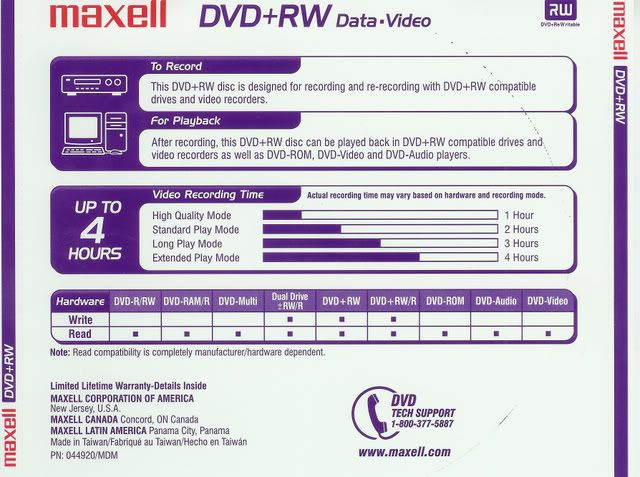
Here's some information regarding what will fit on a 4.7 DVD:


Notice that at "High Quality Mode" (excellent) the disc will hold about 1 hour, "Standard" or good will hold 2 hours, etc.

Apparently where you got this idea:

I was under the impression that if you keep the quality setting on "automatic (fit to disk), and keep the lenght of content on the DVD under 2hours, then you should have an excellent quality end result?

was incorrect.

The "quality rating" reported by Nero Recode you are talking about is based on how much Nero Recode is going to have to compress (actually, remove) from your source in order for it to fit on the disc. The less Nero Recode has to remove, the higher the quality rating.

A regular DVD will contain only so much data, 4.460 gig being max recommended burn to keep the burn from getting too close the the edge. The size of the DVD that you get depends on the sampling bit rate in the conversion into the AVI. If the sampling rate was too high (which would give you a very good avi, by the way), Nero has to throw out more in order to fit it to the disc.

It's the same thing for a movie that is issued on regular dvd and HD dvd. The movie is the same length in both formats but the HD was recorded with a higher sampling rate, which gives you the better quality and the larger file.

How large was your project in NeroVision when you converted the avi to dvd?

Hope this helps.


This message has been edited since posting. Last time this message was edited on 9. August 2007 @ 18:47

afterdawn.com > forums > software specific discussion > nero discussion > recode vs vision (fit to disk)
 

Digital video: AfterDawn.com | AfterDawn Forums
Music: MP3Lizard.com
Gaming: Blasteroids.com | Blasteroids Forums | Compare game prices
Software: Software downloads
Blogs: User profile pages
RSS feeds: AfterDawn.com News | Software updates | AfterDawn Forums
International: AfterDawn in Finnish | AfterDawn in Swedish | AfterDawn in Norwegian | download.fi
Navigate: Search | Site map
About us: About AfterDawn Ltd | Advertise on our sites | Rules, Restrictions, Legal disclaimer & Privacy policy
Contact us: Send feedback | Contact our media sales team
 
  © 1999-2026 by AfterDawn Ltd.

  IDG TechNetwork