User User name Password  
   
Sunday 22.3.2026 / 11:54
Search AfterDawn Forums:        In English   Suomeksi   På svenska
afterdawn.com > forums > software specific discussion > nero discussion > cant burn anymore
Show topics
 
Forums
Forums
cant burn anymore
  Jump to:
 
Posted Message
Senior Member
_
24. August 2007 @ 05:13 _ Link to this message    Send private message to this user   
i know this aint about nero but i thought a good place to post this

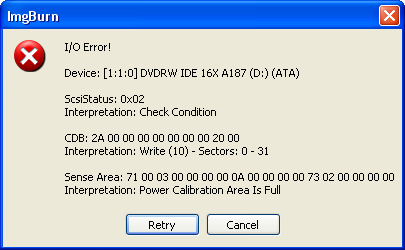
cant get anything to burn i get this message with imgburn
nero wont burn anything either:(

has my burner gone bad ?


I AM A DUMPSTER DIVER AND PROUD OF IT..
Reach Down & Grab it Or Walk in & Get Some !!!!!!!!!!!!!!!}

This message has been edited since posting. Last time this message was edited on 24. August 2007 @ 05:14

laddyboy
AfterDawn Addict
_
24. August 2007 @ 05:37 _ Link to this message    Send private message to this user   
Power Calibration Area Is Full

This could be due to a bad burner, out of date burner firmware, or using poor quality media.

Make sure your firmware is up to date. Firmware can be found at the burner vendor's web support site and at firmware databases, e.g., http://forum.rpc1.org/dl_all.php.

You can use Nero Info Tools or DVD Identifier as well as many other programs to find your firmware version. The firmware version is the 4-character (letter/number/special character) combination found immediatelt after the name of the burner. In ImgBurn in write mode the name of the burner and firmware version is located at the top of the righthand column.

Good quality media is that made by Verbatim, Made in Japan labeled Fuji/Sony, and Taiyo Yuden. Again, Nero Info Tool and DVD Identifier can ID the actual manufacturer of your media. In ImgBurn in Write mode the actual manufacturer ID will be beside the row header "Disk ID:" in the righthand column. Also be sure to limit the burn speed to half or less the rated speed of the media.

If updating the firmware and using better quality media do not solve the problem, try using Device Manager to uninstall both the burner and the communication channel upon which the burner is installed. They will be autoinstalled upon restart.

The last test is to uninstall the burner and reinstall in another system to see if it actually works.
Senior Member
_
24. August 2007 @ 06:23 _ Link to this message    Send private message to this user   
i did this>>uninstall both the burner and the communication channel upon which the burner is installed.and that solved the problem:)


I AM A DUMPSTER DIVER AND PROUD OF IT..
Reach Down & Grab it Or Walk in & Get Some !!!!!!!!!!!!!!!}

This message has been edited since posting. Last time this message was edited on 24. August 2007 @ 06:23

Advertisement
_
__
 
_
laddyboy
AfterDawn Addict
_
24. August 2007 @ 06:30 _ Link to this message    Send private message to this user   
good.
afterdawn.com > forums > software specific discussion > nero discussion > cant burn anymore
 

Digital video: AfterDawn.com | AfterDawn Forums
Music: MP3Lizard.com
Gaming: Blasteroids.com | Blasteroids Forums | Compare game prices
Software: Software downloads
Blogs: User profile pages
RSS feeds: AfterDawn.com News | Software updates | AfterDawn Forums
International: AfterDawn in Finnish | AfterDawn in Swedish | AfterDawn in Norwegian | download.fi
Navigate: Search | Site map
About us: About AfterDawn Ltd | Advertise on our sites | Rules, Restrictions, Legal disclaimer & Privacy policy
Contact us: Send feedback | Contact our media sales team
 
  © 1999-2026 by AfterDawn Ltd.

  IDG TechNetwork