|
@#%$! My printer is so screwed!!!!!! I badly need help
|
|
Member

|
18. September 2007 @ 20:49 |
Link to this message

|
For a long time, my printer is working properly and can print pages perfectly, until today. I really don't know what the reason is but it stopped printing for no reason. I tried printing my document in Word and all I can see is pending. What is up with that?! Technically, I don't get frustrated over these things but my older sister is such a pain in the ass. She blames me for this coz Am always on the computer!!! She even tells me that the reason why the printer has stopped printing is because of the programs that I installed... which is totally irrelevant! arrgghhh, Am soooo in bad mood right now coz they don't even know what's really happening and all they do is blame me due to the fact that Am always on the computer. sorry for this rant mods and viewers but I really can't help it. ANYWAY.....
Since my sister(she needs to print something too) keeps on talking nonsense to me within the last 4hours, I decided to fix it and so I followed the troubleshoot instruction. Now, this is where the problem kicks in. I followed this instruction
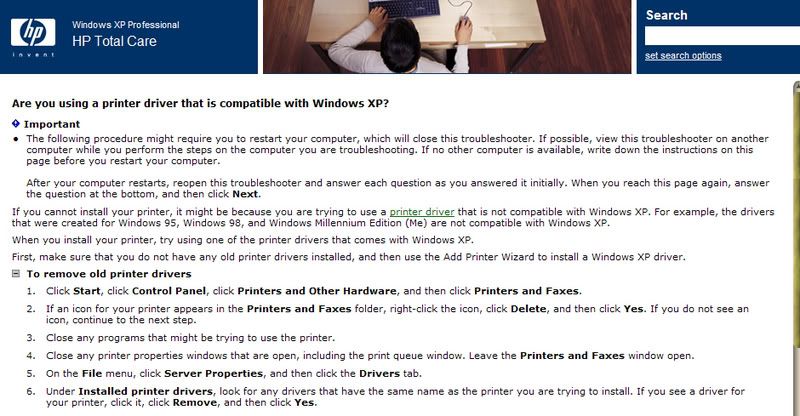
AND ENDED UP WITH THIS
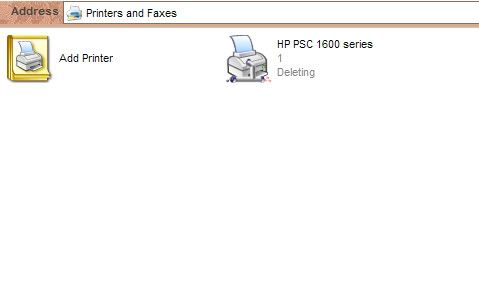
I tried deleting my printer (as it says on the troubleshooter) and was planning to re-install it after. But right now, that isn't the case. As you can see in the pic, it still says "deleting" and can't be remove. So how in the world can I re-install my printer if I can't remove it??? I tried keep on clicking "connect" and "use as default printer" but NOTHING really happens.
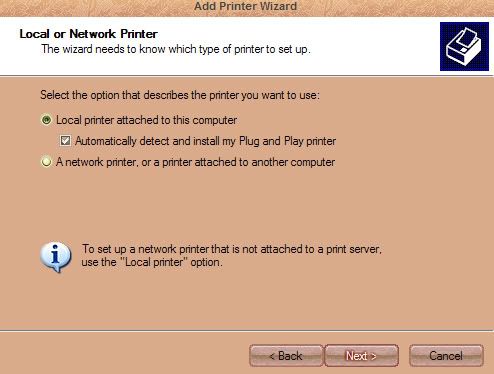
Left with no choice, I clicked "add printer" and this message shows up
from that pic, I clicked next and it led me to this..
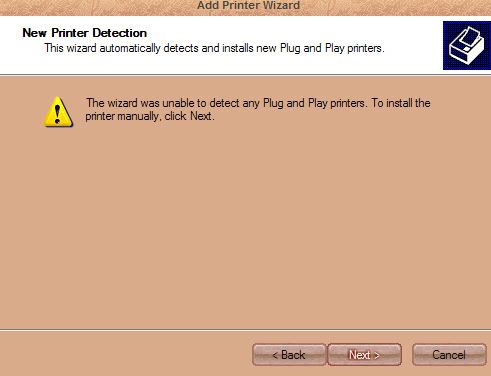
I wonder why my computer didn't detect my printer since its been working for 2 years now... Obviously, I clicked next and tried to do it manually. Now, to my surprise, I didn't see my printer's model and so, I couldn't continue on further. HOW DID THIS THING HAPPENED???? AGAIN, I'VE BEEN USING MY PRINTER FOR 2 YEARS AND NOW, MY COMPUTER COULDN'T DETECT ITS MODEL???????!!!!!!
I REALLY NEED HELP GUYS
|
|
Advertisement

|
|
|
|
Member
8 product reviews

|
19. September 2007 @ 12:44 |
Link to this message
|
First off, I'm sorry I don't have links to give you, so you'll have to use Google:
Okay, it sounds like Driver curruption. This happens when a certain program or hardware device has conflicts with the driver you need. Typically this takes place because of IRQ conflicts with BIOS, but can be resolved most times rather simply.
What you'll want to do is completely unhook the Printer from the computer. Then you'll want to manually go in and uninstall all the software that controls the printer. Next you'll want to go and run a program called DriveCleaner to remove all traces of the driver that may still be in conflict.
Once all that is done it doesn't hurt to clean up your registry through the help of a program such as Tune-Up Utilities 2007 (the free demo will work fine for this purpose). Once all of that is done, you're more or less guarenteed to have resolved any driver conflicts that will have taken place.
Now you just flip your printer upside down and find the model number. Now that you have that, go online to the manufacturer's website and download their most up-to-date driver. Typically the drivers that are released on CD with products have various errors such as this one, which cause them to be updated and posted on the site. Once you've found it, save it to your desktop. It will most likely be an executable setup program (read below) or a non-executable driver file (skip to next paragraph). If it is an executable setup program, just plug in the printer and everything and when you're "Found New Hardware" wizard pops up, cancel it and run the set-up. Problem solved.
If it is NOT a setup file, then you'll have to plug up the printer, and when it opens the "Found New Hardware" wizard, you'll want to follow the options untill you can point it to search for drivers in a specific folder. There, you'll point it to the folder with the driver you just downloaded (making sure its not still compressed within WinRar or something of the sort) and follow through all the steps untill it is finished. If it is a combo printer (printer/scanner/fax), you may need to do this multiple times (once for each function). Just bare with it and it should fix itself.
That should take care of it. Let me know either way. Good Luck!
PS: Nice Windows Skin.
|
|
ddp
Moderator
|
19. September 2007 @ 13:04 |
Link to this message

|
|
|
Member
|
19. September 2007 @ 14:21 |
Link to this message
|
Originally posted by Vicious88:
First off, I'm sorry I don't have links to give you, so you'll have to use Google:
Okay, it sounds like Driver curruption. This happens when a certain program or hardware device has conflicts with the driver you need. Typically this takes place because of IRQ conflicts with BIOS, but can be resolved most times rather simply.
What you'll want to do is completely unhook the Printer from the computer. Then you'll want to manually go in and uninstall all the software that controls the printer. Next you'll want to go and run a program called DriveCleaner to remove all traces of the driver that may still be in conflict.
Once all that is done it doesn't hurt to clean up your registry through the help of a program such as Tune-Up Utilities 2007 (the free demo will work fine for this purpose). Once all of that is done, you're more or less guarenteed to have resolved any driver conflicts that will have taken place.
Now you just flip your printer upside down and find the model number. Now that you have that, go online to the manufacturer's website and download their most up-to-date driver. Typically the drivers that are released on CD with products have various errors such as this one, which cause them to be updated and posted on the site. Once you've found it, save it to your desktop. It will most likely be an executable setup program (read below) or a non-executable driver file (skip to next paragraph). If it is an executable setup program, just plug in the printer and everything and when you're "Found New Hardware" wizard pops up, cancel it and run the set-up. Problem solved.
If it is NOT a setup file, then you'll have to plug up the printer, and when it opens the "Found New Hardware" wizard, you'll want to follow the options untill you can point it to search for drivers in a specific folder. There, you'll point it to the folder with the driver you just downloaded (making sure its not still compressed within WinRar or something of the sort) and follow through all the steps untill it is finished. If it is a combo printer (printer/scanner/fax), you may need to do this multiple times (once for each function). Just bare with it and it should fix itself.
That should take care of it. Let me know either way. Good Luck!
PS: Nice Windows Skin.
hey, thanks. Anyway, It looks like it will take me time coz my desktop is not easy to remove (I mean my printer and computer are so well intact that the table is friggin huge to move and unplug the usb ports for the printer) so I'll try to do what you said this week and let you know if it works. :D thank you again
|
Member
|
19. September 2007 @ 14:23 |
Link to this message

|
|
Thanks ddp. For the meantime, I'll try to do what Vicious88 stated. Until then, I'll let you guys know if it worked.
|
|
ddp
Moderator
|
19. September 2007 @ 14:31 |
Link to this message
|
|
printer cable doesn't have to be unplugged from pc as can be removed from printer it self.
|
Member
|
19. September 2007 @ 15:05 |
Link to this message
|
|
whoa, it worked!!!!! :D thank you guys!!!!!
|
|
ddp
Moderator
|
19. September 2007 @ 15:21 |
Link to this message
|
|
so what did you do so that others can learn from your experience?
|
Member
|
19. September 2007 @ 15:24 |
Link to this message
|
|
Well, I deleted it from add/remove program and restarted my computer. Once I opened my printer, a message popped and the install wizard just did its own thing.
|
|
ddp
Moderator
|
19. September 2007 @ 15:34 |
Link to this message
|
|
teach & learn
|
|
Advertisement
|
|
|
Member
8 product reviews
|
19. September 2007 @ 17:12 |
Link to this message
|
|
Well thats good. I guess I went a bit too in depth and gave you all the steps in case it was driver conflicts, but hey, it's always good to be prepared for the worst. (well next to worst... the worst would have been a hardware problem within the printers circut board causing an I/O error resulting in you having to get a new printer... Seen that happen once before, it sucks)
Anyway, good to hear!
|


