|
Computer Lock up severly help!!
|
|
|
pirate4
Junior Member

|
8. October 2007 @ 14:47 |
Link to this message

|
I'm not sure what is causing this my computer has been freezing continuously for three days. It will freeze during any part of loading, when its idle, trying to run the format disk, or looking at the bios. At one point it said unmountable_boot_drive but I ran my recovery disk and that went away. Also ran my virus scan several times always coming up clean along with running my pc doctor program that says everything passed with no problems. It has windows xp and is a gateway system a few years old. Any suggestions greatly appreciated cause I can't run anything on it for long.
|
|
Advertisement

|
|
|
|
|
ddp
Moderator
|
8. October 2007 @ 20:06 |
Link to this message
|
|
moved to correct forum. check in the bios to see what the cpu temp is like.
|
|
pirate4
Junior Member
|
9. October 2007 @ 09:50 |
 Link to this message
|
|
I went into BIOS but could not find any info on the cpu temp. Not sure where it would be either
|
|
ddp
Moderator
|
9. October 2007 @ 09:59 |
Link to this message

|
|
check under hardware monitor or something like that.
|
|
pirate4
Junior Member
|
9. October 2007 @ 11:17 |
Link to this message
|
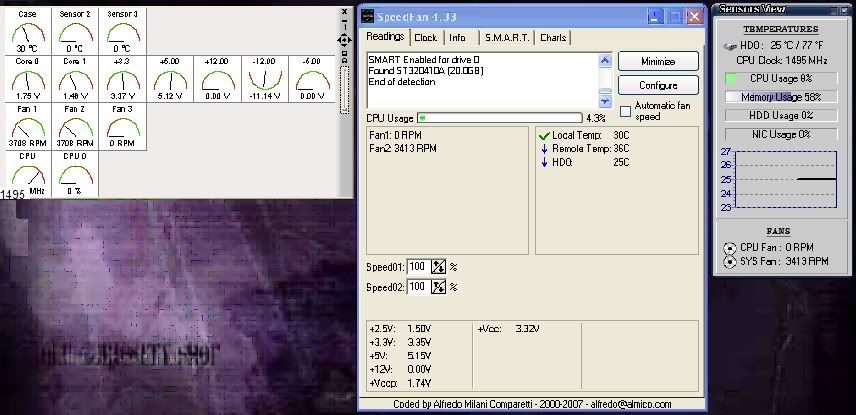
When I hit F1 and search under the bios there is nothing that says hardware monitor and I went through every section in between it freezing and could not locate anything involving temp. Downloaded Sensors View Pro31 and all it gave me was nothing for cpu and showed HD at 30/86 below it said fans cpu fan 0rpm and sys fan 3413rpm. Also ran the same program on a second system and got all temps.
This message has been edited since posting. Last time this message was edited on 9. October 2007 @ 11:19
|
|
ddp
Moderator
|
9. October 2007 @ 18:04 |
Link to this message
|
what is the make & model# of the gateway?
|
|
pirate4
Junior Member
|
9. October 2007 @ 19:09 |
Link to this message

|
It is a gateway 500S/E-3600, the system type is a X86-based pc, version 5.1.2600. On the back it also had MFATXSTL to the left of the model. Also found out it is called a Gateway Micro Tower.
To help you understand the machine a bit more
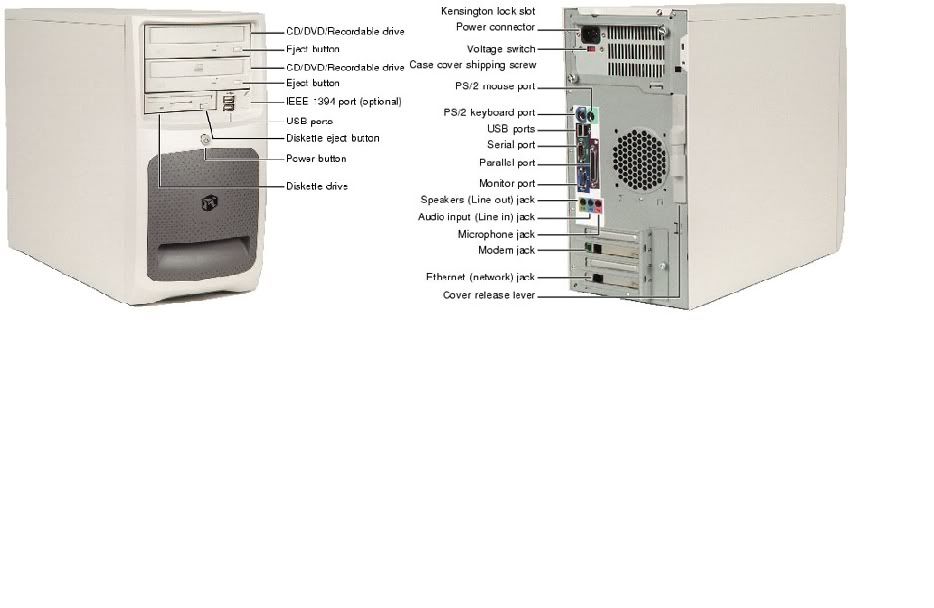
My apologies if it is abit big
This message has been edited since posting. Last time this message was edited on 9. October 2007 @ 19:36
|
Senior Member
|
10. October 2007 @ 11:34 |
Link to this message
|
|
CPU fan at 0? That could be a problem. Pop the cover off and see if the fan is spinning on the CPU heatsink. It not, you are definately overheating and causing damage. Get that fan replaced before you run that PC anymore.(First check to make sure it is plugged in....simple stuff first).
~Rich
|
|
pirate4
Junior Member
|
10. October 2007 @ 11:42 |
Link to this message
|
|
All fans are running can even feel the the air coming out of it.
|
AfterDawn Addict
2 product reviews
|
10. October 2007 @ 11:47 |
Link to this message
|
|
Not the one on the back. The one sitting on your motherboard when you open up your PC. Check if that one is running.
|
|
pirate4
Junior Member
|
10. October 2007 @ 11:49 |
Link to this message
|
|
I did check it is running
|
Senior Member
|
10. October 2007 @ 12:32 |
Link to this message
|
|
How fast is it moving? It may not be moving fast enough for the monitoring software to recognize it. Dust can slow down a fan to the point that it will show 0 on a monitoring program, even though it appears to be spinning. May just not be spinning fast enough to cool the CPU.
~Rich
|
|
pirate4
Junior Member
|
10. October 2007 @ 13:00 |
Link to this message
|
|
It looks like it is moving really fast I did dust it recently. Is there any way to test it besides motherboard monitor or Sensors View, some menu I can access or program.(Don't say Bios that has no info on temp.)
|
AfterDawn Addict
2 product reviews
|
10. October 2007 @ 13:23 |
Link to this message
|
You can try speedfan. Just click on the link.
|
|
pirate4
Junior Member
|
10. October 2007 @ 13:49 |
Link to this message
|
|
Speed fan didn't really tell me anything different. I can post pics of what they show as soon as it stays up.
|
|
ddp
Moderator
|
10. October 2007 @ 14:27 |
Link to this message
|
|
|
|
pirate4
Junior Member
|
10. October 2007 @ 15:22 |
Link to this message
|
|
None of those in that link.
|
|
pirate4
Junior Member
|
10. October 2007 @ 17:30 |
Link to this message
|
Here is a pic of the programs for cpu temp left one is mother board monitor then speed fan and sensor view so you can see what I'm looking at.
|
|
pirate4
Junior Member
|
12. October 2007 @ 13:00 |
Link to this message
|
|
Any ideas what is going on or a possible fix?
|
|
ddp
Moderator
|
12. October 2007 @ 17:24 |
Link to this message
|
|
take a look at the silver topped cans on the motherboard as those are capacitors, are any of them domed as they are supposed to be flat top?
|
|
pirate4
Junior Member
|
13. October 2007 @ 07:05 |
Link to this message
|
|
Checking the capacitors is really hard to tell if they are bulged. They appear to be fine only the slightest possibility of bulge on one or two but they could also be dirty.
|
AfterDawn Addict
4 product reviews
|
13. October 2007 @ 07:13 |
Link to this message
|
|
It could potentially be an improperly cooled CPU (clear all the dust out of the system just in case, it's always good practice) or it could be a dodgy power supply, or even problems with the hard drive. Can you try running the PC with another power supply or hard drive and see if you can replicate the problems? (Note, if it's someone else's Windows drive it probably won't boot windows due to chipset incompatibilities)
|
|
pirate4
Junior Member
|
13. October 2007 @ 13:25 |
Link to this message
|
|
Tried running a different power supply didn't change anything and I don't have a spare hard drive compatabile with the computer. Any other suggestions.
|
|
ddp
Moderator
|
13. October 2007 @ 16:19 |
Link to this message
|
|
clean those caps that might be dirty to see if domed or not
|
|
Advertisement
|
|
|
|
pirate4
Junior Member
|
13. October 2007 @ 17:01 |
Link to this message
|
|
Three medium size caps look slightly bulged (one has a bit of tan color showing around the silver). So if it is bad caps what do I do about it.
|


