|
|
|
Please help answer a Nero 6 "Verification Failure" question.
|
|
Junior Member

|
12. October 2007 @ 21:34 |
 Link to this message

|
I have been using Nero 6 for a long time to burn and verify my DVD's. I use Verbatim DVD-R's exclusively, and they have been great for me. I've never had any problem with Nero 6 until lately, and it's a weird thing.
I normally do my burn at 1/2 the rated speed, followed by verify. But several times lately I have had my verify fail. This has happened very rarely in the past, but now about every 4th or 5th disc will fail to verify. However when I check them by watching them, (usually by spot checking through the disk rather than a full on viewing) they play perfectly and I can't find a thing wrong with them at all!! It's driving me nuts to throw away what seems like a perfectly good recorded disc, but I don't know what to do otherwise. Without the verification I fear that the disc isn't good. When I burn another disc it will always check the verification and complete it with a good report.
I want to add that normally when I burn a disc and I want to do one or two more discs using the same burn files, I don't run the verify routine on the second or third discs since I know that the first burn was fine and checked out when verified. So my question is, if I can't find errors on my "verify failed" discs I'm wondering if the problem is with my discs, or with Nero's verification method.
I am including a burn log from my last failure for those with expertise to examine it. (I don't know how to check them out myself.) But I'm really getting upset and impatient with this problem, and I need a real expert to tell me if my suspicions are worthy or not. So I'm asking, first, are my discs that won't verify really coasters, and second, is Nero 6's verification an accurate gauge of quality, or the lack thereof. Thanks in advance for your help, my Afterdawn Mentors. You have never failed me before and I'm sure you won't now!!
With great appreciation,
Fryerider
Here's the burn log:
Windows XP 5.1
IA32
WinAspi: -
ahead WinASPI: File 'C:\Program Files\Ahead\nero\Wnaspi32.dll': Ver=2.0.1.74, size=164112 bytes, created 11/2/2004 11:54:32 AM
NT-SPTI used
Nero Version: 6.6.1.4
Internal Version: 6, 6, 1, 4d
(Nero Express)
Recorder: <TSSTcorp CD/DVDW TS-H552D>Version: GA01 - HA 1 TA 0 - 6.6.1.4
Adapter driver: <IDE> HA 1
Drive buffer : 2048kB
Bus Type : default (0) -> ATAPI, detected: ?
CD-ROM: <LITE-ON DVD SOHD-16P9SV >Version: FGS4 - HA 1 TA 1 - 6.6.1.4
Adapter driver: <IDE> HA 1
=== Scsi-Device-Map ===
DiskPeripheral : WDC WD3200BB-22KEA0 atapi Port 0 ID 0 DMA: On
CdRomPeripheral : TSSTcorp CD/DVDW TS-H552D atapi Port 3 ID 0 DMA: On
CdRomPeripheral : LITE-ON DVD SOHD-16P9SV atapi Port 3 ID 1 DMA: On
=== CDRom-Device-Map ===
TSSTcorp CD/DVDW TS-H552D E: CDRom0
LITE-ON DVD SOHD-16P9SV F: CDRom1
SanDisk U3 Cruzer Micro N: CDRom2
=======================
AutoRun : 1
Excluded drive IDs:
WriteBufferSize: 83886080 (0) Byte
ShowDrvBufStat : 0
BUFE : 0
Physical memory : 1918MB (1964460kB)
Free physical memory: 805MB (824976kB)
Memory in use : 58 %
Uncached PFiles: 0x0
Use Inquiry : 1
Global Bus Type: default (0)
Check supported media : Disabled (0)
12.10.2007
UDF/ISO compilation
10:38:06 PM #1 Phase 112 File dlgbrnst.cpp, Line 1685
DVD-Video files reallocation started
10:38:06 PM #2 Phase 114 File dlgbrnst.cpp, Line 1685
DVD-Video files reallocation completed (no file modified)
10:38:06 PM #3 Text 0 File Isodoc.cpp, Line 6475
UDF document burn settings
------------------------------------------
Determine maximum speed : FALSE
Simulate : FALSE
Write : TRUE
Finalize CD : TRUE
Multisession : FALSE
Burning mode : DAO
Mode : 1
UDF Mode : UDF/ISO bridge
UDF Options : automatic
UDF Revision : 1.02
UDF Partition Type : physical
ISO Level : 1 (Max. of 11 = 8 + 3 char)
Character set : ISO 9660
Joliet : FALSE
Allow pathdepth more than 8 directories : FALSE
Allow more than 255 characters in path : FALSE
Write ISO9660 ;1 file extensions : TRUE
10:38:06 PM #4 Phase 111 File dlgbrnst.cpp, Line 1685
DVD-Video files sorted
10:38:06 PM #5 Text 0 File ThreadedTransfer.cpp, Line 531
ReadBuffer-Pipe got 262144KB of Memory
10:38:06 PM #6 Text 0 File Reader.cpp, Line 124
Reader running
10:38:06 PM #7 Text 0 File Writer.cpp, Line 122
Writer TSSTcorp CD/DVDW TS-H552D running
10:38:06 PM #8 ISO9660GEN -11 File geniso.cpp, Line 3312
First writeable address = 0 (0x00000000)
10:38:06 PM #9 ISO9660GEN -11 File geniso.cpp, Line 3312
First writeable address = 0 (0x00000000)
10:38:06 PM #10 Text 0 File Burncd.cpp, Line 3305
Turn on Disc-At-Once, using DVD media
10:38:06 PM #11 Text 0 File DlgWaitCD.cpp, Line 281
Last possible write address on media: 2298495 (510:46.45, 4489MB)
Last address to be written: 2286143 (508:01.68, 4465MB)
10:38:06 PM #12 Text 0 File DlgWaitCD.cpp, Line 293
Write in overburning mode: NO (enabled: CD)
10:38:06 PM #13 Text 0 File DlgWaitCD.cpp, Line 2612
Recorder: TSSTcorp CD/DVDW TS-H552D, Media type: DVD-R
Disc Manufacturer: MCC 03 - RG20
Disc Application Code: 64, Disc Physical Code: 193
10:38:06 PM #14 Text 0 File DlgWaitCD.cpp, Line 459
>>> Protocol of DlgWaitCD activities: <<<
=========================================
10:38:06 PM #15 Text 0 File ThreadedTransferInterface.cpp, Line 847
Setup items (after recorder preparation)
0: TRM_DATA_MODE1 ()
2 indices, index0 (150) not provided
original disc pos #0 + 2286144 (2286144) = #2286144/508:1.69
relocatable, disc pos for caching/writing not required/ required, no patch infos
-> TRM_DATA_MODE1, 2048, config 0, wanted index0 0 blocks, length 2286144 blocks [TSSTcorp CD/DVDW TS-H552D]
--------------------------------------------------------------
10:38:06 PM #16 Text 0 File ThreadedTransferInterface.cpp, Line 1059
Prepare recorder [TSSTcorp CD/DVDW TS-H552D] for write in CUE-sheet-DAO
DAO infos:
==========
MCN: ""
TOCType: 0x00; Session Closed, disc fixated
Tracks 1 to 1:
1: TRM_DATA_MODE1, 2048/0x00, FilePos 0 0 4682022912, ISRC ""
DAO layout:
===========
__Start_|____Track_|_Idx_|_CtrlAdr_|_RecDep__________
0 | lead-in | 0 | 0x41 | 0x00
0 | 1 | 0 | 0x41 | 0x00
0 | 1 | 1 | 0x41 | 0x00
2286144 | lead-out | 1 | 0x41 | 0x00
10:38:06 PM #17 Text 0 File SCSIPassThrough.cpp, Line 38
SPTILockVolume - completed successfully for FCTL_LOCK_VOLUME
10:38:06 PM #18 Text 0 File SCSIPassThrough.cpp, Line 83
SPTIDismountVolume - completed successfully for FSCTL_DISMOUNT_VOLUME
10:38:06 PM #19 Phase 24 File dlgbrnst.cpp, Line 1685
Caching of files started
10:38:06 PM #20 Text 0 File Burncd.cpp, Line 4145
Cache writing successful.
10:38:06 PM #21 Phase 25 File dlgbrnst.cpp, Line 1685
Caching of files completed
10:38:06 PM #22 Phase 36 File dlgbrnst.cpp, Line 1685
Burn process started at 8x (11,080 KB/s)
10:38:06 PM #23 Text 0 File ThreadedTransferInterface.cpp, Line 2685
Verifying disc position of item 0 (relocatable, disc pos, no patch infos, orig at #0): write at #0
10:38:06 PM #24 Text 0 File DVDR.cpp, Line 2707
Recording mode: Sequential Recording Mode
10:38:07 PM #25 Text 0 File DVDR.cpp, Line 2863
Start write address at LBA 0
DVD high compatibility mode: Yes
10:38:07 PM #26 Text 0 File Cdrdrv.cpp, Line 8647
---- DVD Structure: Physical Format Information (00h) ----
Media Type: 0, Layer: 0, Address: 0 (0 h), AGID: 0; Length: 2050
Book Type: DVD-R (2), Part Version: 2.0x (5), Extended Part Version: 2.1 (33)
Disc Size: 120 mm, Maximum Rate: <not specified> (F h)
Number of Layers: 1, Track Path: Parallel Track Path (PTP), Layer Type: recordable
Linear Density: 0,267 um/bit, Track Density: 0,74 um/track
Starting Physical Sector Number of Data Area: 30000 h (DVD-ROM, DVD-R/-RW, DVD+R/+RW)
End Physical Sector Number of Data Area: 0 h
End Sector Number in Layer 0: 0 h (LBN: FFFD0000 h, 4193920 MB)
Data in Burst Cutting Area (BCA) does not exist
Start sector number of the current Border-Out: 0 h
Start sector number of the next Border-In: 0 h
Media Specific [16..63]:
00 60 00 10 20 30 40 50 - 00 00 00 21 00 00 00 00 .`...0@P...!....
00 00 00 00 00 00 00 00 - 00 00 00 00 00 00 00 00 ................
00 00 00 00 00 00 00 00 - 00 00 00 00 00 00 00 00 ................
10:38:24 PM #27 Text 0 File Cdrdrv.cpp, Line 1200
22:38:24.046 - E: TSSTcorp CD/DVDW TS-H552D : Queue again later
10:47:22 PM #28 Text 0 File WriterStatus.cpp, Line 116
<TSSTcorp CD/DVDW TS-H552D> start writing Lead-Out at LBA 2286144 (22E240h), lenght 0 blocks
10:47:22 PM #29 Text 0 File ThreadedTransfer.cpp, Line 228
all writers idle, stopping conversion
10:47:22 PM #30 Text 0 File DVDR.cpp, Line 3103
EndDAO: Last written address was 2286143
10:47:49 PM #31 Phase 37 File dlgbrnst.cpp, Line 1685
Burn process completed successfully at 8x (11,080 KB/s)
10:47:49 PM #32 Phase 78 File dlgbrnst.cpp, Line 1685
Data verification started
10:55:54 PM #33 SPTI -1 File SCSIPassThrough.cpp, Line 289
E: CdRom0: SCSIStatus(x02) WinError(0) NeroError(-1)
Sense Key: 0x04 (KEY_HARDWARE_ERROR)
Sense Code: 0x3E
Sense Qual: 0x02
CDB Data: 0x28 00 00 22 41 F0 00 00 10 00 00 00
Sense Area: 0x70 00 04 00 00 00 00 0A 00 00 00 00 3E 02
Buffer x07691600: Len x8000
10:56:46 PM #34 Text 0 File ThreadedTransfer.cpp, Line 228
all writers idle, stopping conversion
10:56:46 PM #35 SectorVerify 20 File Cdrdrv.cpp, Line 9771
Read errors from sector 2245104 to 2245119
10:56:46 PM #36 Phase 81 File dlgbrnst.cpp, Line 1685
Data verification failed
Existing drivers:
File 'Drivers\ADPU160M.SYS': Ver=v3.60a (Lab01_N(johnstra).010529-2218), size=101888 bytes, created 8/17/2001 9:07:32 PM
File 'Drivers\CDRALW2K.SYS': Ver=8.0.0.212 , size=2560 bytes, created 10/4/2006 6:42:42 PM
File 'Drivers\PXHELP20.SYS': Ver=3.00.41a, size=36560 bytes, created 9/27/2006 1:53:22 PM (Prassi/Veritas driver for win 2K)
File 'Drivers\InCDfs.SYS': Ver=4, 3, 23, 2, size=102016 bytes, created 3/23/2006 4:15:58 PM (InCD4 driver for win NT/2K/XP)
File 'Drivers\InCDpass.SYS': Ver=4, 3, 23, 2, size=29440 bytes, created 3/23/2006 4:15:56 PM (InCD4 driver for win NT/2K/XP)
File 'Drivers\InCDrec.SYS': Ver=4, 3, 23, 2, size=8704 bytes, created 3/23/2006 4:00:28 PM (InCD4 driver for win NT/2K/XP)
Registry Keys:
HKLM\Software\Microsoft\Windows NT\CurrentVersion\WinLogon\AllocateCDROMs : 0 (Security Option)
|
|
Advertisement
|
|
|
|
AfterDawn Addict
|
12. October 2007 @ 22:27 |
 Link to this message
|
I'd run Nero's InCD removal tool unless you really need it.
It also looks like Roxio is installed. Remove it too.
Update your Nero version to these two packages I have at my website:
http://www.dvdplusvideo.com/Guides/Software.html
You don't need to pass verification to have a good DVD burn. Errors are common and even the ones that do verify are full of errors. Just look at some of the Nero CD speed scans. Your drive may have a bit more wear on it now and so may not be quite as accurate. The best test is to play the DVD. I think the last time I tried verification it failed so I quit doing it. LOL.
I really wouldn't put a lot of stock in Nero's ability to verify. Verification also occurs as a function of the write process. It's not failing there.
Lastly,
Quote:
10:56:46 PM #35 SectorVerify 20 File Cdrdrv.cpp, Line 9771
Read errors from sector 2245104 to 2245119
Also note that this is only 15 sectors out of 2.5 million. It's a pretty small percentage.
This message has been edited since posting. Last time this message was edited on 12. October 2007 @ 22:47
|
Junior Member
|
12. October 2007 @ 23:00 |
Link to this message

|
Hi fasfrank! Thanks so much for responding!!
Ok, help me understand. You wrote, "I'd run Nero's InCD removal tool unless you really need it." Run it unless I need it? I'm immediately confused. Isn't that a tool to delete the Nero program? And what do you mean by, "unless you really need it"?
Next, I don't have Roxio, and I don't know why you think I do. It's not listed in my programs in my control panel list. So is it hiding somewhere and I need to delete it in some other way? I'm pretty green about all of this, so bear with me.
Next, what am I supposed to download from your site? There are a bunch of software choices, and I don't know what you think I need. And is what you want me to download going to be a replacement for the Nero 6 I have?
What are "Nero CD speed scans"? And how do they relate to verification.
And now to the part I do understand: "Your drive may have a bit more wear on it now and so may not be quite as accurate. The best test is to play the DVD. I think the last time I tried verification it failed so I quit doing it. LOL. I really wouldn't put a lot of stock in Nero's ability to verify. Verification also occurs as a function of the write process. It's not failing there."
This was my suspicion. That somehow my writer drive is ever so slightly off and it's causing the verification to fail, but the disc I've burned is totally usable. I have been tossing discs that seem fine except for that, and I don't like that at all. So did you really just give up on the verification? And if so shall I just not use the verification, spot check the discs in my player, and if they look ok just enjoy them? That would be one easy fix!
Thanks for your help, and for giving me the education that I'm asking for!
Sincerely,
Fryerider
|
Moderator
|
13. October 2007 @ 00:04 |
Link to this message

|
Frank's right about the verification in Nero, it's less than useless..
The only thing i would rely on is a CRC check, Nero has the CD/DVD speed program hat comes with Nero, though there are newer versions released separately every now and then - http://www.cdspeed2000.com
There's other programs that do CRC scanning, but it's all the same difference..
an example - 
In my experience, if a dvd comes back with errors on a CRC check (ie a corruption check) then it's at those parts of a DVD that you'll find skipping/jumping on playback, or obviously problems in recopying..
edit- there's also quality scanning ie -
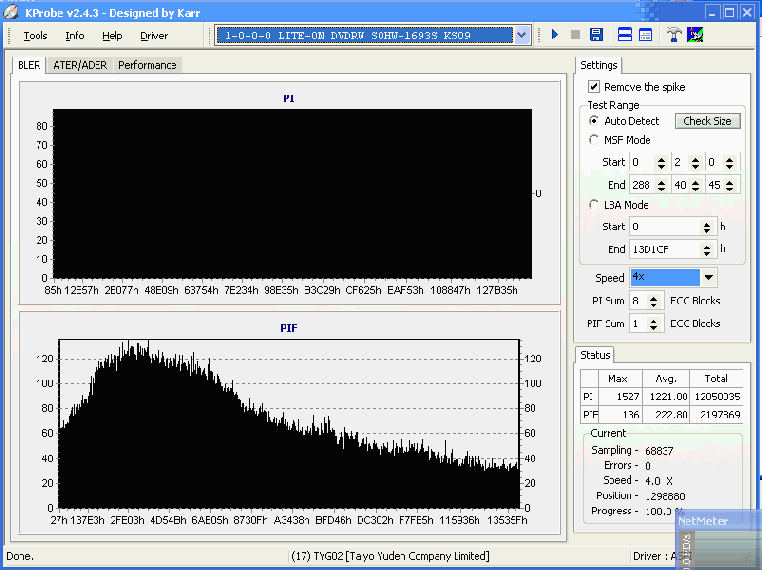
but i don't bother with stuff like that any more, people spend far too much time messing with discs/trying get perfect scans etc etc etc, all i care about is data consistency. I only ever use CRC scanning if ever i buy a new burner/start using a new brand/type of discs i've never used/upgraded Nero (though i won't do that, i'm sticking with Nero 6.6.0.18 unless i buy a new burner that isn't supported in that version). Even then i only crc scan for a few discs, until i'm happy with them being reliable; i watch all my backups anyway, which is obviously a very good test in itself, and i frequently re-backup stuff, again another very good test.
In case you want to check out all that quality scanning bumpf, i have some info here - http://forums.afterdawn.com/thread_view.cfm/193298
but as i say i personally don't put much faith in it myself when i have CRC scanning and playback testing/re-backup testing to rely on..
Read the first post or two in that link carefully, plus see how i'd explained on how those discs in question actually played back correctly (initially anyway) yet were totally uncopyable due to extreme amounts of corruption

Main PC ~ Intel C2Q Q6600 (G0 Stepping)/Gigabyte GA-EP45-DS3/2GB Crucial Ballistix PC2-8500/Zalman CNPS9700/Antec 900/Corsair HX 620W
Network ~ DD-WRT ~ 2node WDS-WPA2/AES ~ Buffalo WHR-G54S. 3node WPA2/AES ~ WRT54GS v6 (inc. WEP BSSID), WRT54G v2, WRT54G2 v1. *** Forum Rules ***This message has been edited since posting. Last time this message was edited on 13. October 2007 @ 00:19
|
Senior Member
|
14. October 2007 @ 05:07 |
Link to this message
|
Originally posted by creaky:
Frank's right about the verification in Nero, it's less than useless..
I?ve always used it and when it?s said it failed always been Wright disk would jump when said verification passed it?s been Wright again disk played fine
|
Moderator
|
14. October 2007 @ 05:11 |
Link to this message
|
But there's the rub, at least if it says it's found a problem then that's good; however the point (as anyone who does DVD movie burning will tell you) is that Nero (in normal use ie without verification turned on) will usually quite happily say a disc has completed when it's full of errors. Don't know if other programs are the same as Nero in this respect.
Main PC ~ Intel C2Q Q6600 (G0 Stepping)/Gigabyte GA-EP45-DS3/2GB Crucial Ballistix PC2-8500/Zalman CNPS9700/Antec 900/Corsair HX 620W
Network ~ DD-WRT ~ 2node WDS-WPA2/AES ~ Buffalo WHR-G54S. 3node WPA2/AES ~ WRT54GS v6 (inc. WEP BSSID), WRT54G v2, WRT54G2 v1. *** Forum Rules ***
|
|
Advertisement
|
|
|
AfterDawn Addict
|
14. October 2007 @ 12:10 |
Link to this message
|
Thank you Creaky for your insights. I always appreciate them!:)
As far as removing the unneeded programs, I was looking at your "Existing Drivers" list from the bottom of the log:
This is a Roxio Driver:
Quote:
File 'Drivers\CDRALW2K.SYS': Ver=8.0.0.212 , size=2560 bytes, created 10/4/2006 6:42:42 PM
You don't necessarily have to remove it but bear in mind it has caused problems in some systems:
Something to read:
http://support.microsoft.com/kb/315345
As far as InCD goes, my opinion is that it usually does not cause problems. It is however, one of the Nero features that is not installed automatically when you do a Nero install so I gather there can be conflicts.
You can run the Driver Clean-tool to deactivate it:
You can download it from here if you like:
http://www.softpedia.com/get/Tweak/Unins...ol-Bundle.shtml
|
|


