|
|
|
New to AfterDawn, but need help, please?
|
|
|
LC57
Newbie

|
30. December 2007 @ 16:41 |
 Link to this message

|
AVI files are driving me nuts. My Nero 7 will not burn my files, so I can view them on my DVD player(s). I have had success burning files before and they always seemed to work fine. (even in my older DVD player). Can't remember what type of file they were, but NERO always seemed to do the job for me. Not now!!
I just bought a new DVD player, thinking that was the problem. It's a Philips DVPS/40. It is suppose to play DIVX, etc, movies, but I'm having no luck, since all I get when I load them, is a "wrong disc" sign. The files seem to transcode ok, and creates menus, etc, but when it comes to burning the file itself, it won't! I have ruined Memorex DVD-R's, DVD+R's,DVD+R DL,and Verbatim DVD-R's. Nothing seems to be working. What am I doing wrong? I use to be able to burn and watch my films with no problem, now I don't know what I'm doing wrong. I have tried converting them. Actually, I have to say, I'm confused as to what type of file I need to convert these avi files to, in order for them to play. I read in previous posts that Gwen said Nero will do that without having to convert seperately. My Nero version 7 is brand new, as it came with my New DVD Philips player. What can you suggest? I have a couple of log files that I have kept in regards to failure to burn these files. Would anyone care to see them? Maybe then someone can help with this problem. I'm getting so tired of seeing "wrong disc" on my TV screen, and "burn process failed" on my PC screen, each and every time I've tried to play these files. There has to be something that can be rectified, if it's my fault. I have a brand new Memorex (external) multi-format DVD recorder, with lightscribe. My PC came with an internal burner, DVDRW IDE 16X. I used this burner forever, and it has always worked. I can burn CD's on it, with no trouble. Thought maybe that was the problem, so I've tried IMGburn, Express Burn, AVS video burner, as well as a ton of others, and I'm at my wits end. I'm sure it's something very simple. All help is needed!! Thank you for your time and input.
LC57
|
|
Advertisement
|
 |
|
|
AfterDawn Addict
|
30. December 2007 @ 17:37 |
Link to this message
|
 Antec 1200 Full-Tower Case/Thermaltake 750-Watt PS/ASUS SABERTOOTH Z77 Mobo/Western Digital Black WD500 500GB 7200 RPM 64MB Cache/NVIDIA GeForce 8800GTX 384-bit GDDR3 PCI Express Video Card/CORSAIR DOMINATOR PLATINUM 16GB DDR3 /Intel Core i7-3770K Ivy Bridge 3.5GHz (3.9GHz Turbo)/CORSAIR Hydro High Performance Liquid CPU Cooler/3-Asus DRW-24B1ST Sata Drives/Samsung 2493HM 24" LCD Monitior 1920x1200 resolution,5ms respone time/OS Windows 10 Pro SP1 64-bit
|
|
LC57
Newbie
|
30. December 2007 @ 22:10 |
Link to this message

|
ZoSo, Thank you for your advice. I am trying to use DVD Flick at the moment, and have gone through all the steps as instructed. Now, I have a space problem. It says I can't encode because I don't have 9576MB of free space on my drive. Can you tell me how to go about freeing up such space? Do I have to delete something, and what would it be? That seems to be alot of space that I have to find. Waiting for your reply.
Thank you,
Lacie
|
AfterDawn Addict
|
30. December 2007 @ 23:19 |
Link to this message
|
|
I'm assuming you have plenty of space on your HD ?
set you target size at DVD 4.3 under the general tab
Antec 1200 Full-Tower Case/Thermaltake 750-Watt PS/ASUS SABERTOOTH Z77 Mobo/Western Digital Black WD500 500GB 7200 RPM 64MB Cache/NVIDIA GeForce 8800GTX 384-bit GDDR3 PCI Express Video Card/CORSAIR DOMINATOR PLATINUM 16GB DDR3 /Intel Core i7-3770K Ivy Bridge 3.5GHz (3.9GHz Turbo)/CORSAIR Hydro High Performance Liquid CPU Cooler/3-Asus DRW-24B1ST Sata Drives/Samsung 2493HM 24" LCD Monitior 1920x1200 resolution,5ms respone time/OS Windows 10 Pro SP1 64-bit
|
|
LC57
Newbie
|
1. January 2008 @ 18:30 |
Link to this message
|
Happy New Year~
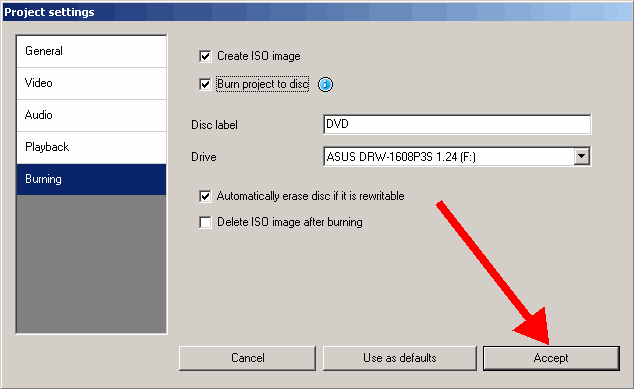
Sorry it's taken a while to get back. I freed up space on my HD, and the iso file burned great. Played on both DVD players. But, now I have a different issue. I tried DVD Flick on another avi file, and it encoded it vob files, instead. Now what would you suggest, and can I expect this to happen with each and every avi file that I encode? *(either iso.files, or vop.files?) Any advice how to get them back to iso files? Am I doing something wrong?
Thanks for the help, and hope you're having a wonderful first day of 2008!
|
|
Advertisement
|
|
|
AfterDawn Addict
1 product review
|
1. January 2008 @ 18:51 |
Link to this message
|
|
This message has been edited since posting. Last time this message was edited on 1. January 2008 @ 19:00
|
|