User User name Password  
   
Tuesday 30.12.2025 / 15:18
Search AfterDawn Forums:        In English   Suomeksi   På svenska
afterdawn.com > forums > pc hardware > other pc hardware > bios fails to see sata drive
Show topics
 
Forums
Forums
Bios fails to see SATA drive
  Jump to:
 
Posted Message
Member
_
14. March 2008 @ 12:19 _ Link to this message    Send private message to this user   
took sata drive and formated it in friends computer

removed and installed sata drive as only drive in computer with no other harddrive

bios doesnt show drive at all

running XP clean install says no drive available to install on

computer previously ran scuzzie (sp?) harddrive (dont know if this is any help)

ran detect devices in bios and still doesnt show up in bios

whats a nerd to do?
Advertisement
_
__
Senior Member
_
14. March 2008 @ 13:05 _ Link to this message    Send private message to this user   
Make sure that your SATA ports are enabled in your BIOS. If the ports are enabled, then your drive won't be recognized.
Member
_
14. March 2008 @ 13:13 _ Link to this message    Send private message to this user   
and what will the enabling feature look like?
Member
_
14. March 2008 @ 13:22 _ Link to this message    Send private message to this user   
someone said that about my laptop cause i was trying to dump vista and install xp..but i never did find where to turn on sata through bios..and i did check everything
Senior Member
_
14. March 2008 @ 13:52 _ Link to this message    Send private message to this user   
It varies from computer to computer and it may not be an option at all. Usually you'll find it in the advanced options where you can turn on or turn off devices such as LAN, Audio, Video, etc... If it's an option, you'll have the ability to enable or disable SATA. Since you were using SCSI before, you may have had your SATA ports disabled.
Member
_
14. March 2008 @ 13:59 _ Link to this message    Send private message to this user   
and what if it isnt an option in the bios? yet the MB has sata ports
Senior Member
_
14. March 2008 @ 14:46 _ Link to this message    Send private message to this user   
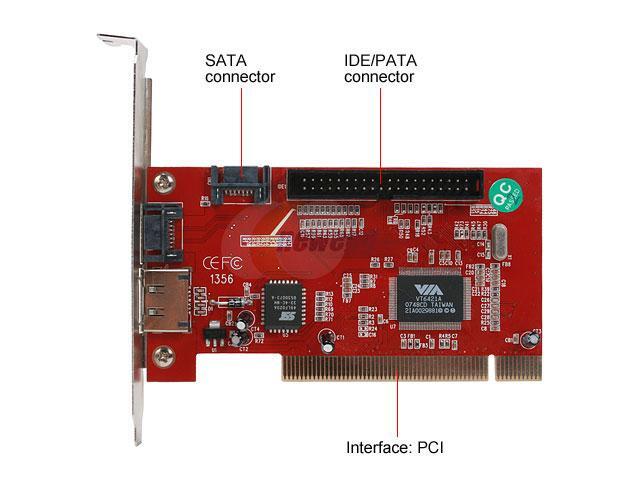
If it's not an option, then it's already enabled. That would pretty much leave you with either a bad SATA controller card or a bad power or data cable (I'm assuming the drive is still good since you just formatted it). If the controller card is bad, then you'd have to replace the motherboard or purchase a PCI SATA add-on controller card like the one pictured below (link here).


Icanbe
Suspended due to non-functional email address
_
14. March 2008 @ 15:53 _ Link to this message    Send private message to this user   
You could also try a different SATA cable, I had a similar problem before, turns out it was the SATA cable.

Good Luck


20 Years ago I saw you yesterday, Youre looking at the picture now.
We Are, What We Are - Sepultura
Say what you want, Time will always tell the truth.

This message has been edited since posting. Last time this message was edited on 14. March 2008 @ 15:54

ddp
Moderator
_
14. March 2008 @ 18:39 _ Link to this message    Send private message to this user   
Zer0ink, what is the make & model# of the computer or motherboard?
moved to correct forum.
Member
_
15. March 2008 @ 02:09 _ Link to this message    Send private message to this user   
just trying to help a friend ..all he knows is the motherboard is MSI?

update: he flashed the bios to no advantage and he said he will be trying with different cables

maybe the MB isnt compatible with the HD... WD 79GB Raptor 10,000 RPM...has this ever happened with those RAPTORS.

I think it's somethng to do with XP and sata drivers myself but that doesnt explain away why his bios doesnt show it. I suggested he purchase a SATA controller card for the PCI slot and if that shows the HD in the bios then it's the MB

When i try to load xp on my laptop to get rid of vista i get a message "no HD to place operating system on found" . The laptop is sata drive too. maybe simular problem?

i'm open for any other comments and guesses
Advertisement
_
__
 
_
ddp
Moderator
_
15. March 2008 @ 13:01 _ Link to this message    Send private message to this user   
i haven't had that sata problem for some reason. if the pc has a floppy drive or i remember to bring a floppy drive then i use my win98 bootdisk to fdisk & format the drive. other then that it is a bios configuration problem.
afterdawn.com > forums > pc hardware > other pc hardware > bios fails to see sata drive
 

Digital video: AfterDawn.com | AfterDawn Forums
Music: MP3Lizard.com
Gaming: Blasteroids.com | Blasteroids Forums | Compare game prices
Software: Software downloads
Blogs: User profile pages
RSS feeds: AfterDawn.com News | Software updates | AfterDawn Forums
International: AfterDawn in Finnish | AfterDawn in Swedish | AfterDawn in Norwegian | download.fi
Navigate: Search | Site map
About us: About AfterDawn Ltd | Advertise on our sites | Rules, Restrictions, Legal disclaimer & Privacy policy
Contact us: Send feedback | Contact our media sales team
 
  © 1999-2025 by AfterDawn Ltd.

  IDG TechNetwork