|
|
|
Need Nero Vision Help
|
|
|
shawanba
Suspended due to non-functional email address

|
31. March 2008 @ 19:36 |
Link to this message

|
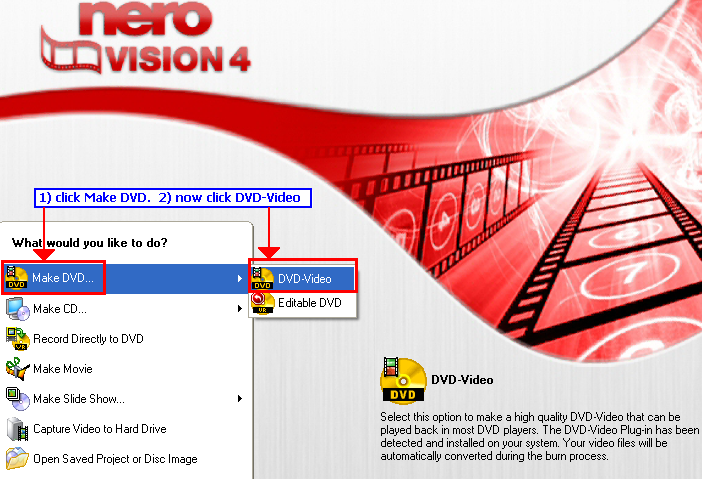
I've been using Nero Vision 4 for a while in order to create DVD's and all of a sudden I can't get the the correct main menu seen here: \
http://i2.photobucket.com/albums/y29/shawanba/nerovisionc1ky.png
When I open Nero Vision 4 I only have the option of "Make CD; Make Movie; Make Slide Show; Capture Video to Hard Drive; Open Saved Project or Disc Image"
Last week I installed WinTV1800 and tried to capture video, but Nero 7 doesn't support this product. So I've been using WinTV to capture my VHS and Camcorder tapes.
This is the first time I have tried to use Nero to create the DVD's. Normally, I convert the files using WinAvi and then use Nero Vision 4 to add files and create my DVD's.
Now I can't get the "Make DVD" option appear in Nero Vision. . . any ideas? Below I've posted info about Nero from the info tool. Thanks :-)
Software Information
--------------------
Description : Nero Burning ROM
Version : 7, 10, 1, 2
Company : Nero AG
Description : Nero BurnRights Control Panel
Version : 2.1.0.11
Company : Nero AG
Description : Nero CD - DVD Speed
Version : 4, 7, 7, 4
Company : Nero AG
Description : Nero DriveSpeed
Version : 3, 0, 11, 1
Company : Nero AG
Description : Nero InfoTool
Version : 4, 4, 3, 0
Company : Nero AG
Description : Cover Designer
Version : 2, 10, 1, 1
Company : Nero AG
Description : Nero BackItUp
Version : 2, 10, 5, 1
Company : Nero AG
Description : Nero Home
Version : 2,0,16,0
Company : Nero AG
Description : Nero ImageDrive
Version : 3.0.0.12
Company : Nero AG
Description : Nero MediaHome
Version : 2,5,16,0
Company : Nero AG
Description : Nero PhotoSnap image editor
Version : 1, 2, 0, 25
Company : Nero AG
Description : Nero Recode 2
Version : 2, 5, 6, 0
Company : Nero AG
Description : Nero ShowTime
Version : 3, 10, 1, 0
Company : Nero AG
Description : Nero StartSmart
Version : 3, 10, 1, 3
Company : Nero AG
Description : Wave Editor
Version : 3, 10, 1, 0
Company : Nero AG
Description : Nero Library
Version : 7, 10, 1, 0
Company : Nero AG
Description : Nero Vision
Version : 4,9,7,2
Company : Nero AG
Description : Nero SoundTrax
Version : 2, 10, 1, 0
Company : Nero AG
Description : Nero Photosnap Image Viewer
Version : 1, 2, 0, 25
Company : Nero AG
Description : AnyDVD Application
Version : 6.4.0.4
Company : SlySoft, Inc.
Description : Nero Check
Version : 1, 0, 0, 6
Company : Nero AG
Description : NeroGadgetCMServer
Version : 1.0.0.2
Company : Nero AG
Description : Nero Patent Activation
Version : 7.10.1.3
Company : Nero AG
Description : NeroRichPreview
Version : 2,0,16,0
Company : Nero AG
Description : Nero Scout Options
Version : 2,0,16,0
Company : Nero AG
Description : Nero Search Advanced
Version : 2,0,16,0
Company : Nero AG
Description : Nero Online Upgrade
Version : 7.10.1.3
Company : Nero AG
|
|
Advertisement

|
 |
|
|
AfterDawn Addict
1 product review
|
31. March 2008 @ 22:19 |
Link to this message

|
 Piss me off, and I Will ignore You! Piss me off, and I Will ignore You! |
AfterDawn Addict
1 product review
|
31. March 2008 @ 22:43 |
Link to this message

|
I have been able to reproduce your symptom.I am thinking that for some reason, at start-up, Nero Vision is not detecting your DVD burner, so it is not giving you the option to make a DVD(since it thinks it cannot burn one due to lack of hardware) . Have you used your burner lately? If you have, that means that all is good with your burner(you should be seeing it in Device Manager if the drive is enabled and its driver is installed properly).If next to it there is a red cross or and yellow exclamation point, something is missing. You can always uninstall it and restart Windows, which will automatically reinstall the burner.
So, if I disable my DVD burner(right click on it in Device Manager), I lose that "Make a DVD" option.
Here is how you can get the option back, even without a burner:

Piss me off, and I Will ignore You!
|
AfterDawn Addict
|
2. April 2008 @ 01:44 |
Link to this message
|
also make sure you have the "EXTRA" serial install code loaded for the "DVD/mpeg2" read that picture at right bottom it looks for this extra plugin serial number...
look in nero control center under licences for dvd plugin

Nothing here to see, move along folks.
 This message has been edited since posting. Last time this message was edited on 2. April 2008 @ 01:48
|
|
jack3216
Junior Member
|
4. April 2008 @ 07:54 |
Link to this message
|
On the subject on Nero Vision4 my Windows Vista does not like it at all because when i try to open it nero 4 window appears and freezes and just stays on my desktop screen. I can use it no problem on xp. Everything else works ok. Anyone any ideas what might be wrong.
|
|
Advertisement
|
|
|
AfterDawn Addict
|
4. April 2008 @ 12:40 |
Link to this message
|
only the late versions of nero v7 work on vista and now v8 nero
Nothing here to see, move along folks.
|
|


