|
P4 cpu temp
|
|
|
mccoy5
Junior Member

|
5. July 2004 @ 00:53 |
Link to this message

|
|
I have a P4-1.7 which has been overheating. I have downloaded three different bits of software, but seem to be getting odd temp readings. I have checked my bios and get a temp of about 50 degs c at idel. If I load mother board moniter it tells me I have a temp of 94 degs C on the cpu, which concerned me. So to check I loaded pc alert4 this agreed with my bios reading. Then i tried speed fan, this gave me three temp readings, two of about 50deg c and one of about 94 degs c. Would this point to me having a dodgy sensor or do I have a problem?
If i decode a dvd the temp reaches about 67 deg c.
I have checked the software on a similar machine i have (1.7 p4) this has a temp of 35 degs c at idel.
|
|
Advertisement

|
|
|
|
|
EYEShurt
Member
|
5. July 2004 @ 01:48 |
Link to this message

|
|
Maybe u should open her up and see if the fan has died or somethink
or get a new computer (not meaning to be mean)
its just that that comp must be pretty old
p4 lga775 540 (3.2ghz)
512mb ddr400 ram dual channel
gigabyte x600 xt pci-e
gigabyte ga 8i915p pro
200gb segate barrumundi hdd
16x DL -/+RW LITEON sohw-1633s
tsunami dream case (400w PSU)
|
|
cozza1987
Suspended due to non-functional email address
|
5. July 2004 @ 02:47 |
Link to this message
|
|
Well basically, most P4 motherboards, have a sensor, that if the fan isnt working correctly the machine either wont boot, or just shut off for no particaular reason.
How old is this comptuer?
What kind of temperature is it there, as in where the comptuer is?
Have you tried overclocking it?
Regards
CoZZa
#ad_buddies ... come and have a chat
SERVER: /server irc.addictz.net:6667
CHANNEL: /join #ad_buddies
 |
|
mccoy5
Junior Member

|
5. July 2004 @ 03:38 |
Link to this message
|
|
The pc is a few years old now, it is about 25 deg c in the area the pc is kept. The temp in the case is about 35-40 deg c. I have a cylindrical type fan on the cpu which works ok. I took the fan off the cpu over the weekend and found that whoever built my machine left a lable on the cpu. So i removed that and put some paste on as that was missing too.
I have thought about over clocking my pc, but i am not too sure how to. And also if it is running hot now, it will only get hotter!!
|
|
cozza1987
Suspended due to non-functional email address
|
5. July 2004 @ 03:48 |
Link to this message
|
Generally a P4 Fan will look like this...

A label.... on the top of the CPU or the underside of the CPU (as in under where the heatsink would go, or the side where the pins are.) and did you use heat paste between the CPU and the heatsink?
My 2.6Ghz Celeron runs at 29 Degrees idle, so your temp seems a little high.
Regards
CoZZa
#ad_buddies ... come and have a chat
SERVER: /server irc.addictz.net:6667
CHANNEL: /join #ad_buddies
This message has been edited since posting. Last time this message was edited on 5. July 2004 @ 03:49
|
|
mccoy5
Junior Member
|
5. July 2004 @ 05:57 |
Link to this message
|
|
The lable was on the top of the chip where the fan/heatsink sits (the type of paper lable a shop would use for pricing). I have a large bule cylindrical fan(some kind of alloy)which sits right on top of the chip (i think it is made by termaltake). I put the paste between the base of the fan & the cpu.
This message has been edited since posting. Last time this message was edited on 5. July 2004 @ 07:24
|
|
Praetor
Moderator
|
5. July 2004 @ 13:53 |
Link to this message

|
Quote:
Generally a P4 Fan will look like this...
That has got to be the ugliest stock fan ever :P
mccoy5: what mobo do you have?
Thermaltake Dragon Orb 3
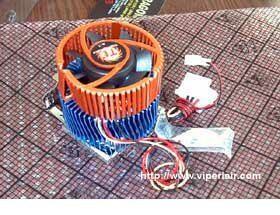
Thermaltake Orb Indigo Series

Some other Orb coolers: http://www.thermaltake.com/coolers/orb/menu.htm
|
|
EYEShurt
Member
|
5. July 2004 @ 18:59 |
Link to this message
|
|
leave it to preator to find a cooler that,ll get your cpu below 0 degrees
p4 lga775 540 (3.2ghz)
512mb ddr400 ram dual channel
gigabyte x600 xt pci-e
gigabyte ga 8i915p pro
200gb segate barrumundi hdd
16x DL -/+RW LITEON sohw-1633s
tsunami dream case (400w PSU)
|
|
Praetor
Moderator
|
5. July 2004 @ 19:06 |
Link to this message
|
|
|
mccoy5
Junior Member
|
5. July 2004 @ 21:59 |
Link to this message
|
|
Yes thats the fan I have, the orb indego. The motherboard I have is a QDI platinix 4.
|
|
Praetor
Moderator
|
5. July 2004 @ 22:03 |
Link to this message
|
|
|
mccoy5
Junior Member
|
5. July 2004 @ 22:40 |
Link to this message
|
|
I have been look at getting a coolmaster aero4 cpu fan, and another case fan. Is this cpu fan any good?
|
Moderator
|
6. July 2004 @ 08:42 |
Link to this message
|
|
If you don't mind a little noise I just installed a Thermaltake POLO 735 and it is one hellacious HSF.
The room my computer is in stays around 30ºC and my P4 3.06 idles at 32ºC and gets to about 55ºC during encoding.

My killer sig came courtesy of bb "El Jefe" mayo.
The Forum Rules You Agreed To! http://forums.afterdawn.com/thread_view.cfm/2487
"And there we saw the giants, and we were in our own sight as grasshoppers, and so we were in their sight" - Numbers 13:33 |
|
Advertisement
|
|
|
|
Praetor
Moderator
|
6. July 2004 @ 09:32 |
Link to this message
|
|


