|
Unreferenced Material
|
|
|
sampson65
Newbie

|
31. December 2004 @ 04:15 |
Link to this message

|
|
Would it be OK to ALWAYS check the "still image" (compression rate) for this section? I mean if its just the boy in the green shorts jumping around, would there ever be a reason to keep it?
Also, can "still image" be used to eliminate other non-value-added material to the DVD such as previews to other movies and things like that? This would save alot of room for a better compression ratio for the main movie. I thought i would ask in here first rather than to make more coasters.
Thanks for your help.
|
|
Advertisement

|
|
|
|
Senior Member
1 product review
|
31. December 2004 @ 06:28 |
 Link to this message

|
Yes I would always "still image" the unreferenced folder. It seems to be the one that causes problems for shrink when you keep it.
Yes you can use it to substitute any extras you don't want save on compression. I use it to replace the fullscreen on movies that contain both full and widescreen versions.
If you'd like some goodies to use in you still images, have a look at these....
http://www.dvdshrink.info/title_replacements.php
This message has been edited since posting. Last time this message was edited on 31. December 2004 @ 06:30
|
AfterDawn Addict
6 product reviews
|
31. December 2004 @ 06:51 |
Link to this message
|
|
zippyd,
Thats pretty cool. I saved that page to my bookmarks. I havn't needed to use "still image" yet as all my backups have worked ok, but looks like I will need to in the near future.
|
|
sampson65
Newbie
|
31. December 2004 @ 07:44 |
Link to this message
|
|
Thanks for your input, zippy....
I also made a good use of the link you provided.
|
|
sampson65
Newbie
|
31. December 2004 @ 07:55 |
Link to this message
|
|
Uh oh....
As you can see, I am very much a nube (and at my age, I shall ALWAYS be an nube and be content with that). But now that I am getting a little more fancy, I now realize that I don't know how to replace the titles with the ones provided from this link.
Would you be interested in giving me a quick guide through this step? I have the desired NEW titles stored on my HD.
Thanks
|
Senior Member
1 product review
|
31. December 2004 @ 08:00 |
Link to this message
|
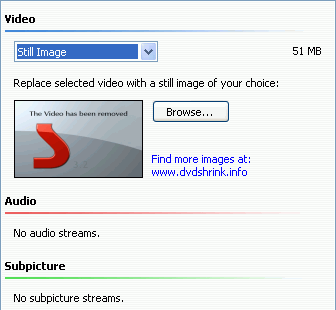
Just press Browse and select another image to get the one you want.
|
|
sampson65
Newbie
|
31. December 2004 @ 09:36 |
Link to this message

|
|
DUH !! What a 'tard I is !!!
Thanks, zippy....
I was running an older version of shrink and while it gave me the option to use a still image, it didnt give me the option to replace it. Thanks for your time!!
|
|
Advertisement
|
|
|
Senior Member
1 product review
|
31. December 2004 @ 11:06 |
Link to this message
|
|
More than glad to have helped. :)
|


