|
DVDXCopy-useless, what can I use now?
|
|
|
ScubaBud
AfterDawn Addict

|
12. February 2005 @ 15:03 |
 Link to this message

|
|
Here are the results of my R&D.
Using an OptoRite DD0203 as the burner in the same PC used before, and also using two lower grade media that I've used before with DVDxCopy Platinum in Express mode, ProdiscS03 4x-2x-1x and PRINCO 2x-1x, the burns using DVD Shrink and the DVD Movie Spiderman, (first version,) played in my Dell Laptop Inspiron 5100 Pent. 2.6 which uses a combo drive Matshita CDRW/DVD UJDA740. The Burns using DVDxCopy using exactly the same burner, PC and media, etc. etc. did not. Since it is no longer a hardware issue, I assume that it might be a setting with DVDxCopy, possible the Region code since I have Shrink set to any region. What else could it be? Are there settings that can change the outcome?
Also doing the same thing on my main PC which is shown in my sig below, and using the burner and media also shown below, had the same results.
Thanks
This message has been edited since posting. Last time this message was edited on 12. February 2005 @ 15:05
|
|
Advertisement

|
|
|
|
|
brobear
Suspended permanently
|
12. February 2005 @ 15:50 |
Link to this message
|
|
The message I'm trying to get across is there is no need to scrap XCopy if you have it and it's working okay. It is so grossly overpriced that I would not recommend buying it. Both XCopy and Shrink suffer from obsolete ripper software. As long as DVD5 is useful, XCopy can still be a useful app. Shrink is more up to date as it will record DVDR9. Shrink has the advantage of being free. However, as I mentioned, there are better apps to be had, like DVDCopy3 and RB/CCE, but they are retail.
|
|
brobear
Suspended permanently
|
12. February 2005 @ 16:01 |
Link to this message

|
|
ScubaBud
Explain to us how the program writes so one player will read it and another won't. Normally if the files are written to a disc, the player keys on the compatibility of the media; which is a matter of player firmware and the media read/write data. Possibly there is something I'm missing here, as I've not run across a selective read problem with XCopy.
If the media is compatible with the player, then the player should read the data if it is written in the correct format. The Mpeg format and DVD files are pretty much standard. Strange things do happen, but that wasn't one of the common faults of XCopy. The big fault many had with the app was system compatibility with other software.
|
|
ScubaBud
AfterDawn Addict
|
12. February 2005 @ 16:33 |
Link to this message

|
brobear
Quote:
Explain to us how the program writes so one player will read it and another won't.
If you are asking if the media plays on the burners, that answer is of course. I am speaking of DVD-Rom's and Players.
I thought that it might be a Region issue so I just downloaded AnyDVD onto the Laptop since one of the perks of it was "Region free". It still didn't allow the movie to play. The DVD-Rom keeps trying to find the disk but never stops. This happens to three different opticals. The Matshita in the laptop, the 8" Portable Player and also in the Samsung TS-H352A 16x DVD-Rom in my Pent 2.8 PC. My other two Memorex DVD-Rom DVD16X6S, one in this PC and one in the PC in the Garage, Pent 2.26 play just fine. Again, it happens with the three media types I mentioned and also the two burners.
This message has been edited since posting. Last time this message was edited on 12. February 2005 @ 16:38
|
|
brobear
Suspended permanently
|
12. February 2005 @ 16:54 |
Link to this message
|
|
Well, I have a Samsung DVD ROM in a P4 2.8GHz PC and it plays the XCopy recorded DVDs flawlessly and a Samsung and Philips play them equally well on a standalone basis. I haven't checked the brand on my son's portable and laptop. They were store specials and not big name brands. The XCopy discs also play with the Memorex burner. So, since we have some of the same brands and mine play and yours don't, I think we can chalk that up to equipment somewhere. You have what appears to be an isolated incident. Glad the Shrink works better for you, but I think there is a bit more to it somehow.
The burners and media may make a difference. I used Ricohjpn media for just about all of my burns. That's one of the best recording discs on the market. Other than that, why would XCopy media play on my Samsung and not yours?
This message has been edited since posting. Last time this message was edited on 13. February 2005 @ 06:16
|
|
ScubaBud
AfterDawn Addict
|
13. February 2005 @ 04:32 |
Link to this message
|
Quote:
Also doing the same thing on my main PC which is shown in my sig below, and using the burner and media also shown below, had the same results.
I made a mistake on the statement above!
This morning I went back and looked at my backed up DVD's that were done with DVDxCopy Platinum and found that they were made with two media's, not three. The two media were ProdiscS03 4x-2x-1x and PRINCO 2x-1x, not the Sony DVD-R 8x or Legacy DVD-R 8x media that I use with my Asus burner. So for a bit more R&D I used DVDxCopy Express again, ticking English only on both the movie and subtitles, and finished the burn in 19/20 minutes. It played perfect in my wife?s Dell Laptop with the Matshita combo drive.
It was a media issue, not hardware or software issue with DVDxCopy Platinum.
brobear, I stand corrected.
Thanks again for your patience!
|
|
brobear
Suspended permanently
|
13. February 2005 @ 06:14 |
Link to this message
|
|
No problem ScubaBud, that was some good detective work you did. I've seen similar problems on other forums. So, spotty reads due to poor quality media appears to be a problem several have suffered from.
|
|
tdavis619
Newbie
|
13. February 2005 @ 20:03 |
Link to this message
|
After opening X Copy Platinum I went directly to the advance tab and was unable to click browse to download a file already saved on my computer. The license agreement screen quickly comes up before you can finish reading what?s behind it. Also, the Browse button is grayed out and not an option.
Is there another program that I can use to copy files form my hard drive to my DVD drive?
How do I use Shrink and AnyDVD with X Copy?
I know AnyDVD are driver, but what I don't know is how is it config. to run with other programs.
I'm new and would greatly appreciate any feed back.
|
|
aabbccdd
Suspended permanently
|
13. February 2005 @ 22:49 |
Link to this message
|
|
the DVD X COPY PLATINUM 4.0 3.8 cant pull files from your harddrive you have to have DVD X COPY PLATINUM 4.0 4.15 verison but that verison doesnt have a ripper either.
|
|
noworries
Newbie
|
14. February 2005 @ 10:43 |
Link to this message
|
|
I purchased a copy of DVD X copy Gold ( a while ago)...and need to install it on my new pc.
I have the disk...but is there a way to get the latest update?
Thanks.
|
|
ScubaPete
AfterDawn Addict
|
14. February 2005 @ 12:36 |
Link to this message
|
noworries,
321 XCopy has been out of business for over a year and hasn't done anything to their product for 1 1/2 years. It is serverly out of date and there are no updates.. The products you see for sale are discontinued and are sold as such.
I suggest you consider using something more suited to today's work - for example - DVD Shrink and DVD Decrypter (Both FREE) coupled with AnyDVD ($39.99USD) which is the only ripper at this time that can rip 100% of the encryptions being used AND they can handle ISO Images, HD files and DVD ripping. Actually, after setup, they are easier to use than XCopy. (4-clicks for XCopy to do a backup, 3-clicks for Shrink and DVDD.
The step by step guides are in my sig. You'll have your first backup within an hour (regular quality) OR 2 hours (for great quality) after beginning.
Let me know how you make out -
Pete
aabbccdd,
Although the ripper is free for that XCopy version, it doesn't fare any better than the ripper version. Any DVD using encryption released after November 03 cannot be ripped by it unless you use AnyDVD.
"P"
|
|
noworries
Newbie
|
14. February 2005 @ 13:51 |
Link to this message
|
I suggest you consider using something more suited to today's work - for example - DVD Shrink and DVD Decrypter (Both FREE) coupled with AnyDVD ($39.99USD) which is the only ripper at this time that can rip 100% of the encryptions being used AND they can handle ISO Images, HD files and DVD ripping. Actually, after setup, they are easier to use than XCopy. (4-clicks for XCopy to do a backup, 3-clicks for Shrink and DVDD.
1. Thanks for the quick feedback. DVD Shrink and DVD Decrypter (Both FREE) coupled with AnyDVD...can it be coupled with something else that is free?
2. Do you know what the latest version is of DVD Gold?
Thanks again.
|
AfterDawn Addict
|
14. February 2005 @ 14:31 |
Link to this message
|
|
"Removed"
Gif by Phantom69
 This message has been edited since posting. Last time this message was edited on 15. February 2005 @ 07:46
|
|
brobear
Suspended permanently
|
14. February 2005 @ 19:06 |
Link to this message
|
No need to duck on using the XCopy, if you have it and it works, no problem. However, it is so grossly overpriced for an obsolete app, I wouldn't advise anyone to purchase it.
XCopy, Shrink or just about any recording program can benefit from AnyDVD. Read the AnyDVD product description at http://www.slysoft.com . AnyDVD runs in the background and requires no setup to work with XCopy, Shrink, or any of the recording apps on the market. As Pete pointed out, it's about the closest there is to a sure thing right now.
XCopy customers can still get some assistance at http://www.dvdxcopy.com and http://www.dvdxcopy-international.com . Anyone wanting to activate the Browse function in 4.0.3.8 or activate the ripper in 4.0.4.15 RF can find the necessary links at http://www.dvdripforums.co.uk .
This message has been edited since posting. Last time this message was edited on 14. February 2005 @ 19:07
|
|
ScubaPete
AfterDawn Addict
|
14. February 2005 @ 19:19 |
Link to this message
|
|
Deleted -
This message has been edited since posting. Last time this message was edited on 18. February 2005 @ 16:06
|
|
brobear
Suspended permanently
|
14. February 2005 @ 20:39 |
Link to this message
|
Quote:
I do not think I could honestly recommend buying Xcopy, due to support etc.
Worked for me though!
I read the same post and noted Pulsar doesn't recommend buying XCopy. I also, said it would be a bad buy. But for those who have the program, it is still usable for DVD5. Anyone who uses Shrink can't knock XCopy, because they both need DVD Decrypter and/or AnyDVD or a similar ripper for the newer movies with encryption like the Sony ARccOS. Shrink has the advantage of being free and works with DVDR9 as well as the DVD5 media. It doesn't matter if 321 has been out of business for about 18 months or Shrink hasn't been updated in about 7 months, the newer encryption systems have come along following Shrink's last update. Many of the new recording/transcoding programs don't even come with a ripper. So, this senior says if you have it, no problem using it. Just don't make a blunder and buy XCopy because it is ridiculously overpriced, has little or no support, and becomes more outdated everyday because there is no longer any continued R&D.
|
|
brochini
Newbie
|
14. February 2005 @ 23:31 |
Link to this message
|
|
Recently I created a new thread but it didn't get published at DVDXCOPY/afterdawn forum about expressing my honest opinion on DVDXCOPY/PLATINUM version. It's a thorough opinion that such product should be banned and quit being advertised or sold because they were just left-over inventories. I totally agree with SCUBAPETE. Stop luring people to buy DVDXCCOPY/PLATINUM. It's dead and a piece of garbage. I discard my own copy bought from 321Studio because it is very outdated and unsupported. The new owner DvdXcopy-International are mere salesmen who won't stop ripping off new and innocent buyers. Unluckily, the moderator caught my intended thread, didn't publish it which resulted to more people getting victimized to buy this now lousy product. I presume this mod is being commisioned by the new owner or just want to keep his mod job...to bad, my advice to him was, DON'T PRACTICE 'EYES WIDE SHUT'. Help people instead.. this is the main reason why we have forums.
|
AfterDawn Addict
|
15. February 2005 @ 01:27 |
Link to this message
|
|
"removed"
Gif by Phantom69
This message has been edited since posting. Last time this message was edited on 15. February 2005 @ 07:47
|
|
brobear
Suspended permanently
|
15. February 2005 @ 18:56 |
Link to this message
|
brochini
Quote:
I totally agree with SCUBAPETE. Stop luring people to buy DVDXCCOPY/PLATINUM.
You can agree with Pete as you will. Just one question though. Who was luring or endorsing the purchase of XCopy in this thread? It would have been a nice speech had you reason to give it. So you hate XCopy... join the club. There are people who own XCopy, still use it, and like it. Others like myself could really care less and have moved on to better programs. I believe I gave the middle of the road, common sense, view on the program; "one may as well use XCopy if they already own it and it's been working for them, but don't run out and buy it." Guess you missed what Pulsar and I both said, we don't endorse the purchase of XCopy.
I can see why the mod on the XCopy forum pulled your post. It borders more on a rant than an evaluation and XCopy supports that forum. Instead of yelling garbage, you can take a hint from my previous post. Quote:
Just don't make a blunder and buy XCopy because it is ridiculously overpriced, has little or no support, and becomes more outdated everyday because there is no longer any continued R&D.
|
|
PvtJoker
Member
|
16. February 2005 @ 13:58 |
Link to this message
|
OK I have a question about DVDXCopy vrs. DVD Shrink.
I backed up 2 of my DVD's using DVDXCopy, great backups except it forced them to widescreen instead of fullscreen. (Yes the param was set correctly).
So I decided to back up my copy of Troy with DVDShrink instead of DVDXCopy. Horrible copy with DVDShrink. My player won't even play the DVD. Why is this? I followed the instructions that were posted. When I go to run the disk it loads, then pauses then resumes, the pauses, etc.
ASUS M2N-SLI Deluxe, AMD 4200 X2, ATI All-In Wonder X1900, Corsair 2GB PC6400, Seagate 80 gig SATA, Maxtor 200 gig SATA, WD 200 gig PATA.
|
|
brobear
Suspended permanently
|
16. February 2005 @ 17:01 |
Link to this message
|
My impression was that XCopy recorded what was there. I own XCopy and when I record a movie, it just duplicates what is there, wide or full. Maybe I missed a setting somewhere. However, I went over most of the user guide in the Program folder. I've known of situations when there was 2 versions of the same movie on a disc and the program picked up the wrong version in Xpress. I always selected the version I wanted in Advanced and recorded from there. The viewer would show which version was wide or full.
I'm not taking up for Shrink, but it sounds like you went wrong somewhere. Shrink normally does a decent job. For large movies one uses Analysis and checks the quality settings. It takes a bit longer but improves the quality. If the compression isn't very high, the settings are a waste of time. Good virtual guides are at http://www.dvdshrink.info and http://www.doom9.org has more comprehensive guides. It may pay to review those and see if there is something you missed.
|
|
ScubaBud
AfterDawn Addict
|
16. February 2005 @ 17:16 |
Link to this message
|
Brobear, on DVDxCopy platinum it did give you a choice of default for regular or widescreen.
I'll look it up and see where that default was and post it back here.
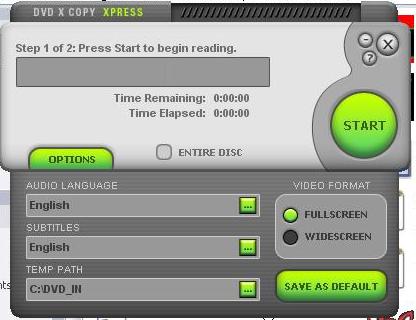
Had it before but forgot to remove a couple of things, like my name, etc. LOL
This message has been edited since posting. Last time this message was edited on 16. February 2005 @ 17:27
|
|
brobear
Suspended permanently
|
16. February 2005 @ 20:14 |
Link to this message
|
|
Scuba Bud
I know the Video Format selection is there, but on a widescreen movie, would it reformat the movie to a fullscreen version or vice versa? I never knew of the program having that ability. (I got the feeling Pvtjoker was expecting the selection he made irregardless of the disc having both versions or not. Maybe I misunderstood the problem.) It may have made a difference on a disc with both versions, but there a person would have to be sure to leave the Entire Disc box unchecked. As I mentioned, I made sure I got the right version in situations where I had both by doing the backup in advanced. Most often when I used XCopy, I used the advanced section.
Of the hundreds of DVDs I've watched, only a handful had the option for both wide and fullscreen on the same disc. So, most of the time, it wouldn't make a difference where the Video Format was set.
This message has been edited since posting. Last time this message was edited on 16. February 2005 @ 20:26
|
|
ScubaBud
AfterDawn Addict
|
17. February 2005 @ 02:37 |
Link to this message
|
Brobear
You were correct...
Quote:
but on a widescreen movie, would it reformat the movie to a full screen version or vice versa?
The answer is "NO". I wasn't sure so I burned Jurassic Park III which is a one sided Widescreen only Movie. With the default setting in DVDxCopy Express/Simple to Full Screen, it still burned it to Widescreen.
Thanks :)
This message has been edited since posting. Last time this message was edited on 17. February 2005 @ 02:38
|
|
Advertisement
|
|
|
|
chatcat2u
Newbie
|
17. February 2005 @ 04:20 |
Link to this message
|
|
This site is the best site on the net.
I've been reading on some problems some of you guys were having with your dvd x copy platinum and i'm unfortunately having the same. i spent $149.99 almost when i came out and now it's usless. by reading just some of your topics on this area i've seen the light.
i was joined on to this sit called dvdhelp.us and put countless postings for help no-one new anything you guys are the best. keep on doing the great job you guys do ( educating the newbies like me ) thanks again.
|


